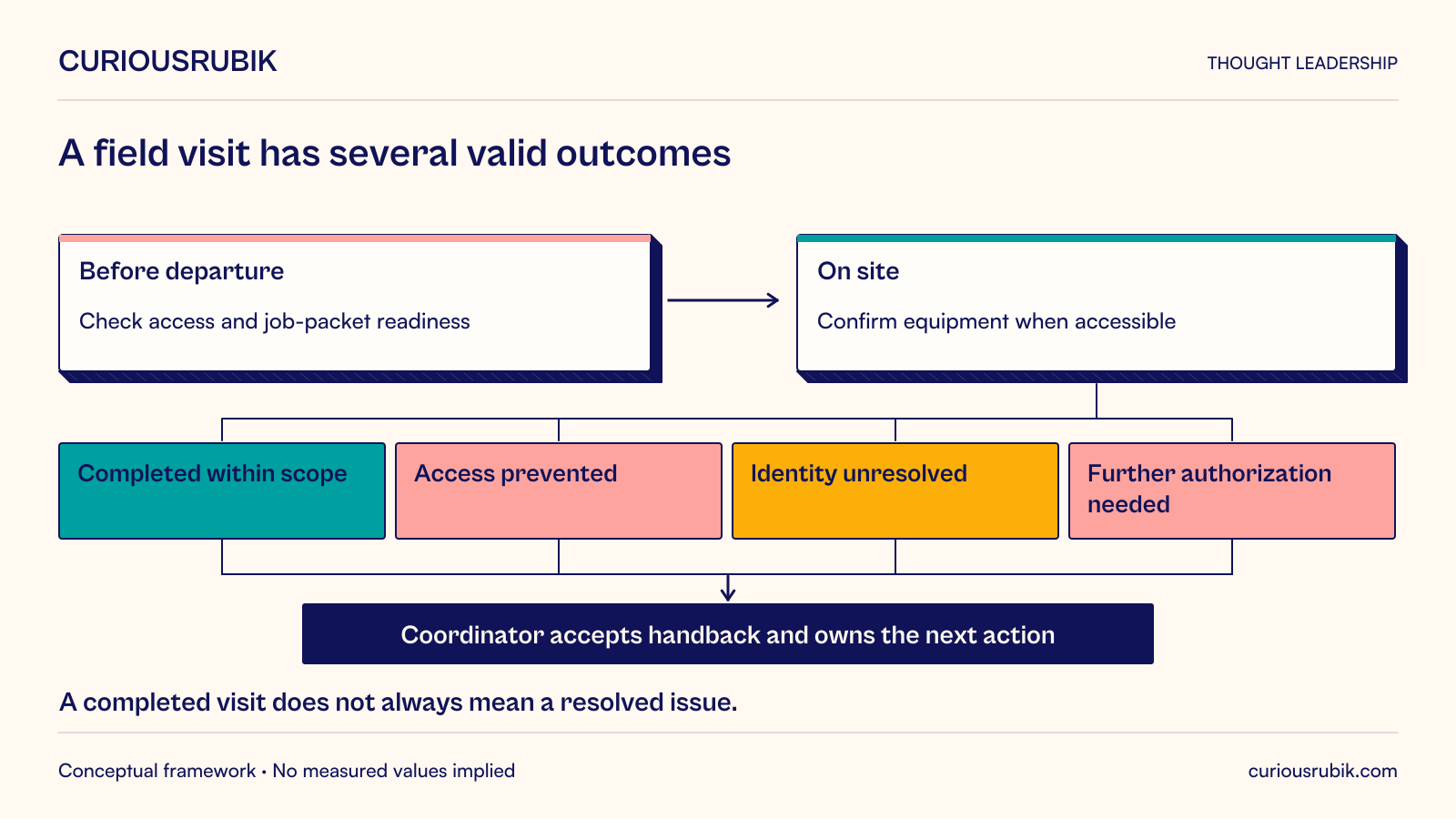
A field application should help a worker arrive prepared, understand the assignment, record what happened, and leave the next owner with a usable result. Designing only the on-site form misses much of that responsibility. A technically sound app can still fail if dispatch sends the wrong job, reference information is missing, or the office cannot interpret the completed record.
For a service operations leader, the central buying decision is which field capabilities must work as one service journey. The proposed application should be evaluated from assignment through reconciliation, including changes of plan and interruptions. Its most important screen may be the one that reveals missing preparation before a worker leaves, rather than the screen with the longest feature list.
The following approach uses a hypothetical commercial building maintenance service. It focuses on operational design rather than repair instructions. Site-specific safety procedures, licensing requirements, and technical maintenance decisions remain with qualified personnel and the organization’s established controls.
List the circumstances under which the app is expected to work. Include device ownership, available connectivity, shift length, shared versus assigned equipment, lighting, protective equipment, languages, and the locations where device use is allowed. Treat these as acceptance conditions, not background context.
Different field roles may require different interactions. A technician needs equipment history and task-specific evidence capture. A dispatcher needs capacity and assignment status. A supervisor needs exceptions that require a decision. Trying to serve them through one dense screen creates unnecessary navigation for all three.
Record what the application may assume. Can the worker charge the device during a shift? Is a replacement device available? Must jobs remain accessible after an authentication interruption? Can the employee use a personal phone? Answers affect equipment budgets, support arrangements, and privacy expectations as much as software architecture.
Design the operating envelope with field employees and the receiving team. Interviewing a manager alone may omit the informal work that keeps the service running, such as calling a building contact to obtain access or checking whether another technician already attended. Those dependencies belong in the workflow if completion depends on them.
A useful assignment packet contains the job identity, authorized scope, location, site contact, access information appropriate to the worker, relevant equipment identifiers, and the reference material needed for the task. It should show when material was last refreshed and which elements are unavailable.
Readiness is a set of conditions rather than a generic green badge. A job may have an assigned technician but no confirmed access window. It may have the correct skills but an unresolved parts requirement. The application should expose those distinctions so dispatch can make an informed decision.
Avoid presenting a proposed resource as committed. A part listed in a catalog is not necessarily available to this job; a tentative appointment is not confirmed site access. Use separate labels for requested, reserved, confirmed, and unresolved where the underlying systems support those states.
The worker also needs a way to challenge an assignment. A reasoned “cannot proceed” response should enter a staffed queue with the job attached. If the only available action is Accept, the app can produce apparently complete dispatch data while concealing unworkable assignments in telephone calls.
Consider a hypothetical facilities service that maintains ventilation equipment in commercial buildings. A technician receives a visit for a unit identified as AHU-17. The assignment includes the building address and complaint, but the equipment is behind a restricted-access door and the necessary escort is not confirmed.
In the proposed design, the job appears as technically assigned but access unresolved. Dispatch contacts the building through its authorized process and records the confirmed window. Before departure, the technician downloads the relevant job packet and sees that the equipment history is available while one large attachment has not finished downloading.
At the site, the technician finds that the label reads AHU-71. The application should support an identity discrepancy rather than encourage editing the asset master casually. The worker records the observed identifier, attaches appropriate evidence, and asks the authorized coordinator to resolve the association. The original assignment remains traceable.
Suppose the visit reveals a follow-on task outside the approved scope. The worker can record the finding and request authorization, but should not mark the original task as fully resolved merely to close the screen. The service record distinguishes work completed, issue still present, and follow-on action requested.
The hypothetical visit therefore has several valid outcomes: completed within scope, access prevented, identity unresolved, additional authorization needed, or return visit required. These are operationally different. A single Complete checkbox would hide the cause of repeat visits and mislead both dispatch and the customer-facing team.
After submission, the receiving coordinator verifies that the findings are usable and assigns the follow-on task. The technician sees that the record was received and whether clarification is required. That feedback matters: without it, field staff have little reason to improve evidence that disappears into an office queue.
Start with the receiving person’s question. If a planner must decide which follow-on visit to schedule, the record needs enough detail to establish the equipment, observed condition, work already attempted within scope, and remaining constraint. Additional photographs are useful only when they resolve a relevant uncertainty.
Give evidence a clear association and meaning. A photograph without a job, item, description, and capture context can become another matching exercise. A numeric reading needs a unit and an explanation of what was measured. Where instruments or procedures matter, include the identifiers needed by the business’s approved process.
Do not prefill findings that workers are expected to observe. A default “no defect” answer can turn a required check into an accidental assertion. Distinguish not inspected, inspected with no issue observed, issue observed, and unable to assess when those states are relevant. Their definitions should be taught with examples.
Make required evidence conditional on the outcome. A prevented-access visit should not require fabricated equipment readings. An unresolved fault may need more information than a routine completed task. Conditional forms reduce irrelevant effort while preserving the evidence needed for consequential decisions.
Field work is interrupted by customer questions, calls, movement between locations, and changes in physical conditions. Save progress at meaningful points, make the current job unmistakable, and allow a worker to resume without reconstructing the previous interaction from memory.
Test ordinary input alternatives. A gesture-only control may be difficult to discover or use under field conditions. WCAG 2.1 requires alternatives to certain multipoint or path-based gestures for web content, with defined exceptions. It also addresses accidental pointer activation. Native applications need corresponding platform and assistive-technology tests rather than an assumed web conformance claim. WCAG 2.1, criteria 2.5.1 and 2.5.2
Use notifications selectively. A reassignment that invalidates the next trip deserves different treatment from a reference-document update. Require acknowledgment when the operation needs it, and provide a dispatcher fallback when no acknowledgment arrives. A delivered notification alone does not prove that a worker understood or accepted the change.
Keep safety-critical operating procedures outside improvisation by the app team. If a workflow requires permits, isolation, supervision, or other controls, the qualified owner must define the process and validation. A mobile checklist can record evidence of an approved procedure; its presence does not certify that the procedure was followed correctly.
The support team should be able to distinguish a missing assignment, an identity problem, a local save, a transmission failure, and a rejected business transaction. Give the worker a safe reference number to share rather than asking for screenshots that may expose customer information.
Decide who handles each class of problem. Device replacement belongs to an equipment support route. Incorrect job scope belongs to operations. An unavailable integration belongs to application support, with an operational fallback. Passing every problem to a generic help desk delays resolution when the employee is already at a site.
Prepare a controlled fallback for device loss or prolonged outage. It should define what work may continue, how necessary information is obtained, how evidence is protected, and how later reconciliation avoids duplicate records. The fallback is part of the service design and should be rehearsed, not discovered during the first failed shift.
NIST’s mobile-device guidance treats enterprise mobility as a lifecycle involving deployment, operation, maintenance, and disposal, including different ownership arrangements. That supports budgeting for device and support responsibilities beyond application delivery. It does not guarantee that a particular management product covers every operational need. NIST SP 800-124 Revision 2, Section 5
A demonstration should follow representative assignments through real decision points. Ask the supplier or development team to show a changed address, denied access, unreadable asset label, missing attachment, interrupted form, and a job requiring further authorization. Observe what the employee and office team can each establish afterward.
Measure usable handback rather than form submission alone. Define the proportion of records the receiving team can act on without clarification, the age of unresolved exceptions, and the frequency of incorrect job associations. Segment by job type so complex visits do not appear worse simply because they require more evidence.
A field pilot also needs an employee-effort measure. Count repeated entry, time spent recovering from interruptions, and contacts needed to resolve application problems. Faster office processing achieved by shifting substantial clerical work onto technicians may still be a poor operating tradeoff.
Set expansion criteria around the critical failure modes. Before rollout, the operations owner should know how an unready job is stopped, how an interrupted record is recovered, who receives each exception, and how a lost device is handled. Choose the application that demonstrates those capabilities in the intended environment. Field readiness is established by a coherent service journey, not by a successful demonstration on the office network.