Employees do not experience the organization as a list of application owners. They experience tasks: find the right policy, request something needed for work, resolve a problem and understand what is waiting for their action. A portal can make those tasks easier to navigate, but a common login and a page of links do not automatically create a unified workplace.
The practical objective is continuity. Employees should be able to recognize the right service, provide the necessary information, understand its status and reach the responsible team without repeatedly reconstructing the context.
For an internal-services leader, the design challenge is to create that continuity while preserving the specialist systems, permissions and ownership needed to perform the work correctly.
Start with a set of common employee intentions, using the language employees use. Those intentions may cross facilities, technology, finance and other functions. The portal should help employees find the relevant path without requiring them to know which department owns each part.
This does not mean every task must be rebuilt inside one application. Some can be completed in a specialist system, while the portal supplies a reliable entry point and clear return path. Others benefit from a shared request and status experience.
Decide what consistency is genuinely useful: naming, identity, accessibility, notifications, case references and the way actions are explained. Preserve necessary differences where the work has different consequences or confidentiality requirements.
The Government Digital Service’s guidance on solving a whole problem emphasizes coherent journeys across organizational boundaries while warning against services that try to do too much. Its public-service context is different, but the design tension is relevant to an employee workplace. GDS, Solve a whole problem for users.
The useful question is not whether everything looks identical. It is whether the employee can move through the task without losing understanding or responsibility.
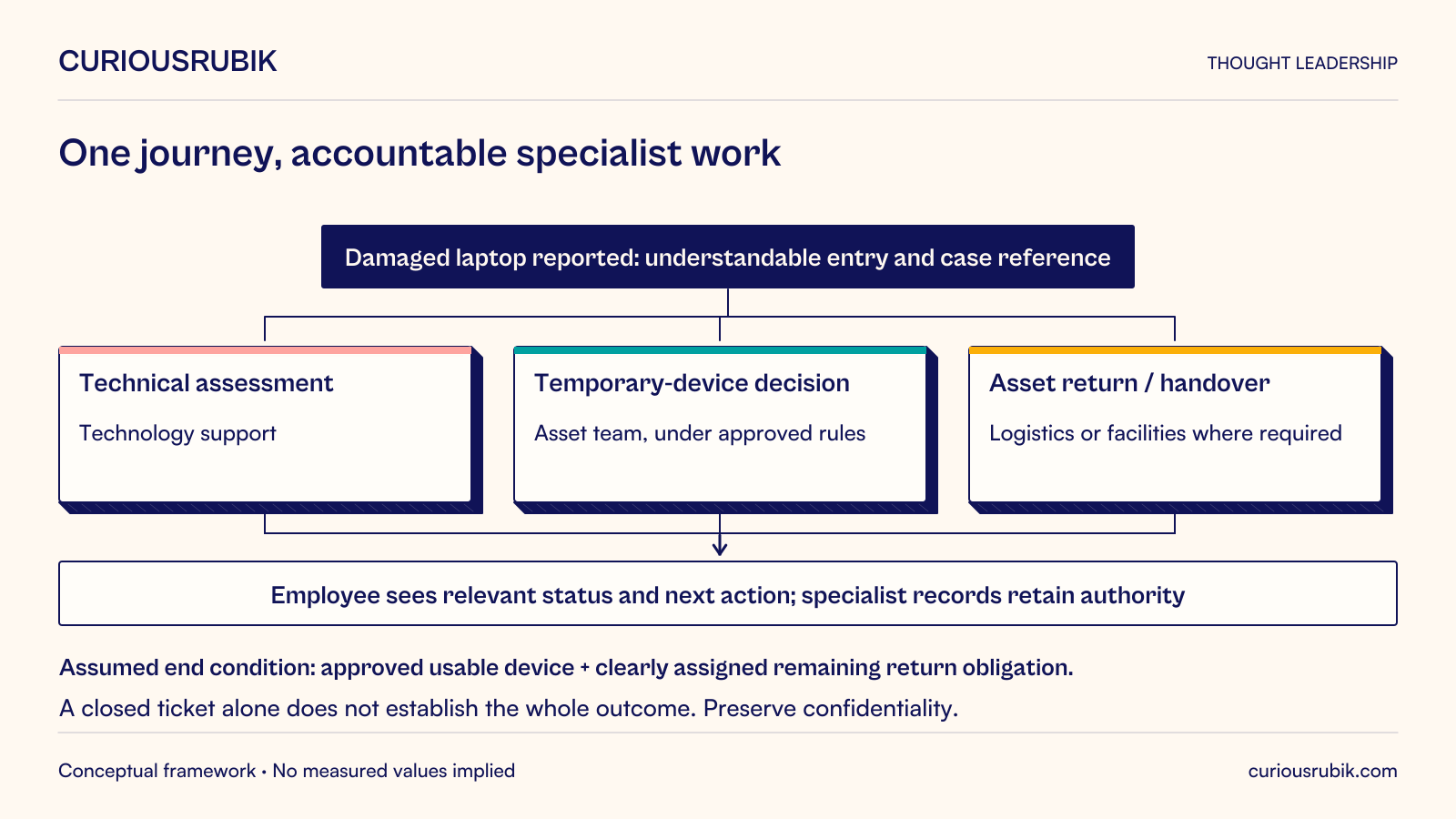
Consider a hypothetical employee whose work laptop has been damaged while traveling between offices. The employee needs to report the problem, understand whether a temporary device is available and know how the damaged asset should be returned.
A fragmented experience might require three separate forms with repeated employee, asset and location information. Each team could close its own ticket while the employee still lacks a usable device. A portal that merely links to those forms preserves the fragmentation.
A more coherent journey begins with the employee’s situation and routes the relevant work. Technology support assesses the device issue. The asset team manages the replacement or loan process under the organization’s rules. Facilities or logistics coordinates the physical handover where required.
The shared view should show the employee what is happening and what they need to do next. It should not expose confidential technical investigation details or imply that every team can modify every record. The specialist records can remain authoritative for their own work.
The end condition must be explicit. For this example, the organization might define service completion as the employee having an approved usable device and the remaining return obligation clearly assigned. That is an assumed operating rule, not a universal policy.
A service catalog should help employees distinguish what they need and what will happen next. It is more than an index of forms.
For each service, explain its purpose, who can use it, what information is required and what outcome it can produce. State significant conditions before the employee begins. If a request needs approval or cannot be completed immediately, make that visible.
Avoid ambiguous categories that force users to choose among overlapping departments. Use research and search behavior to understand how employees describe their needs. Provide a route for uncertain cases rather than making employees guess and accept repeated rerouting.
Keep the catalog owned. A form whose receiving team has changed can continue to collect requests long after its instructions become inaccurate. Assign responsibility for reviewing the service definition, routing and supporting content when the operating process changes.
A small catalog of maintained services is more useful than a large directory that nobody can trust.
Employees often need an answer before they need a transaction. The portal should connect relevant guidance to the task without requiring a separate search through conflicting document versions.
Show the responsible owner and the applicable scope of important guidance. A policy may differ by location, employment arrangement or business unit. The portal should not infer eligibility from an approximate profile when the distinction affects the answer.
Provide an obvious way to report unclear or outdated information. Content maintenance needs a workflow, not an annual reminder that leaves unresolved questions circulating through email.
Search should respect access permissions and help users recognize authoritative results. A document’s popularity does not establish that it is current or applicable. Consider how obsolete copies are retired or clearly marked so that employees do not continue to rely on them.
Where the portal offers a summarized answer, preserve a route to the authoritative source and the context needed to interpret it. Convenience should not turn a conditional rule into an unconditional instruction.
Single sign-on can reduce repeated authentication, but it does not decide which records an employee may see or which actions they may take. Each service still needs appropriate authorization.
Distinguish personal service records, team-level work and administrative functions. A manager’s need to approve a request does not imply access to every detail associated with the employee. A shared workplace should not become a broad collection of sensitive information visible to anyone with an internal account.
Plan for changing roles, temporary assignments and multiple organizational relationships. Permissions should follow approved responsibilities, including removal when those responsibilities end. The portal’s displayed role and the downstream system’s enforcement should remain consistent.
Test links and embedded experiences under actual roles. A portal tile can be hidden correctly while a direct URL still exposes information. Conversely, a tile can invite an action that the receiving system always rejects, producing confusion and support demand.
Security review should cover the connected journey, not just the portal shell.
A unified view can summarize progress from several systems, but it needs defined meanings and update expectations. Received, assigned, awaiting employee action and resolved should correspond to real states in the underlying process.
Explain when a displayed state is awaiting an update. A portal should not suggest that a request is complete merely because one participating team has finished its part. If the broader task remains open, show the remaining owner or action.
Use stable case references to connect records where appropriate. Preserve the relationship between the overall employee journey and its specialist tasks, including corrections and reopened work.
Avoid introducing a second editable copy of each status without a clear authority model. The convenience of a consolidated screen can create reconciliation work if teams update the portal and their own systems independently.
For the damaged-laptop case, the employee view can combine technical assessment, device availability and return instructions while each team records its authoritative event in the system it operates. The integration must make failures and delays visible to support staff.
A unified workplace can become noisy if every application sends its own alerts. Inventory notifications across the journey and identify duplicates, conflicting instructions and messages with no clear action.
Prioritize what the employee needs to know or do. Explain the task, deadline where one genuinely applies and consequence of inaction without overstating urgency. Link to the current authorized record rather than copying sensitive details into an unnecessary channel.
An aggregated action list needs reliable completion and expiry behavior. An approval already completed elsewhere should not remain indefinitely on the portal. A changed request should not continue to present an obsolete decision packet.
Allow reasonable preferences where the service permits them, while preserving required communications through approved channels. The objective is attention to meaningful work, not maximizing message volume or portal visits.
Assign a product owner responsible for the employee journey, alongside service owners responsible for their particular processes. Define how priorities are resolved when a portal improvement requires changes across departments.
Use frontline service teams and employee research together. Support records reveal recurring problems; observation explains why those problems occur. Neither a central technology team nor one department’s preferences should be the sole source of priorities.
Establish ownership for integrations, content, access rules, design patterns and incident response. A polished launch can deteriorate quickly when every dependency is maintained on a different schedule without coordination.
Measure the outcomes of selected journeys: successful completion, employee effort, repeated information entry, rerouting, unresolved work and time to the usable result. Page views and daily visits may describe use, but they do not establish that the workplace is easier to navigate.
Choose one cross-functional journey that employees find difficult and that the organization can support end to end. Improve its language, entry, ownership, status and recovery path. Test it with employees who have different roles, locations and accessibility needs.
Use what the team learns to establish reusable patterns, while checking each new service’s specific requirements. Do not force a sensitive or specialized process into a generic form simply to preserve visual consistency.
A unified digital workplace is an operating capability built over time. The portal succeeds when it reduces the burden of navigating the organization and makes responsibility clearer, while the systems and teams behind it continue to do their work with appropriate authority.