A mobile application changes an operation when it moves a useful decision closer to the place where work happens. Resizing an existing form can make information easier to reach, but it leaves the original delays, duplicate entry, and unclear authority intact. The strongest starting point is therefore a decision about the process: which person should capture a fact, decide what it means, and initiate the next step?
For an operations director considering an employee mobile app, the investment decision is whether the proposed workflow removes a costly handoff without weakening control. That question is more useful than asking how many desktop features can fit on a phone. A narrow application that closes one operational loop can be worth more than a comprehensive mobile menu that sends employees back to a desk to finish.
This article develops a practical way to choose that loop, redesign its ownership, and test whether the change actually improves work. Its worked example is hypothetical. The recommendations are design judgments to validate in the reader’s environment, not a claim that every process benefits from mobility.
Map a transaction from the physical event to the business action that follows. For each step, record who first knows the relevant fact, who enters it, who checks it, and who can act on it. Include informal calls, paper notes, and messages. They may carry information missing from the official workflow.
Separate work time from waiting time. A five-minute inspection followed by a next-day transcription creates a different problem from a two-hour inspection entered immediately. In the first case, mobile capture may shorten an information delay. In the second, redesigning the inspection itself, preparing equipment, or clarifying criteria may matter more.
Ask why each handoff exists. A supervisor might verify a quantity because the original source is unreliable, because policy genuinely requires independent review, or because an old application gave only supervisors access. Those reasons imply different designs. Better capture may remove the first handoff; a control requirement may preserve the second; role redesign may address the third.
Keep the distinction between convenience and authority explicit. Giving a worker a button does not establish permission to commit a transaction. If a mobile workflow changes who can authorize a customer concession, release equipment, or incur expenditure, the accountable process owner must approve that change before the interface normalizes it.
Define the smallest outcome that matters to the next participant. “Record a site visit” is vague. “Submit an identified service issue with enough evidence for a coordinator to assign the next action” provides a clearer boundary. The latter can be tested for completeness, acknowledgment, and ownership.
For that outcome, write a short process contract. Specify the trigger, the person responsible, required evidence, allowed decisions, receiving owner, completion signal, and exception route. This is a working design artifact rather than a formal standard. It prevents the project from measuring success at the instant someone taps Submit.
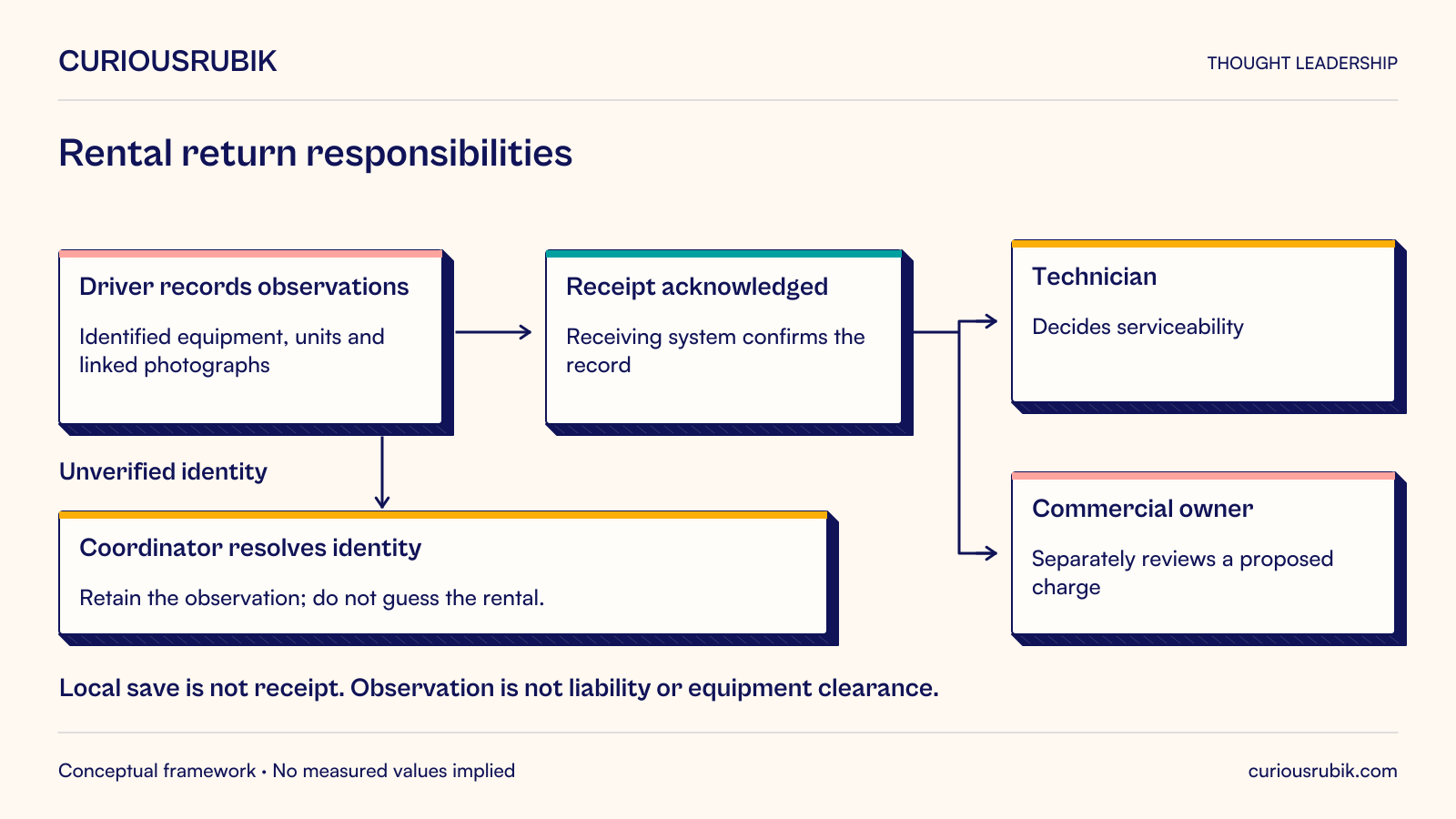
The completion signal deserves particular attention. A locally saved record, a transmitted record, an accepted record, and a completed downstream action are different states. The application should use language that reflects the actual state. Otherwise, employees may leave a site believing the office has received information that remains only on the device.
Do not force every activity into the same unit. A quick observation may require only a location and reason code. A consequential exception may require photographs, measurements, and independent review. Progressive capture can ask for additional information when the selected outcome requires it, instead of burdening every routine interaction with the maximum possible form.
Consider a hypothetical equipment rental business. A driver collects a generator from a customer. The driver notes damage on paper, photographs it with a separate camera application, and returns to the depot. A coordinator later matches the photographs to the rental record, asks the driver for missing details, and routes the item for inspection.
The mobile opportunity is not to reproduce the coordinator’s rental screen. It is to create a reliable return-condition record at collection. The driver identifies the rental and equipment, records the meter reading with its unit, marks visible condition, and links necessary photographs directly to the record. The app displays a locally saved acknowledgment while awaiting transmission.
The redesign preserves a deliberate boundary: the driver records observations but does not decide customer liability. A technician assesses whether the item can return to service. A commercial owner reviews any proposed charge under the company’s approved policy. Photographic evidence supports those decisions; it does not automatically establish fault.
Suppose the design workshop uses an illustrative sample of 40 returns. Under the existing process, 12 require a follow-up question and each follow-up consumes eight minutes across the driver and coordinator. That represents 96 minutes of clarification work in the sample. These are invented planning inputs, not measured savings. The pilot must determine whether the mobile process reduces clarification without adding a greater burden at collection.
Now introduce an exception. The customer disputes the equipment identifier, or the label is unreadable. A rigid app might prevent the driver from recording anything. A better proposed workflow permits an unverified observation, retains the reason, and routes identity resolution to a named coordinator. It must not silently attach the observation to a guessed rental or mark the equipment as cleared.
The business outcome is a return that reaches the correct next owner with usable evidence. The mobile screen is one component. The rental identifiers, damage taxonomy, technician queue, customer-dispute process, and coordinator coverage all determine whether the redesign succeeds.
Observe where the employee can safely use the device. An interaction designed for a desk may fail when a worker is standing in rain, wearing gloves, carrying equipment, or speaking with a customer. The answer may involve different hardware, shorter interactions, voice alternatives, or postponing capture until the worker reaches a safe location. The app should never make unsafe multitasking the expected operating method.
Minimize repeated entry by carrying verified context forward. If the user opened a task from an assigned visit, the app can propose that visit’s identifier. It should still make the association visible and correctable before submission. Invisible defaults are efficient until the employee moves to the next customer and records evidence against the previous one.
Accessibility belongs in task design. WCAG 2.1 includes requirements for identifying input errors and providing labels or instructions in web content. These are useful checkpoints for mobile web workflows; native experiences also need platform-specific accessibility testing. A short form without understandable error recovery is still difficult to use. WCAG 2.1, criteria 3.3.1 and 3.3.2
Prefer an explicit correction path to demanding perfect input. Employees should be able to explain an unusual measurement, replace an unclear photograph, or submit a correction with provenance. Where a completed record must be preserved, the process can add a linked amendment rather than overwrite the original. The appropriate retention and audit design depends on the business and its obligations.
Some handoffs are valuable. Independent review can detect a mistake or separate conflicting responsibilities. The design question is whether the reviewer adds a decision that requires different authority or expertise, and whether the mobile record gives that person enough information to perform it.
A manager who merely transcribes the same fields is a candidate for removal from the routine path. A technician who assesses equipment safety is not interchangeable with data entry. Document which checks become automatic validation, which become exception review, and which remain mandatory human decisions.
Check the downstream consequences before moving a task earlier. Immediate defect submission may create a queue that the maintenance team cannot service. Faster capture then improves visibility but does not shorten restoration time. The operating model may need triage rules, staffing changes, or capacity limits alongside the app.
Ownership must also survive absence. If every exception goes to one supervisor’s phone, mobility has concentrated the bottleneck. Use an accountable team queue with a named duty owner, escalation rules, and a way to establish who accepted responsibility. Notifications should draw attention to that queue rather than substitute for it.
Pilot one process with enough variation to expose ordinary exceptions. Include experienced and newer employees, different device conditions, and the receiving office team. Avoid selecting only enthusiasts on reliable connections; that can conceal the burden imposed on everyone else.
Record a baseline for elapsed time to usable receipt, clarification rate, correction rate, and employee effort. Measure the same definitions during the pilot. If volumes or case complexity differ, report those differences rather than attributing every change to the app. Averages should not hide records stranded for days.
Review a small set of completed and failed transactions end to end. Did the employee choose the right item? Was the evidence understandable? Did the next owner act? Could support explain what happened when transmission failed? This review often produces more actionable findings than a broad satisfaction question.
Use a decision rule agreed before the pilot. For example, expand only when the process owner can account for every submitted record, the next team can act without routine re-entry, and unresolved exceptions have an owner. Numerical thresholds should come from the business’s tolerance and baseline, not an invented universal mobility benchmark.
A dedicated mobile application may be unnecessary when the task is infrequent, connectivity is dependable, and a well-designed responsive web form can complete the same loop. A shared workstation may remain appropriate where the work requires a large document comparison or equipment that cannot be used while moving.
Mobile capture also creates maintenance obligations. Device support, identity recovery, permissions, synchronization, and changing operating procedures all need owners. Evaluate recurring support effort alongside the initial build. If the business cannot maintain the process rules, a more capable interface will not resolve the underlying ambiguity.
The next useful action is to select one delayed handoff and trace ten representative transactions with the people on both sides. Define the intended outcome, the authority that must remain intact, and the evidence the receiver needs. Fund the mobile experience only after that redesigned process makes sense. The resulting application can then be judged by the work it completes, rather than by how faithfully it reproduces a desktop screen.