Customers and suppliers do not adopt a portal because its feature list is complete. They use it when they expect it to help them finish a task with less uncertainty or effort than the alternatives. That expectation is built through the entire experience: finding the service, getting access, completing the work and seeing that the organization responds.
A portal can contain every requested function and still lose users at those transitions. Adding another dashboard may do little if an infrequent user cannot recover access or if a submitted request disappears into an unexplained queue.
For a portal owner, the useful question is why the intended audience chooses, avoids or abandons the service for a particular task. Adoption work should answer that question before it becomes another feature-development program.
Registered accounts are not the same as active use, and active use is not the same as successful task completion. Define adoption in relation to the service’s purpose and the user’s opportunity to use it.
A customer who needs a certificate twice a year should not be judged inactive because they do not log in every month. A supplier required to submit daily updates has a different usage pattern. The relevant denominator is people or tasks with a genuine need during the measurement period.
Distinguish first use, successful completion and return use when another need arises. Each reveals a different part of the experience. A campaign may increase registration without improving completion, while a reliable service may reduce visits because users obtain the answer immediately.
Keep assisted use visible. Some people can complete the task with support, and that may be an appropriate service outcome. Do not hide the assistance merely to make an independent-use measure look stronger.
Feedback from enthusiastic users is valuable but incomplete. Speak with people who continue to email, who tried once and stopped, who cannot complete registration and who do not know the portal exists.
Ask them to show how they currently complete the task. Understand what the alternative channel provides: a familiar person, confirmation that the request is understood, flexibility for exceptions or simply a remembered address. The portal has to replace or preserve those useful qualities, not merely remove the channel.
The Government Digital Service’s guidance on encouraging online use recommends researching why people use other routes, supporting those who need assistance and avoiding attempts to drive uptake by concealing offline help. Its public-service setting differs from a commercial portal, but the diagnostic approach is relevant. GDS, Encouraging people to use your service online.
Separate causes before choosing a remedy. Lack of awareness calls for communication. A confusing task calls for design work. Missing authority or inaccurate data requires an operating correction. Training alone will not resolve all three.
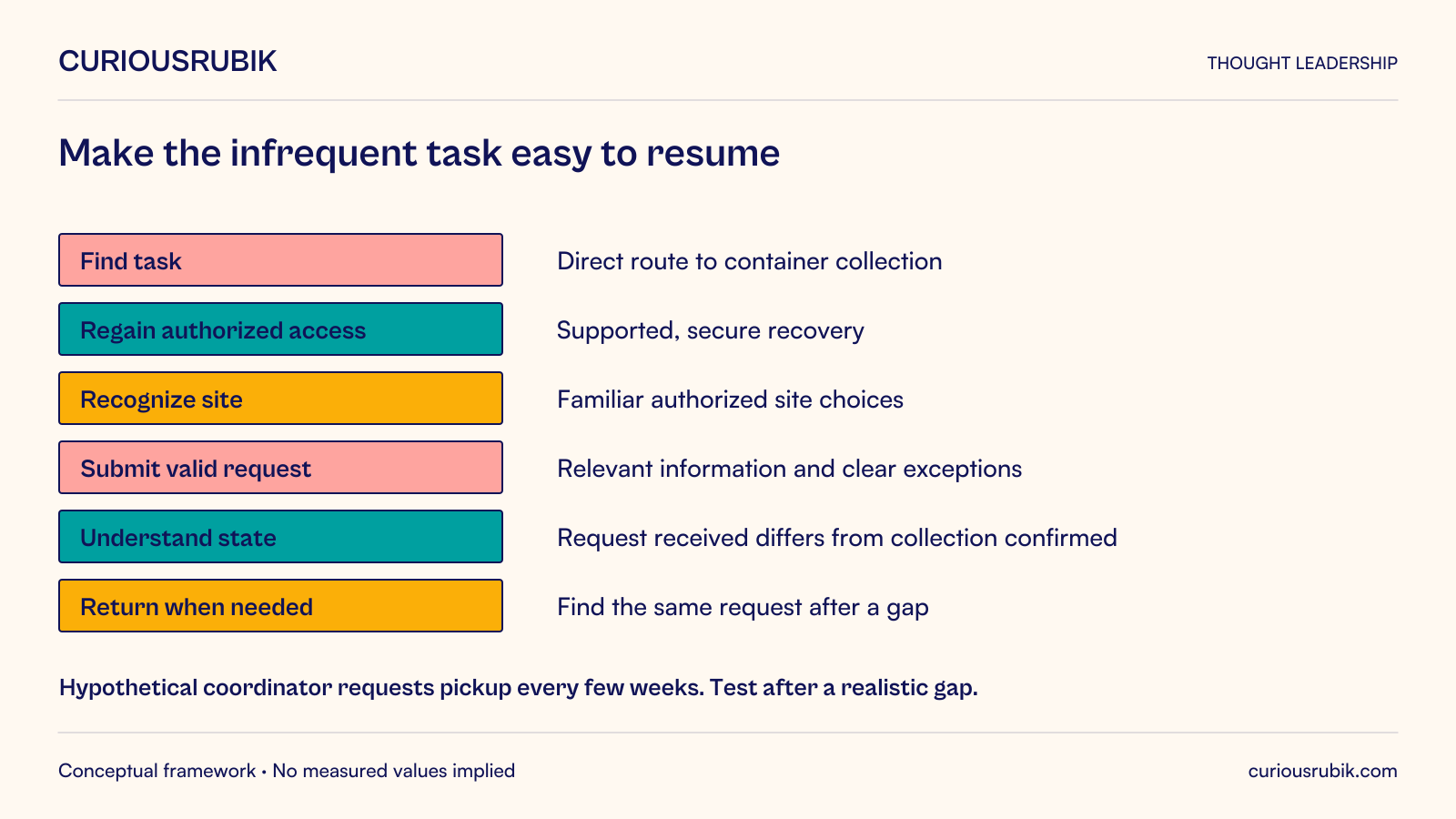
Consider a hypothetical reusable-packaging provider whose customers request collection of empty transport containers. A site coordinator makes a request every few weeks, often while covering other responsibilities. The current method is an email to a known service contact.
The portal offers collection requests, history, reports and a dashboard. Yet the coordinator still emails because they cannot remember the account setup, are unsure which site identifier to choose and do not know whether a submitted request becomes a confirmed collection.
The problem is not the absence of another feature. The portal has failed to make an infrequent task easy to resume and its outcome easy to understand.
A better experience could provide a clear route from the service message to the correct task, a supported and secure access-recovery process, recognizable authorized site choices and an explicit distinction between request received and collection confirmed. The coordinator should be able to find the request later without searching through unrelated menus.
The business still needs to review operational constraints. The portal should not promise an unavailable collection merely to create a smoother interaction. A clear pending state and a reliable response can build more trust than an immediate but unsupported confirmation.
Look at how much work a user must do before receiving value. Registration, identity checks and business authorization may be necessary, but they should be explained and proportionate to the service.
Avoid asking for information that the organization already has and can safely reuse. Where confirmation is needed, show the information clearly and let the user correct it through an appropriate process. Repeated entry can create inconsistency as well as frustration.
Make the first useful task easy to locate. A general homepage full of company announcements can obscure the action that brought the user there. Entry points from relevant communications can help, provided they preserve authentication and authorization rather than embedding sensitive access in an unsafe link.
Do not simplify by removing necessary safeguards or hiding important choices. The aim is to eliminate avoidable effort, not to make consequential actions effortless at the expense of understanding.
Test the journey after a realistic gap. A user who has just completed training may remember steps that an occasional user will not retain several weeks later.
A portal’s response after submission is part of its experience. Users need evidence that the request exists, an understandable current state and a way to see what happens next.
Use a stable reference and preserve the submitted details. If the business needs clarification, ask in the context of that request rather than sending an unrelated message that forces the user to reconstruct the issue.
Make changes visible when they affect the user’s plans. A revised collection date, rejected request or required action should be communicated through an agreed channel and reflected in the current portal record.
When the service fails, explain the actual situation without blaming the user or presenting a generic success state. A useful recovery path can preserve confidence even when the straightforward journey cannot be completed.
Trust grows when the portal’s statements match the organization’s behavior. Marketing claims about convenience cannot compensate for repeated uncertainty after submission.
Support staff should know how the portal works and be able to help users complete the same version of the service. They also need a way to identify defects, missing permissions and recurring misunderstandings.
Avoid a circular support path in which the user must log in to obtain help with logging in. Provide an appropriate route for access problems, while maintaining the verification controls needed to prevent unauthorized recovery.
Preserve context when a user moves to assisted service. The coordinator in the collection example should not have to repeat every site and container detail because the support team cannot see the portal request.
Record the reason assistance was needed. A repeated pattern can point to a design change, a missing service option or an authorization process that is too difficult to administer. This is more actionable than a general complaint that users resist change.
Support should help people become confident where appropriate, but the organization should also recognize situations where continued assistance is a reasonable part of the service.
A portal may be technically reachable while remaining difficult to use with a keyboard, screen reader, magnification or limited familiarity with its terminology. Include relevant access needs in research and testing.
Use recognizable language for tasks, sites, records and statuses. Internal codes can remain available where necessary, but should not be the only way a user identifies the correct choice.
Test the complete journey, including errors, confirmations and return visits. An accessible landing page does not establish that an embedded form or document download is usable.
Consider the user’s working context without making assumptions about their ability. They may be interrupted, using a shared workstation or completing the task outside their normal routine. Clear saved state, meaningful instructions and predictable navigation can help them recover their place.
The appropriate changes should follow observed needs and applicable accessibility requirements, with specialist assessment where needed. A general usability test is not a full conformance assessment.
Build a small set of hypotheses about why people are not completing the target task. For each, specify an observable test and a possible response.
If users do not know the portal can request collections, improve communication at the moment the need occurs. If they reach the task but cannot identify their site, improve the authorized site presentation and data. If they submit and then call for reassurance, investigate the confirmation and operating follow-through.
Change one coherent part of the journey and examine the result. Consider task mix, user experience and other operational changes before attributing a difference to the intervention.
Measure correct completion, assistance, repeat contact and return use at the next genuine opportunity. Keep unsuccessful attempts and abandoned journeys visible. Otherwise, the people most affected by the problem can disappear from the analysis.
Qualitative observation helps explain why a measure changes. A lower number of visits could mean the service is efficient, or that users have given up. The surrounding evidence determines the interpretation.
Before adding a new feature, ask whether it addresses an observed barrier or enables a valuable new task. Estimate the additional permissions, content and support obligations it creates.
Fixing an unreliable core journey can be more valuable than broadening the menu. Equally, a genuinely missing capability may explain nonuse. Experience research should distinguish those situations rather than assume that either redesign or more functionality is always the answer.
Portal adoption becomes sustainable when people have a reason to use the service and confidence that it will help them finish their work. The product team’s job is to make that confidence deserved through clear entry, usable access, meaningful completion and reliable follow-through.