Add a nexus to a subsidiary only when the subsidiary has a valid tax registration for that jurisdiction. Before removing an association, check the tax setup and related transactions with the person responsible for your tax configuration.
Oracle documentation reviewed. Account-specific configuration and outcomes have not been tested.
First check whether the account uses SuiteTax
The legacy workflow uses the subsidiary’s Nexuses subtab. SuiteTax uses Tax Registrations and includes registration numbers, tax engines and validity dates. Follow the procedure that matches your account.
For SuiteTax: If a registration has expired, Oracle directs you to set its Valid Until date instead of removing the nexus when transactions are associated with it. Ask your tax owner to approve the effective date. Oracle requires at least Edit access to Subsidiaries and Subsidiary - Tax Engine Selection to assign registrations. See assigning tax registrations to a subsidiary in SuiteTax.
Add a nexus using the legacy Nexuses subtab
- Open Setup > Company > Subsidiaries and edit the intended subsidiary.
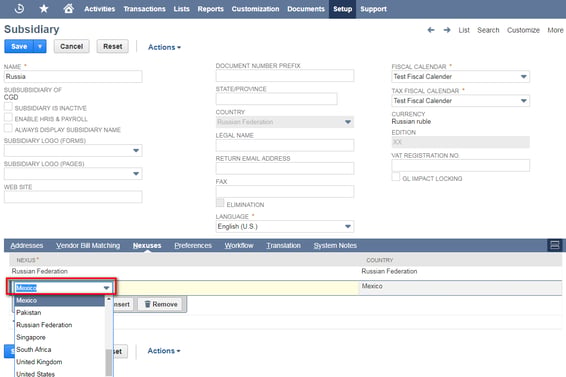
- Open Nexuses. Select the existing nexus on an empty row and click Add.
- Review the association and click Save.
Only nexuses already created in NetSuite appear in the selector. Follow Oracle’s nexus-association instructions for this workflow.
Remove an unused nexus association
Stop if transactions are associated with the nexus. NetSuite blocks removal and identifies the dependent transactions. Do not delete, void or alter valid accounting transactions merely to clear that block. Have your finance and tax owners review the dependency and the intended configuration change.
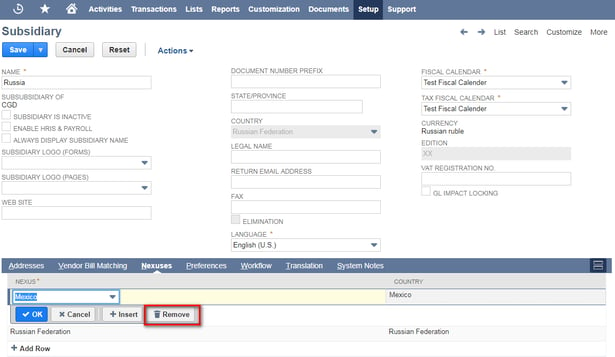
Oracle’s removal instructions require the subsidiary to have no transactions associated with that nexus. If this prerequisite is satisfied and the change is approved, edit the subsidiary, select the nexus row, click Remove and then Save.
Voiding is not a verified workaround: Oracle explains that a voided transaction remains in the system. Deleting a transaction removes its details, and reconciled transactions should not be deleted. See voiding, deleting and closing transactions.
Deleting a nexus record needs separate review
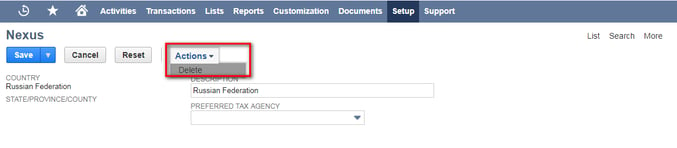
Deleting the nexus from NetSuite is a separate operation from removing its subsidiary association. Oracle requires there to be no associated transactions and says the nexus with internal ID 1 cannot be deleted. If deletion is blocked, ask your administrator and tax owner whether inactivation is appropriate; Oracle documents that alternative under Deleting Tax Nexuses.
Expected result: An approved, unused association can be added or removed without changing accounting transactions. When dependencies exist, retain the history and resolve the configuration with the responsible owners before proceeding.