Bin Management helps to track how much quantity of items held within the warehouse in a particular bin. In NetSuite there are two features for bin management:
- Basic Bin Management:
- Advanced Bin/Numbered Inventory Management.
Implementation Flow Diagram
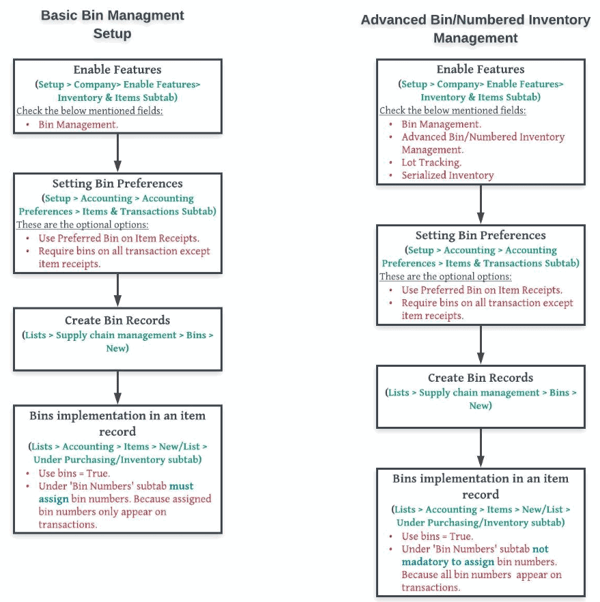
Bins in ‘Transactions’: Bins are appear in transferring or receiving related transactions such as item receiving, item fulfilling, bin transfer, bin put away, inventory transfer, transfer order etc.
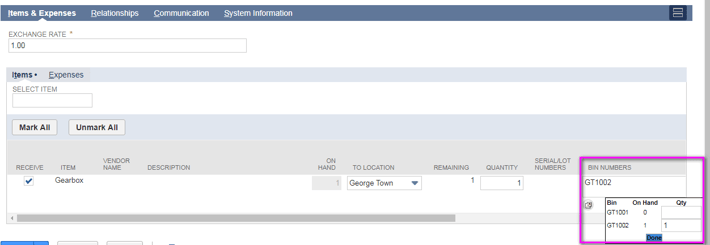
Item Receipt Record (When used ‘Basic Bin Management’ feature):
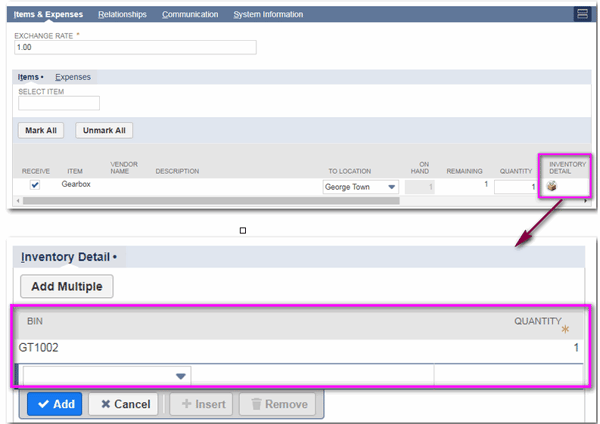
Item Receipt Record (When used Advanced Bin/Numbered Management’ feature):
Comparison b/w ‘Basic & Advanced Bin Management’:
| Basic Bin Management |
Advanced Bin Management |
|
| Bins for Lot/Serialized items |
Not working |
Working |
| Assigning bins in item record |
Required |
Not Required |
| Setting bins to specific locations |
Not Possible |
Possible |
Finally ‘Basic Bin Management’ feature does not allow you to use bins with serial or lot numbered items or on a per-location basis but when enable the ‘Advanced Bin Management’ feature allows to bins with serial or lot numbers items