
Content: Follow below steps for defining search fields in suite commerce advance
Step 1:
Go to >> Setup >> Suite Commerce Advanced >> Setup Website >> Click on edit
Step 2:
Click on search index tab under that select search fields
List on the search fields define the relevance ranking of search results the top row shows the item field and type of match that results in highest relevance ranking.
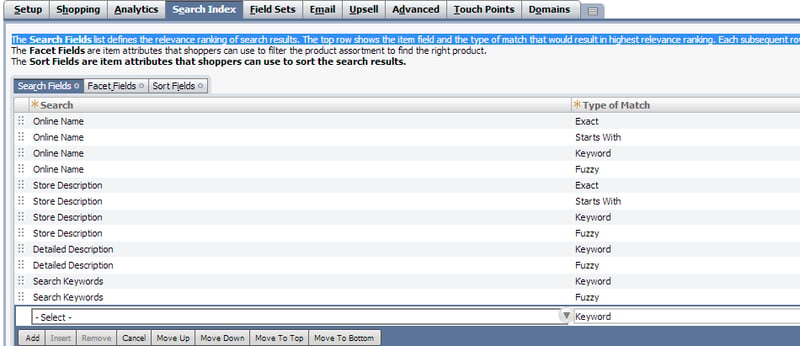
Note: - By default NetSuite defines few search fields
The following are the definitions of “Type of match”
- Exact :- If an shopper searches for “Black Belt” in the search field it will show results only word exact matches with “Black Belt”
- Starts with : If an shopper searches for “ Black” then search results will show all the items starts with black including “Black Belt”
- Keyword: If an shopper searches for “ Belt” it will show all the results with belt including “Black Belt”
- Fuzzy: if matches similar test or misspellings, shopper types “Telt” in the search box it will show similar results “Belt”.