For US commerce teams that want to follow Amazon orders, fees and tax through one week in NetSuite.
Last reviewed: 27 November 2026. Product details reflect this review date. Availability and behavior can vary by account, role and release.
A NetSuite Amazon integration uses NetSuite Connector to bring paid orders you ship into NetSuite as sales orders. Orders Amazon ships typically arrive as cash sales. With settlement import enabled, finance can post fees and refunds, then match the payout. Set up marketplace tax treatment before you test the first orders.
- Check the record type against the team that ships the order.
- Track fees by whether they belong to an order or the settlement period.
- Test remitted tax with a sample order before comparing the payout.
How does a NetSuite Amazon integration split orders?
NetSuite Connector is the connection that brings Amazon order data into NetSuite. The record you see depends on who ships the goods. Merchant Fulfilled Network, or MFN, covers orders that your own team packs and ships. Fulfillment by Amazon, or FBA, covers orders that Amazon ships using stock you have sent to its warehouse.
One item with two shipping routes
A paid MFN order can import as a sales order. The warehouse then has a record to work from.
In the marketplace order flow guide, the handoff starts with the same question of who owns the shipment. Here, the warehouse lead can check those orders against the records their team picked that day. Keep that comparison separate from the orders that Amazon shipped.
Use the item, quantity and shipping details on that record to check the handoff. Once the team ships, it can follow your normal NetSuite fulfillment and billing process.
An FBA order becomes eligible for import after Amazon marks it shipped. By default, NetSuite Connector posts it as a cash sale, which requires no separate fulfillment in NetSuite. The cash sale commits inventory immediately. The connector uses a fixed customer because the FBA order feed omits the buyer's name and address.
Map those cash sales to the NetSuite location that represents Amazon stock. NetSuite Connector does not sync inventory quantities for FBA listings through product sync. Give someone ownership of comparing the stock records for that location. Our guide to integrating with NetSuite covers the decisions around data ownership that matter here.
A hypothetical week at a US home goods brand
This illustrative week uses US dollars. The brand starts with one product sold for USD 50 per unit. There are 20 orders of one unit each, split between two shipping routes. The example assumes the orders, fees and refund all appear in one settlement for easy comparison.
Monday to Thursday
- On Monday, six orders worth USD 300 are paid for and imported as sales orders for the brand's warehouse.
- On Tuesday, Amazon marks 14 orders worth USD 700 shipped and those orders import as cash sales.
- By Thursday, the brand's warehouse has shipped all six orders and the team has completed billing.
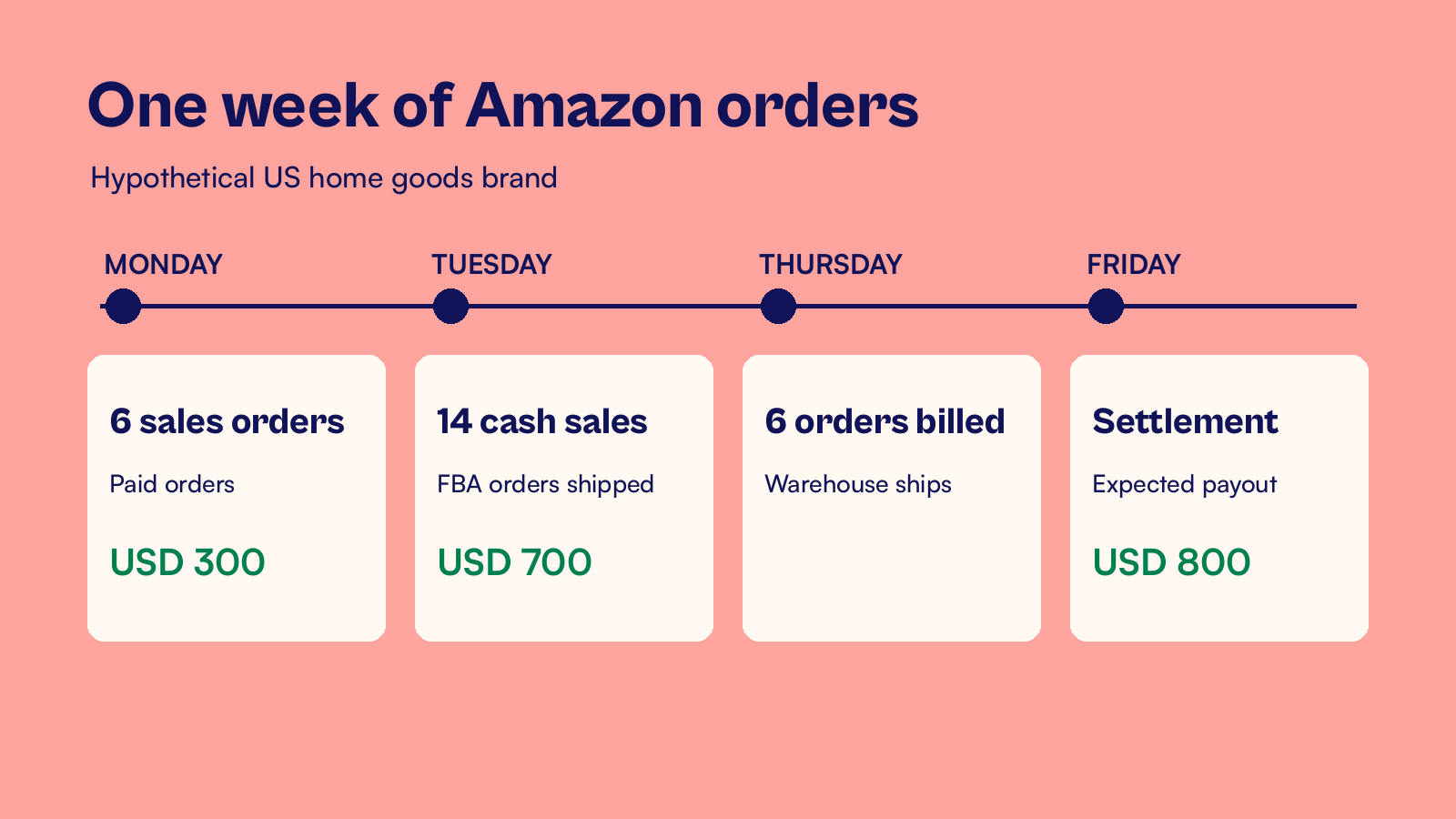
The team now has USD 1,000 in sales before refunds, fees and any tax that Amazon remits. The warehouse checks its six orders against shipment records. Finance checks the other 14 against Amazon's shipped orders and verifies that the cash sales use the agreed customer and stock location.
The team keeps the Amazon order reference with each transaction. That gives finance a way to match one charge or refund to the order it came from. The reference also helps if a shipment appears in one day's Amazon activity and reaches NetSuite on the next import.
At the end of Thursday, the warehouse lead saves a list of the six sales orders and marks which records have shipped. Finance asks for the billed records as well. That gives the accountant a way to tell an order that is still waiting to ship from one that has shipped but is waiting to be billed.
For the other 14 orders, the starting point is the shipment list from Amazon. Check the item code on one cash sale against the product sold. Then check its quantity against the stock activity at the mapped location. The warehouse team can use that location to keep this stock review separate from its own shelves.
Friday's settlement
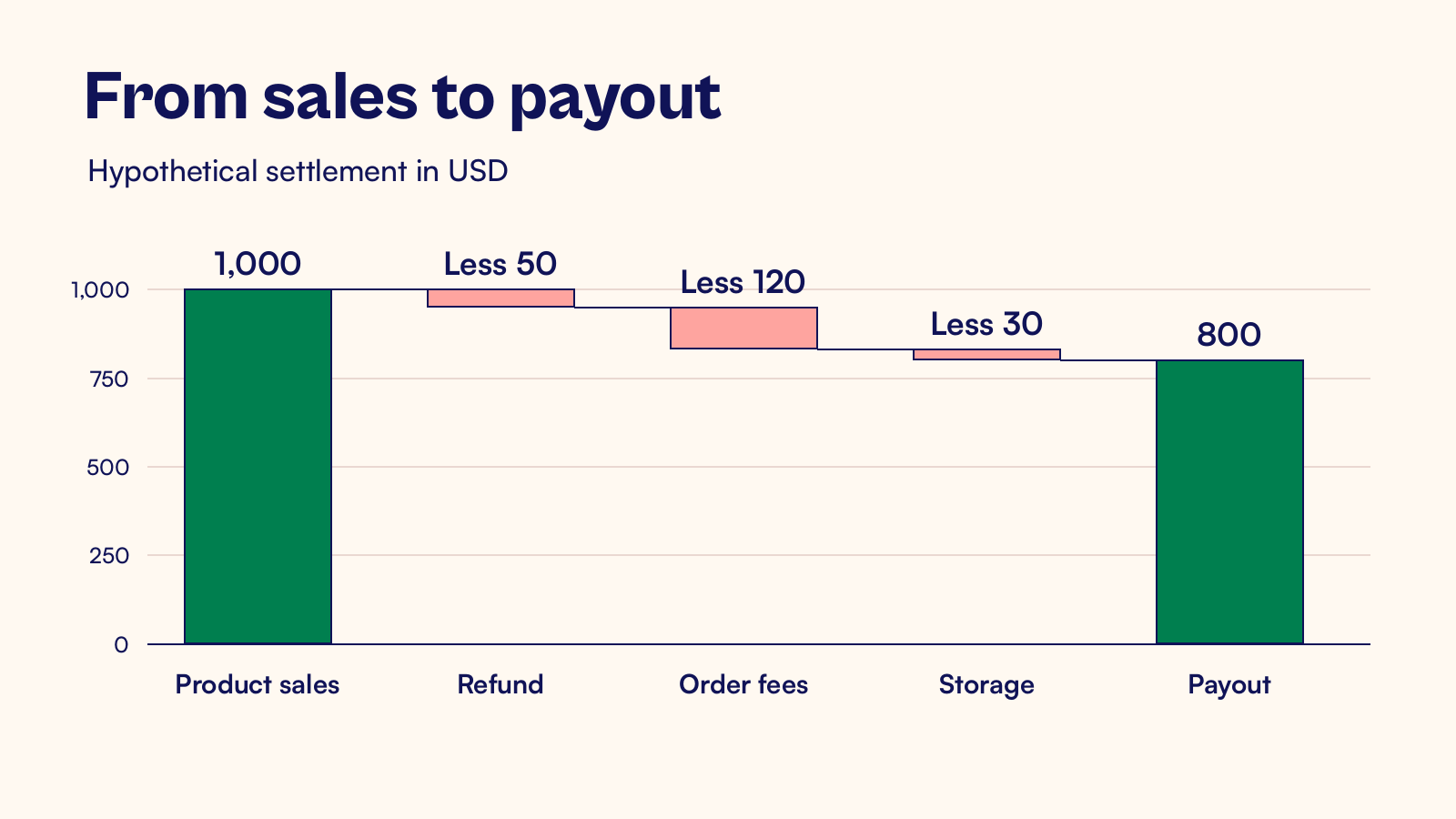
One of the 14 FBA orders has a full USD 50 refund. The settlement also shows USD 120 of fees tied to orders, including FBA fulfillment fees. A separate USD 30 storage fee belongs to the period. The expected payout in this example is USD 800.
| Settlement line | Amount |
|---|---|
| Gross product sales | USD 1,000 |
| Customer refund | Less USD 50 |
| Fees tied to orders | Less USD 120 |
| Storage fee for the period | Less USD 30 |
| Expected payout | USD 800 |
NetSuite Connector offers settlement import as an optional paid feature. Fees tied to an order can post as adjustments to its billed record. NetSuite Connector combines period fees and reimbursements in one summary transaction. The net period adjustments create a cash refund if you owe Amazon or a cash sale if Amazon owes you.
Depending on the source record and setup, refunds can post as return authorizations, cash refunds or credit memos. For this week, the accountant starts with the USD 50 refund and traces it to the original cash sale. They then check that the USD 30 storage fee produces a cash refund on the summary record.
A Friday bank deposit may cover a different set of dates from the order report. Use the dates and reference on the actual statement to find the right group of entries. If the two date ranges differ, write down which orders belong to the later review.
The guide to marketplace fees and reimbursements gives finance a way to think about the source records for period charges and credits. For this sample, keep the fee detail next to the summary record so the reason for the charge is clear.
Give each kind of fee an account and an owner who can explain the mapping. Have the accountant check the charges against the agreed fee terms using the original settlement detail. The settlement reconciliation guide shows how to carry that detail through to the deposit.
Where does marketplace sales tax go?
Marketplace facilitator tax is sales tax that the marketplace collects and remits where it has that obligation. In those cases, Amazon handles the remittance and the tax amount stays out of the seller's payout. Confirm which sales qualify and what you still need to report with your tax adviser.
Hold tax apart from the payout calculation
Suppose customers in the same illustrative week pay USD 80 in tax that Amazon remits, net of any tax refunded. That amount stays outside the USD 1,000 product sales figure. It also stays outside the USD 800 payout calculation. The team retains the marketplace detail to show where the tax went.
Use Omit Remitted Tax When Posting Amazon Orders to keep tax that Amazon remits out of imported orders. Verify that the option is enabled and test it on a sample order. Check NetSuite Connector help for your release and ask your NetSuite contact about availability and fees.
Keep the tax schedules for customers, items and shipping items set for the sales that use your own tax rules. Ask your tax adviser to confirm how to handle orders where you are responsible for collection. Test one of those sales on its own so the team can see that both routes produce the expected tax result.
A useful control for a US NetSuite rollout is to give finance one report with the product amount and another source for the tax Amazon handled. Use the same order reference in the review. If an Australian subsidiary bills the US seller separately, use the Australian intercompany setup guide to test that internal charge through consolidation.
What should you check this week?
Pick a statement with both shipping routes and pass the same sample to your warehouse lead and accountant. Use the source order and settlement references so they can work from the same records. Record the outcome and assign anything still open to the person who can correct it.
- Match one paid merchant fulfilled order to a sales order and check its fulfillment status.
- Match one Amazon shipment to a cash sale and check the fixed customer and stock location.
- Trace a refund to its original billed record and check the amount against the settlement.
- Compare one fee tied to an order and one fee for the period with their mapped NetSuite accounts.
- Tie the payout to sales less refunds and fees, with any tax Amazon remits tracked separately.
CuriousRubik's NetSuite ecommerce integration team can help you test both order routes and trace one Amazon settlement to the expected payout.
Related reading
Reconciling Amazon settlements in NetSuite
Trace the statement entries and payouts to the right records.
Marketplace fees and inventory reimbursements
Keep a clear trail for fees and credits.
Marketplace integration in NetSuite
Plan who owns each part of the order flow.