For US controllers and AP leads who need the aging report and ledger to agree before month end close.
Last reviewed: 24 November 2026. Product details reflect this review date. Availability and behavior can vary by account, role and release.
For a NetSuite A/P aging reconciliation, run the aging report and get the ledger balance for the same cutoff, accounts and subsidiary. Match the report settings first. Then trace each difference to a specific entry or report filter. Document any corrections and have a reviewer confirm the final balance.
What does it mean to reconcile A/P aging to the general ledger?
An A/P aging reconciliation checks that the balances owed to vendors agree with their total in the general ledger. The aging report groups open payables by vendor and age. NetSuite can age bills by due date or transaction date. The ledger holds the A/P control accounts for the balance sheet.
Start by comparing the full aging total with the balance of the same A/P accounts. Once you know the size and direction of a gap, use the detail reports to find the transactions behind it.
Use the same working file each month so the reviewer can see which differences are new. Keep a reference to the record or report row that supports each item.
Start with one subsidiary if you usually close on a consolidated basis. Keep the reconciliation in that subsidiary’s base currency where possible. Once you have checked each subsidiary, compare your work with the consolidated view separately so you can see which amounts change on translation.
What do you need before you start?
Record these choices at the top of your working file.
- The cutoff date. Use the last day of the period, such as October 31.
- The subsidiary. If you run NetSuite OneWorld, reconcile one subsidiary at a time.
- The A/P accounts in scope. Some companies use more than one A/P account. List each one and include them all.
- The currency view. Decide whether you compare in the subsidiary base currency, then keep it the same on both reports.
- The preparer and the reviewer. Two different people, named before you begin.
How do you run a NetSuite A/P aging reconciliation?
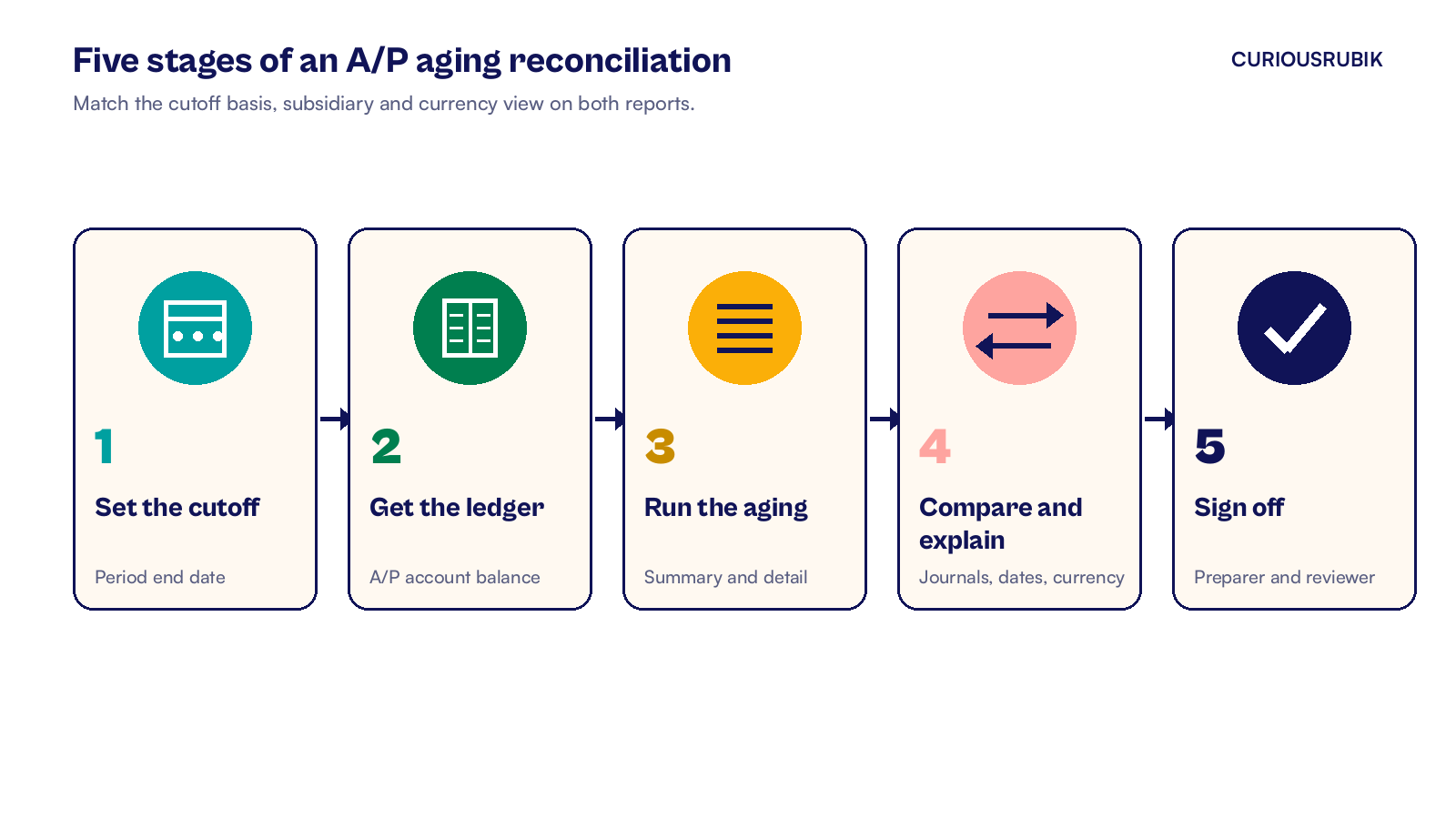
- Set the cutoff date. Pick the period end and keep it for every report in this reconciliation.
- Get the ledger balance. Go to Reports > Financial > Balance Sheet. Select the cutoff date or period and note the balance of each A/P account in scope.
- Run the aging. Go to Reports > Vendors/Payables > A/P Aging for the summary. Choose A/P Aging > Detail from the same menu for the transaction list. Match the scope and currency view.
- Compare the totals. Subtract the aging total from the ledger balance. Write the difference at the top of your file.
- Check journals in A/P. Look for journals under No Vendor in A/P Aging Detail and compare them with the A/P ledger entries. Check whether a vendor filter removes them from your working total.
- Check dates and periods. At Home > Set Preferences, check Report by Period on the Analytics subtab. Match the reporting basis before comparing totals.
- Check currency entries. In accounts with foreign currency bills, compare the timing of the report exports with the posting of the period’s currency revaluation.
- Resolve or document each item. Correct any posting errors with finance approval. For valid differences, record the amount, supporting entry and when you expect the difference to clear.
- Sign off and file. Save the two reports, the working file and the reviewer's initials together.
What usually causes a difference?
Start with report scope and timing. If those match, compare the individual entries. Save enough detail for someone else to repeat the check.
Manual journals posted to the A/P account
A journal posted to an A/P account changes the ledger balance. NetSuite can show journals under No Vendor in the detail report. Check that your working total includes those rows. If a valid accrual will reverse next month, document both the original journal and its reversal date.
If the journal has several lines, check the name on the line that hits A/P. Record the journal number and the net amount posted to the accounts in scope.
Transaction date and posting period on different sides of the cutoff
A bill dated October 31 but posted in November can appear in the October aging run by date. A Balance Sheet run by posting period excludes it from October. Check the date and posting period. If both reports can run by period, rerun them on that basis.
If the rerun clears the difference, keep a copy of the bill with your notes. If it remains, check that you used the same accounts on both runs.
Currency revaluation
NetSuite can revalue open foreign currency payables at period end. If your Balance Sheet includes a revaluation posted after you saved the aging, check the ledger impact and refresh both reports. Compare them using the same subsidiary and currency view.
More than one A/P account or subsidiary
Compare the same A/P accounts and subsidiary on both reports. If you use multiple accounting books, use the same book where supported. Before you total the aging, check for vendor or account filters left over from an earlier review.
Unapplied credits and prepayments
Review unapplied vendor credits separately from amounts already applied to a bill. Trace open credits to the relevant A/P account and avoid counting them twice. A vendor prepayment posts to a prepayment account. When you apply it to a bill, the application reduces A/P and clears the applied amount from prepayments.
A hypothetical month end tie out
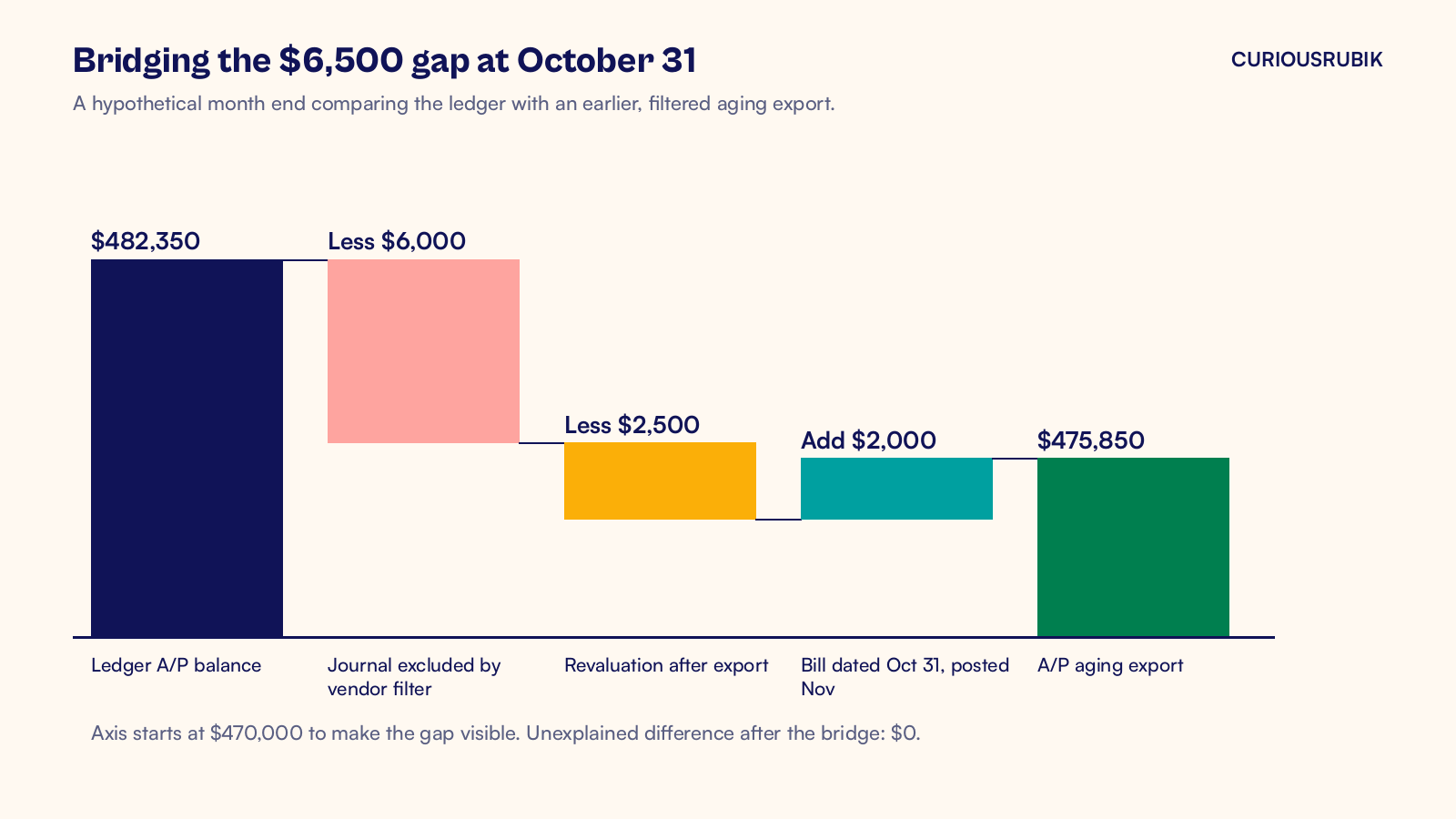
A US distributor compares the October Balance Sheet with an older A/P aging export dated October 31. The aging runs by transaction date and covers named vendors only. The team saved it before posting currency revaluation. The Balance Sheet runs by posting period. The initial gap is $6,500.
| Line | Amount (USD) | What it is |
|---|---|---|
| General ledger A/P balance, October 31 | 482,350 | From the Balance Sheet |
| A/P aging export, October 31 | 475,850 | From the filtered aging report |
| Difference to explain | 6,500 | Ledger is higher |
| Manual accrual journal, no vendor name | 6,000 | Excluded by the vendor filter |
| Revaluation posted to A/P | 2,500 | Posted after the export |
| Bill dated October 31, posted to November | (2,000) | Included in aging by date only |
| Total explained | 6,500 | Unexplained: 0 |
Add $6,000 and $2,500 to the aging export, then subtract $2,000 to reach the ledger balance. The preparer attaches the journal, revaluation and bill. They rerun the reports after revaluation with matching settings and retain the final comparison for the reviewer.
How do you stop differences from coming back?
Set up a few checks before close so the reviewer can recognize a new difference when it appears.
- Limit who can post a journal to A/P. Document the reason for each approved journal and check its effect on aging.
- Agree when to capture the final reports and who will refresh them if someone posts an adjustment before close.
- Check the posting period on bills entered near month end. Follow up with the clerk if a date and period cross the cutoff.
- Review old balances by vendor and note any amount that needs a credit, a payment or a follow up with the vendor.
- Keep the reconciliation file in one folder with the same name pattern each month.
If your team also matches vendor statements, use the reconciliation file to see which ledger entries still need checking. A vendor statement is a separate check of the amount owed to one vendor.
Who should sign off and when?
The preparer is usually a senior A/P specialist or an accountant. The reviewer is the controller or the finance manager. Neither should be the person who approves the bills, so the control stays independent.
Complete the final review after close adjustments and before you close the period. If the period is already closed, ask the controller how to correct the entry. Our NetSuite record to report guide shows where this review fits in the close.
Have the reviewer check the cutoff settings and recalculate the bridge from the saved reports. If an item carries forward, leave it open in the file with an owner and a date for checking it again.
Your next step
Pick last month and run the nine steps once. Record both reports’ settings. Trace any gap to the relevant entries and save the reports with your notes. Agree on one change that would make the next review easier, such as using the same cutoff basis for both reports.
CuriousRubik’s NetSuite reporting team can help you build a review that shows which entries account for the difference. See how we support NetSuite customers in the United States.
Related reading
Why NetSuite AR Aging Does Not Match the GL
The receivables side of the same reconciliation, with a checklist of causes.
NetSuite Supplier Statement Reconciliation for Australia
How to match a supplier statement to your payables records.
Designing NetSuite Accounts Payable Approval Controls
Approval rules that keep bills and payments under control.