Last reviewed: 10 October 2026. Product details reflect this review date. Availability and behavior can vary by account, role and release.
Editorial ink illustration: An engineer and an assembly colleague compare a component with its drawing.
A component change needs more than a new quantity on a list. The production team must know which version applies, when it applies, and what happens to work already planned or underway.
With NetSuite Advanced Bill of Materials, a bill of materials can have revisions with effective dates. Those revisions help represent component definitions over time. The work order still needs to use the intended BOM and revision for its assembly, location, and production context.
This lesson follows a fictional change from two screws to three screws per assembly. It explains the record relationships and the tests to perform at the date boundary. Confirm Advanced BOM availability and your account's setup before applying the model.
Separate the assembly, BOM, revision, and work order
The assembly is the item being produced. A bill of materials, or BOM, describes the required components and quantities. A revision represents a particular version of that component definition for an effective period.
A work order tracks a specific production requirement, including the assembly quantity and components needed. It is not the same record as the reusable BOM definition. A routing, where used, describes manufacturing operations and has another purpose.
These records need to agree, but they should not be collapsed into one idea called “the recipe.” The reviewer needs to identify which assembly, which BOM, which revision, and which work order is being discussed.
For the basic item distinctions that lead into manufacturing setup, see NetSuite item types. An assembly requirement deserves a separate review from a simple purchased stock item.
A BOM can serve more than one production context
Advanced BOM supports multiple BOMs for an assembly and allows a BOM to be linked to more than one assembly. Defaults can be set for an assembly or a location.
That flexibility means the assembly name alone may not identify the correct component list. A product made at two locations can use different approved definitions, or a company can maintain different BOMs for different production purposes.
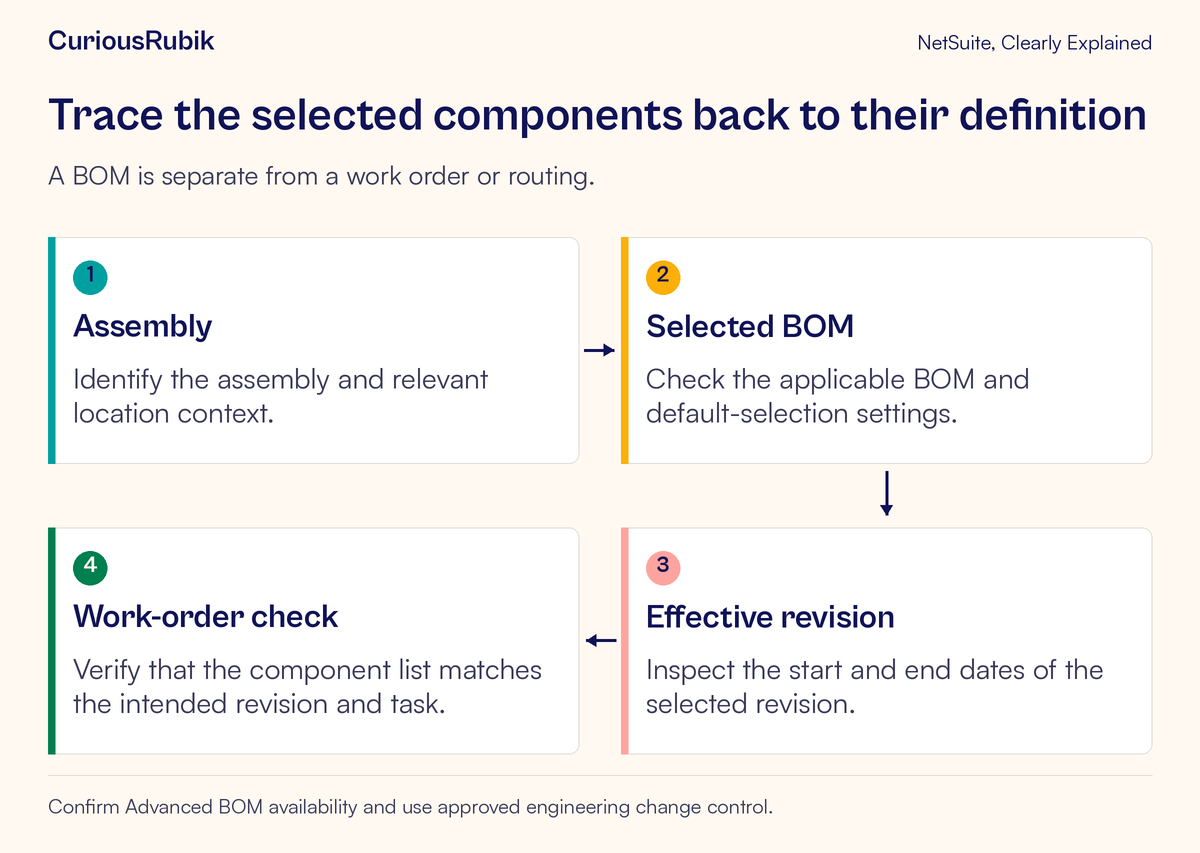
Start by identifying the selected BOM before inspecting its revision. If the wrong BOM was selected, a perfectly valid revision date on that BOM will not solve the problem.
Have the manufacturing owner explain the purpose of each relevant BOM and its default-selection rules. A label such as Main or Current is not a sufficient explanation if several definitions are active for different contexts.
Effective dates choose a version over time
BOM revisions have effective start and end dates. Revisions on the same BOM cannot have overlapping effective periods. Gaps between revision dates are permitted, so the team also needs to check whether the intended production dates are covered.
A new revision should therefore be reviewed together with the preceding one. Confirm where the old period ends and the new period begins. Leaving a prior revision open-ended can affect the creation of the next dated revision.
A revision name is helpful for people, but it does not replace the effective dates. A name containing July does not establish that the record becomes effective on 1 July.
Likewise, the date someone entered the revision is different from the date it is meant to apply. Keep creation timing and effective timing distinct in the change record and the test plan.
Follow a fictional screw-quantity change
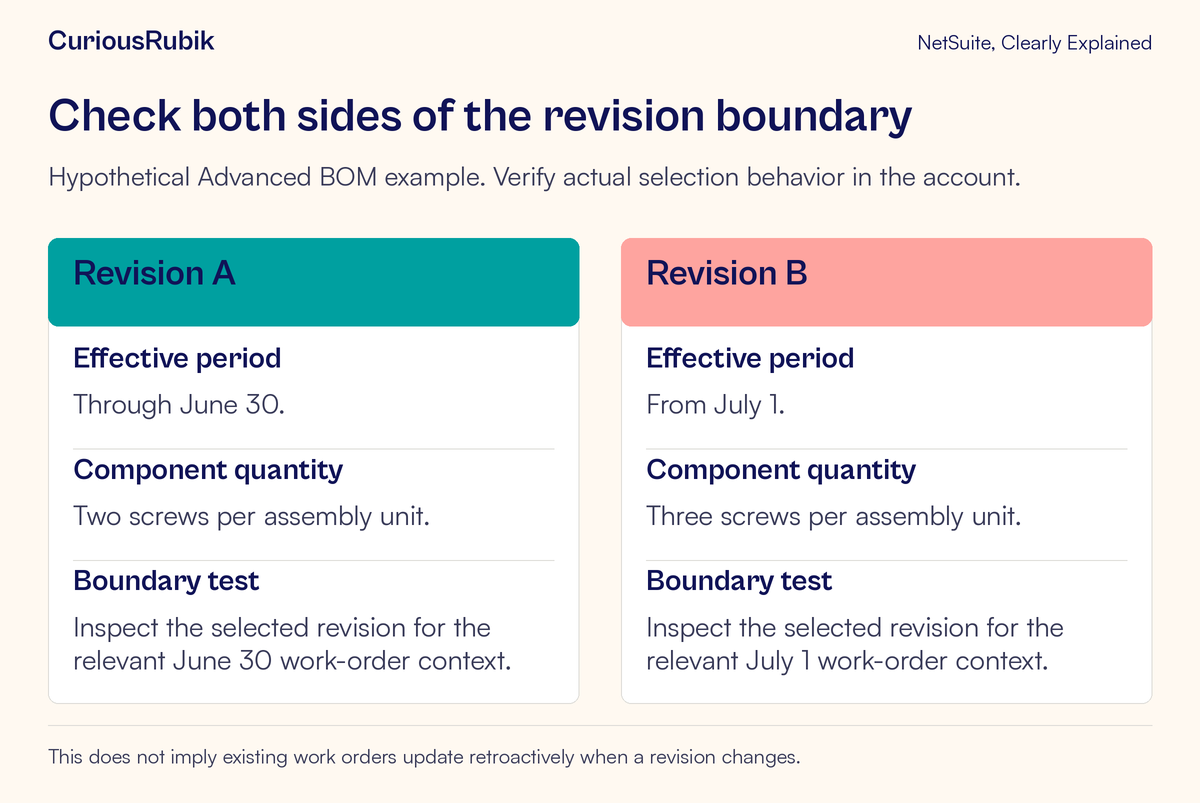
Suppose a fictional manufacturer, Ridgeway Controls, produces assembly TEST-ASM-9. Its approved Advanced BOM currently uses two screws for each assembly unit under revision A, effective through 30 June. Revision B requires three screws from 1 July.
The engineering owner has approved the component change. The planner's task is to verify that the correct definition reaches production at the boundary, including the relevant location and existing work orders.
For this teaching exercise, assume the screw unit is each and ignore scrap, yield, substitutions, and other component adjustments. These assumptions let us focus on revision selection rather than a complete manufacturing-cost calculation.
Check the definitions before testing selection
The reviewer confirms that revision A contains two screws and ends on 30 June, and revision B contains three screws and starts on 1 July. They verify the assembly link and the BOM intended for the test location.
They also check that other components have not changed unintentionally. A revision intended to alter one screw quantity should not silently omit another required component.
The expected test results are written before work orders are created in the authorized test environment. The expectation is that each test order uses the revision appropriate to its verified production-date context.
Test the last day of the old revision
The first test uses the relevant production context for 30 June. The tester inspects the selected BOM and revision rather than assuming the date alone guarantees the result.
For a simplified work order of ten assemblies using revision A, the base screw requirement would be twenty each under the example's assumptions. The reviewer checks that the selected revision and component quantity support that expectation.
If the result differs, first inspect the BOM, the revision dates, the actual scheduling fields, and the units. Do not immediately edit the component line to twenty, because that can hide why the wrong definition was selected.
Test the first day of the new revision
The second test uses the relevant production context for 1 July with the same assembly quantity and location. The intended revision B would require thirty screws for ten assemblies under the same simplified assumptions.
The tester verifies the saved work-order component list and the selected revision. The expected difference is ten additional screws across the ten-unit work order, attributable to the approved change from two to three per assembly.
The numbers are teaching calculations, not a claim about a real account. A production setup with yield, unit conversions, phantom assemblies, or other manufacturing features needs those rules included in its own expected result.
Check the production date that participates in selection
In Advanced BOM work-order entry, revision selection uses effective dates and the relevant Production Start Date context. Scheduling can determine that date, including a start date calculated from backward scheduling.
Do not use the day the work order was typed as a substitute. An order entered in June for production beginning in July can need a different revision from one scheduled to begin before the boundary.
For a test, capture the transaction date, production start date, scheduling method where applicable, location, selected BOM, and selected revision. This makes the conclusion reproducible and explains why two orders created on the same day may legitimately use different definitions.
Also check account-specific form behavior and approved customizations. The aim is to verify what the work order actually selected, not merely to recite a general rule about dates.
Review existing work separately
A revision change is not proof that every existing work order has been rewritten. Inspect the affected existing orders individually or through an approved review method.
Identify which work is planned, released, in process, or already completed. A change suitable for new work can have different consequences for materials already issued or assemblies already built.
The manufacturing and engineering owners should decide how the approved change applies to each group. That may require preserving an existing definition for some work and reviewing other work for a controlled update. This lesson does not prescribe a universal retrofit policy.
When an existing work order differs from a newly created one, compare the selected BOM, revision, dates, component list, and production state. The difference may follow the order's history rather than indicate a failed revision.
Preserve the original evidence before making an authorized change. A later reviewer should be able to understand which definition was originally planned and why it was changed.
Understand the setup implications before enabling Advanced BOM
Advanced BOM is a feature decision with consequences for existing definitions. Enabling it changes how BOM records are represented, including the conversion of existing BOMs into read-only legacy records.
Do not enable it in production simply to follow a lesson about revisions. Have the administrator and manufacturing owner review availability, the current setup, and the transition requirements in a permitted environment first.
The lesson assumes the relevant Advanced BOM structure is already available for the exercise. Accounts using another supported manufacturing setup need the guidance appropriate to that setup rather than a forced match to these record names.
Feature access also does not establish that every user should edit definitions. Distinguish the people who propose an engineering change, maintain the records, plan production, and approve the resulting work.
Troubleshoot the selected definition in order
If the component quantity is wrong, first confirm the assembly and selected BOM. Then inspect the revision and its effective period. Next check the production-date and location context, units, and any component-yield or other applicable settings.
If no suitable revision is available, check for a gap in date coverage or an inactive definition. A gap can be permitted by the system while still being unsuitable for the intended production schedule.
If one location behaves differently, inspect the location defaults before changing the BOM's components. A default-selection issue and an engineering-content issue need different corrections.
If stock appears insufficient after the new revision is selected, inspect the actual component requirement and inventory availability. The lesson on inventory quantities explains why on-hand stock and stock available for this work are different questions.
Avoid fixing the symptom by manually overriding a component quantity without understanding its source. The next work order could reproduce the same problem.
Your revision-boundary checklist
- Identify the assembly, BOM, and relevant location
- Confirm Advanced BOM availability and authorized roles
- Verify old and new component quantities and units
- Check effective start and end dates for overlaps and unintended gaps
- Record the production date and scheduling context used for selection
- Test just before and at the change boundary
- Inspect the saved work-order revision and component list
- Include yield, conversions, and other configured rules in real calculations
- Review existing production work separately from new work
- Preserve engineering approval, evidence, and any correction decision
A revision is dependable when the right definition reaches the right work at the right time. Verify the selection chain and date boundary, then handle existing production through an explicit review rather than assuming a global update.
For help turning those checks into practical planner and administrator training, explore CuriousRubik's NetSuite training services.