Preserve the evidence while deciding how one purchase should be represented.
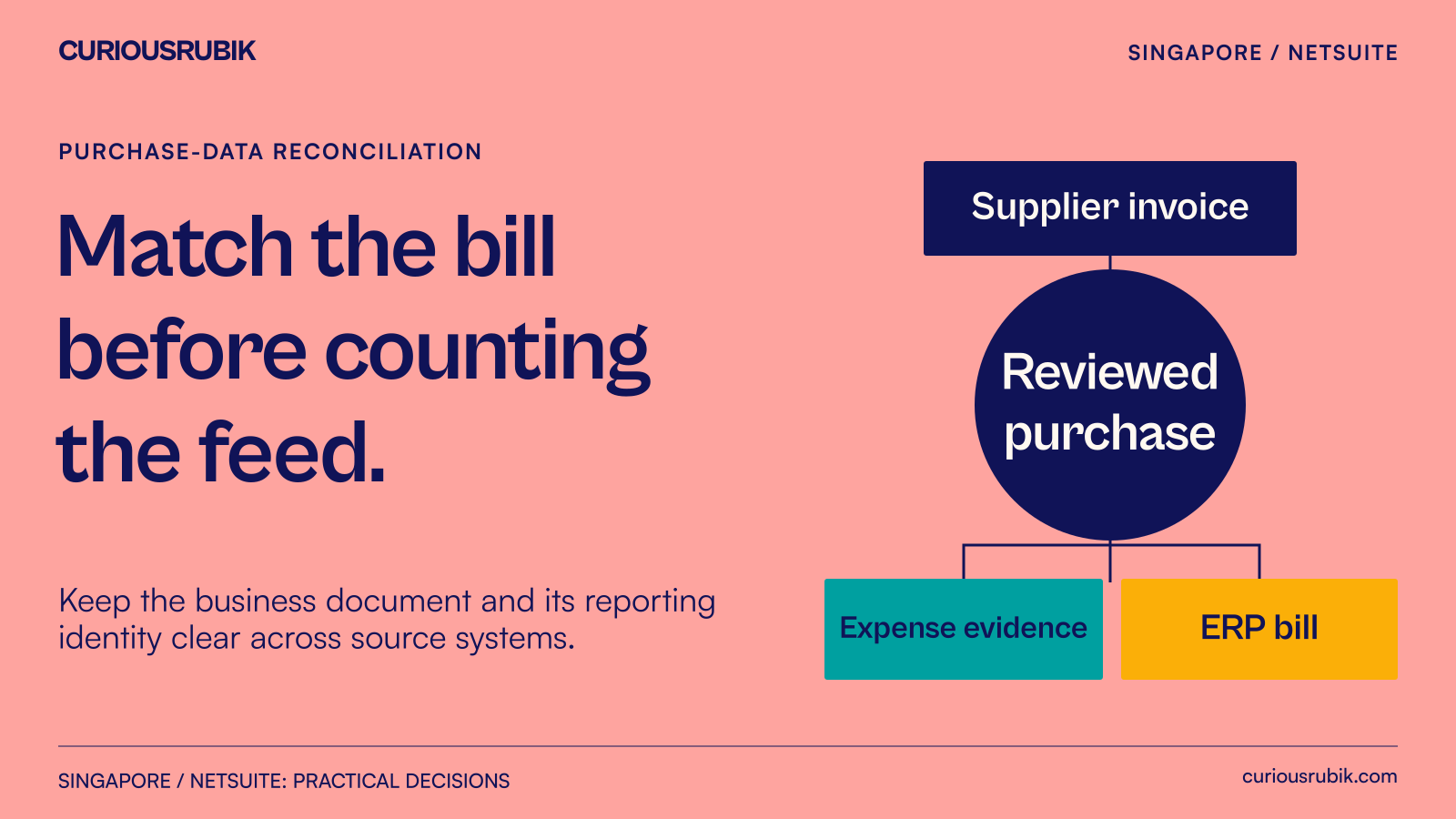
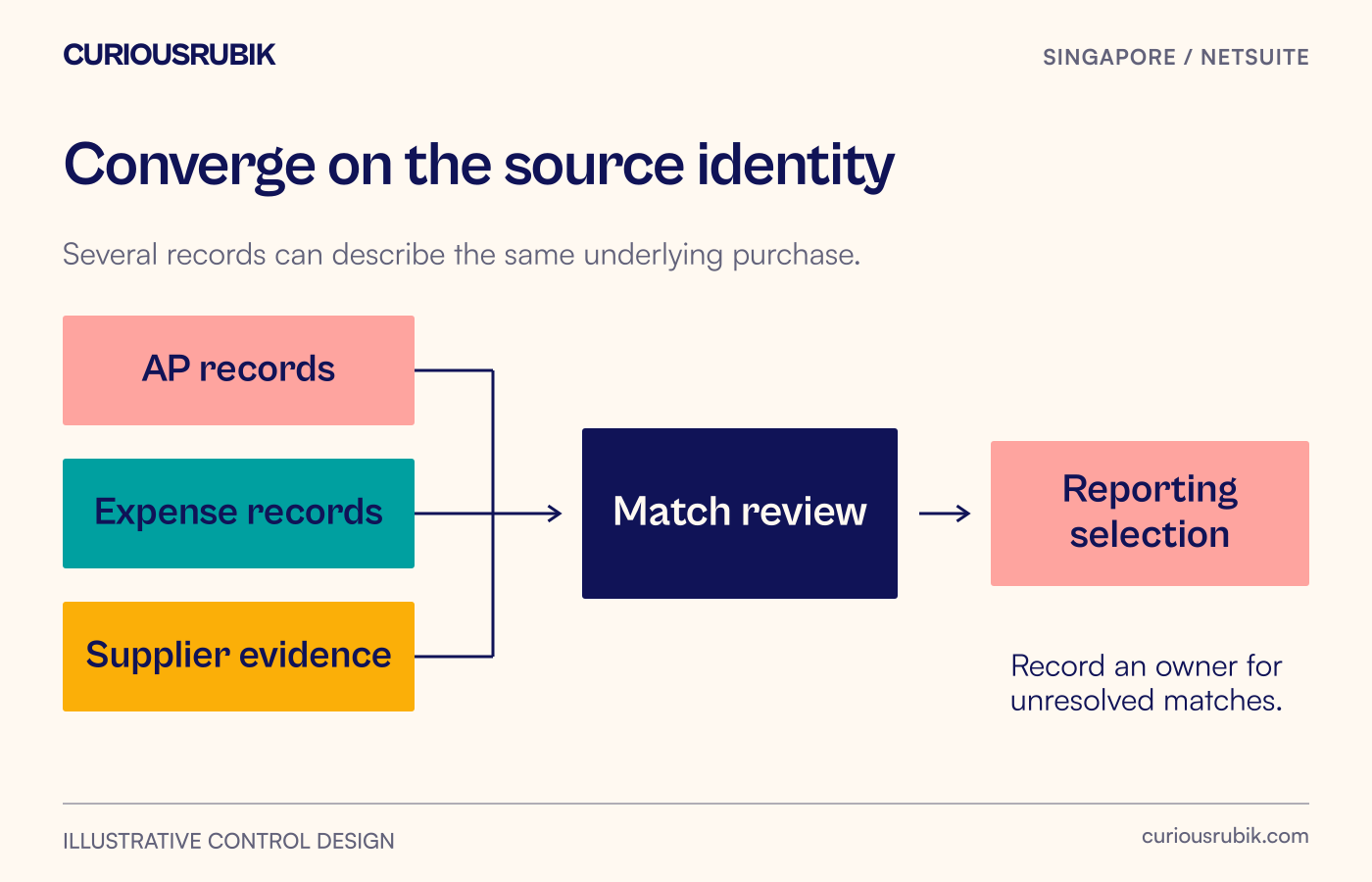
A supplier invoice can appear in an AP inbox, an employee expense report and a NetSuite posting without representing three purchases. Before preparing GST InvoiceNow purchase data, establish which records describe the same underlying document and which record supplies the approved reporting representation.
This matters particularly when a Singapore business keeps purchasing and employee expenses in separate applications. Accounting, reimbursement and invoice-data submission each have their own identities. Matching those identities helps prevent omissions and duplicate representation, but a match alone does not decide input-tax eligibility or the applicable submission scope.
Use the reconciliation below after the tax owner has confirmed the relevant GST InvoiceNow obligations. It is an operating design and test pack, not a claim that NetSuite performs this matching automatically.
Follow one invoice through the three places it appears
In this illustrative scenario, a fictional Singapore consultancy buys office supplies. The supplier issues invoice OFFICE-248 for SGD 500 before GST and SGD 45 GST, giving a total of SGD 545. The example assumes an ordinary standard-rated purchase at 9%; the business's actual tax treatment must be checked separately.
An employee pays the supplier personally and attaches the invoice to expense report EXP-81. Meanwhile, the supplier's email invoice reaches AP, which records bill BILL-930 in NetSuite. The expense service later exports its approved purchase information to the reporting preparation process.
The reconciliation now contains three references:
- Supplier document: OFFICE-248, the commercial invoice identity.
- Employee claim: EXP-81, the reimbursement workflow identity.
- ERP bill: BILL-930, the accounting record identity.
The employee's claim and the supplier invoice carry the same SGD 545 total. That is a useful clue, but it is insufficient proof of a match. The reviewer checks the supplier, invoice image, date, line descriptions and legal entity. They confirm that EXP-81 is reimbursement evidence for OFFICE-248 rather than another purchase.
The accounting owner must then resolve whether the AP and expense processes have created an unintended duplicate liability or posting. That decision is separate from choosing one approved purchase-data representation. Suppressing a reporting row would not repair an accounting duplication, and deleting supporting evidence would damage the audit trail.
Build the matching record before designing the rule
For each candidate, preserve the original supplier name and identifier, document number, document date, currency, net amount, tax amount and gross amount. Store the source-system reference and attachment location alongside them. Include the legal entity receiving the supply; a similar invoice in another group company is not a safe automatic match.
Use a normalised comparison value for matching if needed, but retain the original value. For example, a rule may remove spaces from an invoice number for comparison. The evidence should still show whether the source said “OFFICE 248” or “OFFICE-248”. A normalisation rule that collapses distinct invoice numbers needs to be corrected.
Separate candidate generation from confirmation. A rules-based comparison can flag likely overlaps. A reviewer should resolve ambiguous candidates using the underlying documents and record the reason. “Amounts equal” is a weak reason when the same supplier issues monthly invoices of equal value.
Avoid making an employee's name the primary purchase key. Several people may attach copies of one invoice, and one employee may submit many purchases. Similarly, an expense-report total can cover multiple supplier documents. Match at the document or line level required by the approved reporting design.
Give uncertain matches a usable destination
Use four proposed review states: confirmed same document, confirmed separate documents, insufficient evidence and accounting exception. These are labels for your reconciliation worksheet, not asserted NetSuite or access-point status names.
For OFFICE-248, the first state can be confirmed once the invoice evidence has been checked. The worksheet identifies the approved reporting source and retains the alternate reference as supporting evidence. If BILL-930 has also created an unwanted payable, the accounting exception remains open even after the reporting relationship is understood.
Now change the illustrative case. Suppose EXP-81 includes a second receipt for SGD 109 and the exported expense total is SGD 654. Comparing only the report total with the supplier bill would miss the overlap. The reviewer needs the two underlying documents: the SGD 545 invoice and the SGD 109 receipt. Their submission treatment must be assessed individually or under an explicitly approved aggregation approach.
A third variant involves a blurred invoice number. The supplier, date and amount suggest a match, but the image is unreadable. Keep the case in insufficient evidence, assign it to the expense administrator and request a legible document through the organisation's normal process. Do not manufacture the missing number from the accounting record.
Reconcile the reporting population as well as the matches
IRAS specifies which invoice data is submitted and identifies particular categories that may be aggregated. It does not require every expense-workflow record to be transmitted as a separate purchase. Have the tax reviewer document the applicable purchase scope and any aggregation rule before using the worksheet to build a submission population.
A useful period reconciliation starts with all approved candidate source records. Explain confirmed overlaps, exclusions and unresolved items. Then connect the resulting business-document population to the actual reporting route. Counts, amounts and identifiers should be reviewed together.
Keep rejected or unresolved items visible. An excluded technical row is not necessarily an excluded business purchase. If an interface cannot represent a valid purchase document, the integration owner needs to establish a supported route rather than quietly dropping it.
The expense management integration guide addresses approval, posting and reimbursement boundaries more broadly. In this purchase-data reconciliation, retain only the payment evidence needed to interpret the document relationship; do not mistake a reimbursement status for a submission outcome.
Run a five-case acceptance exercise
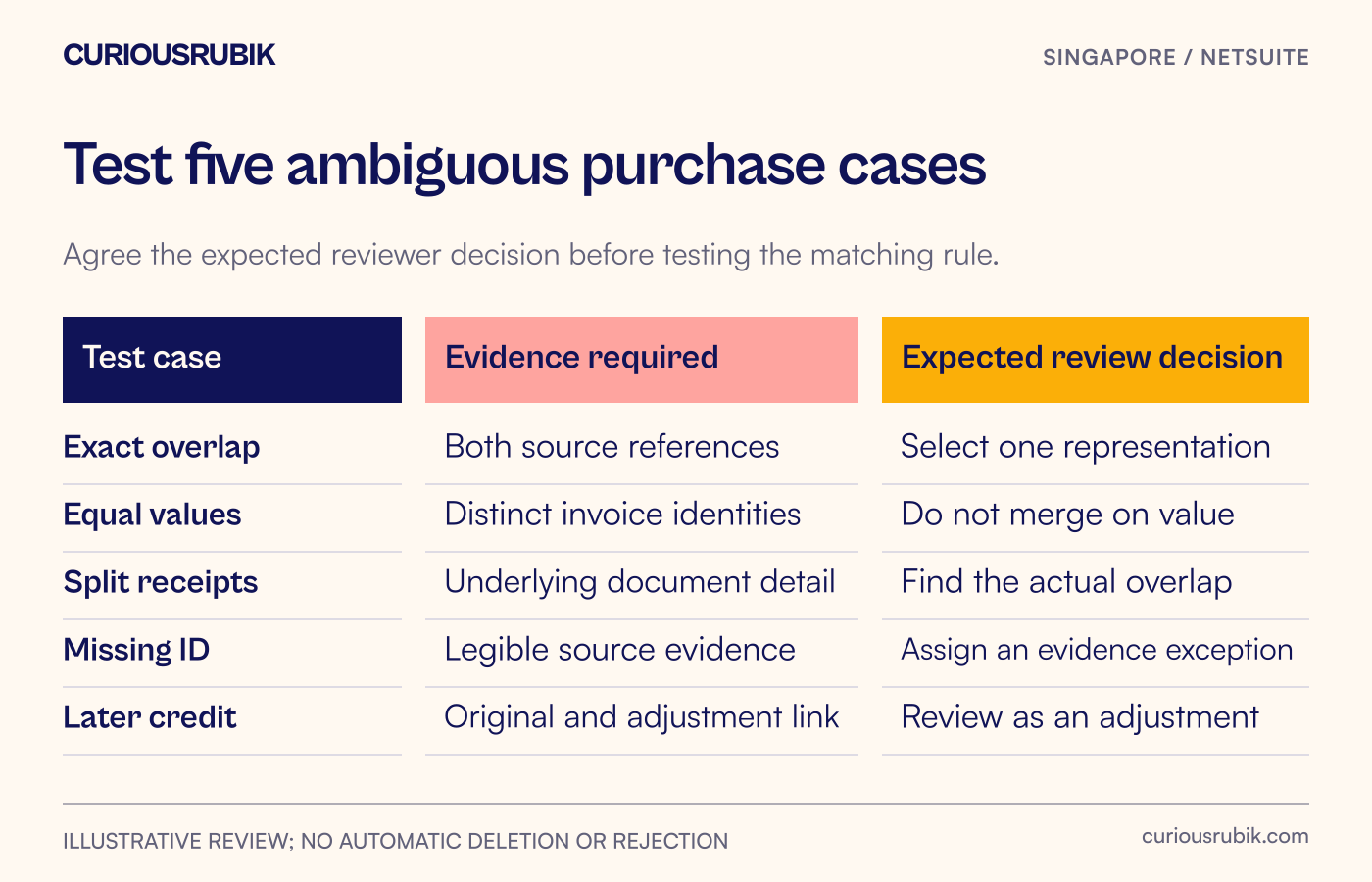
Use synthetic records and pre-agreed expected decisions:
- Exact document in both feeds. Expect one approved reporting representation with both source references retained. Check any accounting duplication separately.
- Equal amount, different invoice numbers. Expect two candidates unless document evidence establishes otherwise. A value-only rule should not combine them.
- One expense report, several receipts. Expect source-document detail sufficient to identify any overlap with AP.
- Missing or unreadable reference. Expect an assigned evidence exception, not an invented identifier or silent exclusion.
- Credit after the original purchase. Expect the adjustment linked to its original document and reviewed under the applicable reporting and accounting treatment. It should not be treated as a duplicate solely because the supplier and amount recur.
For every case, keep the source documents, matching rationale, chosen representation, reviewer and remaining action. Confirm that the reviewer can reopen the evidence without developer assistance.
Assign decisions to the people who can make them
AP owns supplier-document interpretation and coordinates accounting corrections. The expense administrator retrieves employee evidence and explains report structure. The tax owner decides eligibility, period and reporting scope. The integration team implements the agreed mappings and demonstrates their supported behaviour.
Oracle's Singapore e-invoicing functionality has prerequisites and transaction limitations, so validate the chosen route in the actual account. External expense extraction and cross-source matching may require additional integration or a controlled review process. Do not assume that installing a SuiteApp settles those design questions.
Start with one period and the suppliers most likely to appear in both feeds. Take the completed exceptions to an implementation review. A useful outcome is a purchase population that finance can explain, including the records still waiting for evidence, rather than a reassuring total with no document trail.