CURIOUSRUBIK
Let’s talk about your next move ↗View complete sitemap
Back to the blog

Minimize the Spaces in between the Transaction Body Fields when Printing PDF Layouts

  1. Go to Customization > Forms > Transaction PDF Layout > Choose PDF Layout
  2. Highlight the Body Field Element. The border will turn blue.
  3. On the Editor window on the left, under Element Size, set Height as 1.0.
  4. Click Save.

The available body fields will adjust spacing based on the height of the element. If there are only 3 body fields, then the space in between then will adjust. To solve the problem just change the height as desired, usually less than 1.0.

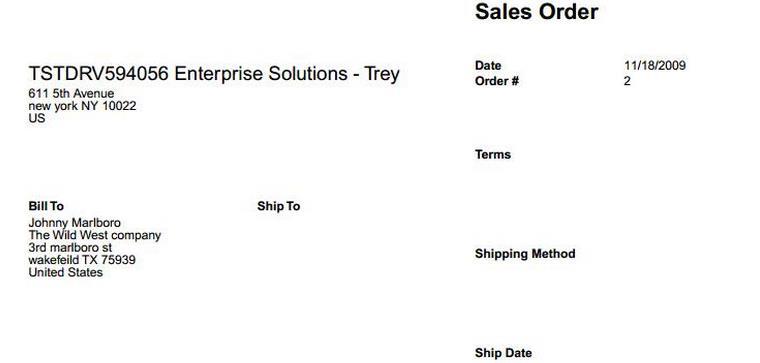
If the Element Height is set to 1.0, notice the spacing between body fields.
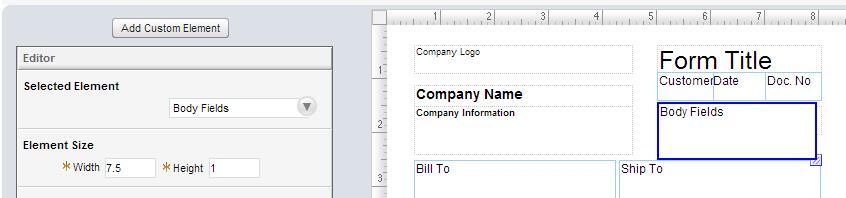
Transaction PDF layout editor with Body Fields selected and element height set to 1.


Sales order PDF with wide vertical spacing between Terms, Shipping Method and Ship Date fields.

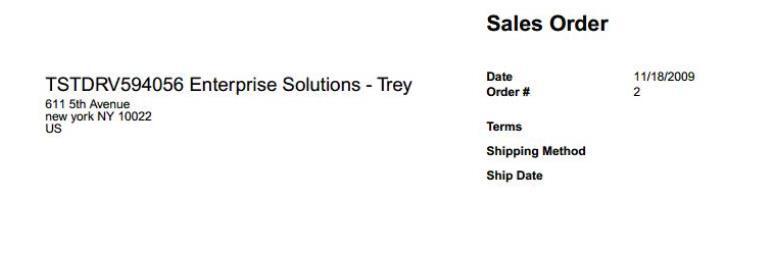
If the Element Height is set to 0.45123 or any number lower than 1.0, the spacing between body fields are smaller.

Sales order PDF with wide vertical spacing between Terms, Shipping Method and Ship Date fields.

Sales order PDF with compact vertical spacing between Terms, Shipping Method and Ship Date fields.

What’s on your mind?

A little context is all it takes to begin.

Please leave out passwords, payment details and confidential account data.