
Last reviewed: 10 October 2026. Product details reflect this review date. Availability and behavior can vary by account, role and release.
Editorial ink illustration: Two colleagues review a financial record before a decision.
An invoice arrives after month-end. Its document date belongs to September, but the accountant is entering it in October. September is closed. Someone suggests using an administrator role to get the invoice through.
That suggestion confuses two controls. In NetSuite, a locked period and a closed period have different consequences. Permission to override a lock does not grant permission to post into a closed period. The correct treatment of the late document also requires a finance decision; a technical workaround cannot make that decision.
This guide explains the distinction, shows how to classify a blocked change and gives a practical way to raise the question with the controller. It assumes the Accounting Periods feature is in use. Accounts without that feature have a different transaction-locking mechanism.
Separate the transaction date from the posting period
A transaction date describes the date recorded on the transaction. A posting period identifies the accounting period in which its general-ledger impact is recorded. They are related, but they are not interchangeable.
When investigating a late transaction, record both. Do not change a document date merely to fit an available period without finance approval. Equally, do not assume that a September date proves the transaction was posted in September.
The actual posting behavior depends on the transaction type, approval status, account preferences and period availability. For some transactions, the posting period is determined during approval and can differ from the period shown on an unapproved record.
That creates an important validation step: inspect the final approved transaction and its actual ledger impact. A screenshot taken during entry may not prove where the transaction ultimately posted.
A useful internal question is, “Which date is supported by the document, and which posting period has finance approved?” This leaves the accounting judgment with the appropriate owner while making the system investigation precise.
What a period lock does
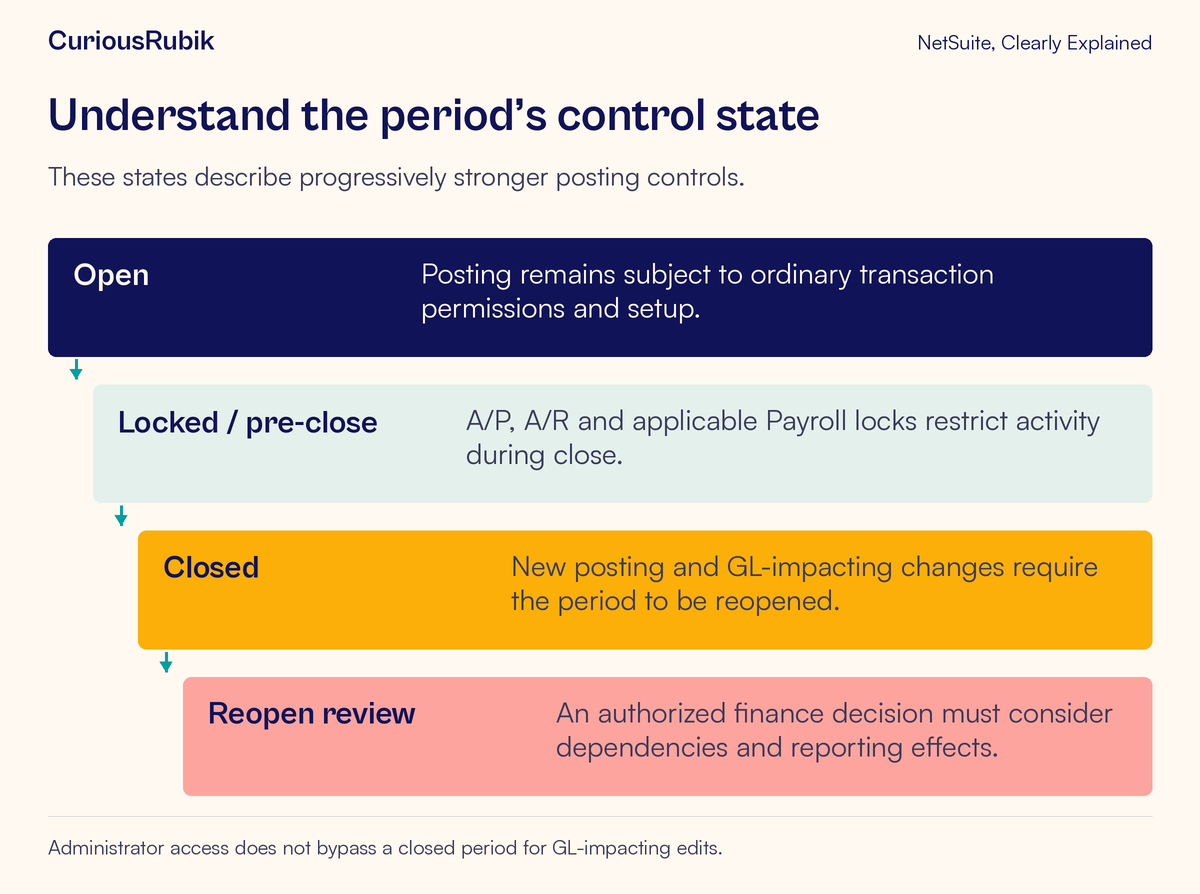
Locks are part of the pre-close process. NetSuite’s Period Close Checklist includes locks for A/P and A/R, Payroll where that feature is enabled, and all posting transactions through Lock All.
These controls help limit ordinary posting activity while finance completes review and adjustments. They do not establish that the period is fully closed or that nobody can affect it.
A user with Override Period Restrictions can add or make general-ledger-impacting changes to posting transactions in a locked period, subject to the other required permissions. A user without that permission may be blocked from the same action.
This explains why two people can report different results without either screen being defective. The difference may be deliberate access design. Record the relevant role and permission rather than borrowing a more powerful role to make the error disappear.
The control also has an operational implication: if a review assumes that values are fixed during a lock, the controller should understand who can still make changes. A locked period is a restricted working state, not evidence that every number has stopped moving.
What closing changes
Closing the period is the final status change after the relevant review and close tasks. Once a period is closed, no one can add new posting transactions or make changes to posting transactions that affect its general ledger. That includes administrators.
To make such a change in the closed period, the period must first be reopened through the authorized process. Override Period Restrictions is not a closed-period bypass.
Closing does not mean every record dated in that period becomes completely uneditable. NetSuite distinguishes posting effects, permitted non-GL changes and non-posting transactions. The next step is therefore to classify the intended change accurately.
Avoid relying on the name of a field to do that classification. A change that looks administrative can affect tax, accounts or amounts through transaction behavior and customization. Establish the actual effect before calling it harmless.
Classify the change before requesting access
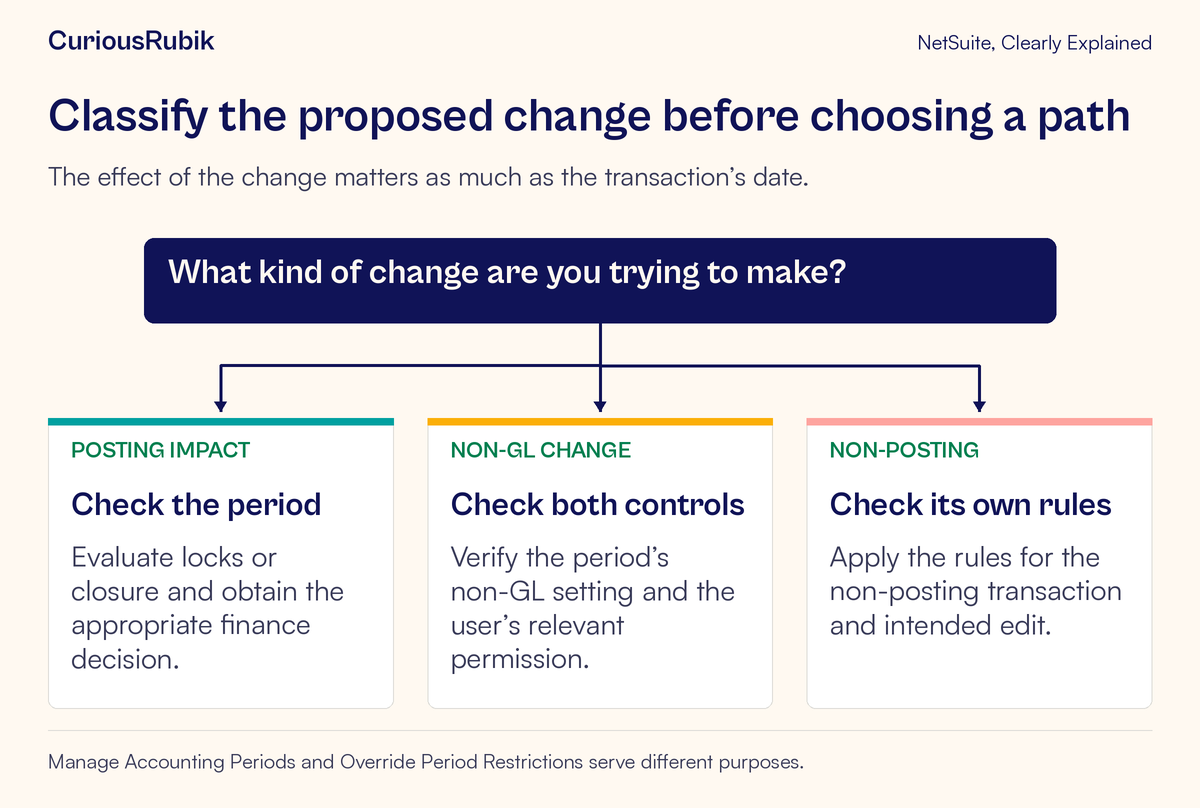
First ask whether the proposed action affects the general ledger. Adding a posting transaction or changing a posting amount belongs in this category. A closed period must be reopened before a GL-impacting change can post there, if finance approves that route.
Second, consider a genuinely non-GL change to an existing posting transaction. NetSuite requires both the period’s Allow Non-G/L Changes setting and the user’s Allow Non G/L Changes permission. The change must actually leave the general ledger unaffected. Existing record permissions still apply.
An address edit is not automatically a cosmetic correction. It can alter tax treatment and is restricted in a closed period. Do not use a non-GL exception as a general permission to change any descriptive-looking field.
Third, identify whether the record is a non-posting transaction, such as a sales order or return authorization. The accounting-period restrictions described here do not apply to those records in the same way. Users still need the appropriate record access and business approval, and later transactions can have posting consequences.
The Advanced Revenue Management lesson provides another useful example: a revenue arrangement is non-posting, while a generated recognition journal provides accounting impact. Similar-looking records can occupy different stages of a process.
Know what the permissions control
Manage Accounting Periods and Override Period Restrictions serve different purposes.
Manage Accounting Periods at Edit or Full level permits tasks such as setting up, editing, locking and reopening periods. View access lets a user inspect the period-management page without changing periods. Task-specific permissions may also be needed for individual close activities.
Override Period Restrictions concerns posting activity in locked periods. It does not replace the permission needed to manage the period, and it does not override a closed status.
Allow Non G/L Changes concerns eligible non-GL edits in conjunction with the period setting. It does not authorize changes to the accounting impact.
For a read-only investigation, the documented period-management route is Setup > Accounting > Manage G/L > Manage Accounting Periods. Have an authorized user inspect the relevant period, locks and close status. A person who only needs an explanation should not receive broad period-management access as a shortcut.
Work through the late-invoice example
Assume a fictional invoice dated 30 September 2026 arrives for entry on 6 October. September is closed in the relevant accounting context. The example does not prescribe which period should contain the transaction.
The clerk first preserves the source document and records what needs to be entered. They confirm that the block concerns a posting transaction, identify the closed period and send the controller a concise question with the document date and business circumstances.
The controller evaluates the appropriate treatment under the organization’s accounting policy and applicable requirements. Depending on that decision, the team may need an approved open-period treatment or a controlled reopening. The clerk should not silently alter the date, select another period or create an offsetting entry simply to get past the block.
Suppose reopening is approved. Before an authorized administrator acts, the team identifies the affected period sequence, book where applicable, close tasks and reports that must be revisited. It records the business justification and the exact correction to be made.
After the approved change, the reviewer checks the final transaction, actual posting period, ledger impact and relevant balances. They then complete the required review and close activity again. The evidence should explain what changed and why the earlier close evidence needed updating.
If reopening is not approved, the controller provides the alternative treatment. The technical team then validates that the resulting transaction implements that decision. Both routes start with finance judgment, rather than permission escalation.
Reopening can have a wider effect
Reopening a closed period also reopens later closed periods in the affected sequence. Close checklist work may need to be repeated. The justification entered during reopening is retained in a user note.
In Multi-Book Accounting, periods can be managed for individual accounting books, subject to access. Confirm the selected book and the consequences for that book’s periods. Do not assume a status seen in one book establishes the status of every other book.
OneWorld fiscal calendars introduce another context check. Confirm the calendar and subsidiary context relevant to the report or close review. A familiar month label is not enough to establish that two reviewers are examining the same accounting view.
Quick Close also deserves care. It marks close tasks complete; it does not execute the underlying close work. Treat it as a feature requiring a separately justified process, not evidence that reconciliations or adjustments were performed.
Investigate common misunderstandings
If one user can post and another cannot, compare the lock status and relevant permissions. Confirm that both are attempting the same action in the same accounting context.
If an administrator is blocked, check whether the period is closed. Broad access does not make a closed-period GL change permissible.
If a small edit is blocked, determine its actual tax or ledger effect and check the non-GL setting and permission. Do not assume all text changes qualify.
If a report changes after reopening, trace the approved transaction changes and the affected period or book. Re-run the relevant comparisons and preserve revised evidence rather than treating the earlier report as current.
For change-tracing techniques, see NetSuite audit evidence for journal and master-data changes. Roles and permissions access review is a related guide to keeping period authority appropriately scoped.
A controller-ready checklist
- The source transaction date and intended posting period are recorded separately.
- The correct account, period and book context have been confirmed.
- Lock and closed statuses have been distinguished.
- The proposed change’s actual GL effect is understood.
- The relevant period and task permissions have been checked.
- Finance has approved the accounting treatment and any reopening.
- Affected reports, close tasks and final posting evidence have been reviewed.
For help organizing controlled period administration around your finance team’s decisions, explore CuriousRubik NetSuite administration. The goal is a clear, reviewable treatment of the transaction and its accounting consequences.