Last reviewed: 10 October 2026. Product details reflect this review date. Availability and behavior can vary by account, role and release.
Editorial ink illustration: A buyer uses a tablet beside familiar stock and packed supplies.
One team wants customers to view their orders and invoices. Another wants customers to browse products, add items to a cart and complete checkout. Both teams may describe their request as “improving the website,” but they are asking for different capabilities.
NetSuite Commerce includes several website products with related terminology and different boundaries. A familiar customer-account page does not prove that a full shopping experience is available. A theme instruction that fits one product may not describe the customization path for another.
This guide helps administrators and business owners define the customer task, identify the site they already have and choose the appropriate configuration or investigation path. It does not assume that every account has every Commerce product licensed or installed.
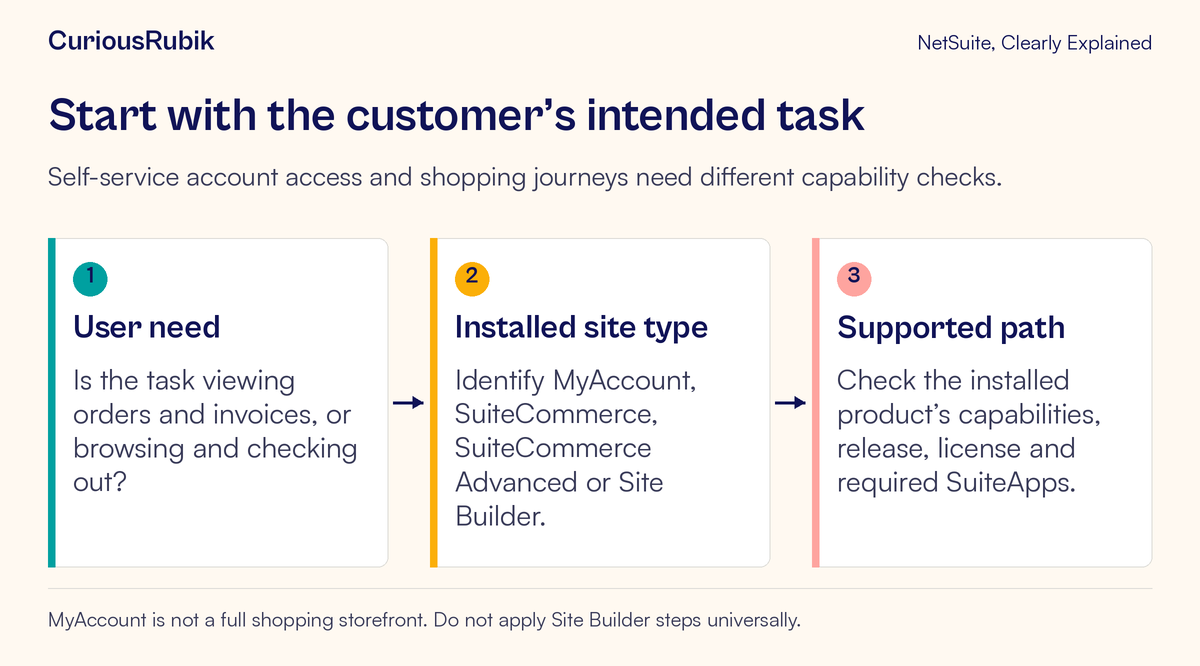
Start with the customer’s task
Write a short description of what the customer should be able to do and what counts as success.
For self-service, the task might be: “An authenticated customer can find a previous order and view the related account information they are authorized to see.” For shopping, it might be: “A customer can find an eligible product, choose an available option, place it in the cart and complete an approved test checkout.”
These descriptions expose different requirements. Self-service depends on customer identity, access and the existing business records. Shopping also requires a supported catalog, pricing, cart, checkout and downstream order process.
Avoid beginning with a requested screen element such as “Add a Buy button.” First establish the business process that button would need to complete. A visual control cannot create an unsupported product capability or resolve missing order configuration.
Keep the first review narrow. One representative customer journey is easier to test than a broad promise that the site will support every sales and service scenario.
Recognize the four documented website types
SuiteCommerce MyAccount is a customer self-service product. It supports account-management tasks such as viewing transactions and balances, paying invoices and managing supported support-case or quote activity. It does not provide the full web-store and checkout features.
SuiteCommerce supports shopping, checkout and customer-account experiences. Its customization approach includes supported themes and extensions, with Site Management Tools for relevant content management.
SuiteCommerce Advanced includes the SuiteCommerce experience and allows deeper source-level customization beyond themes and extensions. That capability comes with a practical responsibility to understand the installed release, custom code and deployment process when planning changes.
Site Builder is a separate Commerce website type with its own setup and behavior. Instructions for its item display or website configuration should not be assumed to apply to SuiteCommerce products.
These short descriptions help identify the starting point. They are not a substitute for checking the specific account, provisioned product, installed components and supported release before making a detailed feature promise.
Build a site identity card
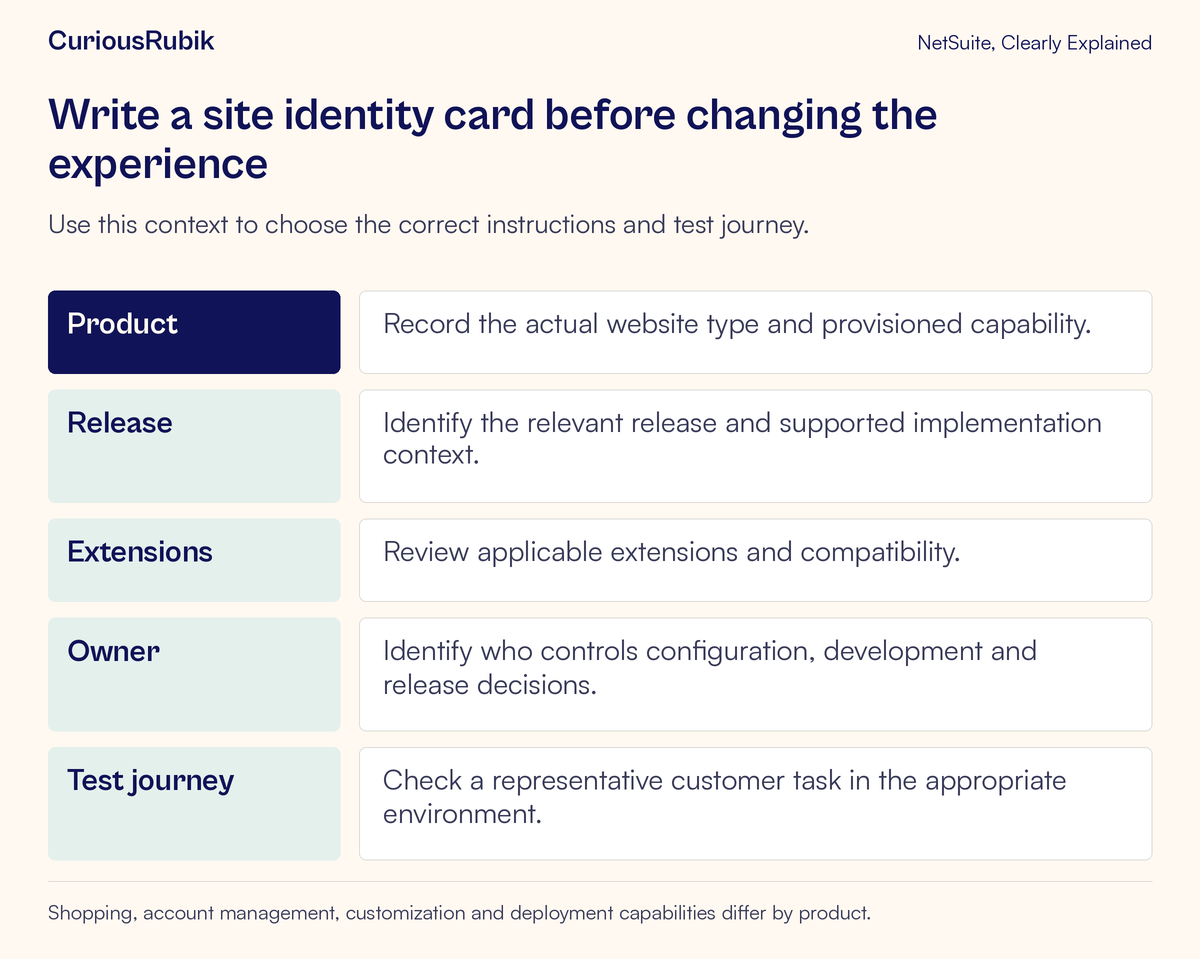
Ask the administrator or technical owner to confirm the site being discussed. Record its website product, relevant release, domain or site identifier, installed extensions, important customizations and responsible owner.
Also identify whether the review concerns a production site or a permitted test or development environment. Similar branding can make two environments look alike while their data, payment settings and integrations differ.
Use a simple internal site identity card. This is an editorial worksheet, not a claim that NetSuite provides a screen with that exact name. Its purpose is to stop the team from applying instructions to the wrong product or deployment.
Record how each fact was verified. A remembered product name from the original project may no longer be enough if the implementation has changed. A page footer or logo also cannot reliably identify the entire application architecture.
License provisioning and required SuiteApps vary by product. If a requested capability belongs to a different product or requires additional components, establish that requirement with the account owner before promising that a small settings change will deliver it.
Separate appearance, functionality and business data
A customer-facing issue can come from several layers.
Appearance concerns presentation: spacing, colors, layout and other visible design. Functionality concerns what the site can do, including supported extensions and custom behavior. Business data concerns the items, customer information, prices, order status and other records displayed or used by that experience.
Changing a theme is not a general solution for a missing business capability. Installing an extension does not prove that its required data and configuration are correct. Correcting an item record does not necessarily change the layout in which it appears.
For a product-display issue, confirm the underlying item and intended commerce use before changing the page. The NetSuite item-types lesson explains why the record type should match the business item.
For an order-status issue, check the actual order and fulfillment evidence. The sales-order lifecycle lesson explains why ordered, fulfilled and billed can describe different stages.
This layered approach keeps troubleshooting tied to the customer’s task while avoiding unnecessary code or configuration changes.
Work through two different website requests
Consider a fictional business that already has a customer self-service site. Its first request is to let customers find previous invoices and understand their account position. The team identifies SuiteCommerce MyAccount as the installed product and checks the relevant supported account-management journey.
The team then prepares a permitted test customer with representative records. It checks whether the customer can sign in, find the intended information and understand what they are viewing. It also confirms that unrelated customer information is not exposed.
A second team asks to add product browsing and checkout to that same site. This is a materially different request. The first team’s successful invoice-viewing test does not establish shopping capability.
The administrator identifies the product boundary and explains that SuiteCommerce MyAccount lacks the web-store and checkout experience. The business can now evaluate a suitable Commerce product and implementation path rather than repeatedly searching for a missing cart setting.
The exercise does not recommend a particular purchase or migration. It demonstrates a better decision sequence: define the journey, identify the installed product, confirm supported capability and then assess the needed work.
Match the change to the supported customization path
For SuiteCommerce, themes and extensions provide supported ways to change presentation and add functionality. For SuiteCommerce Advanced, source-level customizations may also be part of the implementation. The relevant approach depends on the actual site and change.
Before modifying anything, identify the component that owns the behavior. A visible feature may come from the base application, an activated extension, custom code or a content setting. Guessing can lead to editing the wrong layer.
Confirm compatibility with the installed product and release. An extension being available somewhere does not establish that it works with the site’s current configuration. Record dependencies and any known interactions with other components.
Have the technical owner identify the test, deployment and recovery process. A visual preview can be useful, but it does not prove that authentication, order creation or account permissions still work after the change.
Do not paste a Site Builder instruction into a SuiteCommerce change plan merely because both instructions mention items or customers. Similar words can refer to different configuration mechanisms.
Test the complete customer journey
Return to the original task after the approved change. Use the same representative customer context and clearly defined starting point so that the before-and-after comparison is meaningful.
For self-service, test access to the intended records, their meaning and appropriate customer boundaries. Confirm that customer-facing labels do not hide important distinctions, such as invoice amount versus remaining balance.
For shopping, test the supported journey through to the resulting order in the approved environment. Check items, quantities, units, prices, shipping and other relevant totals against the intended configuration. Use authorized test payment arrangements and avoid creating live charges or customer commitments during training.
If another system participates, include its part of the journey. A storefront success page does not necessarily prove that the intended order reached the downstream operational system. Tracing an order through NetSuite Connector explains that separate boundary where the product is used.
Include an exception relevant to the task. For example, test how an authenticated customer is guided when the requested record is unavailable, or how the approved shopping flow handles an item that cannot be ordered. Do not invent an expected behavior; agree it with the business and technical owners before testing.
Investigate common mismatches
If shopping features are missing, confirm the website type first. A self-service product should not be treated as a broken full storefront.
If a theme instruction does not fit, check product, release and the site’s supported customization path. The problem may be the applicability of the instruction rather than the user’s skill.
If an extension appears installed but its behavior is absent, have the technical owner check compatibility, activation and configuration in the relevant site context. Avoid repeatedly installing components without understanding their state.
If product information is wrong, inspect the underlying item and commerce configuration before redesigning the page.
If an order looks correct online but differs in operations, trace the resulting transaction and any integration boundary. Preserve identifiers and test evidence so the relevant owner can reproduce the mismatch.
A site-specific readiness checklist
- The customer journey and success condition are written clearly.
- The installed website product and environment are confirmed.
- Licensing and required components have been checked for the requested capability.
- Release, extensions and important customizations are recorded.
- The change uses the supported configuration or development path.
- Customer access and the complete resulting business process were tested.
- An owner and approved deployment or recovery process are identified.
For help teaching administrators and business reviewers how their configured site supports the customer journey, explore CuriousRubik NetSuite training and adoption. Start with the experience you are managing and the evidence that shows it works.