Last reviewed: 10 October 2026. Product details reflect this review date. Availability and behavior can vary by account, role and release.
Editorial ink illustration: Three colleagues check a warehouse shipment against its records.
A customer ordered ten units. Six have shipped. Someone says the order is “done” because the invoice was created. The warehouse, sales team, and finance team may each be describing a different part of the process.
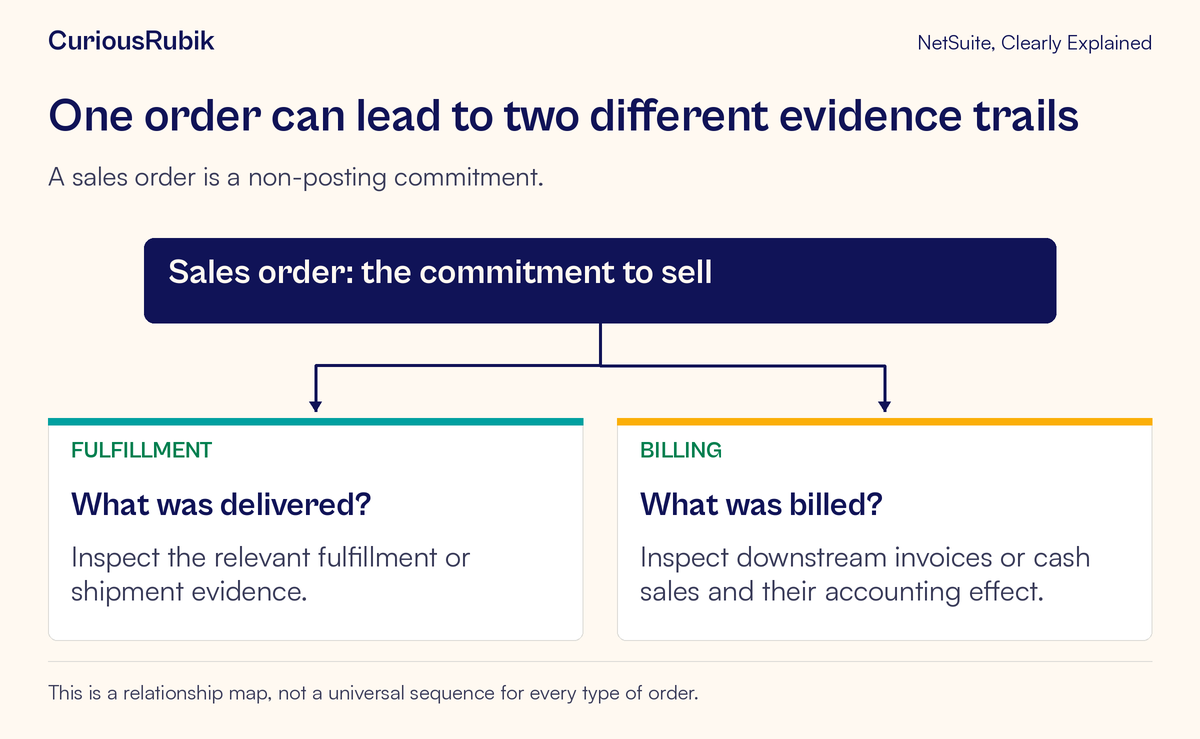
A NetSuite sales order records a commitment to sell goods or services. It helps track what was ordered, what has shipped, and what remains. It is a non-posting transaction: creating the sales order does not, by itself, recognize revenue. Downstream fulfillment and billing records provide evidence of later events.
This lesson follows one fictional order line through a partial shipment. The central habit is simple: keep ordered, fulfilled, and billed quantities distinct, and inspect related records before assigning the next action.
Start with the customer’s recorded commitment
Read the sales order as the agreed transaction in the system. Identify the customer, item or service, quantity, units, price, relevant dates, and approval context. An order can be entered directly or created from an estimate, so check its actual origin when that matters to the question.
The order’s presence does not establish every later event. Approval does not prove shipment. Shipment does not prove that an invoice was created. An invoice does not prove that a customer has paid. Each statement needs evidence appropriate to that stage.
If the customer disputes the order itself, focus first on the commitment and the approved change history. If the customer asks where the remaining goods are, focus on the open quantity and fulfillment evidence. If finance asks why billing is incomplete, review the related billing process.
The records and transactions lesson explains how those connected records retain different purposes. Keeping the question clear makes the sales order much easier to read.
Use a small quantity ledger
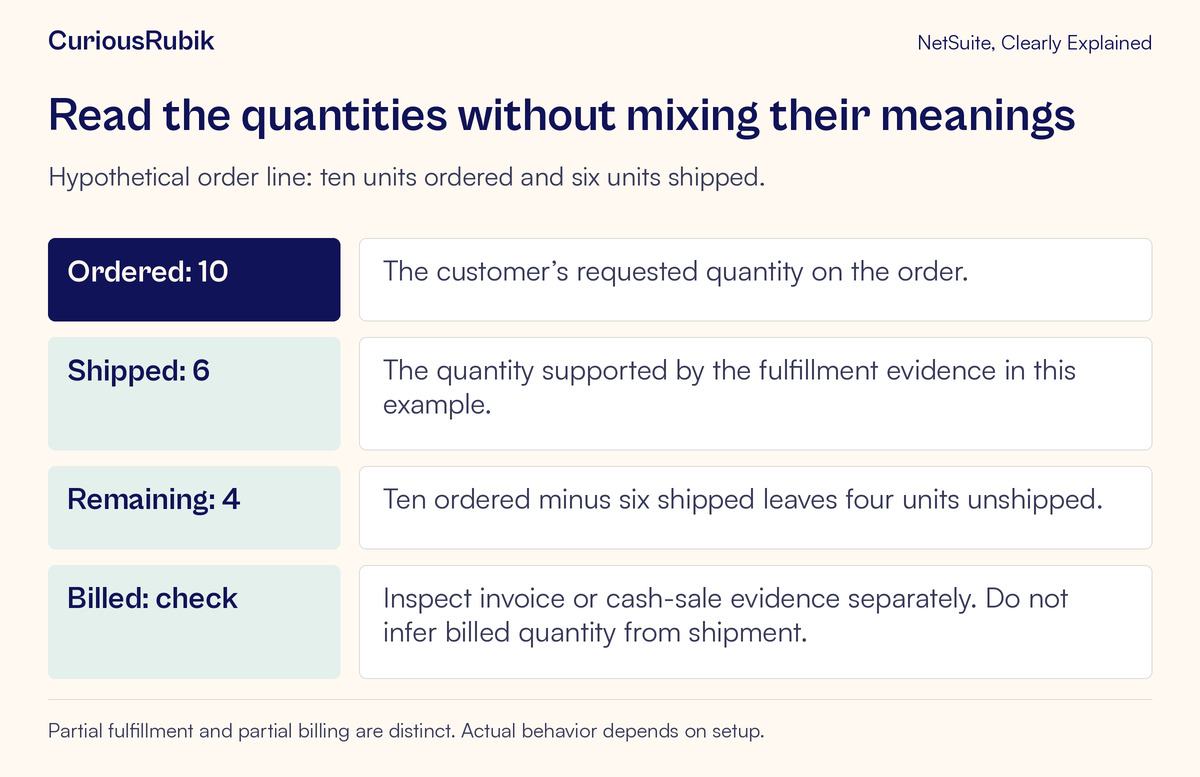
Imagine a fictional order for ten units of one item. The verified shipment evidence shows six units shipped. For this teaching example, there are no order changes, returns, cancellations, unit conversions, or closed remaining lines.
The simple ledger is:
- Ordered: ten units
- Shipped: six units
- Remaining unshipped: four units
- Billed: inspect the associated invoice or cash-sale evidence
Ten minus six gives four. The billed quantity is deliberately left as a question. It cannot be derived from shipment quantity alone without understanding the account’s process and checking the actual billing record.
Suppose the billing review shows an invoice for six units. In this scenario, the shipment and invoice quantities agree for that portion, while four units remain unshipped. If the review instead finds no invoice, the shipping evidence still shows six shipped; the billing question needs its own owner.
If a different approved billing arrangement applies, interpret the evidence under that arrangement. Do not alter a quantity merely to make every column match. The difference may describe the real state of the order.
Read the line before relying on the header status
An order-level status summarizes progress, but individual lines explain the work that remains. One order can contain several items, each with a different fulfillment or billing position. Inspect the applicable line-level quantities and related records before calling the whole order complete.
In standard sales-order views, fulfilled and invoiced quantities can be reviewed for individual item lines. The fields and presentation available to you may differ with the form, features, and permissions. Ask the process owner to identify the appropriate view in your account.
A header label also needs feature context. NetSuite’s status behavior differs depending on whether Advanced Shipping is enabled. The system sets sales-order statuses based on the process; they are not simply free-form labels to edit until the order looks finished.
If the label appears inconsistent with your expectation, record the order identifier, line, quantities, and related transaction evidence. That gives the owner something specific to reconcile instead of a general request to “change the status.”
Understand the shipping and billing setup
Advanced Shipping separates fulfillment from the creation of invoices or cash sales. Without Advanced Shipping, fulfillment and billing use a combined process. This is a major reason that a workflow demonstrated in one account may not match another account’s steps.
Some accounts also permit invoicing before an order is fully fulfilled, subject to the relevant configuration, including the Invoice in Advance of Fulfillment preference. Do not assume every account has that behavior enabled, or recommend enabling it just to clear an exception.
Confirm the actual feature and preference context with the authorized owner. Also establish which order form and billing process apply, since downstream billing may create an invoice or a cash sale.
The goal here is interpretation, not a universal sequence of buttons. Physical goods, services, advance-billing arrangements, and project-related orders can require different operational evidence. The diagram below is a relationship map, rather than a claim that every order must follow an identical timeline.
Distinguish shipment preparation from shipment evidence
When someone reports that goods are “fulfilled,” ask what evidence supports the claim in the account’s warehouse process. Preparing, picking, packing, and shipping can represent different operational steps where those capabilities are used.
For the fictional ten-unit order, the six-unit figure specifically means that shipment has been verified for the example. Do not substitute a picked quantity, an expected shipment, or a warehouse message for the intended evidence without checking what it represents.
If the order shows a quantity that conflicts with the warehouse’s account of events, compare the item, unit of measure, location, and relevant fulfillment record. Confirm that both people are discussing the same line and the same point in the process.
The remaining four units also need a reason and an owner. They might be awaiting available stock, a planned delivery date, or another approved condition. The order quantity alone cannot identify which explanation applies. Avoid promising a shipment date until the responsible team has verified it.
Investigate billing without recreating transactions
If six units have shipped but no billing evidence is found, first check whether an invoice or cash sale already exists and whether your role can see it. Inspect the order’s applicable billing conditions and the configured process.
Do not create a second invoice simply because the expected document is absent from one list view. Another user or a bulk process may have already handled the order, or the relevant record may be outside your current view. Establish the transaction state before any authorized corrective action.
If an invoice exists but its quantity differs from the shipment, review the agreed billing arrangement, line associations, and any relevant changes. A difference can be intentional, incorrect, or simply misunderstood. The evidence should determine which.
For a financial conclusion, distinguish billing from payment and revenue recognition. The invoice’s existence establishes a billing record, while payment and accounting treatment require their own review. The KPI lesson illustrates why orders and invoices can produce different, valid totals for the same period.
Handle changed or closed remaining work explicitly
The ten-minus-six example works because its assumptions are simple. A real order may have approved quantity changes, partial closures, returns, substitutions, or other adjustments that require separate interpretation.
If the customer no longer wants the remaining quantity, the team needs the approved process for that change. Do not mark a delivery as completed to conceal undelivered work. Likewise, do not treat a closed remaining line as proof that the original quantity physically shipped.
Preserve the reason and authorization for the decision in the organization’s approved records. The NetSuite audit-evidence guide explains how available change history can support a review. It should be read alongside the business approval, rather than used as a substitute for it.
A status cleanup should reflect the underlying business outcome. Making a report look tidy is not sufficient reason to change the commitment or its evidence.
Assign the exception to the right team
An approved order with no shipment may need an operations review. A verified shipment awaiting billing may need the billing owner. A disputed price or quantity may need sales and the authorized order owner. Missing visibility may require an access review before anyone changes the transaction.
A useful handoff identifies the order, line, customer question, ordered quantity, verified fulfillment quantity, billing evidence, and the decision required. Include the responsible owner and the next checkpoint without inventing a promised delivery or billing date.
The roles and permissions access review guide helps separate a visibility problem from a process problem. CuriousRubik’s NetSuite optimization services can help teams clarify recurring handoffs across sales, fulfillment, and finance.
Complete a read-only order review
In an authorized training account, choose one simple order and trace its related records. Confirm the approval context, inspect each line, and write down what was ordered, what fulfillment evidence establishes, and what billing evidence establishes.
Check the account’s shipping and billing configuration before explaining the status. State any simplifications, including unchanged quantities and consistent units. If work remains, give it a reason and an owner.
For service delivery, the project-task lesson extends the same idea to planned effort, recorded time, and accepted output. Across both goods and services, an order is best understood through its evidence, one business question at a time.