For US finance and operations leads who already run NetSuite and want a clear order for the fixes that pay back soonest.
Last reviewed: 9 November 2026. Product details reflect this review date. Availability and behavior can vary by account, role and release.
NetSuite optimization for US companies means reviewing a live account against how your team works today and fixing the biggest friction first. Start with seven checks: users and roles, saved searches, scripts and workflows, manual close tasks, standard features, integration alerts and reports. Rank what you find by value, effort and risk, then fix the top three.
What does NetSuite optimization for US companies cover?
An account changes every month. New hires get roles, and a quick saved search becomes a report everyone relies on. A workflow built for last year's approval rule keeps running.
None of this means the setup was wrong. The business moved and the account needs a tidy up to move with it.
Optimization is that tidy up. You look at what exists, decide what still earns its place and fix the friction your team feels every week. It is smaller than a project and more focused than a health check. Our guide to a NetSuite health check with evidence and clear priorities covers the diagnostic side.
NetSuite makes this work easier than you might expect. It is one cloud system, so every check below happens in the same account.
Which seven checks should you run first?
Work through them in this order. Each one is a short working session for an administrator and one person from finance.
- Users and roles. Open Setup, then Users/Roles, then Manage Users. List every active user and the role each one holds, then use the login audit trail to see who still signs in. Inactivate people who have left and take a second look at Full Access users who only approve bills or enter time. Our NetSuite administration team can run this review with you.
- Saved searches. Go to Lists, then Search, then Saved Searches. Sort by owner and type. Look for near copies of the same search, searches owned by someone who left and searches with no clear audience. Keep one trusted version of each, name it plainly and give it an owner.
- Scripts and workflows. Under Customization, then Scripting, review the script list and each deployment. Under Workflow, review the workflows that are still active. For each one, write a single sentence that says what it does and who asked for it. If nobody knows, test it in the sandbox before you switch it off.
- Manual close tasks. Ask your controller which journal entries and reconciliations repeat every month. Recurring journals can often move to memorized transactions or allocation schedules. Our record to report guide shows where the close usually loses time.
- Standard features nobody switched on. Open Setup, then Company, then Enable Features. Read the list with a finance lead and an operations lead. NetSuite includes approval routing, saved reports, dashboards and other tools that many teams never turned on, because the first project had a narrow scope.
- Integration alerts. Every connection to a store, a bank, a tax engine or a warehouse needs a named owner and a clear message when it fails. Ask each owner two questions. How would you know today if the connection stopped, and where do the failed records wait? If the answer is "we would hear from a customer", that goes near the top of your list.
- Reports and dashboards. Ask each team which numbers they still rebuild in a spreadsheet. A role based dashboard with five trusted numbers beats a home page full of portlets. The cause is often a missing field or an unclear saved search. A reporting review can fix the source.
Write each finding as one line with a problem, an owner and the evidence. Keep the list short enough to read in five minutes.
How do you rank what you find?
You will probably end with fifteen to thirty findings. Do not try to fix them all. Score each one on three questions, using high, medium or low.
| Question | What to ask | Why it matters |
|---|---|---|
| Value | How many people or how much money does this touch each month? | Fixes that touch the close or cash come first |
| Effort | Can your administrator do it in a day, or does it need a developer? | Quick wins build trust in the work |
| Risk | Could the change break something that works today? | Risky fixes get a sandbox test and a rollback plan |
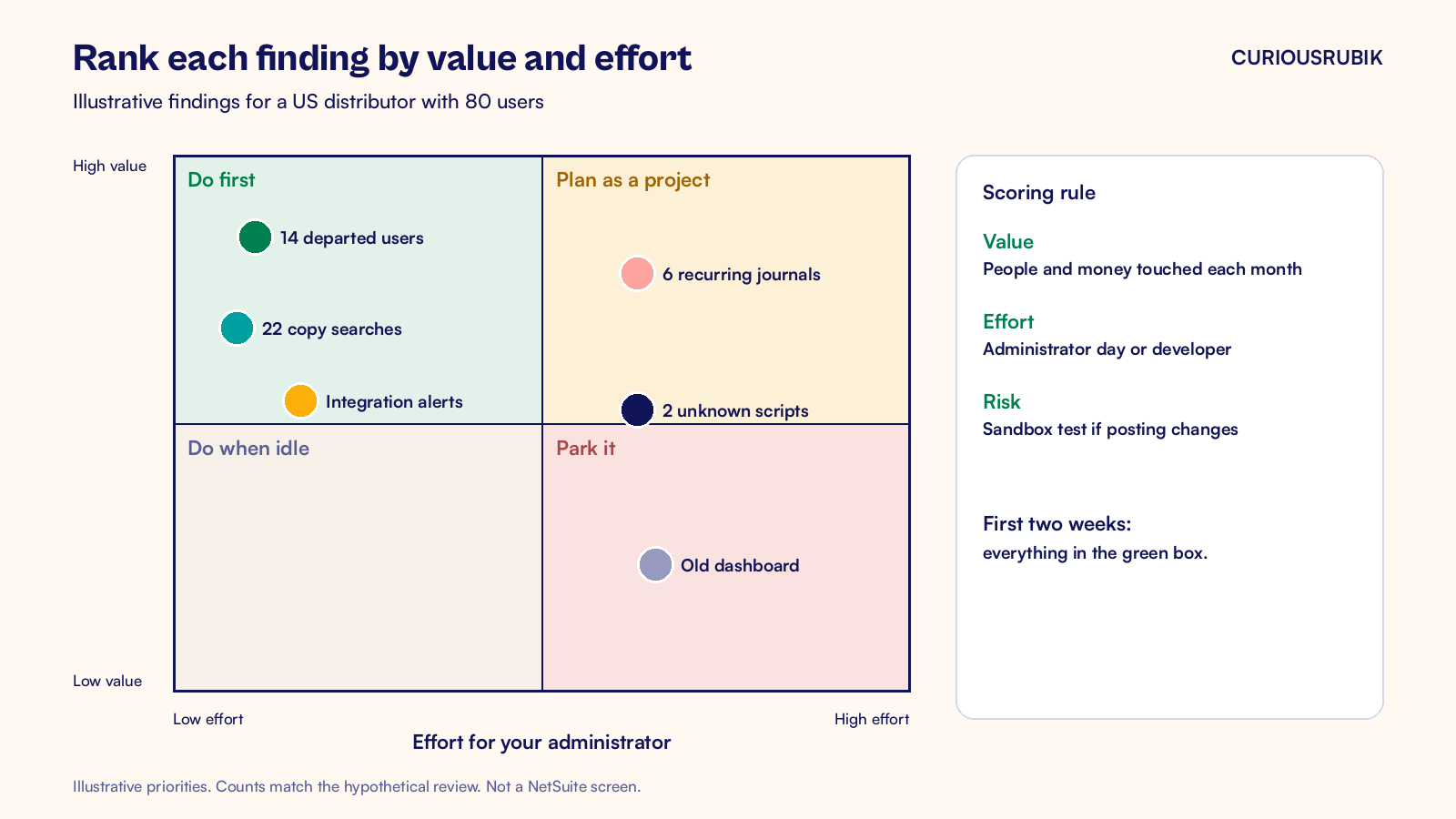
Take everything that scores high on value and low on effort and do it in the first two weeks. Schedule the high value and higher effort items as small, named projects. Park the rest in a backlog, and leave them there until they cost real time.
Who should own optimization after the first month?
One person, with a calendar. In most US companies that is the NetSuite administrator, with the controller as the sponsor. Without a named owner the list grows and nobody closes items.
Review every quarter
Hold a short review every quarter. Bring the same seven checks and ask which ones have drifted again. Users and roles usually drift fastest, because hiring and role changes never stop. Saved searches come next.
Test changes in the sandbox
Use your sandbox for anything that changes how a transaction posts. Test the change with one real example, ask the person who owns the process to confirm the result and then move it to production. Keep a short change note for each fix, so the next administrator can see what changed and why.
Plan around the release calendar
Oracle releases new features twice a year, and some of them replace a workaround you built years ago. A review in the weeks before each release is a cheap way to find those.
A hypothetical first month
Take a US distributor with 80 NetSuite users that has run NetSuite for three years. A hypothetical review finds 14 people who have left but still have active logins. It also finds 22 saved searches with "copy" in the name and 2 scripts that nobody can explain. The close includes 9 manual journals every month.
In week one the administrator inactivates the 14 users and renames the saved searches. In week two the team tests the 2 scripts in the sandbox and retires the one that does nothing.
In week three the controller moves 6 of the 9 journals to memorized transactions. In week four the team writes the owner and the alert for each integration. Nothing in that month needed a new project, and the next close is lighter.
The numbers here are illustrative. Your own account will show different counts, but the order of work holds.
What to check this week
- Pull the list of active users and mark everyone who has not signed in for 90 days.
- Choose the one saved search your leadership team opens most and confirm it has a named owner.
- Ask your controller for the three tasks that repeat in every close.
- Write down who gets the alert when your busiest integration fails.
If one of these answers is "nobody knows", you have found your first optimization task.
CuriousRubik's NetSuite optimization team reviews your account with your people, ranks the findings and delivers the first fixes in short rounds. If you would rather have an ongoing partner for the work after that, see our guide to what NetSuite managed services should cover. We work with NetSuite customers across the United States.
Related reading
A NetSuite Health Check That Prioritizes Evidence and Business Impact
How to run a structured review and record what you found.
NetSuite Managed Services for US Companies: What to Cover
A scope checklist for ongoing NetSuite support.
NetSuite Record to Report Process for US Finance Teams
The close flow from journal entry to board reporting.