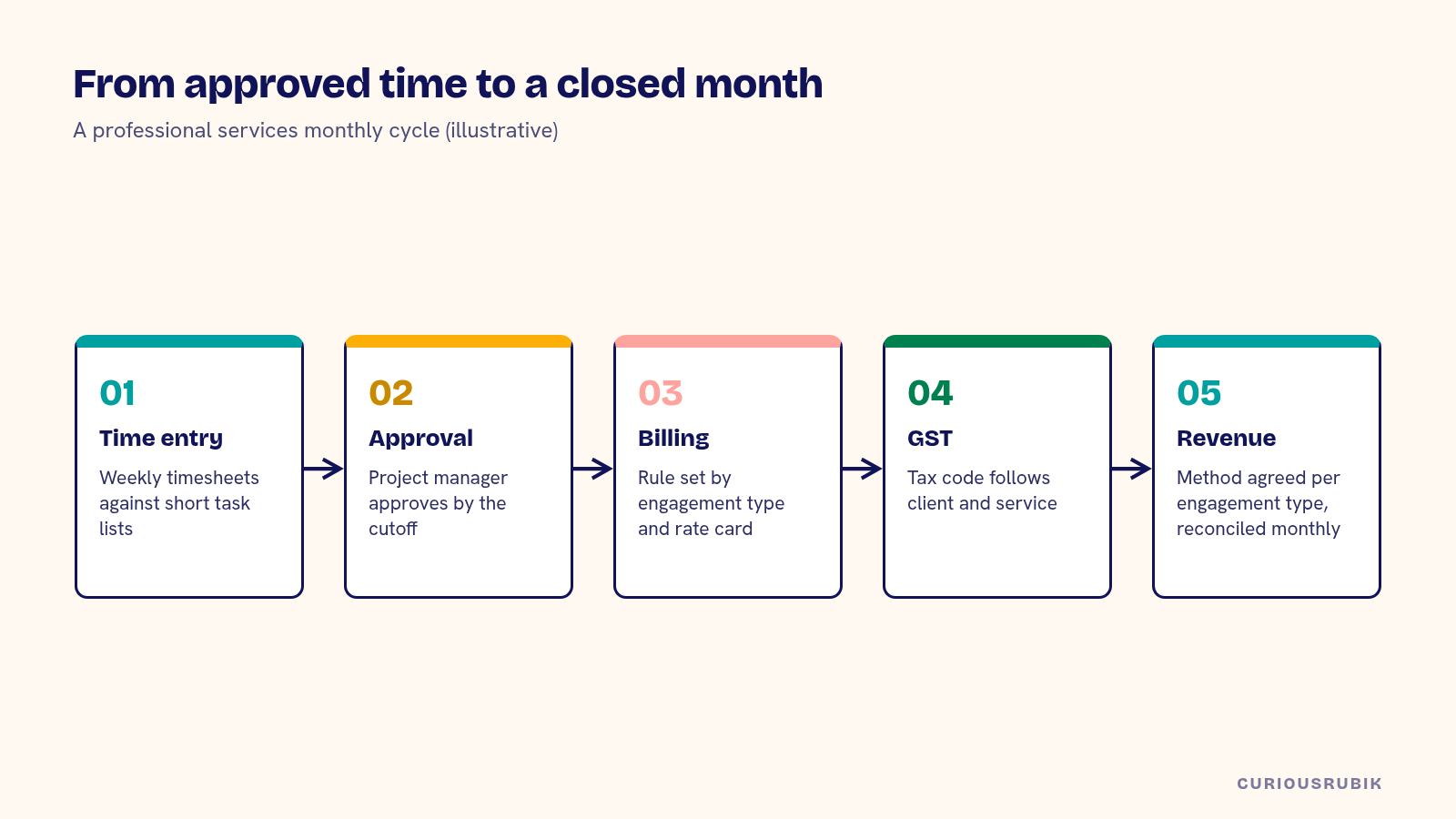
A good NetSuite professional services setup for a Singapore firm rests on five design choices: how projects and tasks are structured, how time and expenses are captured and approved, which billing rules each engagement type uses, how GST applies to local and overseas clients, and how utilization and margin are reported. Get those right and the monthly cycle of approving time, billing clients and closing the books becomes routine.
Singapore consulting, engineering, legal and IT services firms often serve clients across Southeast Asia from one office, bill in several currencies and run a mix of fixed-fee, time-and-materials and retainer work. That mix is where most setup decisions get tested.
Structure projects around how you bill
Start from the engagement letter. Each billing arrangement suggests a structure: a fixed-fee engagement with milestones, a time-and-materials project billed monthly, a retainer with a monthly fee and an overage rate. Create project templates for each type, with standard tasks, billing rules and revenue settings.
Keep task lists short. A project with 60 tasks makes time entry slow and reports noisy. Use tasks for what you bill or track separately, and leave detailed planning in a project tool if your teams already use one. Check whether NetSuite's native project features meet your needs, or whether a larger firm needs SuiteProjects Pro or a similar add-on. Our post on NetSuite implementation requirements for professional services covers that decision.
Capture time and expenses with clear approval
Time drives billing, revenue and utilization, so the time entry process matters more than any report. Decide who enters time, how often, against what, and who approves. Weekly timesheets with project manager approval work well for most firms.
Set a cutoff. If time for the month isn't approved by the second working day, billing and the close both slip. Expenses need the same discipline: receipts attached, billable flag set, GST captured correctly on local claims. Make it clear which expenses are passed on to clients and at what markup, if any.
Set billing rules by engagement type
For time-and-materials projects, decide whether rates come from the employee, the role, the project or a client rate card. Rate cards per client are common in Singapore firms with regional clients, and they need an owner who updates them when agreements change.
For fixed-fee work, link billing milestones to deliverables the client recognizes. For retainers, decide how unused hours and overages are handled and how they appear on the invoice. Whatever the rule, test it with a real engagement before go-live.
Look at the invoice the client receives, too. Many clients want time detail by consultant and date, a purchase order number and a summary of work done. Agree a small set of invoice templates, one per engagement type, and decide which project fields print. An unclear invoice usually comes back as a question, and the question lands on the project manager instead of finance.
Apply GST correctly to local and overseas clients
Services supplied to a Singapore client are generally standard-rated. Services supplied to overseas clients may qualify for zero-rating as international services under section 21(3) of the GST Act, if the conditions are met, and the evidence needs to be kept. Some imported services may fall under the reverse charge rules. Confirm your treatment with your tax adviser and check current IRAS guidance.
In NetSuite, make the tax code follow the client and the service, through defaults on the customer record and the item. Review the zero-rated sales report monthly, and check that the supporting evidence is on file for each overseas client. If you bill in foreign currencies, the SGD amounts on tax invoices follow the same rules covered in NetSuite multi-currency for Singapore trading companies.
Recognize revenue on a consistent basis
Professional services revenue usually follows SFRS(I) 15 or the equivalent standard that applies to your entity. Fixed-fee engagements are often recognized by percentage of completion or milestones, time-and-materials as work is performed and retainers over the period. Decide the method for each engagement type with your auditor, then configure NetSuite's revenue settings to match.
Watch the gap between billing and revenue. Unbilled revenue and deferred revenue should reconcile to project data every month, and the explanations should be easy to produce at audit.
Report utilization on the right denominator
Utilization is billable hours over available hours. The available hours figure needs care: public holidays, leave and part-time schedules all change it. Singapore firms with staff in other countries need each country's holiday calendar. Our guide to NetSuite project utilization and the available-hours denominator explains how to set it up.
Margin by project needs the same care. Use loaded labor costs, and make sure non-billable time on a project is visible. Our post on NetSuite project profitability reporting has a method for explaining margin movements.
A hypothetical Singapore consulting firm setup
A hypothetical Singapore IT consulting firm has 45 consultants, clients in Singapore, Malaysia and Australia, and three engagement types. All figures are illustrative.
| Engagement type | Billing rule | GST treatment | Revenue method |
|---|---|---|---|
| Fixed-fee implementation | 30% at start, 40% at UAT, 30% at go-live | Standard-rated for SG clients; zero-rated where international services conditions are met | Percentage of completion by hours |
| Time and materials | Monthly, client rate card, SGD or AUD | As above | As work is performed |
| Support retainer | S$4,500 monthly, overage at S$190 per hour | As above | Over the month; overage when delivered |
After two months live, the firm finds that 11% of approved hours sit on an internal "admin" task on client projects. It adds two specific non-billable tasks so managers can see where time goes. Your setup will differ. The design choices carry over.
Plan migration and support
If you are moving from Xero and spreadsheets, decide which open projects, unbilled time and work in progress come across, and at what level of detail. The approach in moving from Xero to NetSuite in Singapore applies to project balances too. After go-live, make sure your support arrangement covers project and billing questions during the monthly billing run. Our guide to NetSuite support in Singapore explains how to compare coverage.
Use the NetSuite professional services setup checklist
Before go-live, check each of these:
- Is there a project template for each engagement type?
- Are task lists short and tied to billing or tracking needs?
- Are time and expense approval rules and cutoffs agreed?
- Do rate cards have an owner and an update process?
- Do tax codes follow client and service, with zero-rating evidence kept?
- Is the revenue method for each engagement type agreed with the auditor?
- Do unbilled and deferred revenue reconcile to project data monthly?
- Is utilization calculated on a correct available-hours figure?
Our NetSuite implementation team sets up professional services firms in Singapore, and our page for Singapore-led NetSuite programs describes the wider work.
Related reading: NetSuite Project Profitability Reporting That Explains the Margin
Frequently asked questions
Does NetSuite handle professional services billing?
Yes. It supports time-based, fixed-fee and milestone billing on projects. Larger firms may add SuiteProjects Pro or another add-on.
Are services to overseas clients zero-rated for GST?
They may be, if the international services conditions are met. Confirm with your tax adviser and keep the evidence.
How should Singapore firms calculate utilization?
Billable hours over available hours, with public holidays, leave and part-time schedules removed from available hours.
Which revenue standard applies?
Usually SFRS(I) 15 or the standard that applies to your entity. Agree methods with your auditor.
How long does a professional services setup take?
It depends on engagement types, integrations and data. Plan time for testing billing rules on real engagements.