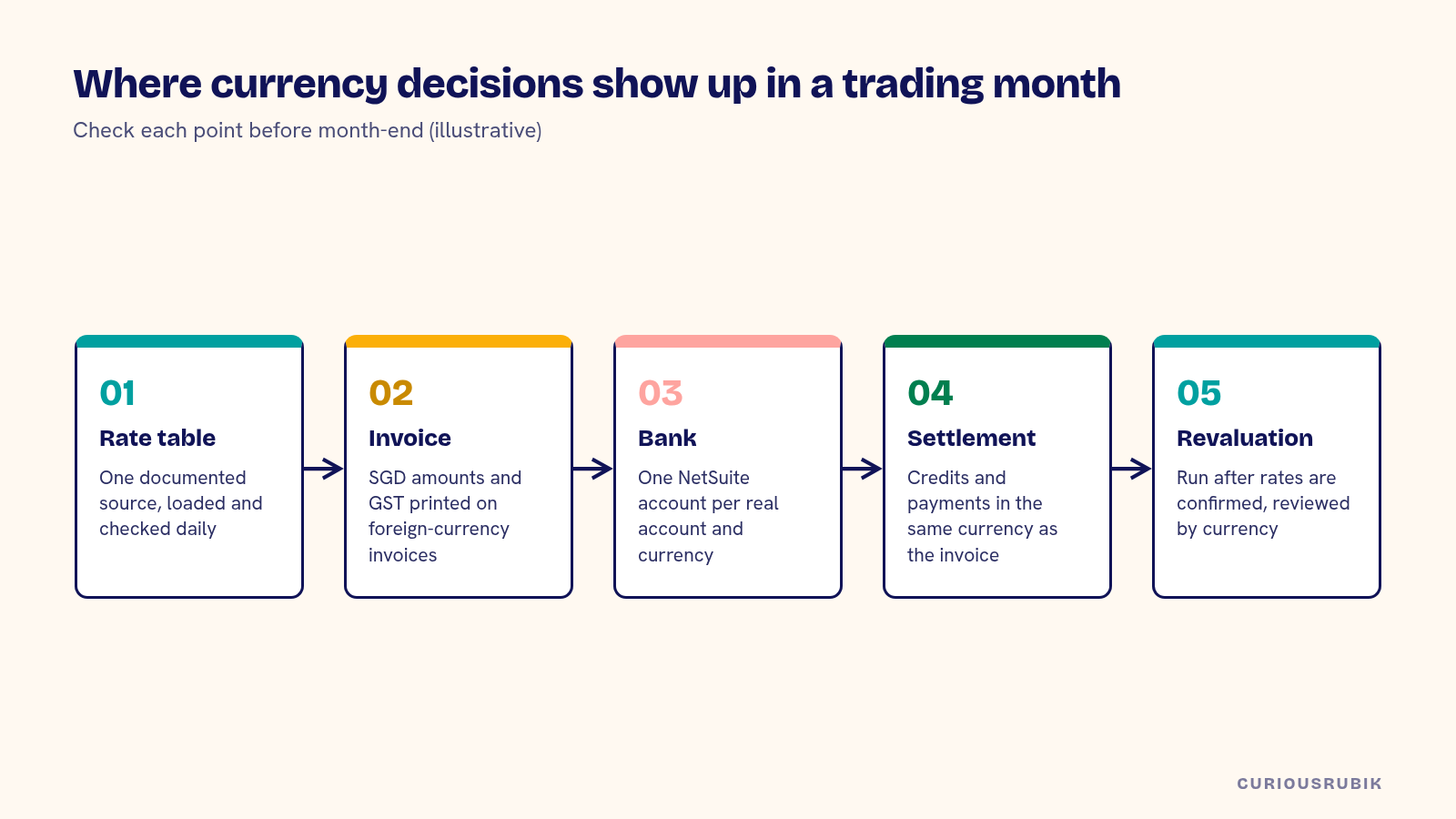
A Singapore trading company gets NetSuite multi-currency right by settling five decisions early: which exchange rate source you use and how it loads, how SGD amounts and GST appear on foreign-currency invoices, which bank accounts hold which currencies, how customer and vendor currencies are assigned, and how month-end revaluation is reviewed. Most of the trouble traders have with currency comes from leaving one of these to the defaults.
Trading businesses feel this more than most. A typical month might include USD purchases from a Chinese supplier, sales in MYR, IDR and USD, a EUR freight bill and payments through two banks. Each step creates exchange differences, and finance needs to explain them.
Choose and document your exchange rate source
NetSuite keeps a currency exchange rate table and can update it automatically through its exchange rate integration, or you can load rates yourself. Decide which source you will use and when rates load each day.
For GST, IRAS publishes the exchange rate sources it accepts for converting foreign-currency amounts, and expects a business to use its chosen basis consistently. Check the current IRAS guidance, confirm that the rate NetSuite applies matches the basis you have adopted, and write down who checks the rate table and what happens if a load fails.
Show SGD amounts and GST on foreign-currency invoices
When a GST-registered business issues a tax invoice in a foreign currency, the GST amount needs to be shown in SGD, along with the details IRAS requires. In NetSuite, this usually means customizing the invoice template to print the exchange rate, the SGD equivalent and the SGD GST.
Test the rounding. A USD invoice with many lines can produce an SGD GST total that differs by a cent from the GST calculated line by line. Decide which method you use and make sure the template, the GST report and the ledger agree. Our post on validating SGD amounts on foreign-currency tax invoices covers the checks in detail.
Supplier invoices raise the opposite problem. A supplier may have converted GST at a different rate from yours. The guidance in when a supplier invoice's SGD GST differs from NetSuite's book conversion explains how to record it.
Set up bank accounts by currency
Create a NetSuite bank account for each real bank account and currency. A USD account at a Singapore bank should be a USD bank account in NetSuite, so balances reconcile to the bank statement in USD and revaluation treats the balance correctly.
Avoid recording foreign-currency receipts in an SGD account with a manual conversion. It makes the bank reconciliation harder and hides realized exchange gains and losses inside clearing entries.
Transfers between your own accounts need care too. When you convert USD to SGD at the bank, record the transfer at the bank's actual rate so both accounts match their statements, and post any difference against the rate table to a defined exchange account. Bank charges deducted from foreign receipts should be recorded as a fee at the time of receipt. If they are written off later as a lump, the customer balance stays open by small amounts and revaluation keeps moving it every month.
Assign customer and vendor currencies deliberately
NetSuite lets one customer or vendor record trade in several currencies, with a primary currency and others added as needed. Decide which partners need more than one. A distributor that sometimes invoices a Malaysian customer in USD and sometimes in MYR needs both currencies on that record, along with clear rules for which to use.
Watch credits and payments. A credit note in USD can't be applied to an MYR invoice. Our guide to NetSuite foreign-currency customer and vendor settlement walks through common settlement cases.
Review revaluation at month-end
At period end, NetSuite revalues open foreign-currency balances, such as receivables, payables and bank accounts, and posts unrealized gains and losses. Realized gains and losses post when invoices are paid. Both need review.
Run revaluation after the period's rates are confirmed and all transactions are posted. Then review the result by currency and account, and look for large swings that come from a wrong rate or a transaction in the wrong currency. Our post on reviewing NetSuite currency revaluation at month-end has a review routine.
A hypothetical Singapore trading company month-end
A hypothetical Singapore electronics trader buys in USD and sells in USD, MYR and SGD. It holds SGD and USD accounts at one bank. All figures are illustrative.
| Item | Before review | Finding | After review |
|---|---|---|---|
| Unrealized FX loss on AP | S$41,800 | USD rate loaded twice on the 30th, second rate wrong | S$6,200 |
| Realized FX on USD receipts | S$3,100 gain | Receipts recorded in SGD account with manual conversion | Moved to USD bank account; S$2,700 gain |
| GST on USD invoices | S$1.85 difference to GST report | Rounding at invoice level vs line level | Template and report aligned |
| MYR customer credits | 4 unapplied | Credits raised in USD | Reissued in MYR |
The controller adds a daily check of the rate load and a monthly review of revaluation by currency. The month-end close gets shorter because the explanations are ready. Your figures will differ. The review points are common.
Plan the move from your current system
If you are moving from Xero or another system, decide how open foreign-currency balances come across: at their original rate, with a revaluation on the opening date, or at the cutover rate. Each choice affects the first month's gains and losses. Our guide to moving from Xero to NetSuite in Singapore covers the cutover in more detail.
If you are comparing ERPs, test multi-currency in the demo with your own transactions. The comparison in NetSuite vs SAP S/4HANA Cloud for Singapore HQs suggests how to structure it.
Use the NetSuite multi-currency setup checklist
Before go-live or your next quarter-end, check each of these:
- Is the exchange rate source documented, consistent with your GST basis and checked daily?
- Do foreign-currency invoices show the SGD amounts and GST IRAS requires?
- Do invoice templates, the GST report and the ledger agree on rounding?
- Is there a NetSuite bank account for each real bank account and currency?
- Do customer and vendor records carry the currencies they actually trade in?
- Is revaluation run after rates are confirmed and reviewed by currency?
- Are realized and unrealized gains and losses explained every month?
- Are e-invoicing documents tested with foreign-currency amounts?
That last point matters for InvoiceNow. Read NetSuite Peppol in Singapore: rejections and exceptions for the failure cases to test. Our NetSuite implementation team sets up multi-currency for Singapore traders, and our page for Singapore-led NetSuite programs describes the wider work.
Related reading: Reviewing NetSuite Currency Revaluation at Month End
Frequently asked questions
Which exchange rate should a Singapore company use in NetSuite?
Use a source IRAS accepts for GST and apply it consistently. Check current IRAS guidance and document your choice.
Does NetSuite show GST in SGD on USD invoices?
It can, with a customized invoice template that prints the exchange rate and SGD amounts. Test rounding against the GST report.
Why are our unrealized FX gains so large this month?
Common causes are a wrong rate in the table, a transaction in the wrong currency or revaluation run before rates were confirmed.
Can one customer trade in several currencies?
Yes. Add the currencies to the customer record and set clear rules for which one each transaction uses.
Should foreign currency receipts go to an SGD bank account?
No. Use a bank account in the matching currency so reconciliation and revaluation work correctly.