A 12 point checklist for US controllers and receivables leads who want customers to pay sooner with settings NetSuite already has.
Last reviewed: 26 October 2026. Product details reflect this review date. Availability and behavior can vary by account, role and release.
NetSuite DSO best practices come down to four habits. Send a correct invoice the day you can bill and make paying easy. Enforce your terms and credit limits, and follow up before the due date as well as after it. NetSuite covers each habit with standard settings, Payment Link and the Dunning Letters SuiteApp.
- Many of the days in DSO are lost before the due date: late invoices, wrong contacts and missing PO numbers.
- Payment Link puts a pay link in the invoice email. A customer can pay by card in a few clicks, or by ACH where your setup supports it.
- Credit holds and dunning only work when the rules are written down and someone owns the exceptions.
- Measure DSO the same way every month, or you will chase changes in the formula instead of changes in behavior.
What are NetSuite DSO best practices?
Days sales outstanding (DSO) is the average number of days your customers take to pay after you invoice them. A lower number means cash reaches your bank sooner. NetSuite DSO best practices are the settings and routines that shorten that wait without straining customer relationships.
This checklist is about moving the number, not defining it. NetSuite can show DSO in more than one way. The Financial Ratios scorecard uses a balance based ratio. Where your account has the Benchmark 360 dashboard, it uses the average days open of invoices paid in the month.
Pick one view for monthly reporting and stay with it. Our post on how NetSuite calculates DSO explains the formulas and when each view fits. Benchmark 360 also lists Payment Link and Dunning Letters among the NetSuite features that help with DSO, and both appear in this checklist.
Read DSO next to your overdue balance, which only counts invoices past their due date. A big month of sales on Net 60 can raise DSO even when every customer pays on time, but it will not raise the overdue balance.
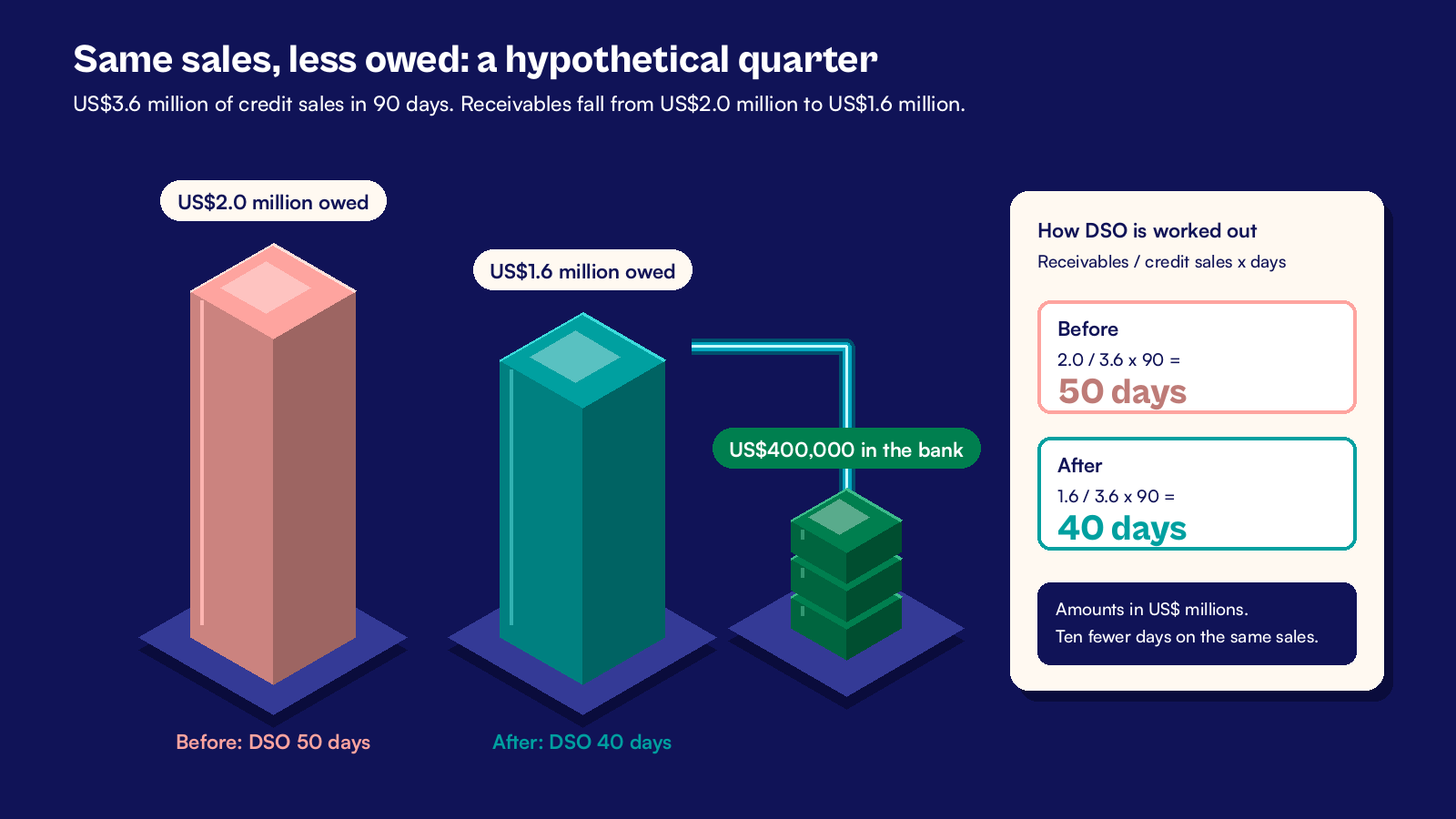
A hypothetical US distributor shows why the habits matter. It sells US$3.6 million on credit in a 90 day quarter and ends the quarter with US$2.0 million owed. Its DSO is 2.0 divided by 3.6, times 90, or 50 days. If the same sales left only US$1.6 million owed, DSO would be 40 days, and US$400,000 would sit in the bank instead of in receivables.
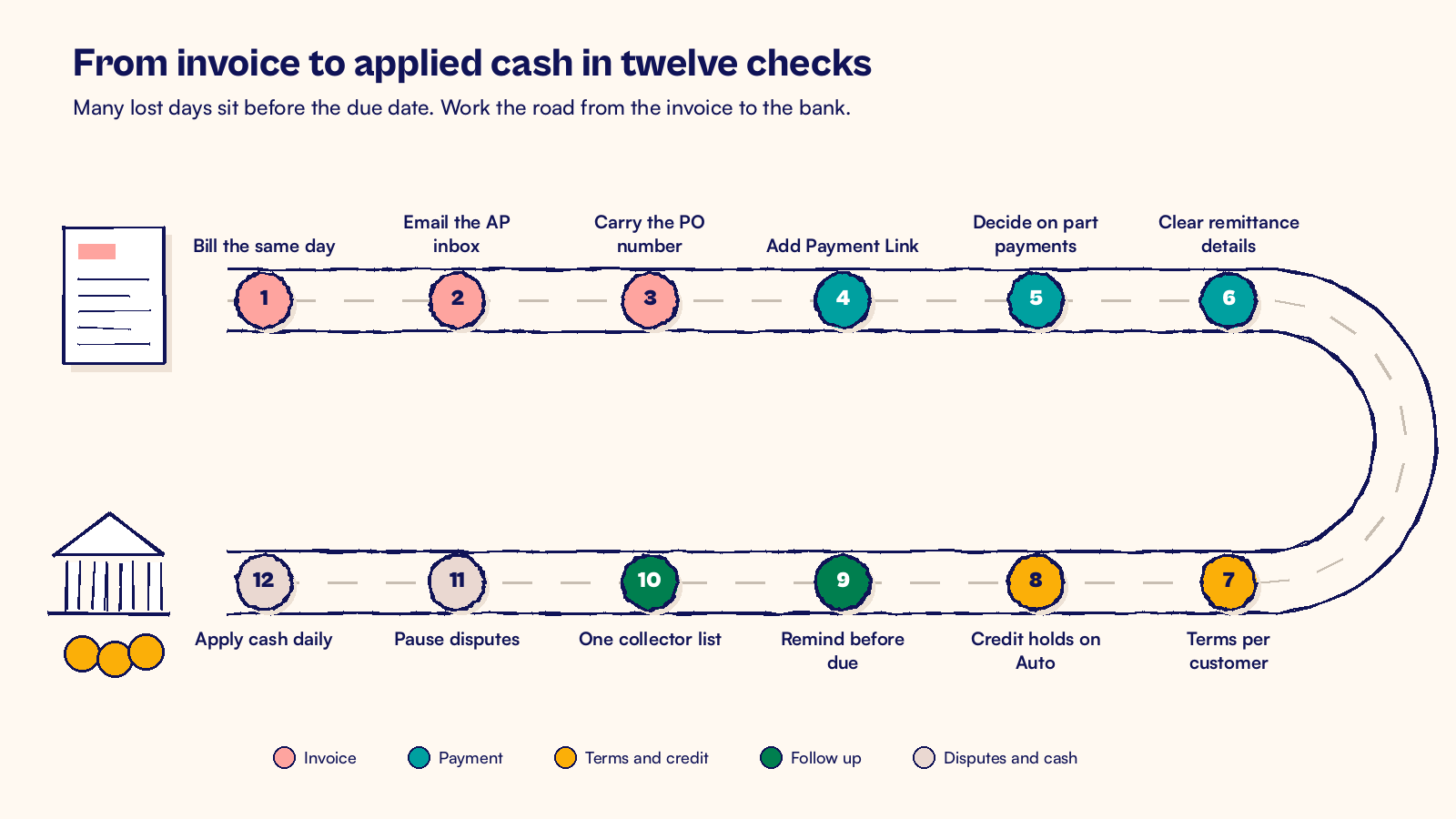
The checklist below follows an invoice from the moment you can bill to the moment the cash is applied. Work through it in order. The early items usually move the number most.
| # | Checklist item | Where it lives in NetSuite | Usual owner |
|---|---|---|---|
| 1 | Bill on the day you can | Bill Sales Orders, billing schedules | Billing team |
| 2 | Email every invoice to the right person | Customer record, Preferences subtab | Billing team |
| 3 | Carry the PO number and AP contact | Sales order form, customer contacts | Sales operations |
| 4 | Add Payment Link to invoice emails | Commerce > Payment Link | Controller |
| 5 | Decide on part payments | Payment Link settings | Controller |
| 6 | Print clear remittance details | Invoice template | Billing team |
| 7 | Match terms to each customer | Accounting Lists, customer record | Credit manager |
| 8 | Let credit holds work for you | Accounting Preferences, customer Hold field | Credit manager |
| 9 | Remind before the due date | Dunning Letters SuiteApp | Receivables lead |
| 10 | Give collectors one list | Saved search on the dashboard | Receivables lead |
| 11 | Pause disputed invoices | Dunning pause, credit memo | Receivables lead and sales |
| 12 | Apply cash every working day | Automated Cash Application | Cash team |
Does your invoice leave on time and arrive complete?
1. Bill on the day you can
Every day between shipping and invoicing adds a day to DSO. Use Transactions > Sales > Bill Sales Orders every working day, not once a week. For subscriptions and milestones, set billing schedules on the sales order so invoices come out on their own dates.
If an invoice must wait for a manager to approve it, agree a same day rule for that approval. An invoice that sits in Pending Approval for a week costs you the same week in DSO.
2. Email every invoice to the right person
Check the Email box on the Preferences subtab of each customer record. NetSuite then ticks To Be E-mailed on new invoices and sends them to the address on the customer header. Point that address at the accounts payable inbox, not the buyer who placed the order.
3. Carry the customer's PO number and contact
Many US companies will not pay an invoice without their purchase order number. Use a custom sales order form for those customers with the PO # field set as mandatory. Add the AP contact name to the invoice, so the right person sees it on day one, not day 25.
Some large US customers only accept invoices through their own supplier portal. Note that on the customer record and upload the invoice on the day you bill. Otherwise the email goes out on time and the clock still starts late.
Can customers pay the way they want to?
4. Add Payment Link to invoice emails
Payment Link adds a link or QR code to the invoice email. Your customer opens a checkout page, reviews the invoice and pays with a method you allow, such as a credit card.
To turn it on and set it up:
- Check Payment Link at Setup > Company > Enable Features > Transactions > Payment Processing.
- Configure it at Commerce > Payment Link.
- To offer ACH, install a third party SuiteApp that supports ACH payments and set up an ACH payment processing profile.
- Choose the email templates customers receive when a payment is accepted or rejected.
5. Decide whether to accept part payments
Payment Link has an Accept Partial Payments setting. Turn it on if your customers often pay the undisputed part of a large invoice. You collect most of the money now and keep only the disputed amount open.
6. Print clear remittance details
State your bank details, the reference you want on ACH payments and where remittance advice should go. An ACH payment that carries the invoice number is far easier to match than one that says "payment". Put the same details on your customer statements, so every document asks for the same thing.
Are your terms and credit limits doing their job?
7. Match terms to each customer
Payment terms live at Setup > Accounting > Accounting Lists > New > Term. Use a standard set, such as Net 30 and 2% 10 Net 30, and set a default on each customer record. Review any customer on Net 60 or longer once a year, and confirm the term is still a deliberate choice.
Price an early payment discount before you offer it. On a US$50,000 invoice, 2% is US$1,000 for getting paid 20 days sooner. That can be worth it for a customer who would otherwise pay late, but it should be a decision, not a default.
8. Let credit holds work for you
Set Customer Credit Limit Handling in Accounting Preferences. Warn Only shows a message, while Enforce Holds blocks new sales orders and invoices that would take a customer to or over its limit. Days Overdue for Warning/Hold sets the grace period for overdue invoices. Customer Credit Limit Includes Orders counts unbilled orders too.
On each customer, the Hold field stays on Auto so those rules apply. Our guide to NetSuite credit hold rules covers who should release a hold and how to record why.
How should reminders and collections run in NetSuite?
9. Send a reminder before the due date
The Dunning Letters SuiteApp can send a friendly reminder a few days before an invoice falls due, then firmer letters at set points after it. Each dunning level has its own days overdue, amount threshold and letter template. A scheduled evaluation workflow decides who gets which letter, and each send is logged in system notes. Our dunning setup questions help you agree the wording and levels first.
10. Give collectors one list to work from
Build a saved search of overdue invoices by customer, ordered by amount and days late, and add it to the dashboard of each collector. Assign customers to collectors so nobody calls the same AP team twice in a day. Record each call as a phone call activity on the customer, with the promised payment date.
Check promises the day after they fall due. A promise that slips once is a reminder. A promise that slips twice is a reason to talk to the account manager or review the credit limit.
Are disputes and cash posting slowing the number?
11. Pause, do not ignore, disputed invoices
When a customer disputes an invoice, pause dunning on it and record the reason. Keep the reasons to a short list, such as price, quantity, damaged goods and missing PO. Then give each dispute an owner and a target date.
A short credit memo for a damaged item settles the rest of the invoice faster than a long email thread. Review the reasons each quarter. If one reason keeps coming back, fix it at the source, in pricing or in the warehouse.
12. Apply cash every working day
DSO depends on receivables, so a payment that sits unapplied still counts as owed. Import bank statements daily and use Transactions > Bank > Automated Cash Application to match receipts to invoices. Then review payments with an unapplied amount every week, using our unapplied cash review.
Where should a US finance team start this month?
Start with items 1, 2 and 12. They cost nothing beyond a few settings and a daily habit, and they remove days you lose before a customer even sees the invoice. Next, turn on Payment Link and the reminder before the due date. Leave credit limit changes until last, because those need sales leadership to agree the rules.
Take a baseline first. Note your DSO from the view you picked, your overdue balance and your unapplied cash on the first working day of the month. Check the same three figures on the same day each month after that. If DSO moves while sales are steady, you will know which change caused it.
At CuriousRubik, we start with one month of your invoices and payments and trace where the days go. Our NetSuite optimization team can then set up Payment Link, credit rules and dunning around the way your customers actually pay. The NetSuite United States page shows how we work with US finance teams.
Related reading
Designing NetSuite Collections Worklists and Promise Tracking
How to build a collector worklist that records promises and disputes.
NetSuite Order to Cash Process: Flow and Best Practices
The full flow from sales order to cash, with an owner for each step.
Why NetSuite AR Aging Does Not Match the GL
A checklist for tying your receivables aging to the general ledger.