For US controllers and CFOs: why variance explanations belong in NetSuite, and how to use AI drafts without losing control.
Last reviewed: 23 October 2026. Product details reflect this review date. Availability and behavior can vary by account, role and release.
NetSuite flux analysis is the month end review of why account balances moved between periods, written and approved inside NetSuite. In release 2026.2, Intelligent Flux Analysis drafts those explanations from your own account data. The best practice is simple. Set clear thresholds and owners, let NetSuite draft the answer and have a named person check and approve it.
Key takeaways
- Variance answers kept in email and spreadsheets get lost. Keep them next to the numbers in NetSuite.
- Intelligent Flux Analysis drafts the explanation. A person still confirms the business reason.
- Write the rules first: which accounts, what threshold, who explains and who approves.
- Auditors and boards get faster, more consistent answers when the trail lives in one system.
What is NetSuite flux analysis?
Flux analysis is the review of changes in account balances from one period to the next, with a written reason for each material change. Controllers run it during the month end close, before the period is locked. The question is always the same. Why is this number different from last month, and is the reason correct?
In most US finance teams, the review lives outside the ledger. Someone exports a comparative income statement to a spreadsheet, highlights the big moves and emails account owners for answers. The replies come back in different formats, at different times. By the next audit, nobody can find the note that explained a spike in March.
Why do variance answers belong inside NetSuite?
Our view at CuriousRubik is that the explanation is part of the close, so it belongs in the same system as the close. NetSuite already holds the balances, the transactions behind them and the people who posted them. Keeping the explanation there too has three clear benefits.
First, the answer stays linked to the evidence. A reviewer can open the transactions behind a change instead of trusting a sentence in an email. Second, the close becomes visible. A controller can see which accounts still need an answer without chasing anyone.
Third, the trail is ready for audit. Public companies and those preparing for SOX are asked for flux commentary every quarter, and external auditors ask for it at year end. Our guide to SOX controls in NetSuite for companies preparing to go public explains why a clear review trail matters.
This is a strength of a unified system. When finance, sales, purchasing and payroll all post to one ledger, the reason for a change is usually already in NetSuite. It only needs to be found and written down.
What changes with Intelligent Flux Analysis in 2026.2?
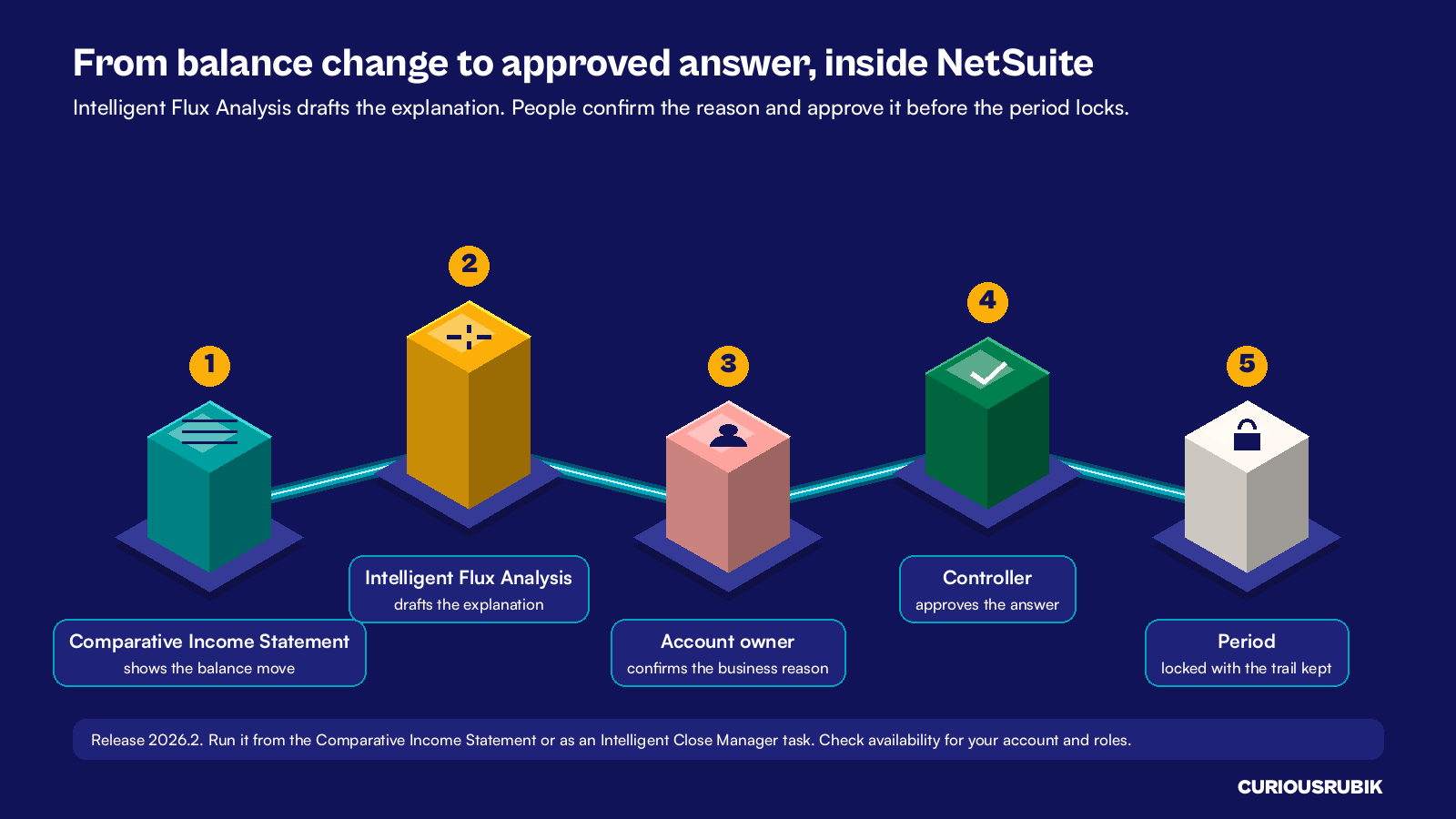
NetSuite 2026.2 adds Intelligent Flux Analysis. It uses AI to draft explanations of why account balances changed between periods. You can run it from the Comparative Income Statement or as a task in the Intelligent Close Manager portlet. The same release lets teams set task priority and assign close tasks to named employees.
That shifts the controller's job from writing to reviewing. The first draft no longer starts from a blank page and a pile of exports. It starts from the activity that drove the change.
The draft is a starting point, not the final answer. AI can point to the activity that moved a balance. It cannot always know the business reason, such as whether a cost was planned or a one off.
Treat it like any first draft from a junior analyst. A qualified person reviews it, corrects it and approves it. Check that the feature is enabled for your account and roles before you plan around it.
Set the rules before you switch it on
AI drafts work best inside a clear close policy. Agree these five rules with your controller and audit lead first.
- List the accounts in scope. Start with revenue, cost of sales, payroll and major expenses. The AI draft runs from the Comparative Income Statement, so plan how you will review the balance sheet accounts your auditors focus on. Revenue moves often trace back to revenue schedules, which our post on NetSuite ASC 606 requirements explains.
- Set a threshold for each group. Most teams use both a dollar amount and a percentage, such as US$25,000 and 10 percent. A change must pass both to need an answer.
- Name an owner for each account. The owner confirms the business reason behind the draft.
- Name a reviewer. A controller or finance manager approves each answer before the period locks.
- Decide what evidence to keep. A link to the transactions, a contract or a budget line. Keep it with the close task in NetSuite.
Review the thresholds once a year, and after any big change such as an acquisition or a new product line.
A hypothetical US software company's September close
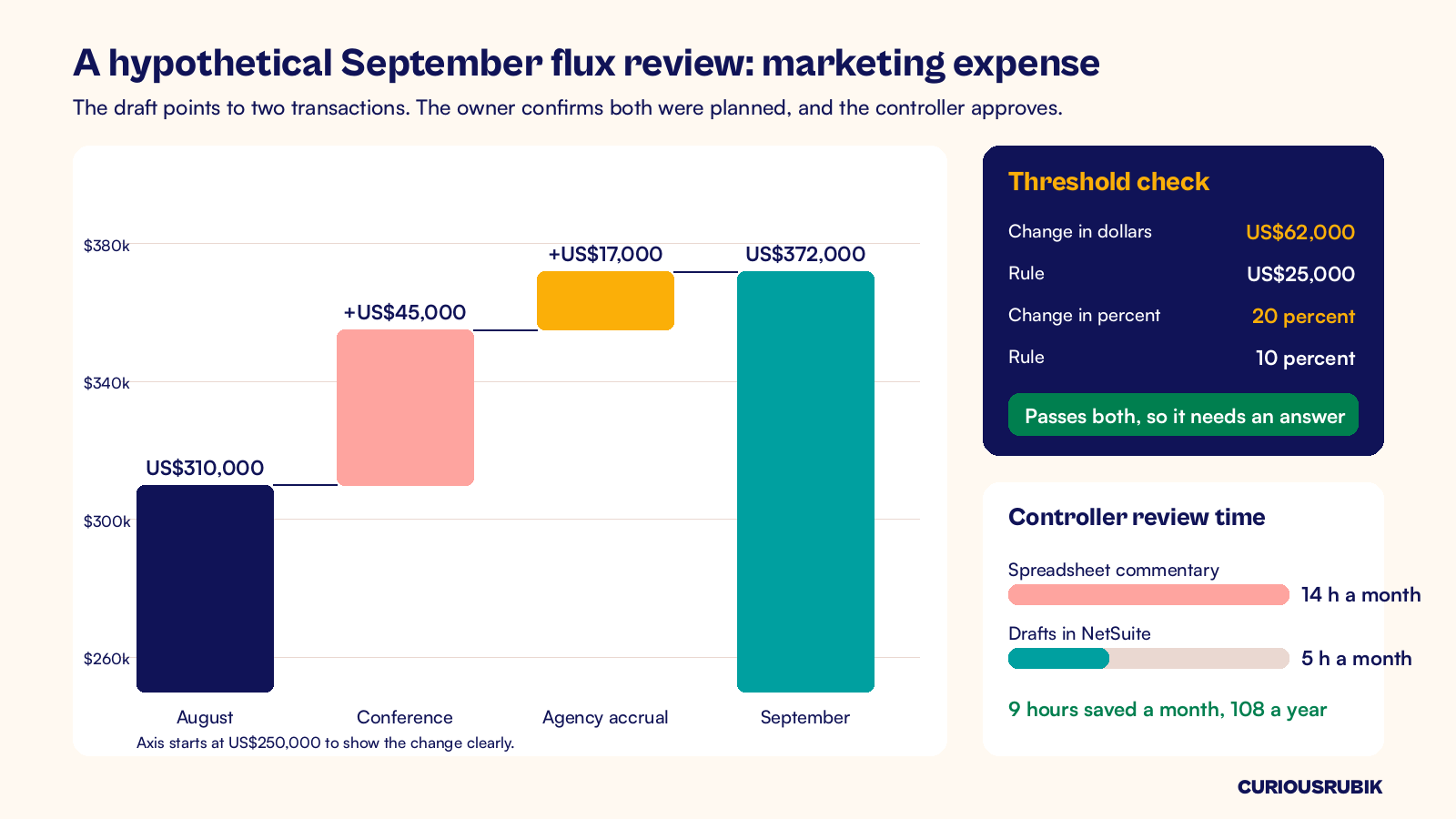
A hypothetical US software company reviews 140 income statement accounts each month. Its threshold is US$25,000 and 10 percent. In September, 11 accounts pass both.
Marketing expense rose from US$310,000 in August to US$372,000 in September. That is US$62,000, or 20 percent.
The Intelligent Flux Analysis draft points to two drivers: a US$45,000 annual conference invoice and a US$17,000 agency fee accrual. Together they explain the full US$62,000. The marketing lead confirms both were in the annual plan, and the controller approves the answer in NetSuite.
Before the change, the controller spent about 14 hours each month writing flux commentary in a spreadsheet. With drafts in NetSuite, review takes about 5 hours. That frees 9 hours a month, or 108 hours a year, for real analysis. Teams that also plan in NetSuite can compare actuals to budget in the same place, as our guide to NetSuite planning and budgeting shows.
What should finance leaders do next?
Start small. Pick one month and one group of accounts, such as operating expenses. Write the five rules, run the drafts and time the review.
Then add more accounts once the team trusts the process. Our NetSuite month end close checklist shows where flux review fits in the wider close.
CuriousRubik's NetSuite AI and automation team can set up your close tasks, thresholds and review steps, then train your owners to approve drafts with confidence. Our NetSuite United States page explains how we work with US finance teams.
Frequently asked questions
What is a flux analysis in accounting?
A flux analysis compares account balances between two periods, such as this month and last month, and explains each material change. Finance teams run it during the month end close. Each explanation names the cause, links to evidence and is approved by a reviewer before the period is locked and the results are reported.
What threshold should trigger a flux explanation?
Most teams use two tests together: a dollar amount and a percentage. A change must pass both before it needs a written answer, which avoids noise from small accounts. Set different levels for revenue, payroll and cash if needed. Agree the levels with your auditors and review them at least once a year.
Can AI write our month end variance explanations?
AI can draft them. NetSuite Intelligent Flux Analysis reviews the activity behind a change and writes a first explanation. A person still has to confirm the business reason and approve it. Treat the draft as a strong starting point that saves writing time, while your finance team keeps full ownership of the answer.
Where do we find Intelligent Flux Analysis in NetSuite?
In release 2026.2 it is available from the Comparative Income Statement and as a task in the Intelligent Close Manager portlet. Availability can depend on your account, features and roles. Ask your administrator or NetSuite partner to confirm it is enabled and to set up the close tasks and reviewers.
Related reading
NetSuite Month End Close Checklist with Reconciliation Evidence
A step by step close checklist with the evidence each task should leave behind.
SOX Controls in NetSuite for Pre-IPO Companies
How US companies preparing to go public set up controls and review trails in NetSuite.
NetSuite ASC 606 Requirements Before Configuration
The revenue recognition decisions to settle before you configure NetSuite, so revenue moves are easy to explain.