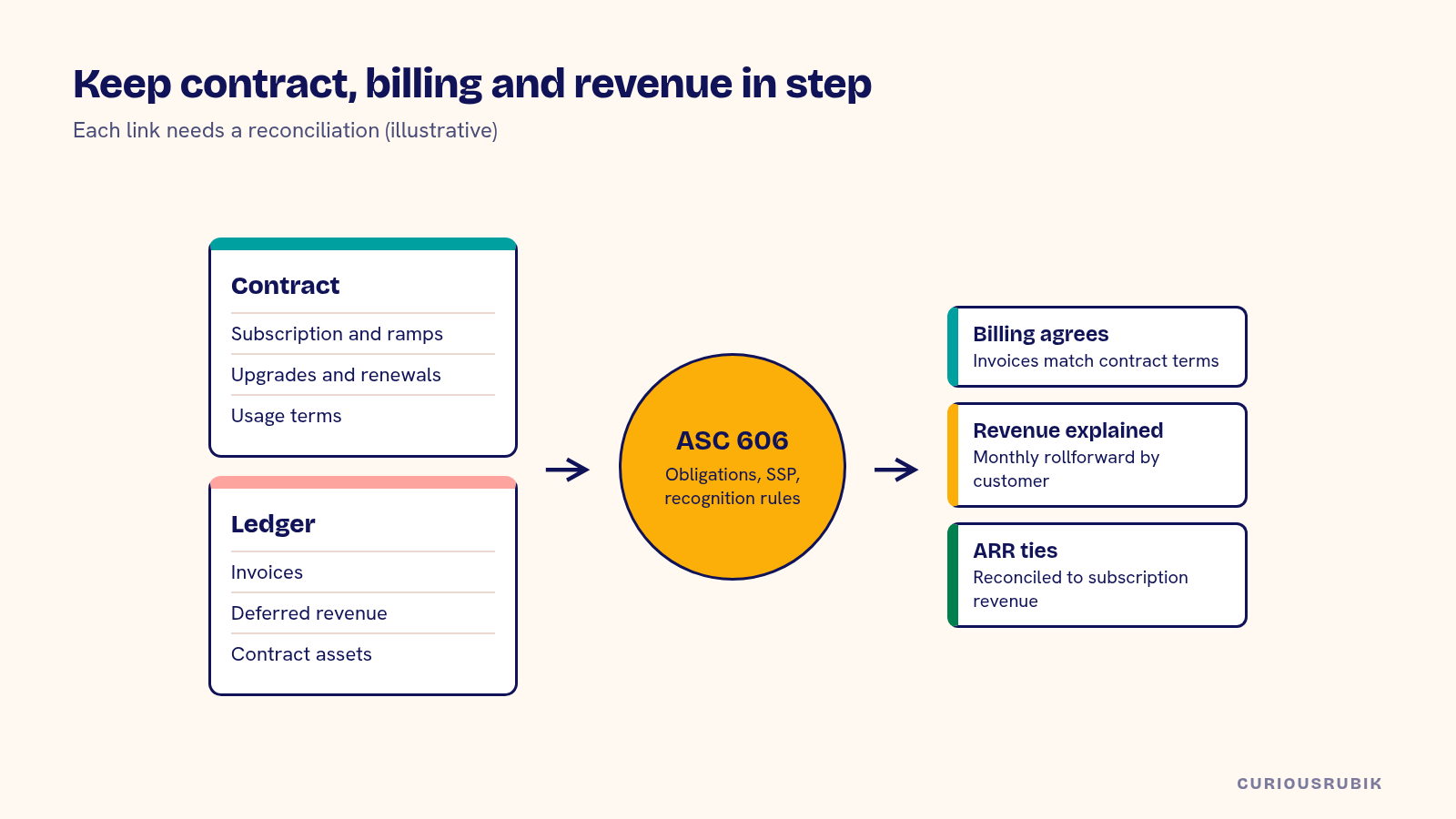
Making NetSuite for SaaS work comes down to keeping three records in step: the contract your sales team signed, the invoices your billing process sends and the revenue your accountants recognize under ASC 606. Decide where subscriptions live, how upgrades, downgrades and usage flow into billing, how each contract is split into performance obligations, and how ARR reporting ties back to the ledger. Most SaaS finance problems trace back to one of those links breaking.
A typical US SaaS company starts with Stripe or a CRM driving invoices and a spreadsheet driving revenue. That holds until the first audit, the first multi-year deal with a ramp or the first usage-based product. NetSuite can carry the whole cycle, but only if the design is deliberate.
Decide where subscriptions are mastered
The first decision is the system of record for subscriptions. Options include NetSuite's SuiteBilling, a billing platform such as Stripe Billing or another subscription tool integrated with NetSuite, or the CRM with NetSuite handling invoices only. Each works for some companies.
Choose based on your pricing. Simple annual or monthly plans can run in many tools. Ramped multi-year contracts, mid-term upgrades with proration, usage tiers and multiple currencies need a tool built for them. Our post on choosing a NetSuite recurring billing design compares the options in detail. Whatever you choose, write down which system owns the subscription, the price and the invoice, and don't let two systems own the same thing.
Design upgrades, downgrades and renewals
SaaS contracts change constantly. A customer adds seats in month four, moves to a higher plan in month seven and renews with a discount. Each change affects billing and revenue differently.
Agree the rules for proration, co-terming and credits, and test them on real contracts. In NetSuite, those changes are typically handled as change orders on the subscription. Check that each one produces the invoice you expect and updates the revenue arrangement correctly. A mid-term upgrade usually creates either a contract modification or a new contract under ASC 606, and your auditor will want to see how you decided which.
Bring usage into billing with a reconciliation
Usage-based pricing adds a data feed from your product to billing. Decide which events are billable, how they are aggregated, when the period closes and how late data is handled. Then decide where rating happens: in the product, in a billing platform or in NetSuite.
Reconcile usage every billing period, from raw events to rated usage to invoice lines. Our guide to reconciling NetSuite usage billing from events to invoices has a method. Without it, revenue for usage will drift from what customers were billed, and nobody will be able to say why.
Map contracts to ASC 606 performance obligations
ASC 606 requires you to identify the performance obligations in each contract, allocate the transaction price based on standalone selling prices and recognize revenue as each obligation is satisfied. For SaaS, that usually means the subscription recognized over time, implementation or onboarding services as delivered or with the subscription depending on whether they are distinct, and usage as it occurs.
NetSuite's Advanced Revenue Management can automate allocation and recognition once the rules are set. Agree standalone selling prices, item mappings and recognition rules with your auditor before configuring. Our guide to NetSuite ASC 606 revenue recognition covers the setup in more depth.
Sales commissions sit next to this. Under ASC 340-40, incremental costs of obtaining a contract, such as commissions paid on a new deal, are generally capitalized and amortized over the period of benefit, which can extend beyond the initial term when renewals are expected. Decide where commission data comes from, how the amortization schedule is built and who reviews it. Many companies keep the calculation in a commissions tool and post a monthly journal to NetSuite with a supporting schedule.
Expect billing and revenue to differ, and explain it
Invoices and revenue won't match in any month. An annual upfront invoice creates deferred revenue. A ramped deal billed flat creates a contract asset or liability as allocation shifts revenue between periods. Free months, discounts and credits change the pattern again.
Build a monthly rollforward for deferred revenue and unbilled receivables, by customer if possible. Our post on NetSuite billing and revenue recognition date differences explains common causes.
Handle SaaS sales tax by state
Sales tax treatment of SaaS varies across US states. Some tax it, some don't and some apply special rules. Once you have nexus in a state, through economic thresholds or physical presence, you need to know how that state treats your product and collect accordingly.
Map your items to the right tax codes, either in NetSuite or through a tax engine. Keep customer exemption certificates on file. If you sell into many states, a tax engine integrated with NetSuite usually saves more effort than it costs. Confirm treatment with a tax adviser before go-live.
A hypothetical SaaS contract through NetSuite
A hypothetical Austin SaaS company signs a three-year contract: US$60,000 a year for the platform, ramped to US$72,000 and US$84,000 in years two and three, plus US$15,000 for onboarding billed upfront. All figures are illustrative.
| Element | Billing | Revenue treatment |
|---|---|---|
| Platform subscription | Annual invoices of US$60,000, US$72,000 and US$84,000 | Recognized over 36 months after allocation |
| Onboarding | US$15,000 upfront | Treated as distinct in this example; recognized as delivered over 2 months |
| Total contract value | US$231,000 | Allocated across both obligations by standalone selling price |
If standalone selling prices support it, the allocation spreads the subscription revenue more evenly than the ramped invoices, so in year one recognized subscription revenue exceeds billing and a contract asset builds. The controller reconciles the rollforward monthly and shows the auditor the SSP study behind the allocation. Your contracts and conclusions will differ. The structure carries over.
Report ARR that ties to the ledger
ARR and MRR aren't GAAP measures, but boards and investors rely on them. Define them in writing: what counts, how upgrades and churn are dated and how multi-year ramps are treated. Build the report from subscription data in the system of record, then reconcile it to recognized subscription revenue each month.
If your multi-entity structure is growing, read NetSuite vs Acumatica for US mid-market companies and NetSuite vs Dynamics 365 Finance for US multi-entity groups to see how billing and consolidation compare.
Use the NetSuite for SaaS setup checklist
Before go-live, check each of these:
- Is one system named as owner of subscriptions, prices and invoices?
- Are proration, co-terming and credit rules agreed and tested?
- Is usage reconciled from events to invoices every period?
- Are performance obligations, SSPs and recognition rules agreed with the auditor?
- Is there a monthly deferred revenue and contract asset rollforward?
- Is SaaS taxability confirmed for every state where you have nexus?
- Are ARR and MRR defined in writing and reconciled to revenue?
- Are commissions capitalized where required, with an amortization schedule?
Our NetSuite implementation team designs billing and revenue for SaaS companies, and our page for US companies on NetSuite describes the wider work.
Related reading: NetSuite Usage Billing: Reconcile Events to Invoices
Frequently asked questions
Do SaaS companies need SuiteBilling?
Not always. Simple plans can run through other billing tools integrated with NetSuite. Complex pricing often benefits from a tool built for subscriptions.
Does NetSuite handle ASC 606?
NetSuite's Advanced Revenue Management can automate allocation and recognition. You still need agreed policies, SSPs and auditor review.
Why doesn't our revenue match our invoices?
Upfront billing, ramped pricing, allocation and credits all create differences. A monthly rollforward explains them.
Is SaaS subject to sales tax?
It depends on the state. Check each state where you have nexus and confirm with a tax adviser.
Should ARR come from NetSuite?
It should come from the subscription system of record and reconcile to recognized revenue in NetSuite.