For finance leads at Australian importers who buy in USD or CNY and want clean AUD books, step by step.
Last reviewed: 22 October 2026. Product details reflect this review date. Availability and behavior can vary by account, role and release.
NetSuite multi currency in Australia keeps AUD as your base currency while each supplier bills in its own currency. You enable Multiple Currencies, add USD and CNY, load daily rates and enter bills in the supplier's currency. NetSuite converts them to AUD, posts the realized gain or loss on payment and revalues open balances at month end.
Key takeaways
- Set AUD as the base currency before the first transaction. It is hard to change later.
- Let NetSuite load exchange rates every day, so nobody types a rate by hand.
- Freight, duty and broker fees are AUD costs. Add them as landed cost, not as part of the USD bill.
- Run the revaluation after every bill and payment for the month is in, then review it line by line.
What is NetSuite multi currency?
NetSuite multi currency is the set of features that lets one account record transactions in foreign currencies while it reports in a single base currency. For an Australian company, that base currency is AUD.
Each transaction keeps two amounts. One is the amount in the supplier's currency, such as USD 30,000. The other is the AUD amount at the exchange rate on that date. Your supplier statement matches the first amount. Your balance sheet and BAS work from the second.
This matters most for importers that buy in USD or CNY and sell in AUD. NetSuite handles both sides in one ledger, so stock, payables and margins all read in AUD without a spreadsheet in between.
How do you set up NetSuite multi currency in Australia?
Agree the rate source with your bank and accountant first. Then work through these steps in a sandbox.
- Confirm AUD as the base currency on the company record, or on each subsidiary if you use NetSuite OneWorld.
- Enable the Multiple Currencies feature under Setup, Company, Enable Features.
- Create a currency record for each supplier currency, such as USD and CNY, with its symbol and display format.
- Turn on Currency Exchange Rate Integration so NetSuite loads rates every day, or import your bank's rates by CSV if your policy uses them.
- Set the currency on each vendor record so purchase orders and bills default to it.
- Create a bank account record for any USD account you hold, with USD as its currency.
- Check the realized and unrealized exchange gain and loss accounts and decide where they sit on your profit and loss report.
- Run one purchase order, one bill and one payment in the sandbox and match the AUD results to your bank statement.
If you run an overseas subsidiary, such as a sourcing office in Asia, NetSuite OneWorld also uses consolidated exchange rates. These translate the subsidiary's results into AUD for group reports. Our guide to NetSuite implementation cost for Australian multi entity groups covers how that changes the project.
How does NetSuite convert a USD vendor bill to AUD?
NetSuite stores an exchange rate as the number of base currency units for one unit of foreign currency. So the rate on a USD bill reads as AUD per USD. Banks in Australia usually quote it the other way, as USD per AUD.
A bank quote of 0.6579 USD per AUD is the same as about 1.5200 AUD per USD in NetSuite. Mixing the two up is an easy setup error to make. The bill then shows an AUD amount that is far too small or far too large.
The table shows which rate NetSuite uses at each stage and what posts in AUD.
| Stage | Rate NetSuite uses | What posts in AUD |
|---|---|---|
| Purchase order | Rate on the order date | Nothing posts. The order is a commitment only. |
| Vendor bill | Rate on the bill date | Inventory or expense, and the payable to the supplier |
| Bill payment | Rate on the payment date | Cash leaves the bank. The difference from the bill posts as a realized gain or loss. |
| Month end revaluation | Rate on the last day of the period | Open bills and USD bank balances are restated. The change posts as an unrealized gain or loss. |
The realized gain or loss is final. It happened because the rate moved between the bill and the payment. For settlement detail, such as part payments and credits in foreign currency, read our post on NetSuite foreign currency customer and vendor settlement.
Bring freight, duty and GST into AUD
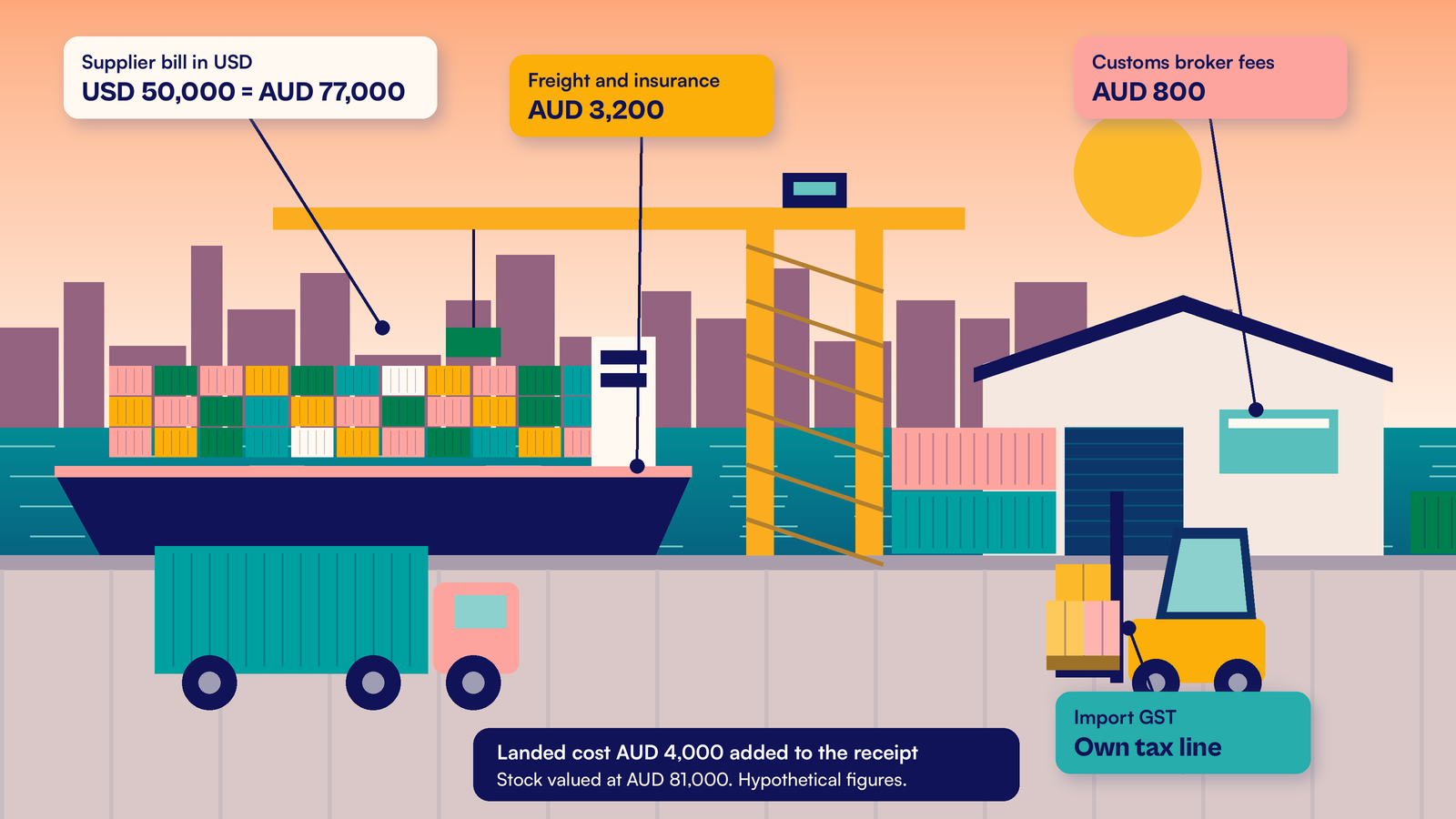
The supplier's USD bill covers the goods. Everything after the factory gate usually arrives in AUD. That includes sea freight, insurance, customs duty and the broker's fees.
Record these as landed cost in NetSuite. Landed cost adds the freight and duty to the value of the stock you received, so your item cost reflects what the goods really cost to land. Our guide to NetSuite landed cost allocation with a worked reconciliation shows how to spread the cost by value, weight or quantity.
GST on imported goods is assessed in AUD on the customs value of the goods plus duty, transport and insurance. Your customs broker usually handles the entry. Treat the import GST as its own tax line, not as part of the supplier's bill. Confirm the treatment, and whether deferred GST applies, with your tax adviser.
When you sell in a foreign currency, the tax invoice should show the GST in AUD, or enough information to work it out. The ATO lists what a tax invoice must include. An advanced PDF template in NetSuite can be set up to print the AUD tax amount on a foreign currency invoice.
A hypothetical Melbourne homewares importer's October
A hypothetical Melbourne homewares importer buys about USD 80,000 of stock a month from two factories. Its base currency is AUD. Rates load into NetSuite every morning. Here is one month.
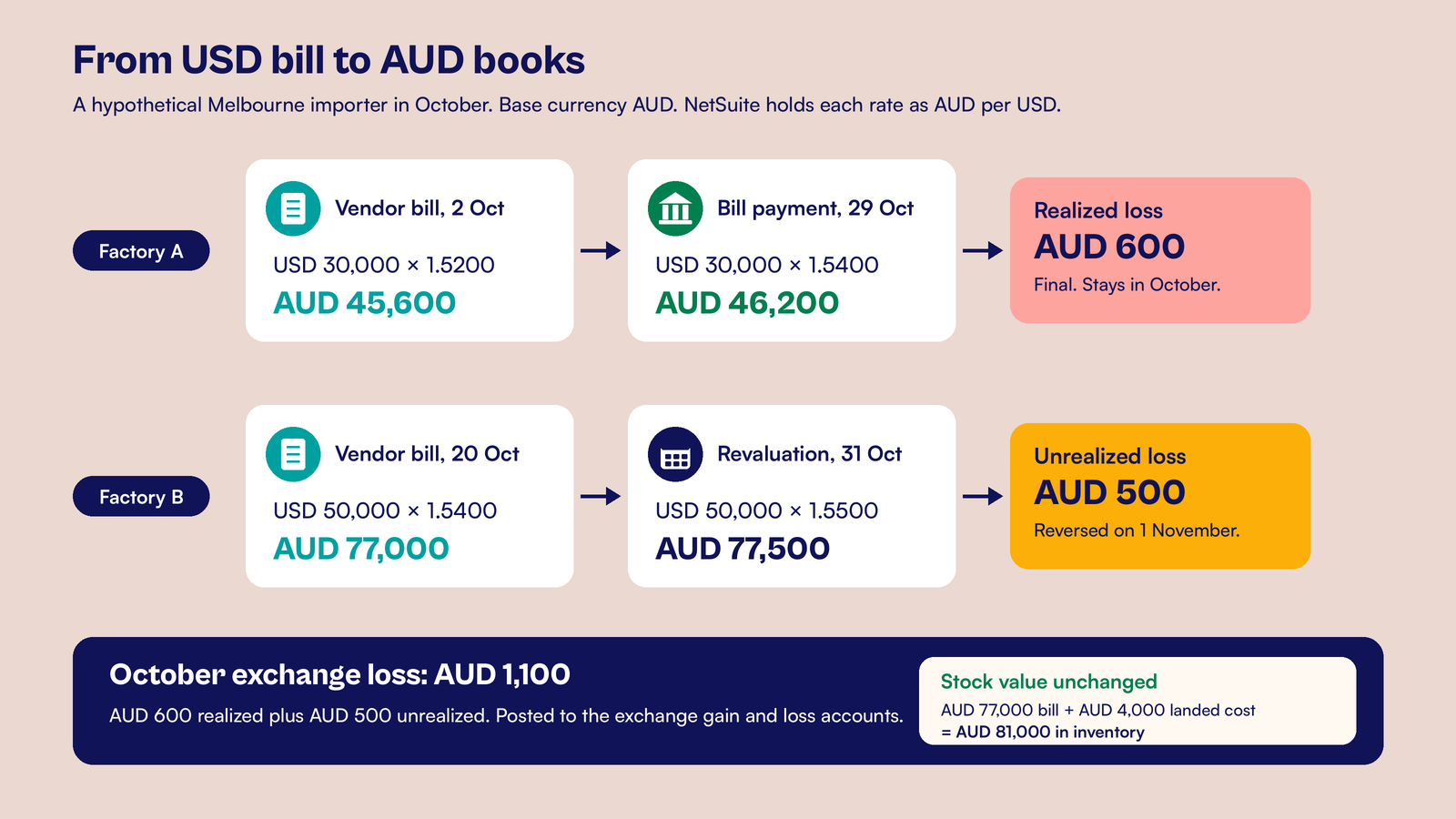
- 2 October: Factory A bills USD 30,000 at 1.5200 AUD per USD. NetSuite posts the payable at AUD 45,600.
- 20 October: Factory B's goods arrive and are billed the same day. The bill is USD 50,000 at 1.5400, so the payable is AUD 77,000.
- 20 October: The forwarder bills AUD 3,200 for freight and insurance and the broker bills AUD 800 in fees. The team adds AUD 4,000 of landed cost to Factory B's receipt. The stock is now valued at AUD 81,000.
- 29 October: The team pays Factory A USD 30,000 at 1.5400. That costs AUD 46,200. NetSuite posts a realized loss of AUD 600.
- 31 October: Factory B's bill is still open. The month end rate is 1.5500, so USD 50,000 is now worth AUD 77,500. The revaluation posts an unrealized loss of AUD 500.
October shows a total exchange loss of AUD 1,100: AUD 600 realized and AUD 500 unrealized. On 1 November, NetSuite reverses the AUD 500 so the next revaluation starts clean.
Note what did not change. The stock stays at AUD 81,000. Revaluation restates the payable, not the inventory.
Run the month end revaluation and review it
Run the revaluation only after every bill, payment and bank entry for the month is posted. Otherwise the open balances are wrong and the gain or loss is wrong with them.
- Confirm the period end exchange rate loaded for each currency.
- Lock the period so no new bills or payments post into it.
- Go to Transactions, Financial, Revalue Open Currency Balances.
- Pick the accounting period and the subsidiary, then review the accounts listed.
- Save to post the revaluation.
- Open Reports, Financial, Unrealized Exchange Rate Gains and Losses and check the largest lines against the open bills.
- File the report with your month end pack.
A reviewer should be able to pick any line and recompute it with a calculator. Our post on reviewing NetSuite currency revaluation at month end lists the checks we run on larger accounts.
At CuriousRubik, our NetSuite implementation team sets up multi currency for Australian importers and tests it with your real suppliers, rates and freight bills before go live. You can also see our work for wholesale and distribution businesses and our NetSuite services in Australia.
Frequently asked questions
Can NetSuite update exchange rates automatically?
Yes. With the Currency Exchange Rate Integration feature turned on, NetSuite loads new rates for your currencies every day from its rate provider. You can also enter rates by hand or import them by CSV if your policy uses your bank's rates. Pick one method and use it every month, so your results stay consistent.
What base currency should an Australian company use in NetSuite?
Use AUD. Your BAS, income tax return and statutory accounts are all reported in AUD, so the ledger should be too. Set it before the first transaction, because it is hard to change once transactions exist. If you own an overseas subsidiary, give that subsidiary its own local base currency in NetSuite OneWorld.
What is the difference between a realized and an unrealized exchange gain?
A realized gain or loss comes from a finished deal. You paid or were paid at a different rate from the bill or invoice. An unrealized gain or loss comes from an open balance, restated at the period end rate. NetSuite reverses the unrealized amount at the start of the next period and recalculates it.
How do I show GST in AUD on a foreign currency invoice?
The ATO expects a tax invoice to show the GST in AUD, or enough information to work it out. In NetSuite, an advanced PDF template can be set up to print the AUD tax amount and the exchange rate used next to the foreign currency total. Confirm the wording and the conversion rule with your tax adviser.
Does a currency revaluation change the value of my stock?
No. Revaluation restates open foreign currency balances such as supplier bills, customer invoices and foreign bank accounts. Your inventory keeps the AUD cost it had when you received it, plus any landed cost. That is why freight and duty should be added as landed cost, not left as separate expenses.
Related reading
NetSuite Foreign Currency Customer and Vendor Settlement
How part payments, credits and bank charges in foreign currency settle in NetSuite.
NetSuite Landed Cost Allocation with a Worked Reconciliation
How to add freight and duty to item cost and prove the numbers.
Reviewing NetSuite Currency Revaluation at Month End
The checks to run before you sign off the revaluation.