For Australian finance and IT leads who want to know what NetSuite upgrades involve and how to keep each one calm.
Last reviewed: 23 October 2026. Product details reflect this review date. Availability and behavior can vary by account, role and release.
NetSuite upgrades happen twice a year, and Oracle runs them for every customer. Before each upgrade, you get a release preview account to test your own processes. Your configuration, data and most custom scripts carry forward. For an Australian business, NetSuite upgrades mean new features and fixes without a separate upgrade project or extra license cost.
This is one of the biggest reasons growing companies choose NetSuite. The system stays current on its own, and your team spends its time on the business.
What are NetSuite upgrades?
NetSuite upgrades are the two major releases Oracle ships each year, named by year and number, such as 2026.1 and 2026.2. Each release adds features, improves existing ones and updates the platform. Oracle applies the upgrade to your account on a scheduled date, usually on a weekend.
Because NetSuite is a true cloud product, every customer moves to the same version within each release window. Nobody falls years behind, and there is no large upgrade project every few years. Security patches and performance improvements arrive the same way, without any work from your IT team.
Each release also brings new capability you can switch on when you are ready, such as new reports, workflow options and AI features. Many teams keep a short list of release features to try after go live, so the upgrade adds value instead of only being tested.
How does a NetSuite upgrade cycle work?
Each release follows the same pattern. Once your team knows it, upgrades become routine.
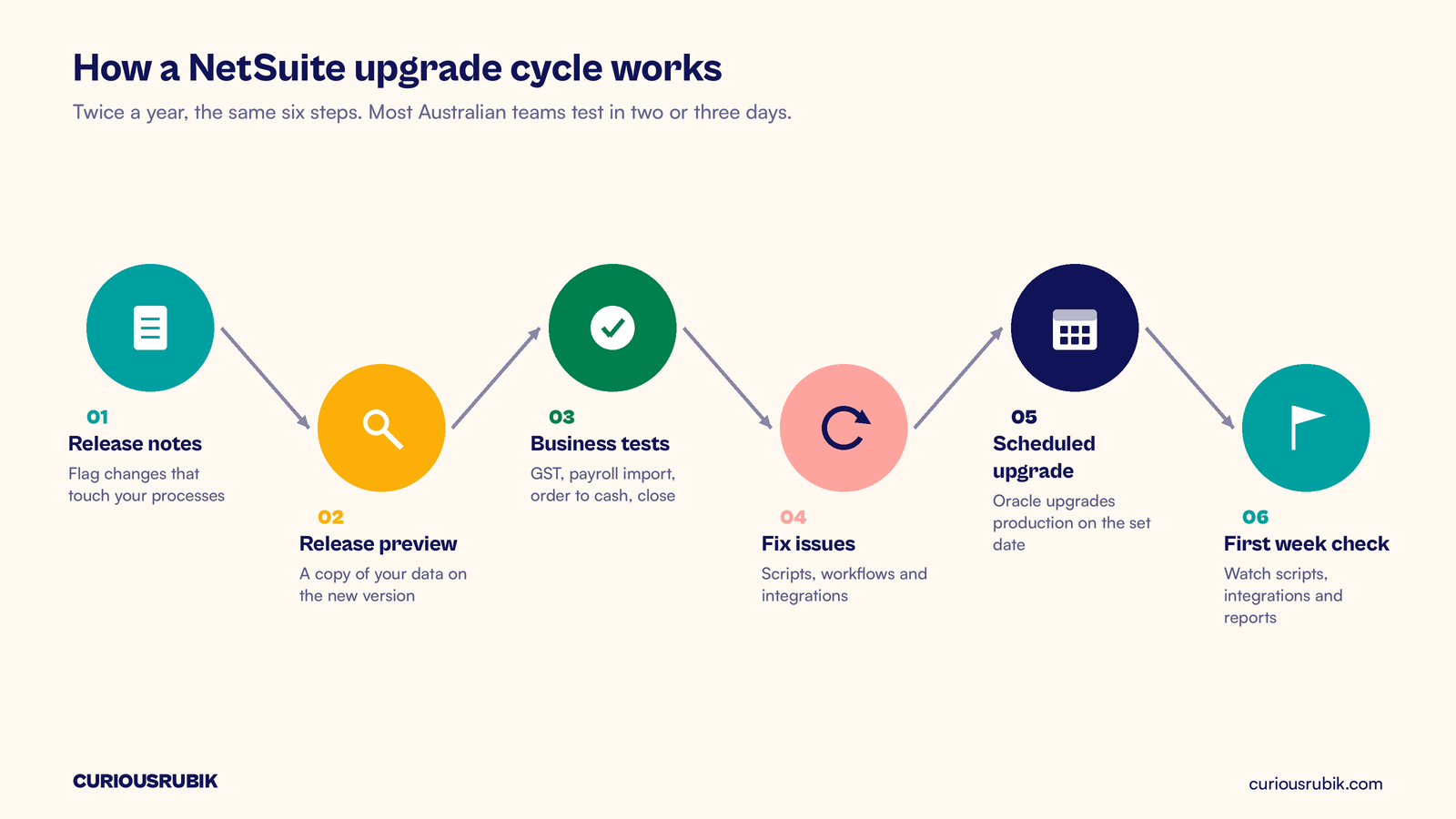
- Release notes. Oracle publishes release notes ahead of each release. Read them and flag changes that touch your processes.
- Release preview. Oracle provides a preview account with a copy of your data on the new version.
- Business testing. Your team runs key processes in the preview, such as order to cash, purchasing and the month end close.
- Fixes. Any issue with a script, workflow or integration is fixed before the upgrade date.
- Scheduled upgrade. Oracle upgrades your production account on the date shown in your account.
- First week check. Watch scheduled scripts, integrations and key reports for a few days.
In our experience, Australian companies with one to three entities can finish business testing in two or three days per release. The first cycle takes longer, because the team is writing its test list for the first time. After that, the same list is reused and only the changed areas need extra checks.
Our post on NetSuite release preview testing by business process risk shows how to choose which tests to run.
What should Australian businesses check before each upgrade?
Two things need attention each release: your customizations and the processes that would hurt if they stopped.
Customizations
Custom fields, forms, saved searches and workflows carry forward. SuiteScript code also keeps running, because Oracle supports each script version for a long time and gives notice before older features are retired. Keep it that way with a few habits.
- Write new scripts on the current SuiteScript version.
- Keep a list of every script, workflow and integration with an owner.
- Retire customizations nobody uses. See our guide to NetSuite customization retirement and dependency review.
- Test integrations in the preview, since connected systems are a frequent source of surprises.
Australian processes
For many Australian companies, the short test list looks like this.
| Process | What to check in preview |
|---|---|
| GST on sales and purchases | Tax codes and amounts on a sample of invoices and bills |
| Payroll journal import | The STP provider's journal imports into the right accounts |
| Bank feeds and payments | Bank files and matching rules still work |
| Order to cash | Sales order, fulfillment, invoice and payment run end to end |
| Month end reports | Profit and loss, balance sheet and BAS reports match production |
Keep the list short and repeat it each release. Add a line whenever a new process goes live, such as a new bank, payment method or entity. Remove lines for processes you no longer run. A list that matches how the business works today is worth more than a long list nobody finishes. See also our guide to NetSuite BAS and Australian GST reconciliation.
Compliance changes
Tax and reporting rules change often in Australia. Oracle maintains NetSuite's core tax engine and Australian localization features. Many localization tools ship as SuiteApps, which their publishers update on their own schedule, often between major releases. Payroll stays with your STP provider, which keeps its own software current with ATO rules.
Keep a short compliance calendar next to your upgrade plan. Mark BAS due dates, the end of financial year and any known ATO changes. Avoid big configuration changes in the same week as an upgrade or a BAS lodgement, so each change can be checked on its own.
Who owns NetSuite upgrades in your team?
Name one upgrade owner, often the NetSuite administrator or the financial controller. That person reads the release notes, books testers and signs off before the upgrade date. The table shows a typical split for a hypothetical Perth distributor with 34 users, two Australian companies and four custom scripts.
| Role | Job each release | Hypothetical effort |
|---|---|---|
| Upgrade owner | Reads release notes, plans tests, signs off | 4 hours |
| Finance and operations testers | Run the Australian test list in the preview | 8 hours |
| Partner consultant | Reviews scripts and integrations, fixes issues | 4 hours |
| Oracle | Applies the upgrade on the scheduled date | Included in the subscription |
A simple release calendar
Most teams settle into the same rhythm each release.
- When release notes arrive, the upgrade owner flags the changes that touch your processes.
- When the preview account opens, testers run the Australian test list and log issues.
- Two weeks before the upgrade date, the partner fixes any script or integration issues.
- In the week after the upgrade, the owner checks scheduled scripts, integrations and the first BAS or month end reports.
At A$110 an hour for internal time and A$180 for the partner, that is A$1,320 plus A$720, or A$2,040 a release. Over two releases a year, the distributor spends about A$4,080 a year to stay on the latest version, with no separate upgrade project and no new license. The effort usually falls after the first year, once the test list and the script inventory are in place. These figures are illustrative.
At CuriousRubik, our NetSuite managed support team reviews scripts and integrations each release and helps your testers. You can also see our NetSuite services in Australia and read about how to choose a NetSuite partner in Australia.
Related reading
NetSuite Release Preview Testing by Business Process Risk
How to choose release preview tests by the business processes that matter most.
NetSuite Customization Retirement and Dependency Review
How to find and retire custom scripts and fields nobody uses.
Signs Your Business Is Ready for NetSuite in Australia
Six signs your Australian business is ready to move to NetSuite.