For Australian finance and IT leads choosing ongoing NetSuite help: what managed services cover, what drives cost and how onboarding works.
Last reviewed: 22 October 2026. Product details reflect this review date. Availability and behavior can vary by account, role and release.
NetSuite managed services in Australia are an ongoing arrangement where a partner team looks after your account every month. The work covers user requests, fixes, small changes, release testing, integration checks and the tax calendar around BAS, STP and the end of the financial year. You pay for a monthly allocation of hours sized to your real workload.
Key takeaways
- Managed services are planned, ongoing care for your NetSuite account. Reactive support only answers tickets as they arrive.
- Oracle NetSuite support helps with the product itself. Your partner looks after your own setup, scripts and integrations.
- Size the monthly hours from three months of real requests, then add time for June and the two yearly releases.
- Ask for a named team, cover in your time zone and a written escalation path.
What are NetSuite managed services?
NetSuite managed services is a monthly service in which a partner team takes ongoing responsibility for running and improving your NetSuite account. The team knows your setup, keeps a log of every change and plans work ahead instead of waiting for something to break.
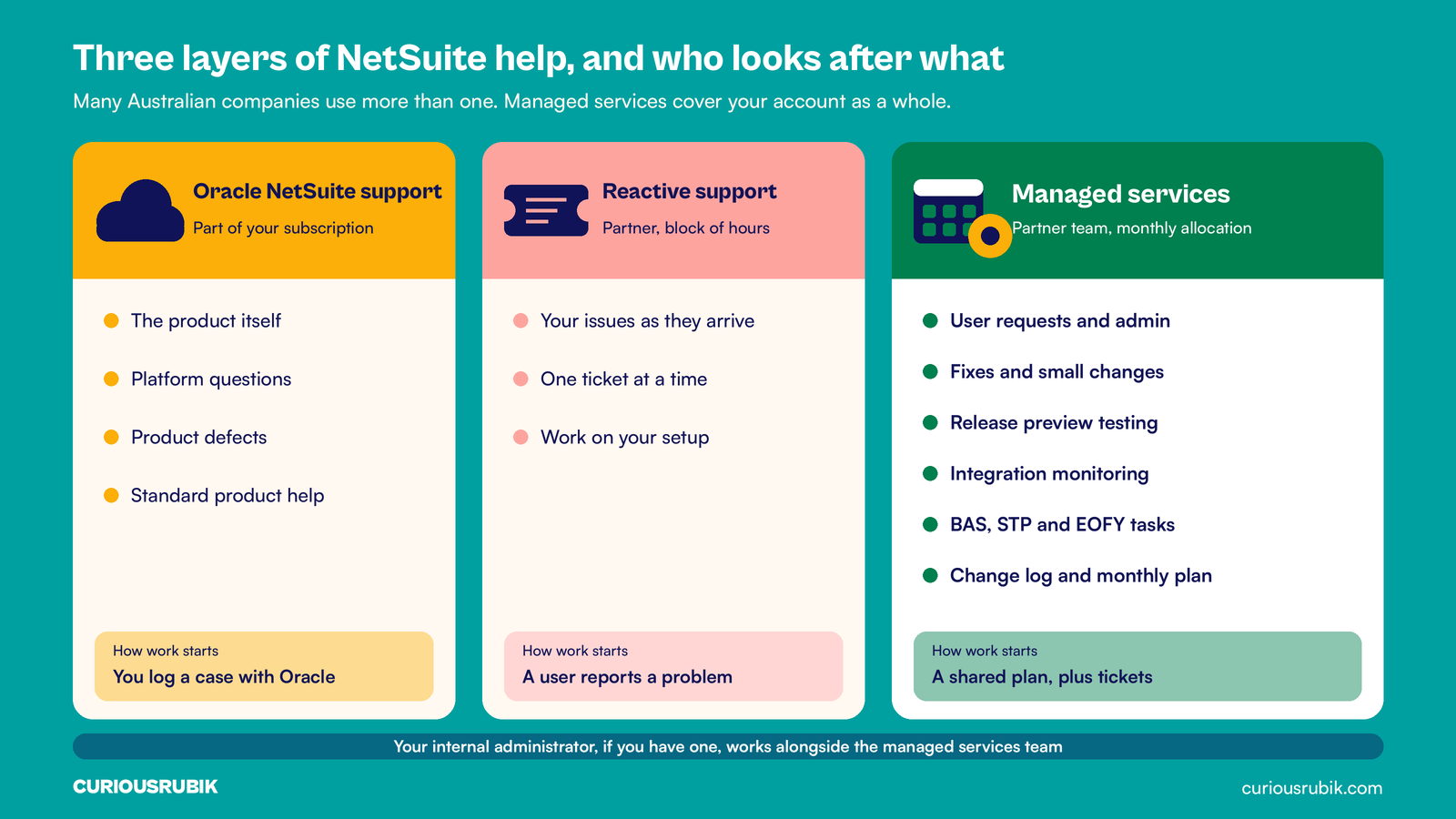
It helps to see three layers of help side by side. Each one has a clear job, and many Australian companies on NetSuite use more than one.
| Layer | Who provides it | What it looks after | How work starts |
|---|---|---|---|
| Oracle NetSuite support | Oracle, as part of your subscription | The product itself, platform questions and product defects | You log a case with Oracle |
| Reactive support | A partner, often on a block of hours | Your issues, one ticket at a time | A user reports a problem |
| Managed services | A partner team on a monthly allocation | Your account as a whole: requests, fixes, changes, releases, integrations and calendar tasks | A shared plan, plus tickets |
Oracle's support team knows the product deeply. Questions about your own workflows, saved searches, scripts and integrations need someone who knows your account. That is the gap a managed services team fills. Many companies also keep an internal administrator, and the partner works alongside that person.
What work does a monthly allocation cover?
A good allocation is split by type of work, so you can see where the hours go. These are the work types we see most often in Australian accounts.
- Administration and user requests. New users, role changes, password resets, form tweaks and saved search edits.
- Fixes. Investigating an error, a wrong report figure or a stuck approval, then correcting the cause.
- Small changes. A new field, a workflow step or a report a manager asked for, each with a test and a note in the change log.
- Release testing. Oracle upgrades NetSuite twice a year and gives a preview window first. The team tests your key processes before your account moves. Our guide to release preview testing by business risk explains how to pick what to test.
- Integration monitoring. Checking that orders, payments, payroll journals and bank files arrived, and rerunning any that failed.
- Calendar tasks. Monthly or quarterly BAS checks and STP pay event reviews. Super paid with each pay run under Payday Super, which started on 1 July 2026. End of financial year work after 30 June, plus the TPAR due by 28 August if your business must lodge one.
Month end routines belong here too. If you trade in foreign currencies, the team can run and check the revaluation each month. Our same week guide to NetSuite multi currency setup in Australia shows that routine step by step.
What do NetSuite managed services in Australia cost?
Cost depends on the hours you need and the rate for the people doing the work. No two accounts are the same, so be wary of a price quoted before anyone has looked at your requests.
These factors move the number most:
- Number of users and roles, which drives access requests.
- Number of subsidiaries and currencies.
- Number of integrations and how often they run.
- Volume of custom scripts and workflows.
- Hours of cover you need, such as Perth and Sydney business hours.
- Mix of senior consultants and administrators on the team.
Rates vary by skill level. Our guide to NetSuite consultant rates in Australia shows how to read a rate card, and the CuriousRubik pricing page explains how we scope work before we price it.
Most allocations are monthly. Ask whether unused hours roll over, for how long, and what happens when a busy month runs past the limit.
A hypothetical Brisbane distributor's monthly allocation
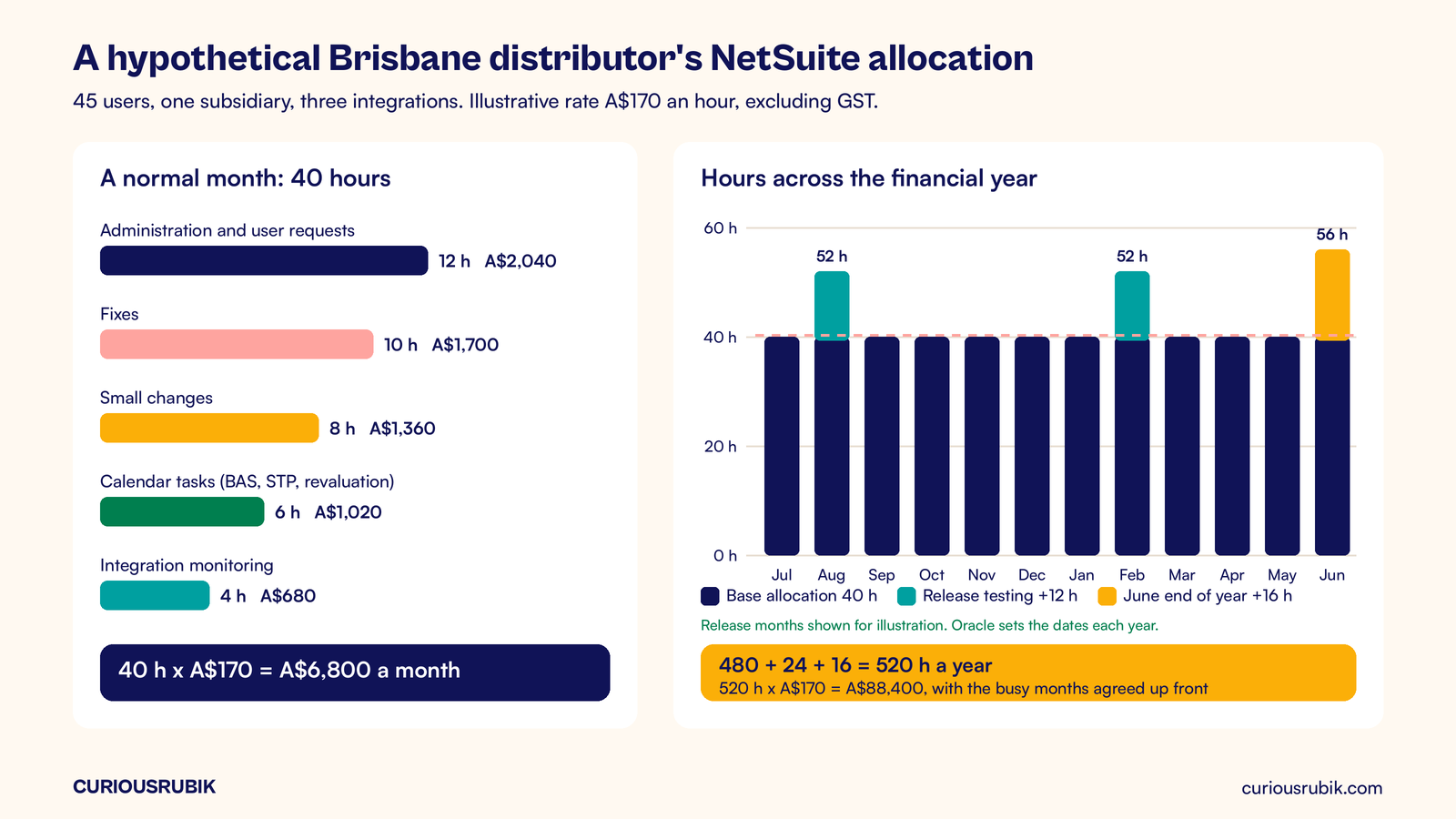
A hypothetical Brisbane wholesale distributor has 45 NetSuite users, one subsidiary and three integrations: a web store, a payroll provider and a bank feed. Its finance manager pulls three months of requests and finds about 40 hours of work a month.
At an illustrative rate of A$170 an hour, excluding GST, 40 hours costs A$6,800 a month. A normal month splits like this:
| Work type | Hours | Cost (A$) |
|---|---|---|
| Administration and user requests | 12 | 2,040 |
| Fixes | 10 | 1,700 |
| Small changes | 8 | 1,360 |
| Calendar tasks (BAS, STP, revaluation) | 6 | 1,020 |
| Integration monitoring | 4 | 680 |
| Total | 40 | 6,800 |
June is busier. End of year stocktake, accruals and payroll finalization add about 16 hours, so June runs to 56 hours, or A$9,520. The two release preview windows each add 12 hours of testing.
Over a year that is 480 base hours, plus 16 for June, plus 24 for releases, so 520 hours. At A$170 an hour, the year costs A$88,400. Agreeing the June and release hours up front means the busy months are planned, not a surprise on the invoice.
What should an Australian SLA and cover window include?
An SLA (service level agreement) is the written promise of how fast and how well the team responds. Do not accept a vague one. Ask the provider to write down these points.
- Priority levels. What counts as urgent, such as a blocked payroll journal or invoicing stopped, and what can wait.
- Response and fix targets for each priority, stated in business hours.
- Cover hours in your time zones. Perth runs two hours behind Sydney in winter and three hours during daylight saving. Brisbane stays on AEST all year.
- Named people. A lead consultant and a backup who know your account by name.
- Escalation path. Who you call when a ticket stalls, with phone numbers.
- Monthly report. Hours by work type, open items and changes made.
The best SLA reads like a working agreement, not a sales sheet. If a target matters to your business, such as payroll day cover, write it in.
How does onboarding with a new partner work?
A careful start saves months of confusion. In our experience, four to six weeks from signing to a steady monthly rhythm is a fair planning range, not a fixed rule.
- Share admin access through a dedicated role for the partner team.
- Hand over your documents, open tickets and known issues.
- Let the team review scripts, workflows and integrations and write an account map.
- Agree priority levels, cover hours and contacts.
- Set the first month's plan, including any release or calendar dates in the window.
- Hold a review after 30 days to adjust hours and fix gaps.
At CuriousRubik, we start with one bounded problem you name, agree how we will prove it is fixed and show the result before the monthly rhythm begins. If you are still choosing who to work with, our guide to choosing a NetSuite partner in Australia covers the questions to ask.
CuriousRubik's NetSuite managed support team can review your last three months of requests and propose an allocation you can check line by line. You can also see our NetSuite work in Australia.
Frequently asked questions
What is the difference between NetSuite support and managed services?
NetSuite support usually means help when something goes wrong, either from Oracle for the product or from a partner for your issues. Managed services add planned work on top: release testing, integration checks, calendar tasks and small improvements. The team owns your account month after month, keeps a change log and plans ahead with you.
Do we still need an internal NetSuite administrator?
Many companies keep one. An internal administrator knows your people and handles quick daily requests. The managed services team covers deeper fixes, scripts, integrations and release testing, and acts as backup during leave. Smaller companies sometimes outsource the full administrator role instead. Decide based on request volume and how much knowledge you want kept in house.
How many hours a month does a NetSuite account need?
It depends on users, integrations and how much you change. The simplest way to size it is to count the requests from the last three months and group them by work type. Add time for June and the two release windows. Review the number after 90 days and adjust it up or down.
Can a managed services team work Australian business hours?
Yes, and you should ask for it in writing. State the hours you need in AEST or AWST, the days covered and who answers after hours for urgent issues such as payroll or invoicing. Also confirm cover across daylight saving changes, since Brisbane and Perth do not move their clocks.
What happens to unused hours in a monthly allocation?
That depends on the agreement. Some allocations let unused hours roll into the next month or quarter, while others reset each month. Ask how long rolled hours last, whether they can fund small projects and how extra hours are charged in a busy month. Put the answer in the signed agreement.
Related reading
How to Choose a NetSuite Partner in Australia
The questions Australian buyers should ask before they sign with a NetSuite partner.
NetSuite Release Preview Testing Based on Business Risk
How to pick which processes to test in each release preview window, starting with the ones that cost the most to break.