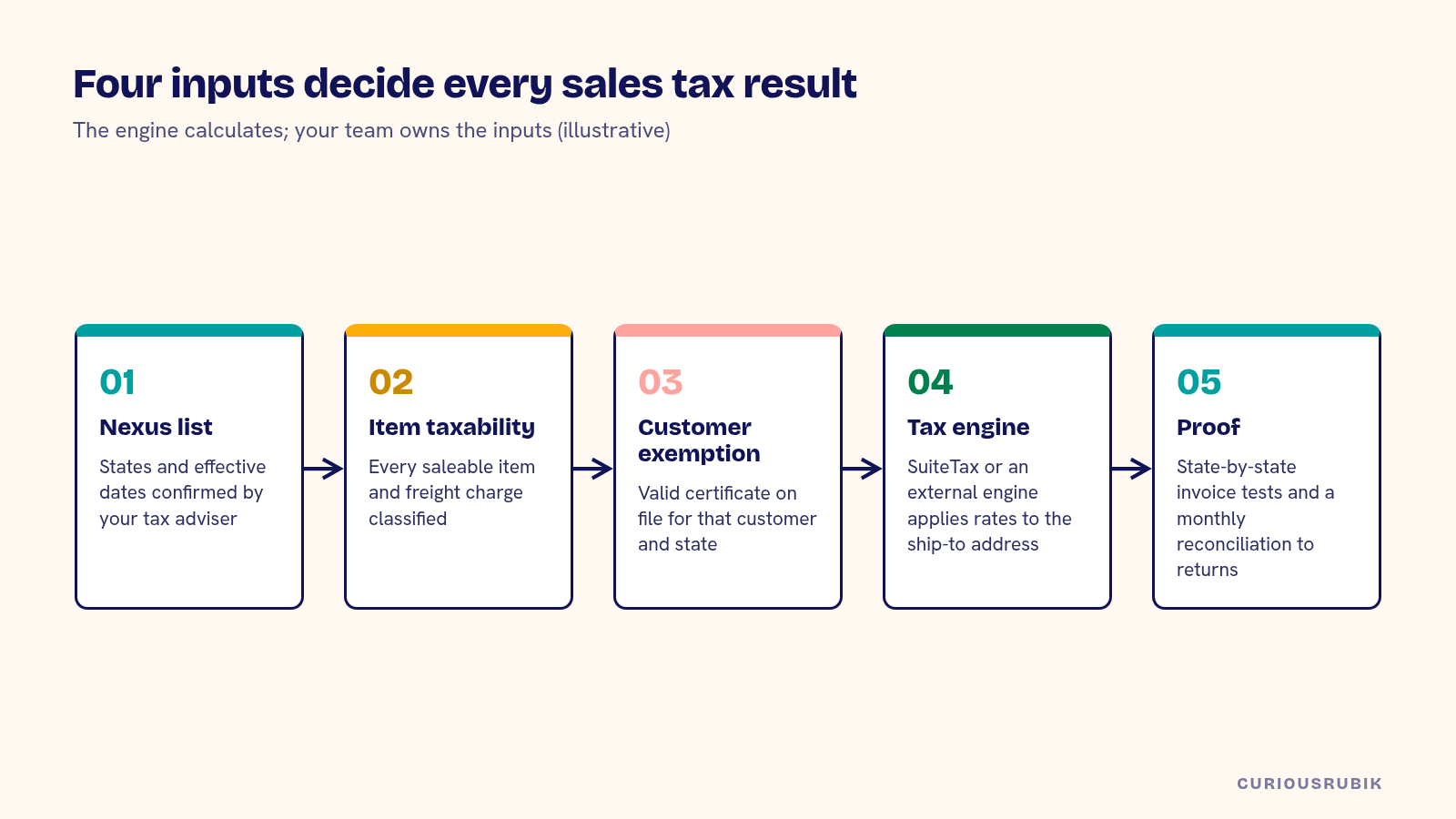
NetSuite sales tax for a US business works when four decisions are made before configuration: where you have nexus, which tax engine calculates the rate, how each item and customer is classified, and how you will prove the result on real invoices. The engine handles rates and jurisdictions. Your team still owns the nexus list, the item taxability and the exemption evidence.
Most sales tax problems found after go-live trace back to one of those inputs. An item mapped to the wrong tax code. A state added to the nexus list late. A customer marked exempt without a valid certificate on file. The configuration screens look complete long before the data behind them is.
Confirm where you have nexus today
Since the Supreme Court's 2018 decision in South Dakota v. Wayfair, states can require remote sellers to collect sales tax once they pass an economic threshold, even without a physical presence. Thresholds and measurement periods vary by state, and some states have changed their rules since they first adopted them. Physical nexus still counts too: employees, inventory in a third-party warehouse or a trade show presence can create it.
Before configuration, have your tax adviser confirm the list of states where you are registered or must register, with effective dates. Keep the source of each decision. NetSuite will calculate tax wherever you tell it you have nexus, so the list is the control point.
Marketplace sales need their own line. Where a marketplace facilitator law applies, the marketplace collects and remits on your behalf, and your NetSuite design must avoid charging the tax a second time on those orders.
Choose between SuiteTax and an external engine
NetSuite offers native tax capability through SuiteTax, and many US companies connect an external engine such as Avalara AvaTax through a SuiteApp. The choice depends on how many jurisdictions you collect in, how complex your product taxability is and whether you need certificate management and filing services from the same provider.
A company collecting in a handful of states with simple products may find native features enough, provided someone maintains the rates and rules. A company shipping into many states, with products that are taxed differently by jurisdiction, usually benefits from an engine that maintains rates and taxability at the address level. Price the engine's annual subscription, transaction tiers and filing add-ons into the total cost, alongside the other lines in NetSuite implementation cost in the US on a complete USD basis. Our earlier post on tax engine selection and testing requirements sets out the evaluation in more detail.
Map item taxability before the first invoice
Every item that can appear on an invoice needs a tax classification the engine understands. Software, digital goods, services, freight, installation and warranties are the usual trouble spots, because states treat them differently.
Export your item list with sales history and sort by revenue. Classify the top items first with your tax adviser, then work down. Give shipping and handling items explicit treatment, since freight taxability varies by state and by how the charge is presented on the invoice.
Collect exemption certificates as evidence
Resale, manufacturing and nonprofit exemptions only hold up in an audit if you have a valid certificate for that customer and state. Marking a customer "exempt" in NetSuite without the certificate creates exposure you won't see until an auditor asks.
Decide where certificates live, who validates them, how expiry is tracked and what happens to orders from a customer whose certificate has lapsed. If you use an external engine, its certificate management tool can drive the exemption status on the transaction. If not, build a review into the customer onboarding workflow.
A hypothetical state-by-state test pack
A hypothetical US equipment supplier collects tax in 9 states and uses an external engine. Before go-live, the controller builds a test pack of 40 invoices. A few rows look like this. All values are illustrative.
| Test | Ship-to | Item | Expected result | What it proves |
|---|---|---|---|---|
| 1 | Texas, taxable customer | Equipment + freight | Tax on both lines at the address rate | Freight treatment for that state |
| 2 | Same customer, resale certificate on file | Equipment | No tax, certificate referenced | Exemption evidence drives the result |
| 3 | A state with no nexus | Equipment | No tax calculated | Nexus list is respected |
| 4 | Marketplace order | Equipment | No tax charged by you | No double collection |
| 5 | Credit memo against test 1 | Partial return | Tax reversed proportionally | Credits follow the original calculation |
The supplier finds that test 1 charges no tax on freight because the shipping item was never classified. A single item fix corrects it before the first live invoice. Without the pack, the gap would have shown up as underpaid tax months later.
Reconcile tax collected to the returns you file
Calculation is half the job. Each month, someone has to agree the tax collected in NetSuite to what the engine reports, and then to the returns filed. Differences come from invoices edited after the engine committed the transaction, voided documents that didn't reach the engine and manual journals to the tax liability account.
Agree the monthly reconciliation steps before go-live, and decide who reviews the tax liability account. When a figure looks wrong, investigate the unexpected tax result on the transaction before adjusting the ledger.
Plan for use tax and changes over time
Purchases where the vendor didn't charge sales tax may create a use tax obligation. Decide whether you will accrue it in NetSuite, through the engine or outside the system, and who reviews vendor bills for it. Vendor tax data has a second use at year end, covered in NetSuite 1099 reporting: vendor setup and year-end checks.
Then plan for change. New states cross thresholds as the business grows, and rates and rules change regularly. Give someone the job of reviewing nexus each quarter against sales by state, and of retesting a sample of invoices after any engine or NetSuite release that touches tax.
Run the go-live NetSuite sales tax checklist
Before the first live invoice, confirm each of these:
- Is the nexus list confirmed by your tax adviser, with effective dates and sources?
- Are marketplace orders excluded from your own tax collection where a facilitator collects?
- Has the tax engine decision been made, with subscription and filing costs in the budget?
- Does every saleable item, including freight, have an approved tax classification?
- Are exemption certificates stored, validated and linked to customer status?
- Has the state-by-state test pack passed, including credit memos?
- Is there a monthly reconciliation from NetSuite to the engine to the filed returns?
- Is someone named to review nexus quarterly?
A CuriousRubik NetSuite implementation project can include the nexus review, item mapping and test pack as agreed outcomes with acceptance criteria. If you are planning the wider US scope, start with A NetSuite US Implementation Requirements Checklist, and if you sell bundled software or services, read NetSuite ASC 606 requirements before configuration as well. Our US NetSuite services page shows the wider scope we cover.
Related reading: NetSuite Tax Engine Selection and Testing Requirements
Frequently asked questions
Does NetSuite calculate US sales tax automatically?
Yes, once nexus, tax codes and item classifications are configured, either natively or through an external engine. The quality of the result depends on that setup, so test it.
Do we need Avalara with NetSuite?
Not always. It tends to pay off when you collect in many states or sell products with varied taxability. Compare it with native features on your own invoice sample.
Who decides where we have nexus?
Your tax adviser and finance team. NetSuite and tax engines apply the nexus you configure. They don't decide it for you.
How do we handle tax on marketplace sales?
Where a marketplace facilitator collects and remits, make sure NetSuite doesn't charge tax again on those orders. Test it with a sample marketplace order.
How often should we review nexus?
Quarterly is a sensible rhythm for a growing business. Compare sales and transaction counts by state against current thresholds, and record each decision.