For CFOs and finance heads at Vietnamese contract manufacturers who want supplier invoices checked before anyone keys them in.
Last reviewed: 29 November 2026. This article describes process design, not tax advice or a product feature. Invoice rules can change, so confirm them with your tax adviser.
This Vietnam factory invoice capture checklist covers 10 checks before posting. Capture each electronic invoice once and match material and subcontract invoices to an approved purchase order and the warehouse record of what arrived. Software runs the routine checks and flags duplicates. Your finance team handles exceptions and approves payment.
Key takeaways
- Read the structured invoice file, not only the PDF copy a supplier emails.
- Match material and subcontract invoices to an approved purchase order and a recorded receipt before posting.
- Keep tax differences, price changes, bank detail changes and payment release with named people.
What is invoice capture for a Vietnamese factory?
Invoice capture is the step where a supplier invoice enters your accounts payable (AP) process as a checked record. Capture ends when the invoice is ready for approval in the system you use to manage purchasing and accounting, such as an enterprise resource planning (ERP) system.
A contract manufacturer in Vietnam can receive hundreds of supplier invoices a month. They cover resin, steel, cartons, subcontracted plating, freight, utilities and repairs. A supplier may send a structured data file called XML along with a PDF you can read. A clerk may still type in the invoice and ask the warehouse to confirm what arrived.
Vietnam generally requires sellers to issue electronic invoices in a standard data format with prescribed fields. Some transactions and sellers are exempt. The current decree on electronic invoices, Decree 254/2026/ND-CP, took effect on 1 July 2026. Ask your tax adviser which fields and cases apply to your business before you set the checks below.
At CuriousRubik, we build AI automation portals for this work. Software reads the invoice file and compares it with your supplier and order records. It flags each line that fails a check. The portal connects to your current system, which stays the record of every invoice.
What belongs on a Vietnam factory invoice capture checklist?
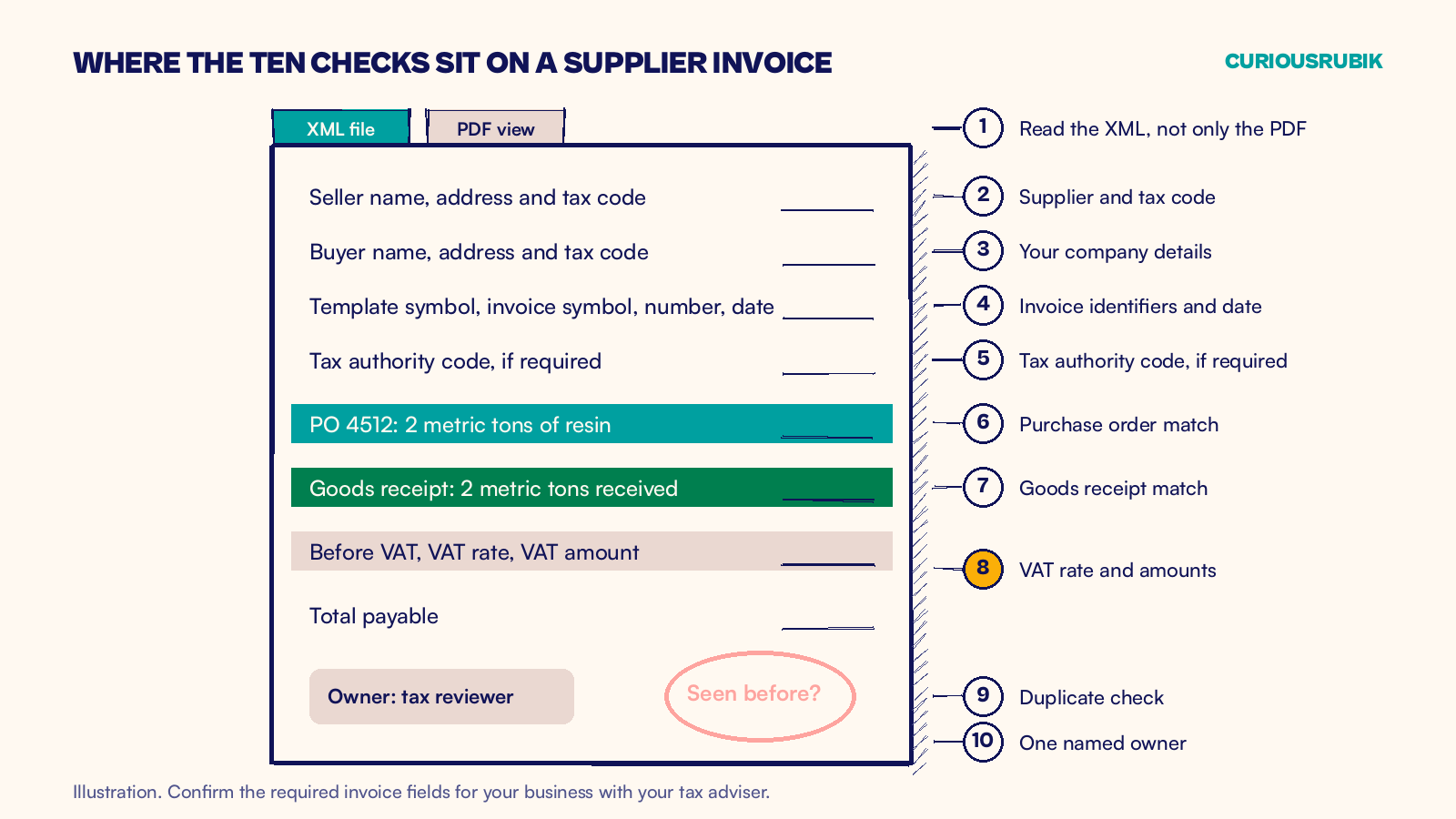
Run these 10 checks in order. Each one has a short reason so your team knows why it is there.
1. Capture the XML file, not only the PDF
The XML file holds the invoice data in a structured form. The PDF is a view of it. Reading the XML avoids misread numbers and lets software check every field the same way each time.
2. Confirm the supplier and its tax code
Match the seller's name, address and tax code to the supplier record in your system. A new or changed tax code is a reason to stop and ask, not to create a new supplier.
3. Confirm your own company details
Check that your company name, address and tax code on the invoice are correct. If they are wrong, ask the supplier how it will correct the invoice and check the handling with your tax adviser.
4. Check the invoice identifiers and date
Record the invoice template symbol, invoice symbol and number exactly as issued. Use all three fields in the duplicate check. Flag any invoice dated well before or after the delivery it covers.
5. Check the tax authority code where one applies
Many invoices carry a code issued by the tax authority. Your tax adviser can tell you which invoices you receive should carry one. Flag any invoice that should have a code and does not.
6. Match to an approved purchase order
Every material and subcontract invoice should point to an open purchase order. Match supplier, item, unit and price. Invoices without an order number go to the buyer to identify, not to AP to search for.
7. Match to the goods receipt, the warehouse record of what arrived
Compare invoiced quantities with what the warehouse recorded. For subcontract work, compare with the job or batch that came back. Ask the warehouse to confirm any receipt difference. Send unresolved quantity differences to the buyer for a decision before posting.
8. Check the value added tax (VAT) rate and amounts
Recalculate the amount before VAT, the VAT amount and the total for each rate on the invoice. A difference of even one line goes to the tax reviewer, not back to the clerk to adjust.
9. Stop duplicates
Check the supplier tax code, invoice template symbol, invoice symbol and number against invoices already captured. The same invoice can arrive twice, once by email and once with the delivery.
10. Route each exception to one named owner
Price questions go to the buyer, quantity questions to the warehouse, tax questions to the tax reviewer and supplier detail changes to the AP lead. Each exception should show who holds it and since when.
A hypothetical month at a Binh Duong assembly plant
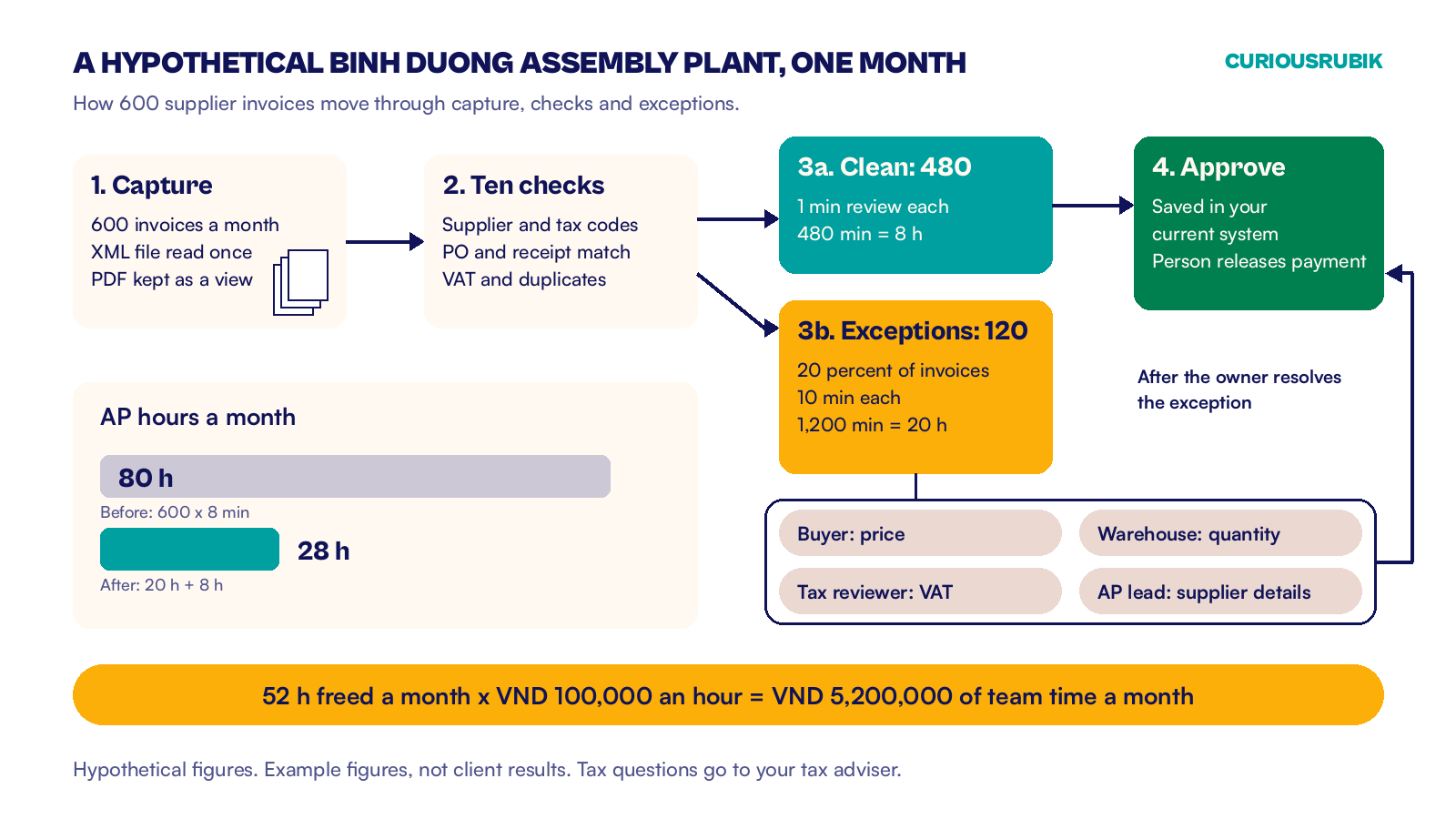
A hypothetical electronics assembly plant in Binh Duong receives 600 supplier invoices a month. Today, a clerk keys and checks each one by hand, which takes about eight minutes. That is 4,800 minutes, or 80 hours a month.
With capture in place, software reads all 600 and runs the 10 checks. Assume 120 invoices, or 20 percent, fail a check and need a person for about 10 minutes each. That is 1,200 minutes, or 20 hours. The other 480 get a one minute review before approval, which adds 480 minutes, or 8 hours.
| Measure | Before | After |
|---|---|---|
| Supplier invoices a month | 600 | 600 |
| Invoice handling | 600 entered and checked by hand | 120 exceptions (20%) and 480 routine reviews |
| Minutes per invoice | 8 | 10 per exception, 1 per clean invoice |
| AP hours a month | 80 | 28 (20 + 8) |
| Hours freed a month | 52 | |
| Value at VND 100,000 an hour | VND 5,200,000 a month |
These are example figures, not client results. The exception rate depends on how clean your supplier and item records are and on how many invoices carry an order number. Measure your own baseline for four weeks first: invoices per clerk per day, exception rate, days from receipt to approval and duplicates caught.
The hours are only part of the value. When invoices are approved sooner, your team can take up early payment terms where suppliers offer them, and month end has fewer invoices still on hold. The same approach can serve supplier invoice matching in Indonesia, where suppliers fix their own mismatches in a portal before AP sees them.
Which decisions stay with your finance team?
Software takes the keying and first round of checks. It should not decide anything that changes what you pay or what you file. These stay with a person:
- any VAT difference, or an invoice that may need an adjustment or replacement by the supplier
- accepting a price that differs from the purchase order
- accepting a short delivery or a quantity over the order
- approving a change to a supplier's bank account, after calling an established contact on a number already on file
- releasing payment
Vietnam's rules set out when a supplier must adjust or replace an invoice and when a notice is enough. Agree with your tax adviser how your team handles each case, then write that into the exception steps.
How ready is your finance team for invoice capture?
Give your team one point for each statement that is true today:
- Supplier records hold a current tax code for every active supplier.
- Item records hold the units suppliers actually invoice in.
- Most material invoices quote a purchase order number.
- The warehouse records receipts on the day goods arrive.
- Subcontract returns are recorded against the job or batch.
- Invoices arrive in one shared mailbox, not in personal inboxes.
- Someone owns the duplicate check today.
- Price, quantity and tax questions each have a named owner.
- Your tax adviser has confirmed which invoice cases need special handling.
- You know your current invoices per clerk per day.
A score of 8 to 10 means you are ready to pilot capture with the 20 suppliers that send the most invoices. A score of 5 to 7 means you should fix supplier and item records first, which shortens the pilot later. A score below 5 means you should start with receipts and order numbers, because capture cannot match what was never recorded.
The vendor and partner portal adds a supplier view once capture works. Our workflow automation practice sets up the exception routing for manufacturing finance teams. On the customer side, see why a wholesale customer order portal matters in Singapore.
CuriousRubik can design an AI automation portal that connects your supplier invoices to the systems you already run. You can book a consultation to walk through one supplier group, agree what good looks like and see a working result before you decide the next step.
Related reading
What Malaysia E Invoice Means for Wholesale AP Capture
How wholesale AP teams can capture supplier invoices once under the Malaysian mandate.
How a Supplier Portal Cuts Invoice Mismatches in Indonesia
How suppliers confirm orders and invoice against the goods receipt.
Accounts Payable Invoice Processing and Workflow Automation
How AP automation reaches past data entry into approvals and exceptions.