For operations heads at Australian builders merchants who want to send accurate quotes sooner and stop unit errors reaching orders.
Last reviewed: 27 November 2026. This article describes process design, not a product feature. How it works depends on your system, catalog and customers.
I would automate quoting first, to catch unit and price errors before they reach an order. Building supplies quote automation in Australia can read the builder's list and draft a quote using your catalog, stock and prices. Your counter team resolves the exceptions and approves the quote before it goes out.
What is building supplies quote automation in Australia?
Building supplies quote automation is a controlled way to turn a builder's request into a priced quote without retyping it. The request might be an emailed takeoff, a PDF from an estimator, a photo of a handwritten list or notes from a phone call. A takeoff is the list of materials and quantities measured from a set of plans.
Software reads the request and matches each line to an item in your catalog. It converts the builder's units into the units you sell. It checks stock at the branch that will supply the job and applies the customer's trade or project price. Then it prepares a draft quote for a person to approve.
The work happens in an AI automation portal. That is a controlled workspace where your staff, and later your trade customers, can send a request and see its status. The portal connects to the system you already run. It does not replace it.
Why should quotes come before orders?
Order entry can look like the obvious place to start if your counter team spends part of each day keying orders.
My view is that the quote comes first, for three reasons.
A quote error can carry through to the order
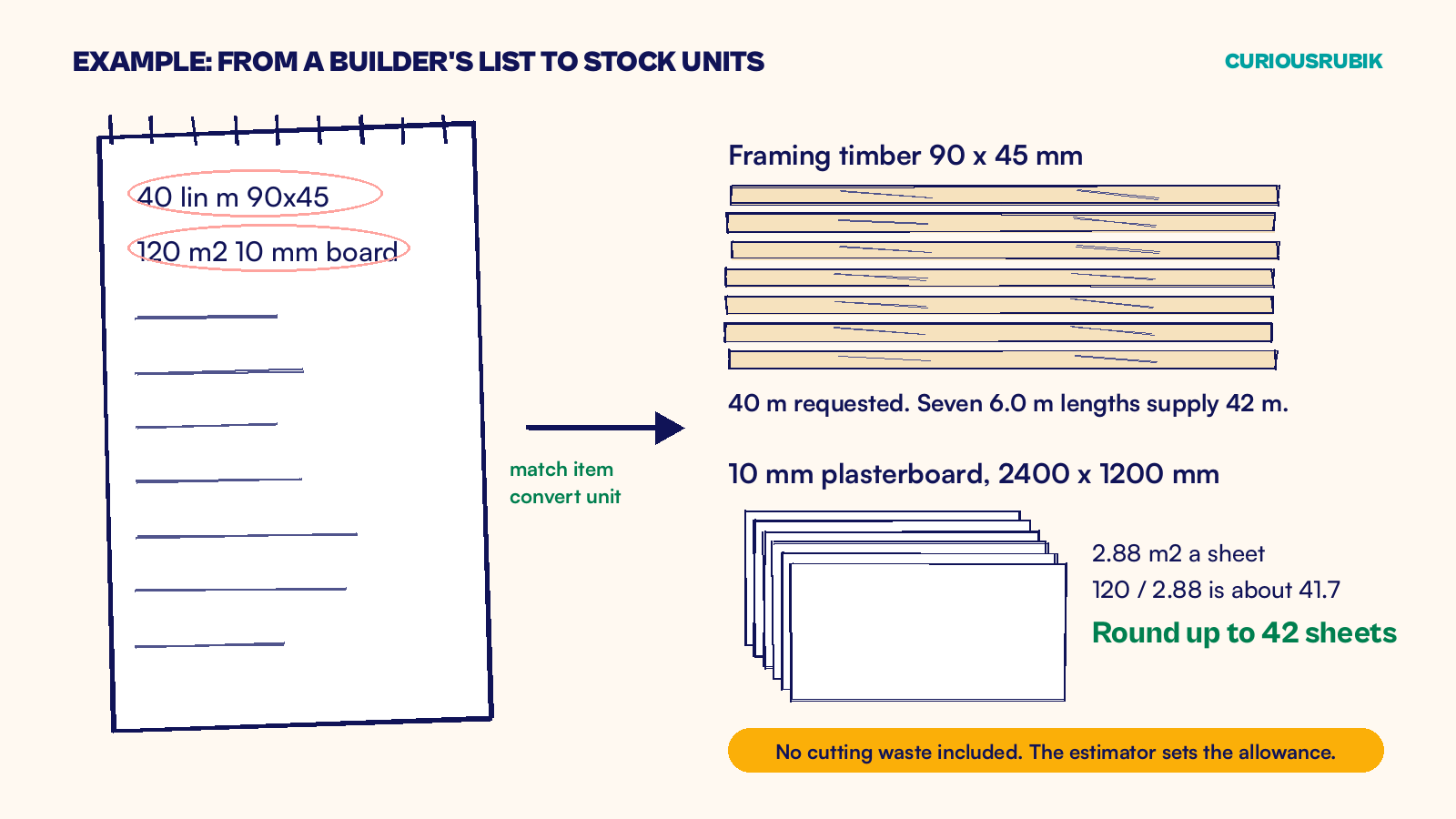
A unit error can occur when someone enters the builder's quantity in the wrong sales unit. For example, a builder asks for 40 lineal meters of 90 x 45 mm machine graded pine (MGP10) framing. If you sell it in 6.0 meter lengths, the quote needs seven lengths, which supply 42 meters. Someone in a hurry keys 40 lengths instead.
In the same way, 120 square meters of 10 mm plasterboard rounds up to 42 whole sheets at 2400 x 1200 mm, not 120 sheets. These conversions assume no cutting waste and do not check whether the required pieces fit the stock lengths or sheets. The estimator checks the layout and confirms any waste allowance.
If a wrong quote is accepted and copied into an order, the truck can go out with the wrong load. Fixing it may mean a credit note or a second delivery. Automating the order step alone would copy that error faster.
A faster reply can keep you in the running
A builder who asks several merchants for a price may decide before the last quote comes back. If your quote takes until tomorrow, the decision can be made without it. Drafting from the list gives your team the chance to check and send the quote sooner.
A stock check can flag a shortage before you quote
Yesterday's stock sheet can miss a shortage at the supplying branch. Check current stock at the supplying branch before you send the quote. Your counter team then confirms another branch, a later date or an approved substitute.
A hypothetical week at a western Sydney merchant
A hypothetical builders merchant in western Sydney receives 150 quote requests a week by email, phone and counter visit. Each takes about 20 minutes to key, check for stock and price. That is 3,000 minutes, or 50 staff hours a week.
With quote automation, software drafts each quote and flags the lines it cannot match. Checking a drafted quote takes about 8 minutes on average. That is 1,200 minutes, or 20 hours a week.
| Measure | Before | After |
|---|---|---|
| Quote requests a week | 150 | 150 |
| Minutes per quote | 20 | 8 |
| Staff hours a week | 50 | 20 |
| Hours freed a week | 30 | |
| Value at AUD 45 an hour | AUD 1,350 a week |
These are example figures, not client results. Your own numbers will depend on list length, catalog quality and how many requests arrive as photos.
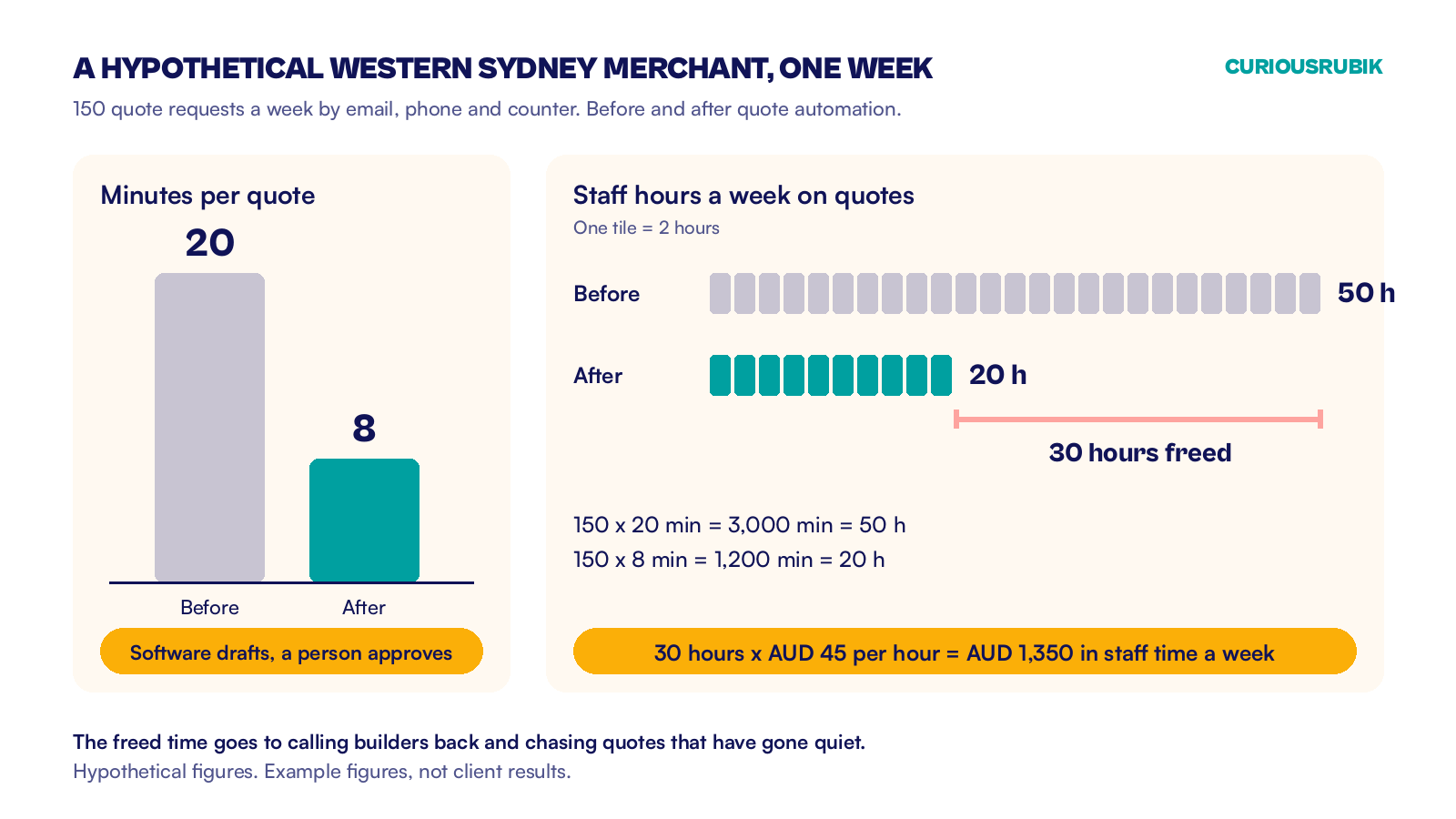
The hours matter, but they are not the main gain. The freed time goes to calling back builders, chasing quotes that have gone quiet and checking the jobs with tight delivery windows. Track these four measures for four weeks before you change anything:
- Minutes from request received to quote sent.
- Quotes sent with a wrong unit, item or price.
- Credit notes and second deliveries traced back to the quote.
- Share of quotes that become orders within 14 days.
What should stay with your counter team?
Automation should take the typing and matching off your team. It should not take the decisions. In a builders merchant, the decisions that stay with a person include:
- substitutions when an item is short or discontinued
- price exceptions, including prices below the customer's agreed trade or project price
- credit limit overrides
- delivery promises, including jobs that need a crane truck or a site access check
- waste allowances, which the estimator confirms
Here is how a request moves through the portal, one action per step:
- Log the request in the portal, from email, upload or the counter.
- Capture each requested item and quantity.
- Match each line to a catalog item.
- Convert each quantity to the unit you sell.
- Check stock at the supplying branch.
- Apply the customer's agreed price.
- Flag exceptions for review.
- Have the right person clear each exception.
- Have a counter team member approve the draft.
- Save the approved quote in your ERP or current system.
- Send the approved quote to the builder.
When the builder accepts, your team can turn the approved quote into an order without retyping its lines, where your current system supports that step. This is the point where order entry automation, like the approach in our guide to AI order entry for wholesalers, joins up with the quote.
Where would I start?
Start with your ten busiest trade accounts and the product groups that cause the most unit errors. Timber, plasterboard, mesh and roofing are common places to look. Clean the unit conversions and the customer price lists for those groups first. The software can only quote as well as the catalog it reads.
Then run four weeks of real requests through the portal beside your current method. Use the messy ones too, such as photographed lists and takeoffs with old item codes. Compare the four measures above. If a customer portal later lets builders upload lists themselves, the same matching rules apply.
For more on how quote, order and invoice records should hand over, see the architecture of a quote to cash process. Building supplies is a wholesale distribution business at heart, and the same discipline applies.
Extend the portal to order entry once the pilot shows two results. Quotes go out sooner than your baseline, and fewer of them need a correction. If either measure has not moved, fix the catalog and price rules before you widen the scope. Order workflow automation then starts from quotes your team has already checked.
CuriousRubik can design an AI automation portal that connects your quoting to the systems you already run. You can book a consultation to walk through one product group, agree what good looks like and see a working result before you decide the next step.
Related reading
AI Order Entry for Singapore Wholesalers Tired of Retyping
How to capture WhatsApp and PDF orders once and check only the exceptions.
The Architecture of a High-Performing Quote-to-Cash Process
How quotes, orders, invoices and payments hand over without rework.
Customer Portals: Reducing Service Costs While Improving Experience
How self service portals cut routine calls and give customers clear answers.