If you run a Singapore wholesale distributor, this explains how to decide whether trade customers should order and check invoices online.
Last reviewed: 29 November 2026. This article describes process design, not a product feature. How it works depends on your system, customers and credit rules.
A wholesale customer order portal in Singapore lets trade customers place repeat orders, check delivery status and download invoices without calling your office. I think the owner should decide where to start. The portal can cut routine service calls, and easier access to invoices can remove one reason for late payment.
What is a wholesale customer order portal in Singapore?
A wholesale customer order portal is a secure page where each trade customer sees its own price list, past orders, open deliveries and invoices. The buyer at a restaurant group, a minimart or a contractor logs in, repeats last week's order and changes two lines. The order goes into your order queue, where your team can review any exceptions.
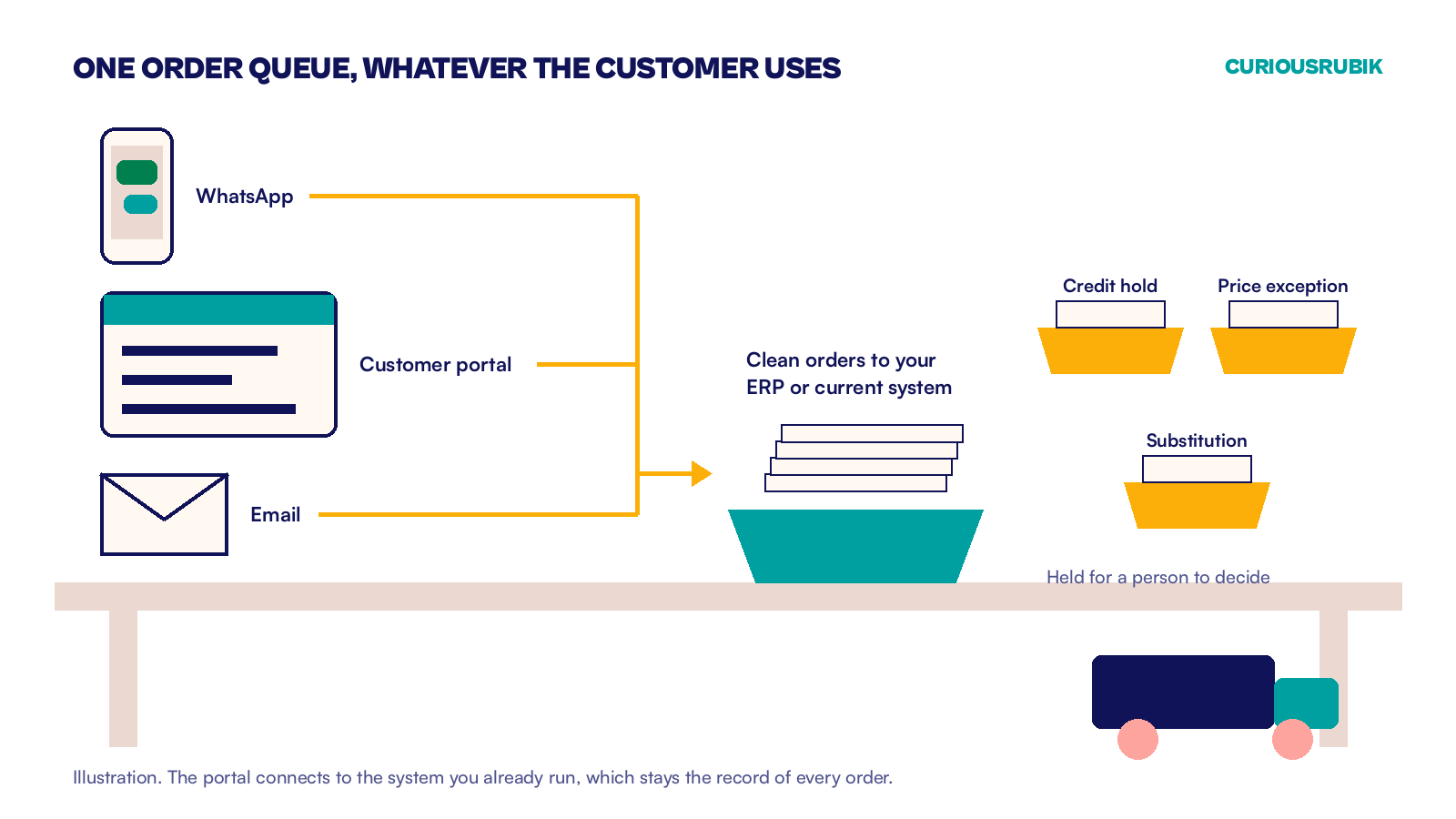
Your orders may arrive on WhatsApp, by email or by phone. Sales reps may also bring in orders they took in person. A portal does not have to replace all of these on day one.
At CuriousRubik, we build these as AI automation portals. Customers can enter their own orders in the portal.
Some customers will keep sending WhatsApp messages and PDFs. The software can read those messages and PDFs and match the order lines to your items and prices. It sends unclear lines to your team for review.
The portal can connect to the system you already use, including an enterprise resource planning (ERP) system. Your current system keeps the official order and invoice records.
If you want the order capture side first, our post on AI order entry for Singapore wholesalers covers the sales desk view.
Why should a CEO own the portal decision?
Your service team spends time answering status calls, and finance spends time resending invoices. I would ask both teams for their figures before deciding what the portal should handle first.
A hypothetical day of customer calls
Take a hypothetical Singapore food and household goods distributor with 150 trade customers. Its customer service team handles about 48 calls and messages a day asking where an order is, whether an item is in stock or for a copy of an invoice. Each one takes about five minutes to look up and answer.
That is 240 minutes, or four hours of staff time every working day. Suppose half of those questions move to the portal because customers can see the answer themselves. The team gets back two hours a day, or 10 hours over a five day week. At an example cost of SGD 30 an hour, that is SGD 300 a week of time freed for customers who need a person.
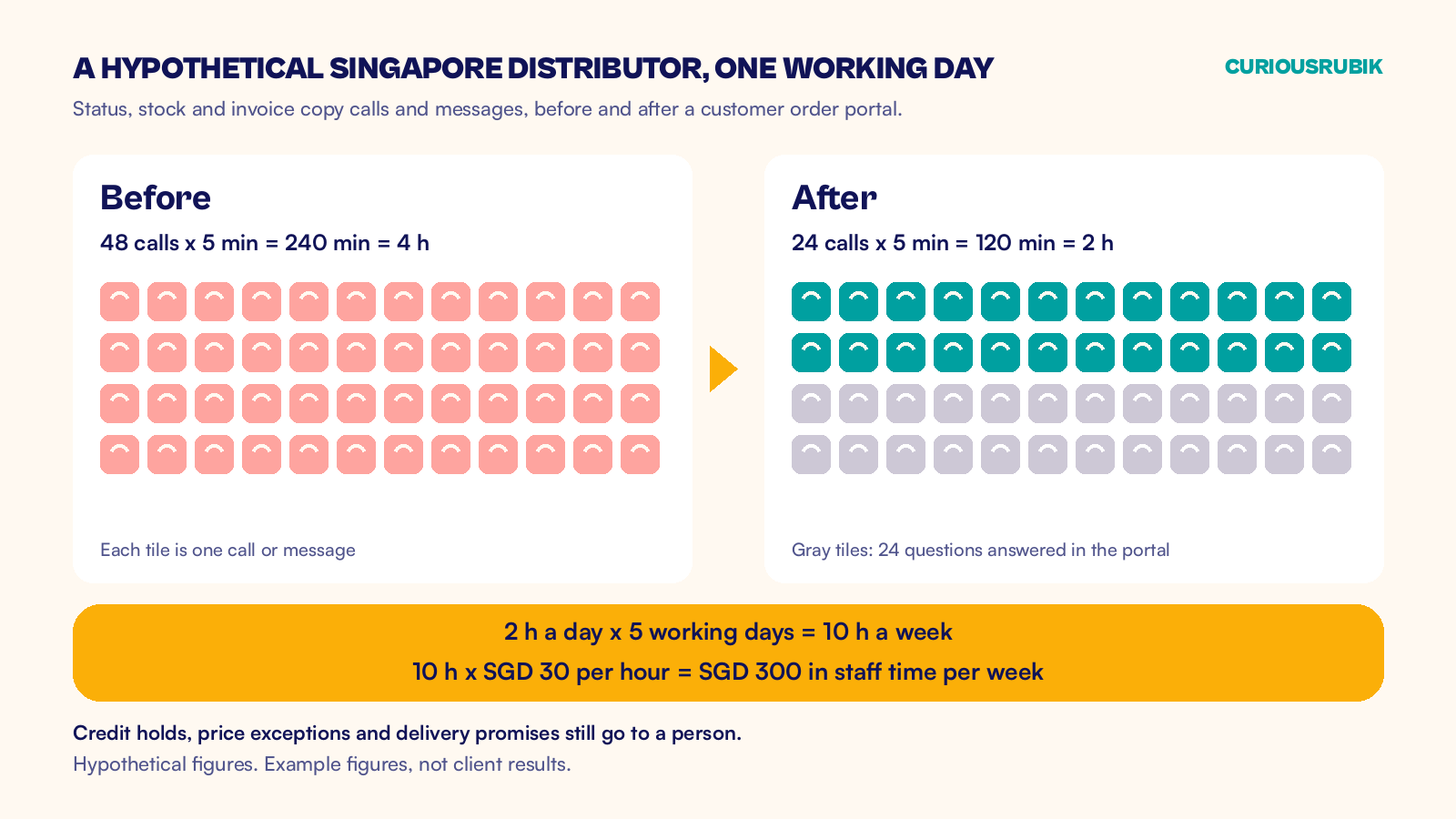
These are example figures, not client results. Count your own calls for two weeks before you estimate anything, and note how many are simple status questions.
Missing invoice copies can delay payment
Payment can wait while a customer's accounts team asks for a missing invoice or the signed delivery order that confirms receipt. Your finance team may have to find those records and resend them.
When you make those copies available in the portal, authorized staff at each customer can download documents for their own account. I would track requests for missing documents and see whether fewer invoices are held up for that reason.
Order changes stop living in chat threads
A buyer changes a quantity on WhatsApp at 9 pm. A sales rep forwards it the next morning. By then the picking list has printed.
The portal can record the requested change against the order and log when it came in. Allow routine changes while the order is open and before your cutoff. Route requests to your team once the cutoff passes or the order is released for picking.
The portal makes your rules visible
Write down your minimum order values, delivery days by area and cutoff times. Review those rules with your team before you display them to customers in the portal. New staff then work from the same written rules.
What should stay with your people?
The portal takes typing and status questions off your team. It should not take decisions that carry risk or affect a customer relationship. In my view these stay with a person:
- releasing an order for a customer who is over the credit limit or has overdue invoices
- approving any change to the customer's agreed price
- offering a substitute when an item is short
- promising a delivery date outside the normal schedule
- verifying and approving billing or delivery address changes before updating the customer record
A credit hold stops an order from moving ahead until an authorized person clears it. In a hypothetical example, a customer submits an order for SGD 4,000 while SGD 6,000 in invoices are more than 60 days overdue. If that triggers your credit rules, the portal records the request as pending and alerts your credit controller.
The credit controller checks the account and may call the customer about payment. The controller decides whether to release the order under your credit policy. The customer can see that the order is pending while picking and shipment wait for approval.
Set these up as exceptions that land in one queue with a clear owner. Your sales and credit teams then spend their time on the orders that need judgment. Our workflow automation work routes each exception to the right person.
For a first pilot, I would use 20 regular customers and eight weeks:
- Invite customers who order every week from a stable list.
- Give each buyer access to their own prices, repeat orders, delivery status and invoice copies.
- Keep phone and WhatsApp open during the pilot.
- Track portal order share, daily status calls and days from delivery to invoice.
- Use the results to decide whether to invite the next group.
Questions to ask your team this week
Before you approve a portal project, I would ask your managers for four answers:
- How many status, stock and invoice copy calls did we take last week, and how long did each take?
- Which 20 customers order most often from a stable list?
- Which of our order rules (cutoff times, minimum values, delivery days) are written down, and where?
- Who approves credit holds and price exceptions today, and how long do those orders wait?
If routine calls take up a lot of staff time and your rules are clear, test a customer portal with one group of trade buyers. See how it fits your wholesale distribution workflow before you invite more customers. Our post on customer portals and service costs explains the service side in more depth.
CuriousRubik can design an AI automation portal that connects your trade customers' orders and invoices to the systems you already run. You can book a consultation to walk through one customer group, agree what good looks like and see a working result before you decide the next step.
Related reading
AI Order Entry for Singapore Wholesalers Tired of Retyping
How AI order entry captures WhatsApp and PDF orders once for the sales desk.
Customer Portals: Reducing Service Costs While Improving Experience
How a customer portal cuts routine service requests.
Why Self-Service Portals Are Becoming Essential Business Infrastructure
Why customers and suppliers now expect to serve themselves online.