For Singapore wholesale operations heads who want WhatsApp, email and PDF orders entered once, checked properly and shipped on time.
Last reviewed: 22 November 2026. Product details reflect this review date. Availability and behavior can vary by account, role and release.
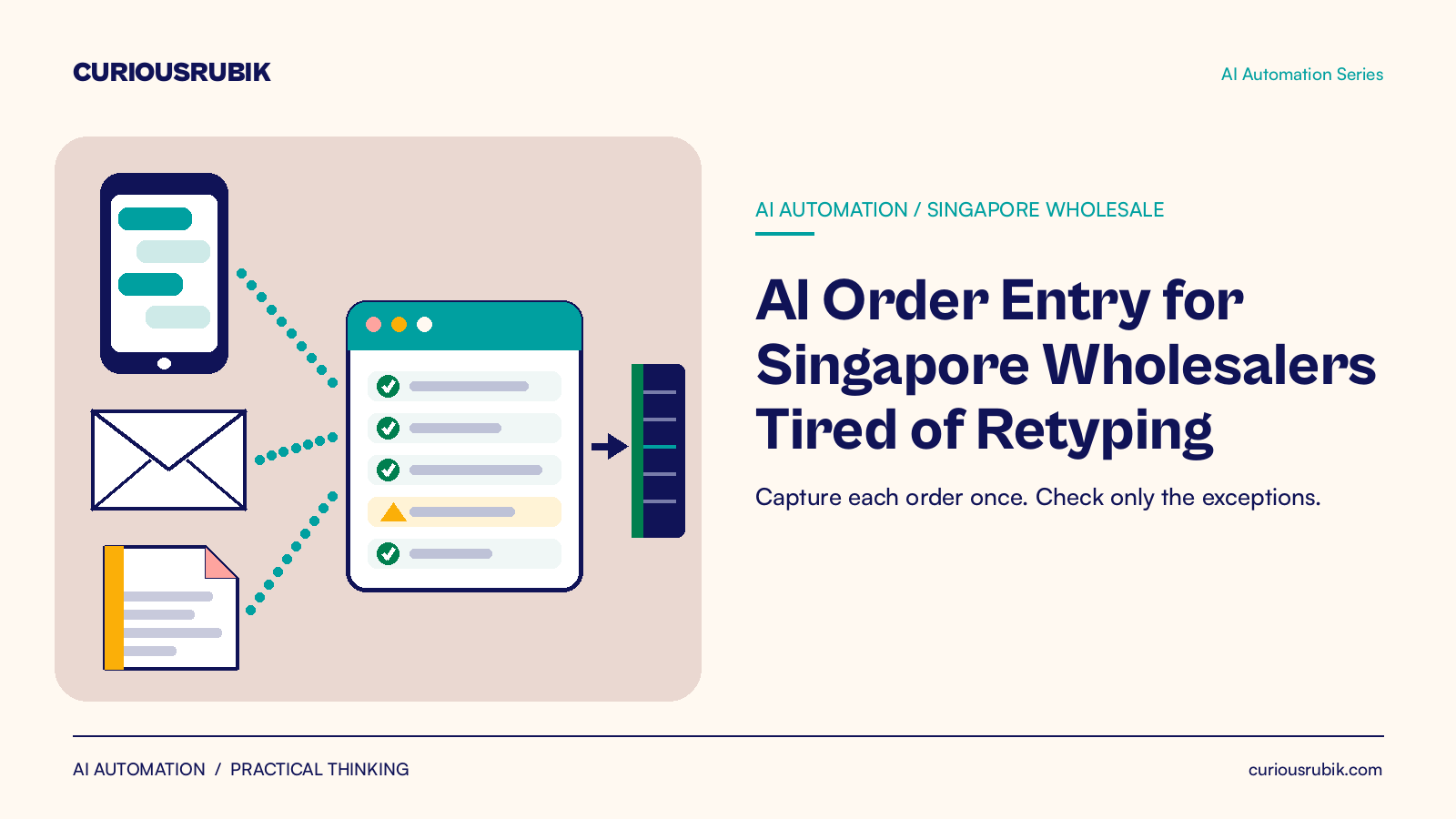
AI order entry for Singapore wholesalers means software reads each WhatsApp message, email or PDF purchase order. It matches the lines to your customers, items, units and prices, then prepares a sales order in your system. Your team checks only lines that do not match. Typing time falls, wrong item credit notes drop and invoices go out sooner.
Key takeaways
- Start with clean customer, item and price data. The model can only match against what your system holds.
- A person still approves price exceptions, credit overrides and new items.
- Measure hours per 100 orders and wrong item credit notes before you start, so you can see the change.
What is AI order entry for a Singapore wholesaler?
AI order entry is the use of software to read an incoming order, find the customer and items in it, then prepare a clean order for approval. It replaces the step where someone reads a message and types it into the system line by line.
For a Singapore wholesaler, orders rarely arrive in one format. A restaurant buyer sends a WhatsApp photo of a handwritten list. A hotel group emails a PDF purchase order. A regular customer types "same as last week, plus 2 cartons of gloves".
Each one ends up as a sales order in your ERP, but only after someone reads it, finds the right codes and keys it in.
An AI automation portal sits between the inbox and your ERP. It is a controlled workspace where orders are captured, matched and checked before anything is written to your system. It connects to the ERP you already run. It does not replace it.
Where does retyping cost a Singapore wholesaler the most?
Typing time is the obvious cost. The larger costs often show up later.
| Where it shows | What it looks like | What to count |
|---|---|---|
| Hours | Staff key orders before the morning cutoff, then again after lunch | Minutes per order and orders per person per day |
| Errors | Wrong pack size, wrong variant, a missed line | Credit notes and redeliveries for wrong items each month |
| Cash | Orders entered late, so delivery and invoice slip a day | Share of orders invoiced on the delivery day |
| Speed | Customers wait for a confirmation or call to check | Time from message to confirmed order |
| Knowledge | Only two people know which "blue gloves" each customer means | Orders that wait for one specific person |
The last row matters more than it looks. When customer shorthand lives in one person's head, a week of leave slows the whole desk.
How do we capture WhatsApp and PDF orders into our current system?
- Pick the intake channels. Start with one shared WhatsApp Business number and one orders email address. Orders sent to personal phones stay invisible to any system.
- Load the reference data. The portal reads your customer list, delivery addresses, item codes, units of measure and price lists from your ERP.
- Teach it customer shorthand. Record the names customers really use, such as "the 500 ml bottles" or "usual order", and map them to item codes.
- Read and match each order. The model pulls out the customer, delivery date, items, quantities and notes. It then matches each line to a customer and item record in your system.
- Score each line. A line that matches the customer, item, unit and current price goes to the approval list. A line with any doubt goes to the exception queue, with the reason shown.
- Approve and write back. A coordinator confirms the order in the portal. The portal creates the sales order in your ERP through its standard connection, with the original message attached.
- Confirm to the customer. The customer receives the lines as entered, so a mistake is caught before the truck is loaded.
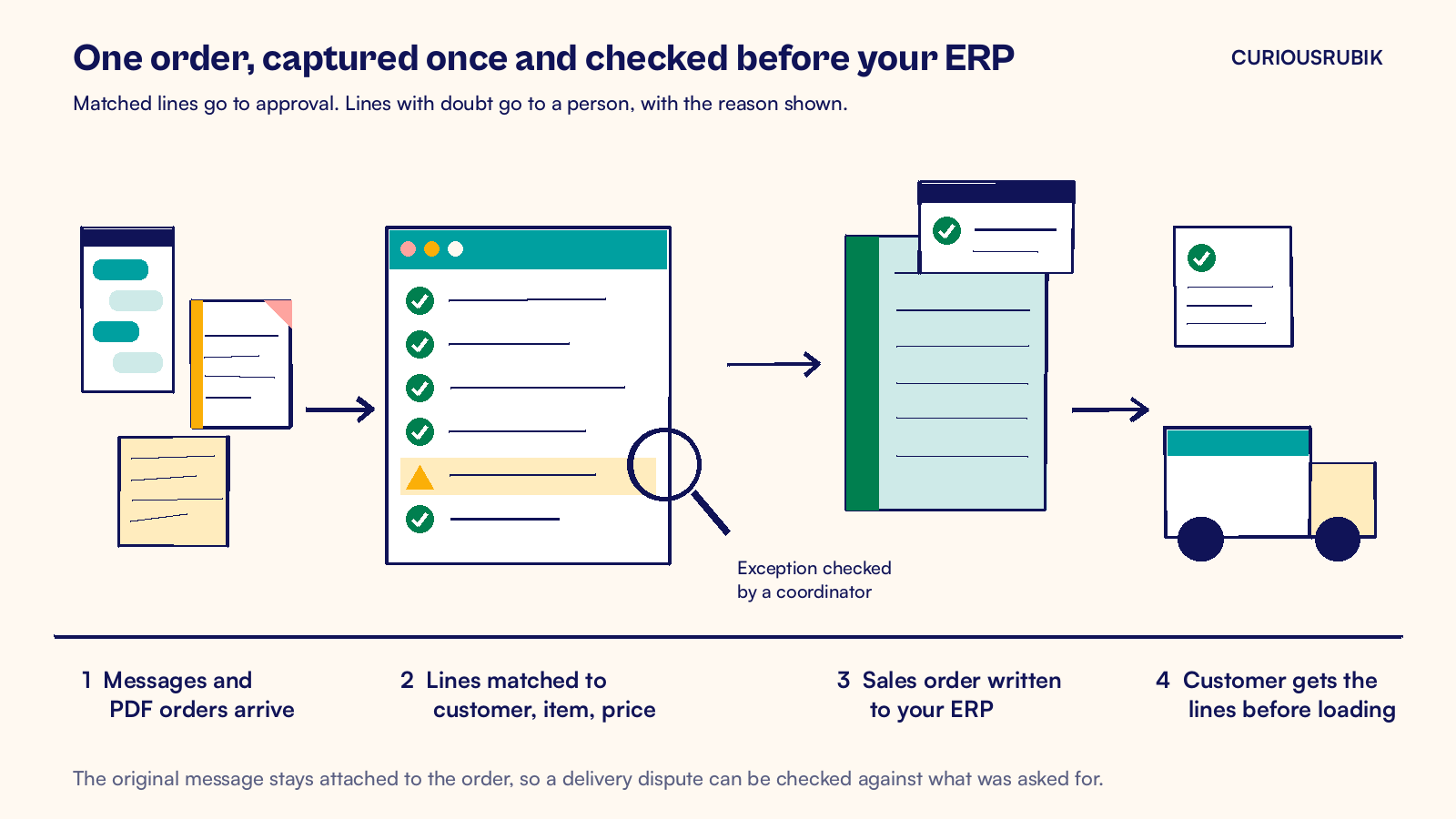
Step 4 should also flag a message that repeats an earlier order. A customer who resends a corrected list needs an updated order, because a revised purchase order should not become a second customer order. Keep the original message linked to the order as well. When a customer disputes a delivery, your team can show exactly what was asked for.
This capture, check and write back pattern is the core of our workflow automation work.
Which order lines should a person still check?
Automation takes the typing and matching off your team. It should not take decisions that change money, credit or risk.
Keep a person on these lines:
- Prices that differ from the customer's agreed price list.
- Orders from customers on credit hold or over their credit limit.
- New items, new delivery addresses or new customers.
- Quantities far outside the customer's normal pattern, such as 200 cartons instead of 20.
- Substitutions when stock is short.
Each exception should show the reason and a suggested fix, so the check is quick. For more on where to draw that line, read our post on human in the loop automation.
A hypothetical Singapore distributor's order desk
Hours on the order desk
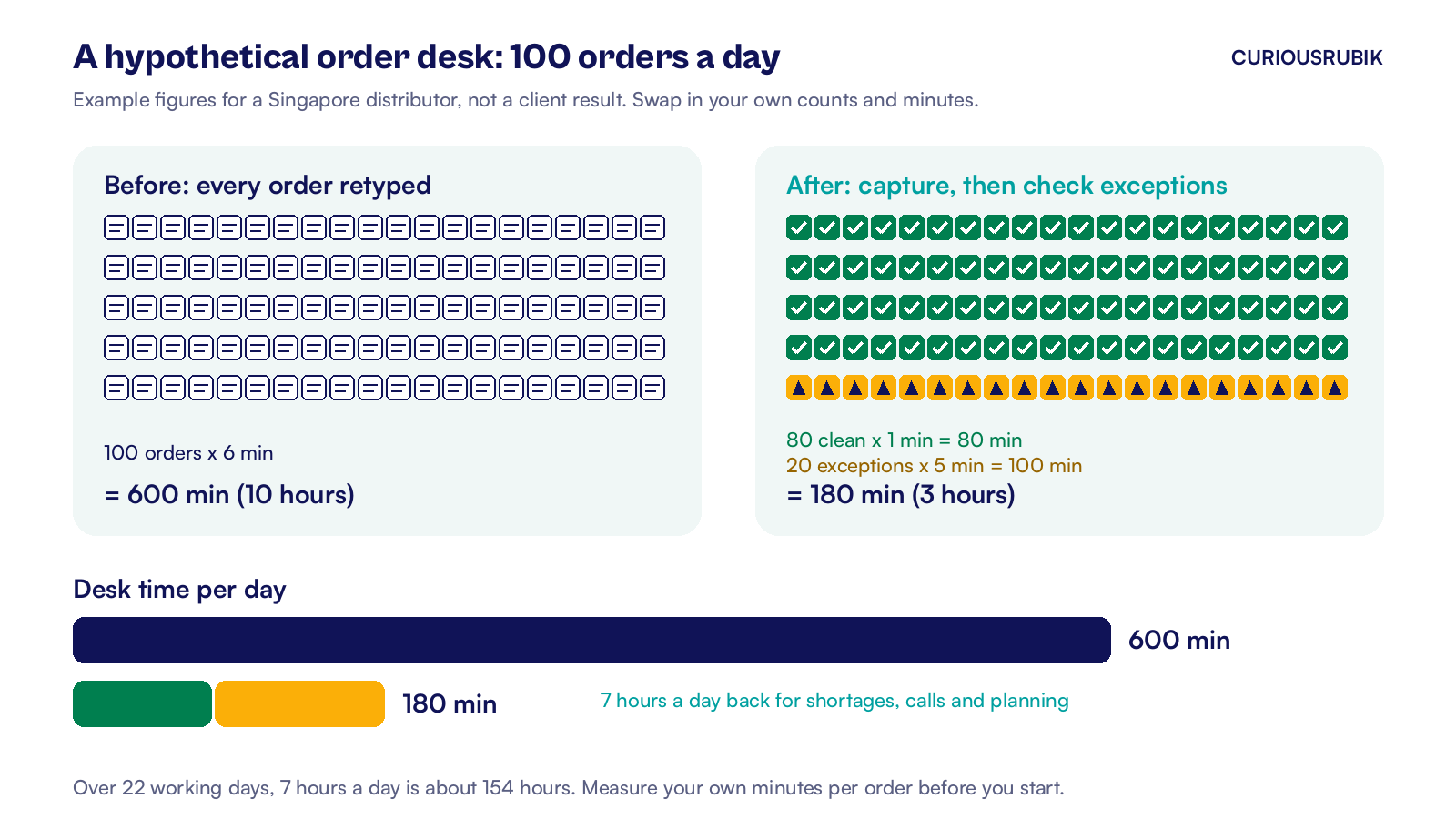
A hypothetical Singapore distributor of cleaning and packaging supplies receives 100 orders a day by WhatsApp and email. Two coordinators retype them. Each order takes about 6 minutes to read, key and check. That is 600 minutes, or 10 hours, every working day.
After order capture, 80 orders match cleanly and need about 1 minute each to confirm. The other 20 have an exception and need about 5 minutes each.
| Orders | Before | After |
|---|---|---|
| Clean orders | 80 x 6 min = 480 min | 80 x 1 min = 80 min |
| Orders with an exception | 20 x 6 min = 120 min | 20 x 5 min = 100 min |
| Total per day | 600 min (10 hours) | 180 min (3 hours) |
That frees 7 hours a day, or about 154 hours over 22 working days. The coordinators spend that time on stock shortages, customer calls and tomorrow's delivery plan.
Wrong item credit notes
Errors are the second gain. Say 2 in every 100 typed orders carry a wrong item or quantity. That is about 44 credit notes a month. If each one costs S$60 in a second trip, restocking and admin, the monthly cost is S$2,640.
These are example figures. Count your own wrong item credit notes before you start, so you have a baseline to measure against.
How do you start without changing your ERP?
Run a short pilot on one slice of orders. After a baseline week, four weeks is usually enough to judge the matching.
- Week 0, measure the baseline. Record minutes per order, orders per coordinator, wrong item credit notes and the share of orders invoiced on the delivery day.
- Week 1, pick 10 to 20 customers. Choose those whose messages are hardest to read, because they show the value fastest.
- Weeks 2 and 3, run side by side. The portal prepares each order, and your team compares it with what they would have typed. Fix matching rules every day.
- Week 4, switch the pilot group over. Your team now approves instead of typing for those customers. Compare the numbers with week 0.
Your ERP stays as it is. Finance still sees normal sales orders and invoices. If you are still choosing which process to automate first, our guide on how to identify the processes that actually deserve automation helps you rank the options. To turn pilot numbers into a business case, see how to measure the ROI of business process automation.
Later, the same approach can let customers place orders and check delivery status themselves through customer portals, which cuts the "where is my order" calls.
Where I would start
I would start with the data, not the AI. If one customer appears three times under slightly different names, no model will pick the right one every time. Spend a week cleaning customer records, units of measure and price lists.
Then pick your hardest customers and run the pilot. Judge it on two numbers: hours per 100 orders and wrong item credit notes. If both fall and your coordinators trust the exception queue, widen the pilot one customer group at a time.
At CuriousRubik, we build these portals one workflow at a time, for wholesale distribution teams and others with high order volumes. CuriousRubik can design an AI automation portal that connects order intake to the systems you already run. You can book a consultation to walk through one workflow, agree what good looks like and see a working result before you decide the next step.
Related reading
How to Identify the Processes That Actually Deserve Automation
A way to rank candidate processes by volume, error cost and how stable the rules are.
Human in the Loop Automation: Designing Better Decision Systems
How to decide which steps software handles and which stay with a person.
Keeping Customer Portal Information Consistent with Your ERP
Why what customers see in a portal has to match the records behind it.