An automated reminder can help an employee keep a promise. The same mechanism can also send an irrelevant message after the customer has already replied, create duplicate tasks, or escalate a case to someone who cannot resolve it.
The difference is not the sophistication of the automation engine. It is whether the workflow understands the current state, has authority to act, handles exceptions, and stops when its purpose is no longer valid.
CRM automation creates value when it removes predictable coordination work without obscuring responsibility. It creates friction when it accelerates an ambiguous process or treats every event as a reason to contact someone. For a sales or service leader, the key decision is the appropriate level of automation for each action, including where human judgment and deliberate friction should remain.
Separate preparation from commitment
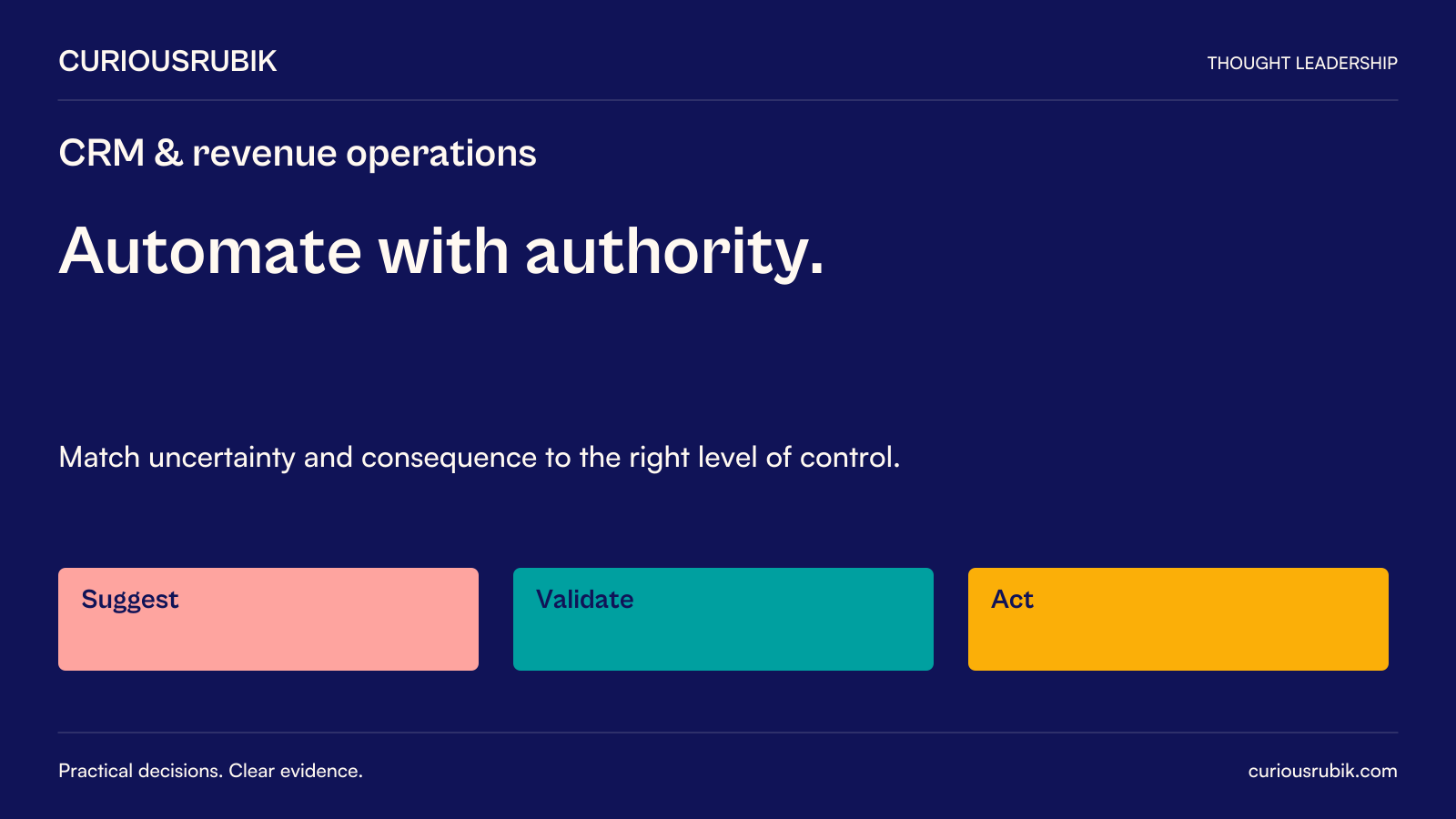
Automation can prepare work without taking the final action. It can assemble a meeting brief, identify an overdue commitment, draft a response, or route a request to an appropriate queue. These actions have different consequences from sending a proposal, changing an account owner, offering a concession, or closing a complaint.
Evaluate them separately. A system that reliably drafts a useful email has not thereby earned authority to send every email. A routing rule that assigns straightforward cases may still need a review path for ambiguous customer identities or specialist issues.
The distinction is especially important when a workflow crosses systems. Updating a CRM field may trigger a notification, billing action, or service instruction elsewhere. Assess the full chain of effects rather than the apparent simplicity of the first step.
Document what the automation is authorized to do, what it may suggest, and what it must escalate. Make those boundaries visible to users and maintainers.
Choose the level of automation by consequence and uncertainty
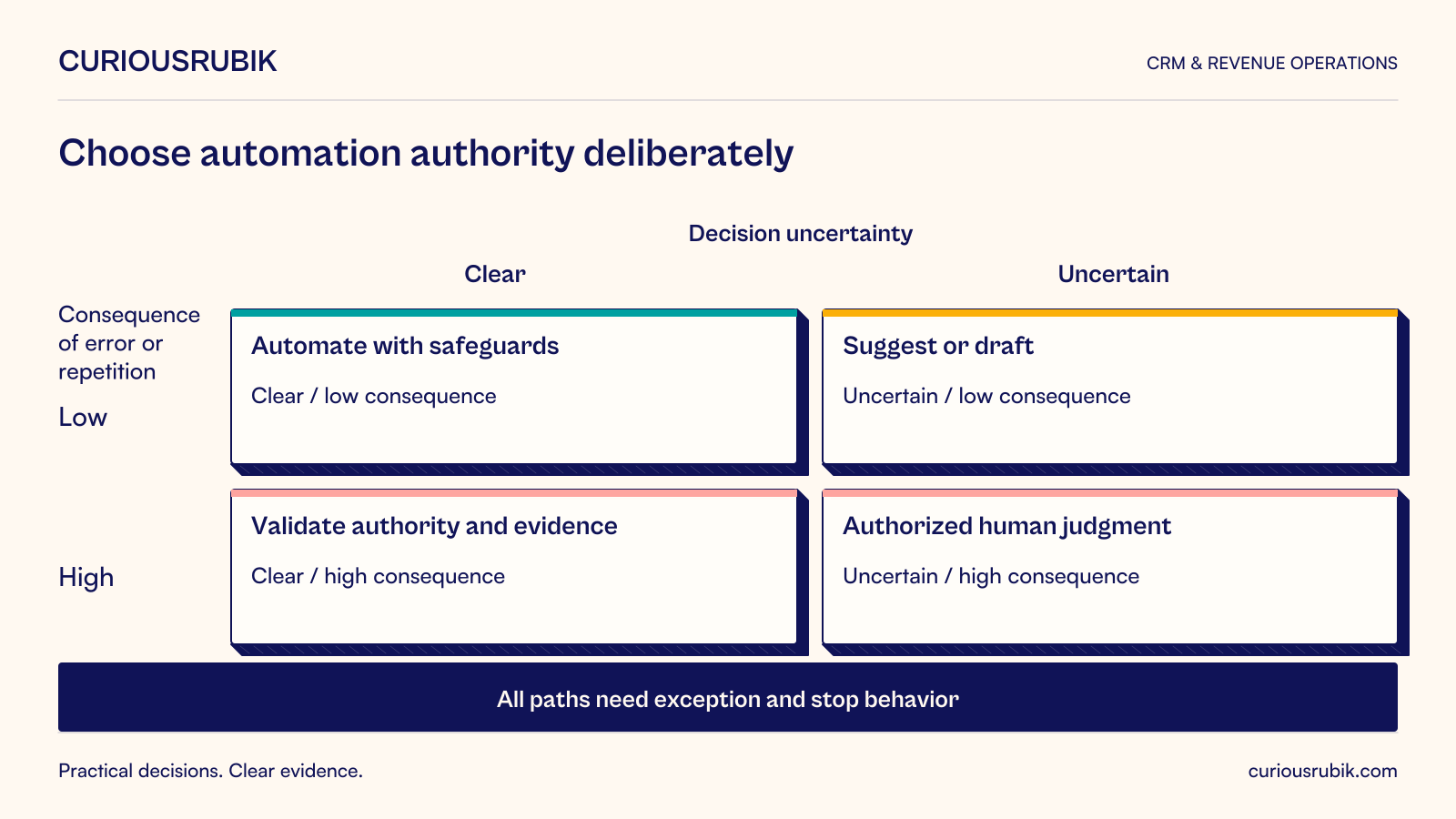
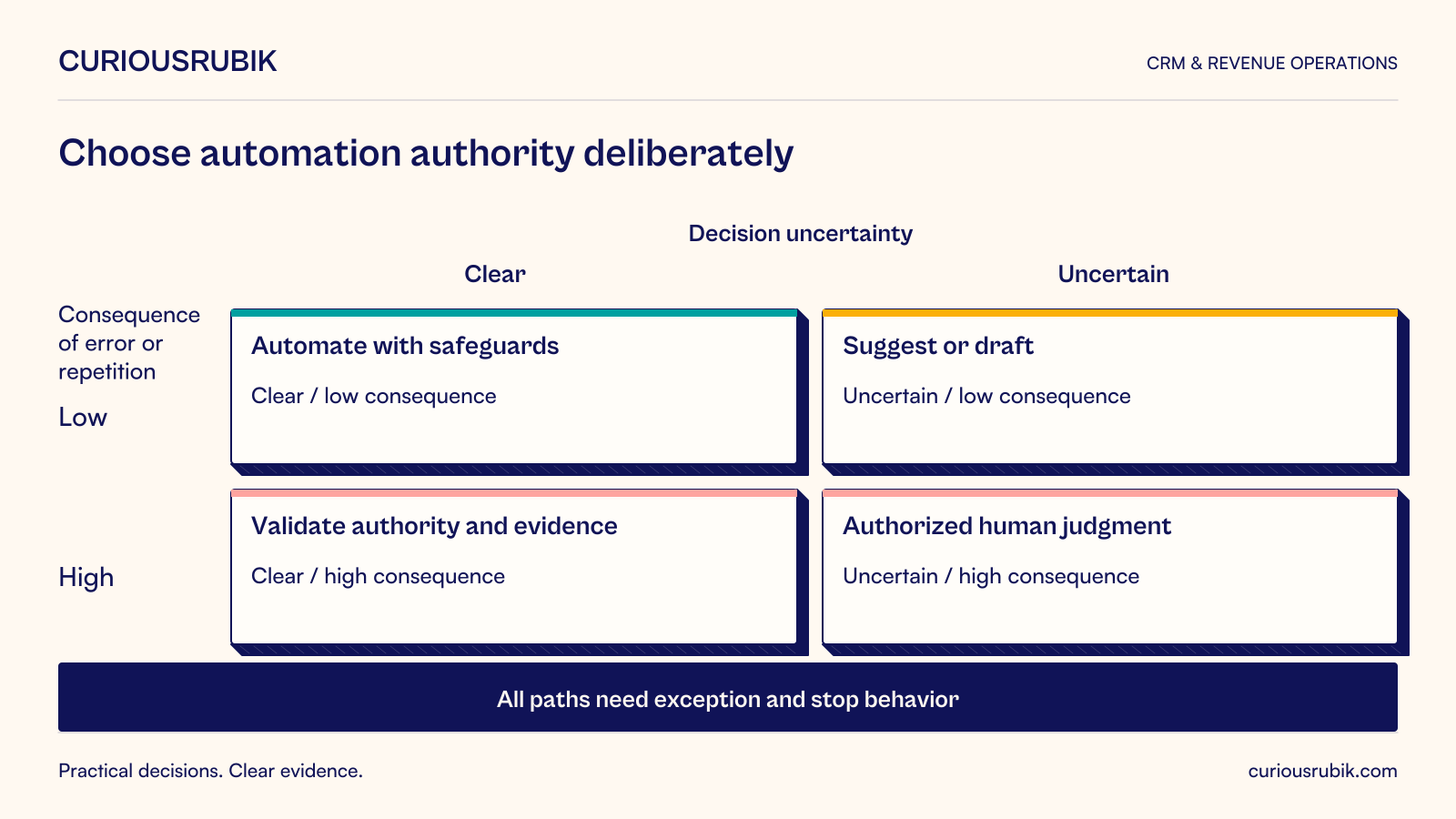
Use a working heuristic based on two questions: how clear is the decision, and how costly is an incorrect or repeated action? This is a proposed design aid, not an industry classification.
Clear, low-consequence actions are often suitable for direct automation. Examples include creating an internal reminder from a confirmed date or attaching an approved reference to a known record. They still need sensible duplication and cancellation behavior.
Uncertain, low-consequence actions may suit suggestions or drafts. A likely account match can be proposed for review rather than silently merged. A suggested follow-up can include the evidence that prompted it.
Clear, high-consequence actions need strong validation and authority controls. A routine contractual notice may follow a well-defined rule, but the recipient, content, timing, and underlying obligation still matter. The business must determine the appropriate approval and legal requirements.
Uncertain, high-consequence actions should remain with an authorized person until uncertainty is reduced and safeguards are adequate. Automation can gather evidence and present options without pretending that a difficult judgment has become mechanical.
A commercial service desk redesigns reminders
Consider a hypothetical company providing commercial kitchen maintenance. Its CRM sends a reminder when a customer has not confirmed a proposed service visit. The rule runs from a scheduled date on the case.
Several failures are possible. The customer may have replied to a shared mailbox that has not synchronized. A dispatcher may already have changed the visit. The site contact may have left. A duplicate event may create two reminders. The message may imply a confirmed appointment when it was only a proposed slot.
The redesign treats the reminder as a state-dependent action. Before sending, the workflow confirms the current case version, whether confirmation remains outstanding, whether the contact is authorized, and whether a newer scheduling action has superseded the proposal. It uses wording appropriate to a proposed visit and provides a clear response route.
The system records a unique action reference so retrying after a technical failure does not create a second customer message. If it cannot determine whether a previous send succeeded, it enters a reconciliation queue rather than blindly resending. Dispatchers can pause reminders for an active conversation, with a reason and review point.
The pilot includes a changed appointment, a late customer response, an unavailable messaging service, and two nearly simultaneous updates. It measures inappropriate reminders, duplicate messages, manual reconstruction, and visits delayed because confirmation was missed.
The aim is dependable coordination. A higher send volume would not be a success measure. The example is hypothetical and does not claim that automation improved any measured client outcome.
Design for repeated, late, and out-of-order events
Business applications do not always receive events once and in the order people expect. A retry can repeat a request; a delayed update can arrive after a newer one; a connection can fail after the receiving system has acted but before it confirms success.
Idempotency means that repeating an operation has the same intended effect as performing it once. HTTP defines idempotent method semantics, but choosing a particular HTTP method does not by itself make a multi-step business workflow safe. The workflow still needs application-level safeguards. RFC 9110, section 9.2.2.
For CRM actions, useful safeguards can include a stable business action identifier, a record of completed effects, version checks, and reconciliation. Define the scope and retention of duplicate detection. Reusing an identifier incorrectly can suppress a legitimate later action just as failing to reuse it can cause duplication.
Decide how to handle a stale instruction. A reminder based on an old appointment should usually be reevaluated against the current state. A historical audit event may still need to be stored. Different event purposes require different processing behavior.
Ask technical teams to demonstrate ambiguous outcomes. “The API call failed” does not always mean the business action failed. A reliable design distinguishes confirmed failure, confirmed success, and unknown outcome.
Preserve useful friction
Some extra steps prevent expensive mistakes. Confirming a recipient before a sensitive message, reviewing a commercial exception, or checking a destructive account merge can be appropriate even when the software could proceed automatically.
The W3C’s 2018 WCAG 2.1 Recommendation includes error-prevention provisions for certain legal, financial, and data submissions, using reversibility, checking, or confirmation. This is an accessibility criterion with a defined scope, not a universal CRM approval rule, but it illustrates why preventing consequential errors deserves design attention. WCAG 2.1, Error Prevention.
Make review meaningful. A generic confirmation box shown repeatedly encourages habitual approval. Present the specific change, affected customer, relevant evidence, and consequence. Let the reviewer correct the problem without restarting the entire process.
Human review also requires capacity. Sending thousands of low-quality suggestions to a small team can create a queue that people clear mechanically. Reduce unnecessary referrals and reserve attention for decisions where judgment adds value.
Control customer contact across workflows
Several individually reasonable automations can combine into an unreasonable customer experience. Marketing, sales, service, and finance may each send messages without seeing the others’ activity.
Establish contact rules appropriate to the relationship and purpose. Consider active complaints, ongoing conversations, contact preferences, local time, and communication permissions. Required notices may need different handling from optional outreach; involve the appropriate policy owners.
Give one accountable owner a view of cross-workflow collisions. A customer should not receive an expansion offer while waiting for a serious unresolved service issue merely because separate teams maintain separate rules.
Do not suppress all communication reflexively. A service incident may make an operational update more important. The design should distinguish relevant, necessary contact from unrelated promotion rather than applying a single “do not contact” flag to every purpose.
Treat exceptions as part of the product
Every automation needs an exception owner and an understandable reason for referral. A queue labeled “workflow errors” gives an employee little basis for action. Distinguish missing information, policy ambiguity, unavailable systems, conflicting updates, and uncertain completion.
Provide the evidence needed to resolve the issue, with appropriate access controls. Include the intended action, relevant record version, prior attempts, and current status. Avoid exposing unnecessary customer information in broad operational logs.
Define aging and escalation rules according to business consequence. An unsent appointment confirmation may require attention before a technician is dispatched; an internal enrichment failure may wait. Escalation should reach someone who can act, not simply a more senior inbox.
Build a safe pause mechanism. Operators should be able to stop a faulty workflow without disabling unrelated CRM functions. Preserve pending work so the team can inspect, correct, and resume it without losing or repeating commitments.
Evaluate the total work created
Automation benefits should include the work it creates as well as the steps it removes. Count exception handling, customer corrections, monitoring, rule maintenance, and review time.
Measure the business outcome and a small set of guardrails. For reminders, consider whether necessary confirmations arrive on time alongside inappropriate messages and duplicate contacts. For assignment, consider acceptance and resolution alongside reassignment and queue aging.
Compare with a simpler option. A clearer form, better ownership rule, or shared queue may solve the problem without a complex automation. If the process changes frequently, the cost of maintaining rules may outweigh the manual effort for a small volume of cases.
Retire rules whose purpose has disappeared. Maintain a register of owner, trigger, conditions, external effects, failure behavior, and review date. A CRM can accumulate invisible interactions among old workflows unless someone periodically examines them together.
The buyer’s demonstration should include failure
Ask suppliers to show a duplicate trigger, an outdated record, a withdrawn communication preference, and a response lost after the receiving system acted. Ask how an operator identifies affected customers and safely resumes work.
Request clarity on authority, logging, versioning, and rollback limits. Some actions can be reversed technically but cannot be undone in the customer’s experience. A sent message can be corrected; it cannot be made unread.
The right automation makes responsible work easier to repeat. It reduces avoidable effort while preserving context, ownership, and recovery. When those elements are absent, speed mainly helps the organization create mistakes faster and at greater scale.