For Australian accounts payable teams who want each supplier statement to agree with NetSuite before the month closes.
Last reviewed: 22 November 2026. Product details reflect this review date. Availability and behavior can vary by account, role and release.
NetSuite supplier statement reconciliation means matching a supplier's statement to what NetSuite shows you owe that supplier on the same date. Run A/P Aging Detail for the vendor, compare each invoice and credit line by line, enter what is missing and note anything still in transit. The remaining gap should match the items you can explain.
What is NetSuite supplier statement reconciliation?
A supplier statement is the supplier's own list of what you owe them. It shows invoices, credit notes and payments they have recorded, with a closing balance.
NetSuite holds your side of the same story. A/P Aging Detail shows open amounts by vendor as of the report date. It reflects posting activity, so check whether a missing bill is still awaiting approval.
A difference can come from a missing document, a payment recorded on different dates or a bill entered for the wrong amount.
What do you need before you start?
Gather four things first:
- The supplier statement, dated at month end if you can get one.
- A/P Aging Detail for that vendor, run as of the same date. In NetSuite OneWorld, make sure the report and statement cover the same subsidiary.
- Permission to enter bills and vendor credits, or the name of the person who has it.
- A working paper to record the result.
Open Reports > Vendors/Payables > A/P Aging > Detail. Use the detail report to match items and the summary to scan balances by vendor. The Accounts Payable Register helps trace posted bills, credits and payments.
Oracle documents a separate shortcut in NetSuite QuickStart. On the vendor record, select More actions > View vendor statement to see charges, payments and a running balance.
How do you reconcile a supplier statement in NetSuite?
Follow these steps for each supplier:
- Run A/P Aging Detail for the vendor as of the statement date.
- Compare the closing balance on the statement with the vendor total on the report. Write down the difference.
- Check off each statement invoice against a bill in NetSuite. Look for the supplier's invoice number in the Reference No. field. If a line was partly paid, compare the open amount and trace the payment or credit that reduced it.
- List every statement line with no match in NetSuite. Check for bills waiting for approval and credit notes you have yet to receive. If goods arrived but the invoice did not, see our guide to supplier goods in transit.
- List every NetSuite bill that is not on the statement. Check the vendor and statement date before asking the supplier about the missing line.
- Check payments. A payment you recorded on November 28 may reach the supplier after the statement date. See how bank payments match vendor payments.
- Enter the missing bills and vendor credits, once you have the supporting documents. Rerun the report with the original date and filters.
- Record the final difference with a reason for each item, and ask the supplier for anything you cannot explain.
Use a saved search when you have many suppliers
For more than a handful of suppliers, build a saved search to triage currently open bills. Keep A/P Aging Detail as the comparison for a past statement date. Use a Transaction search with Type set to Bill, Main Line set to true and Amount Remaining greater than zero.
Sort by vendor and include the due date, open amount and supplier reference. Check the reference column against Reference No. on a known bill. Main Line gives you one row per bill.
Use the Audience subtab to share the search with your accounts payable (AP) team if you have Publish Search permission.
A hypothetical month with one supplier
A hypothetical packaging supplier sends a statement dated November 30. The statement closing balance is A$18,420.00. A/P Aging Detail for the same vendor and date shows A$15,050.00. The difference is A$3,370.00.
Working through the lines finds three items:
| Item | Where it is | Effect on the difference |
|---|---|---|
| Invoice INV 4471 for A$2,200.00 including A$200.00 GST | On the statement, not yet entered in NetSuite | Statement is higher by A$2,200.00 |
| Credit note CN 0318 for A$330.00 including A$30.00 GST | On the statement, not yet entered in NetSuite | Statement is lower by A$330.00 |
| Payment of A$1,500.00 recorded in NetSuite on November 28 | Supplier banked it on December 2 | Statement is higher by A$1,500.00 |
A$2,200.00 less A$330.00 plus A$1,500.00 equals A$3,370.00.
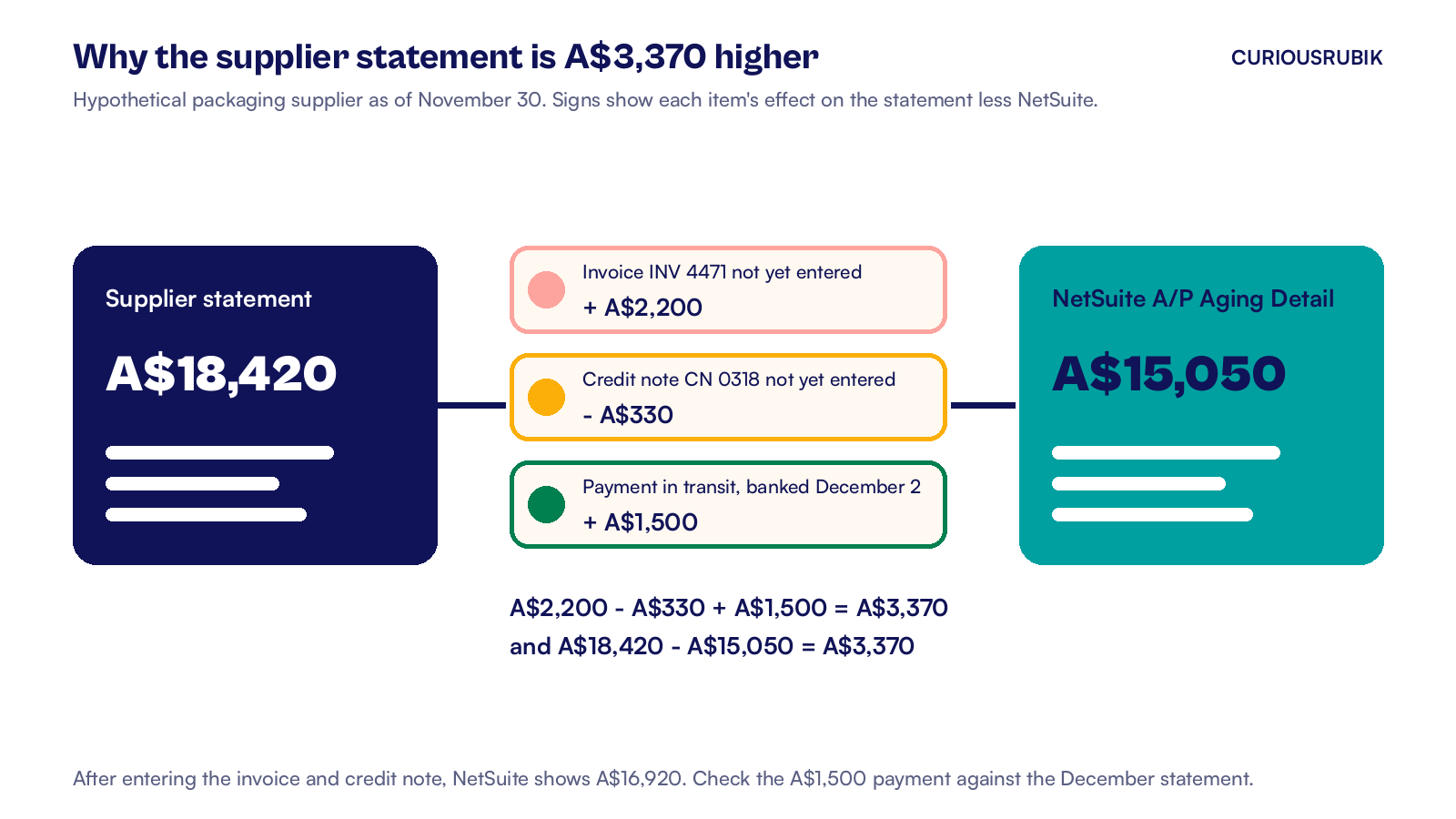
Under Transactions > Payables, the AP clerk opens Enter Bills for INV 4471 and Enter Vendor Credits for CN 0318. On the credit's Apply subtab, the clerk selects the bill the credit belongs to and saves. Once both entries are posted for the statement date, NetSuite shows A$16,920.00. The only gap is the A$1,500.00 payment, which the clerk logs to check against the December statement.
What should an Australian AP team check on each line?
- Tax invoice. You generally need a valid tax invoice to claim a goods and services tax (GST) credit on purchases over A$82.50 including GST. For taxable sales over that amount, the supplier has 28 days to provide it after you ask. At A$1,000 or more, check that the invoice shows the buyer's identity or Australian business number (ABN).
- ABN. Confirm the seller's ABN on the invoice matches the one in your vendor records. For reportable contractors, see the Taxable Payments Annual Report guide.
- GST code. Check the tax code on the bill matches the GST shown on the invoice, before you prepare the business activity statement (BAS).
- Credit notes. Check whether the supplier's credit note also meets the rules for an adjustment note. The ATO generally requires a valid note before a decreasing GST adjustment, with an exception if the GST adjustment is A$75 or less. That threshold is the change in GST, not the face value of the credit. Ask your tax adviser which adjustment applies to your BAS.
- BAS timing. If you need a tax invoice and lack it when you lodge the BAS, wait until you hold it to claim the credit. Our EOFY checklist lists other checks to make before the June 30 close. Reconcile your largest suppliers before the BAS is prepared.
How often should you reconcile supplier statements?
Reconcile your largest suppliers every month, before the period closes. These are the ones with the most invoices and the most credit notes. For suppliers with fewer transactions, set a review schedule based on the balance and how often you see differences.
Give each open item an owner and a follow up date. Carry unresolved items into the next review so a payment in transit from last month does not disappear from the list.
This week:
- Pick your five largest suppliers and get their latest statements.
- Run A/P Aging Detail for each vendor as of the statement date.
- Search for statement invoice numbers in the Reference No. field of your bills.
- Enter missing bills and credits and write a reason beside every remaining difference.
- Save the vendor bills search so next month starts with a list of open bills.
CuriousRubik's NetSuite reporting team can build the saved searches and role access that make this a routine monthly job. See how we support NetSuite customers in Australia.
Related reading
NetSuite EOFY Checklist for Australian Companies
What to settle in NetSuite before 30 June, from open payables to BAS and STP.
NetSuite Bank Integration in Australia
How bank feeds and payment files match up with vendor payments in NetSuite.
NetSuite Superannuation Reconciliation
A reconciliation routine for super liabilities that agrees with the ledger each quarter.