For US controllers and project leads who want every record, balance and tax total to arrive in NetSuite and tie out.
Last reviewed: 21 November 2026. Product details reflect this review date. Availability and behavior can vary by account, role and release.
For a NetSuite data migration US finance teams can sign off, load master records first. Then load open transactions and use a clearing account to reconcile them to opening balances. Check year to date 1099 payments, W-9 data, sales tax exemptions, vendor bank details and fixed asset tax books before launch.
Key takeaways
- Load in dependency order and keep a legacy ID on every record.
- Bring open items in one by one, then balance everything through a clearing account.
- On a mid year go live, plan 1099 totals across both systems before cutover.
- Use the trial balance, aging reports and inventory valuation to sign off.
What does NetSuite data migration for US companies cover?
Data migration is the work of moving the records your business still needs from your current system into NetSuite, in a form your team can use from day one. For most US companies that means four groups of data.
| Data group | Examples | How it usually arrives |
|---|---|---|
| Setup and master data | Chart of accounts, departments, classes, locations, customers, vendors, items, employees | CSV imports with External IDs |
| Open transactions | Unpaid invoices, unpaid bills, open sales and purchase orders | One record per open item |
| Balances | Trial balance at cutover, inventory quantities and costs, fixed asset values | Journal entry import, inventory adjustment, asset import |
| History | Prior year detail for reporting or audit | Summary journals, or kept in an archive you can search |
You rarely need every old transaction. Agree with your auditor and tax adviser what history must be reachable, and where it will live.
Which records move first, and which US details need checks?
NetSuite builds each record on the ones before it. A vendor bill needs its vendor and any referenced accounts or items to exist first.
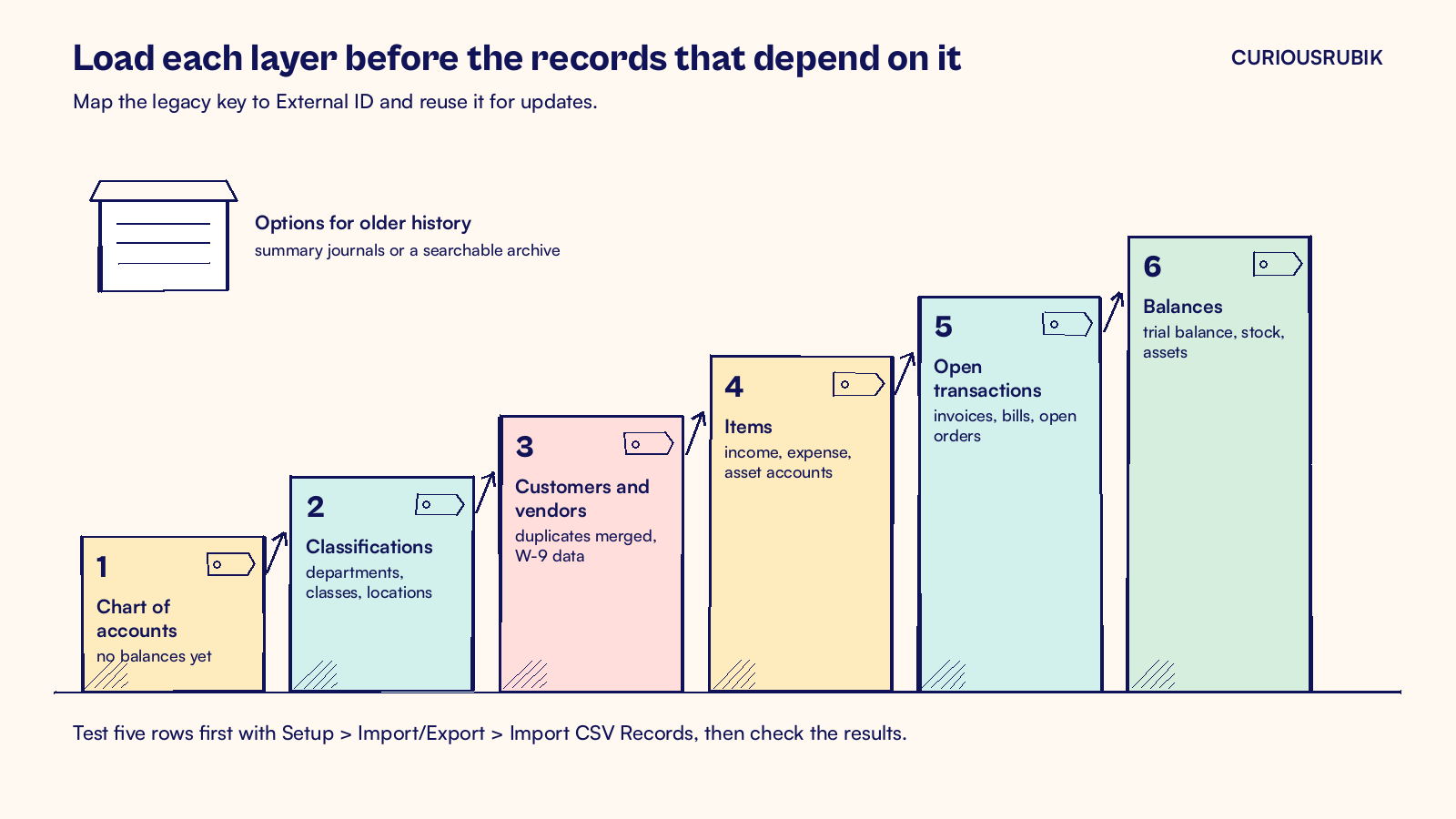
Load order
- Keep a legacy ID on every row. Put the old system's unique key in an External ID column. Use the same key when you run an update. For vendor bills, map External ID or Internal ID as the unique bill key on every line. Use a unique ID to reference the vendor too.
- Load the chart of accounts without balances. Make this the first data import. Use the journal entry import for opening balances at go live.
- Load classifications next. Departments, classes, locations and subsidiaries come before anything that is coded to them.
- Clean customers and vendors before import. Merge duplicates in the file. Two records for one supplier split spend, split 1099 totals and let one invoice be paid twice.
- Load items with their accounts set. Check the posting accounts that apply to each item type before testing transactions.
- Test with a handful of rows first. Use Setup > Import/Export > Import CSV Records with five records, check the result, then run the full file. Each import job is limited to 25,000 records or 50 MB, whichever limit you reach first.
Our post on NetSuite external ID design covers how to choose those keys so reloads stay safe.
US details that need their own checks
Assign an owner to each tax and payment check before cutover.
- Plan 1099 totals across two systems. Use amounts paid during the calendar year to total reportable nonemployee compensation. The Form 1099-NEC threshold rose from $600 to $2,000 for payments made in 2026. If you go live mid year, run payments by vendor from 1 January to cutover and keep that report. A contractor with $1,500 in reportable payments before cutover and $900 after reaches $2,400. That exceeds the threshold even though each system shows less than $2,000.
- Bring W-9 data with each vendor. Use the W-9 to confirm the payee name and tax classification. Map Tax ID and check 1099 Eligible on the vendor record as applicable. Have your tax adviser confirm which payments count. Our guide to NetSuite 1099 reporting lists the fields to check.
- Review sales tax setup and open invoices. Confirm your sales tax obligations in each state where you have nexus. Set up those jurisdictions and the applicable customer and item tax settings. Keep exemption certificates with your tax records. Reconcile the unpaid gross invoice amounts and check that the load does not post the same tax twice. Our post on NetSuite sales tax and US nexus explains the setup behind it.
- Handle ACH bank details as a controlled step. With Electronic Bank Payments, import US vendor bank details through the Import Assistant. Have a second person check the routing and account numbers against verified vendor instructions before releasing payments.
- Import fixed assets with their tax book. If you use the Fixed Assets Management SuiteApp, import each asset first, then its depreciation history. Map Last Depreciation Date and Last Depreciation Period. Under Fixed Assets > Setup > System Setup, clear Run Server Scripts on CSV Import for this migration load. Running those scripts can reset cumulative depreciation and the last depreciation values to zero. Keep your MACRS tax book values beside the book values.
- Load inventory by location at cutover cost. Quantities and unit costs by item and location should match the count you sign off on cutover day.
How do you prove the migration balanced?
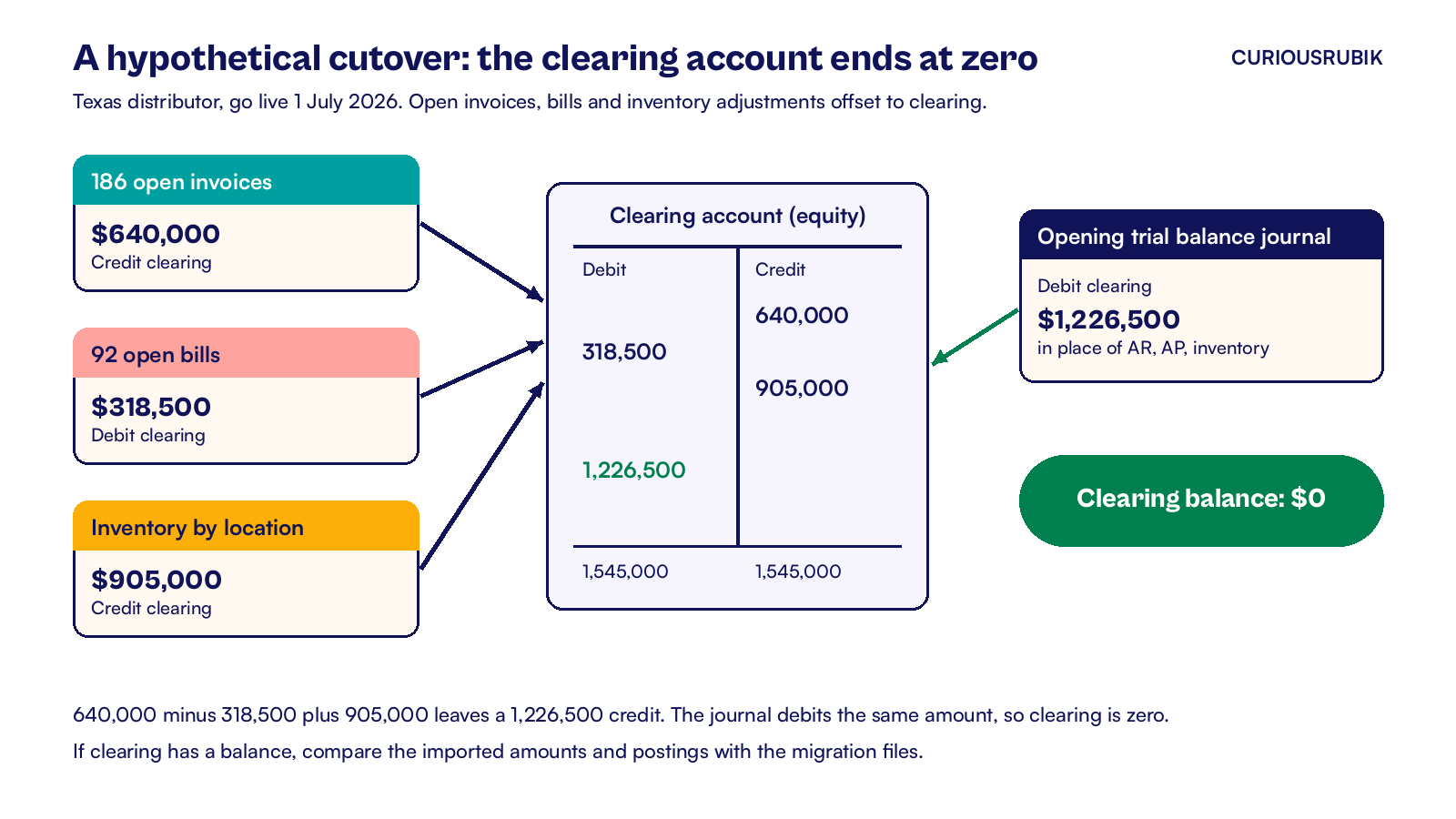
In this example, use a temporary equity account called a clearing account. It offsets the opening invoices, bills and inventory adjustments. Have your controller test the posting accounts and tax handling in a sandbox before running the load.
The opening trial balance journal then posts every remaining account and offsets clearing. When the loads are right, clearing ends at zero.
A hypothetical cutover in USD
A hypothetical Texas distributor goes live on 1 July 2026. It loads 186 open invoices worth $640,000, 92 open bills worth $318,500 and inventory worth $905,000.
- Invoices debit accounts receivable (AR) and credit clearing by $640,000.
- Bills debit clearing and credit accounts payable (AP) by $318,500.
- Inventory adjustments debit inventory and credit clearing by $905,000.
Clearing now holds a credit of $1,226,500. The opening trial balance journal posts all other accounts and debits clearing $1,226,500 in place of the receivables, payables and inventory lines. Total debits and credits in clearing are $1,545,000 each, leaving a zero balance.
Then run the sign off tests, with a named owner for each.
- Trial balance in NetSuite matches the legacy trial balance at cutover, account by account.
- AR aging and AP aging match legacy aging by customer and vendor.
- Inventory valuation matches the cutover count by location.
- Record counts match the source files, less any duplicates you merged on purpose.
- Pre cutover 1099 payments by vendor are saved where the tax team can find them in January.
Plan at least two mock loads in a sandbox before the real one. Our post on NetSuite mock migration defects shows how to log and close what they find. CuriousRubik's NetSuite data migration team can map your records, run the mock loads and prepare the reconciliation pack for sign off. See how we work with NetSuite customers in the United States.
Frequently asked questions
Should we go live on 1 January to keep 1099s simple?
A January launch simplifies reporting if you record every payment for the new calendar year in NetSuite. If the project needs a later launch, keep the original payment dates and agree who will combine the two systems’ totals. Check the combined figures against your payment records before filing.
How much transaction history should we migrate?
Work backward from the reports you need for month end. For example, monthly summary journals can support comparisons when the underlying detail is available in a searchable archive. Agree on retention with your tax adviser and auditor, then test whether your team can retrieve a sample old transaction and its supporting documents.
Can we import open invoices without sales tax lines?
If you use balance only migration entries, carry the full unpaid amount, including any unpaid tax. Keep the original invoice available for the tax breakdown. Ask your controller and tax adviser to approve the posting approach. Then test customer statements and sales tax reports to catch omitted receivables or duplicate tax.
Who should sign off the migration?
The controller signs off balances and aging, the AP lead signs off vendors and 1099 data, and the tax lead signs off sales tax setup. Each signs against a named test with the numbers attached. A single sign off from the project team is weaker evidence if questions come up at year end.
Related reading
Migrating Open Receivables and Payables to NetSuite
How to load unpaid invoices and bills so collections and payments continue on day one.
NetSuite 1099 Reporting: Vendor Setup and Year End Checks
The vendor fields, account mapping and checks behind a clean 1099 filing.
NetSuite Fixed Asset Migration and History Reconciliation
How to bring assets and their depreciation history across and reconcile them.