For US controllers and AP leads who still write checks and want a bank review when a check differs from their records.
Last reviewed: 20 November 2026. Product details reflect this review date. Availability and behavior can vary by account, role and release.
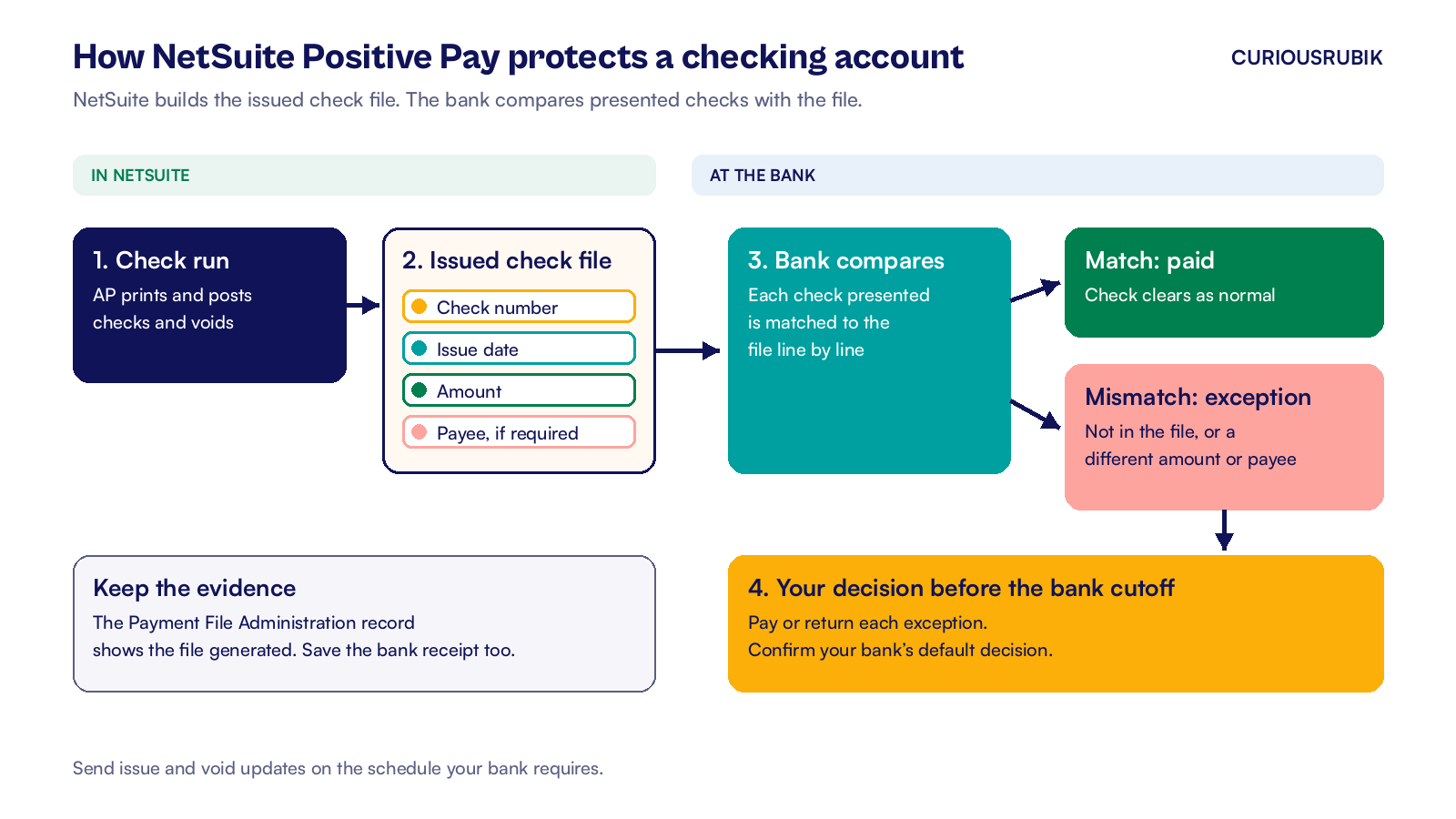
NetSuite Positive Pay creates a file of the checks you issued in the layout your bank expects. You upload it to the bank on the schedule you agreed with them. The bank compares checks presented for payment against the file and flags exceptions. Your bank's cutoff and default response determine how it handles exceptions you leave unresolved.
Key takeaways
- Positive Pay is part of the Electronic Bank Payments SuiteApp, set up once per bank account.
- Three bank layouts come ready to use. For other layouts, build a template from the bank's specification.
- Send issue and void updates on the schedule your bank requires.
What is NetSuite Positive Pay?
Positive pay is a bank service that matches each check presented for payment against a list of checks the company says it issued. An unlisted check or a mismatch on a field your bank checks becomes an exception. Your reviewer tells the bank to pay it or return it before the cutoff.
NetSuite's part is the list. The Electronic Bank Payments SuiteApp reads the check transactions already in your ledger and builds the issued check file for one bank account. Your accounts payable team can compare the selected checks with the register before sending the file.
For month end reconciliation, compare bank exceptions with your check register. Our explainer on NetSuite intelligent transaction matching shows how bank lines match the checks in your register.
Standard positive pay generally compares check number and amount. Your bank may also check the issue date. Payee positive pay also compares the payee name printed on the check, which catches checks where only the name was changed. Ask your bank which level your account has, because the file layout differs.
How do you set up and run Positive Pay in NetSuite?
Setting up the bank record
Setup happens once per bank account. Use the EP Configurator role for setup and have the bank's file specification on hand.
- Install the Electronic Bank Payments SuiteApp (bundle 533070) if it is not already in your account, and complete Payments > Setup > Electronic Payments Preferences.
- Create a File Cabinet folder for the payment files and note its internal ID.
- If your bank needs a custom layout, create one at Payments > Setup > Payment File Templates > New. Set Payment File Type to Positive Pay. Use FreeMarker for the layout and set Maximum Lines from 1 to 5,000.
- Go to Payments > Setup > Bank Details > New. Fill in the fields below and save the record.
- On the Positive Pay Template Details subtab, enter the bank account number. Pad it with leading zeros to 12 digits for BoA/ML or 10 for RBC.
- Send a test file to the bank and wait for written confirmation that it loads cleanly before you rely on it.
| Field on Bank Details | What to enter |
|---|---|
| Name | A label staff can recognize. |
| GL Bank Account | The checking account your checks post to. Currency fills in from it. In OneWorld, so does Subsidiary. |
| Legal Name | Your company's legal name as the bank knows it. |
| Positive Pay Template | BoA/ML, RBC, SVB-CDA or your custom template. |
| File Cabinet Location ID | The internal ID of the folder from step 2. |
| File Name Prefix | Optional. A short code that makes each file easy to find. |
Sending the file after each check run
To build the file after a check run, open the Positive Pay page from the checks section of the Payments menu. Pick the bank account, then narrow the list with Date From, Date To and the check number range. Review the eligible transactions before you submit.
Select the include void box so checks voided with a reversing journal go to the bank as voids. Select the exclude cleared box if you only want items still outstanding.
Click Submit. NetSuite creates a Payment File Administration record. Click Refresh until the file is ready, download it from the File Reference field and upload it to the bank's portal.
Keep that record as evidence of file generation and save the bank's upload confirmation.
Give this job a named owner and a backup. Use different people for the check run and the file upload, so one person cannot both issue a check and send its issue record to the bank. Our guide to NetSuite controls before an IPO covers that split of duties in more detail.
What should a US finance team check this week?
At CuriousRubik, we suggest five checks before you trust positive pay to catch a bad check.
- Confirm with your bank whether your accounts have standard or payee positive pay, and what time the daily file cutoff is.
- Run the Positive Pay page for last week's checks and compare the count and total with your check register.
- Make sure payee names in NetSuite match what prints on the check, and ask the bank how it handles name differences.
- Find who decides exceptions at the bank today, and confirm whether the bank can default to returning unresolved checks.
- List every account that writes checks, including payroll and refund accounts, and confirm each one has a Bank Details record.
Review outstanding checks at year end. Our view on why the NetSuite year end close for US companies starts in November puts that task on the same calendar.
If your team pays vendors abroad as well, our guide to NetSuite international payment processing covers the wire and ACH side of the same SuiteApp. See how we support NetSuite customers in the United States.
CuriousRubik's NetSuite finance and payments integration team can set up Positive Pay, build a custom template for your bank and test the first files with you.
Related reading
NetSuite International Payment Processing for US Companies
How outbound wires and foreign currency payments run through Electronic Bank Payments.
NetSuite Intelligent Transaction Matching for US Teams
How bank lines match to NetSuite transactions so cleared checks are easy to confirm.
SOX Controls in NetSuite for Pre-IPO Companies
Roles, approvals and evidence for finance teams preparing for audit.