For Australian finance, operations and IT leads who want each NetSuite change built once, tested properly and working after every release.
Last reviewed: 12 November 2026. Product details reflect this review date. Availability and behavior can vary by account, role and release.
NetSuite customization in Australia works best when every request passes a short checklist before anyone writes code. Test standard features and the ANZ Localization SuiteApp first. Then scope the script, its owner, its tests and its release plan. A request that clears these checks is cheaper to build and much easier to support.
- Check whether configuration, a workflow or an installed SuiteApp meets the request before you commission code.
- ANZ Localization offers Australian Business Number (ABN) checks and local reports. Check your tax setup before you script.
- A script needs a named business owner and a test plan before it is built, not after.
- Oracle updates NetSuite twice a year, so every script needs a place in your release testing.
What is NetSuite customization, and when does an Australian business need it?
NetSuite customization is a change to standard records, forms or behavior. This checklist focuses on changes that need SuiteScript, NetSuite's scripting language based on JavaScript. Configuration is different. It means setting up fields, forms, roles, saved searches and workflows with the tools NetSuite already gives you.
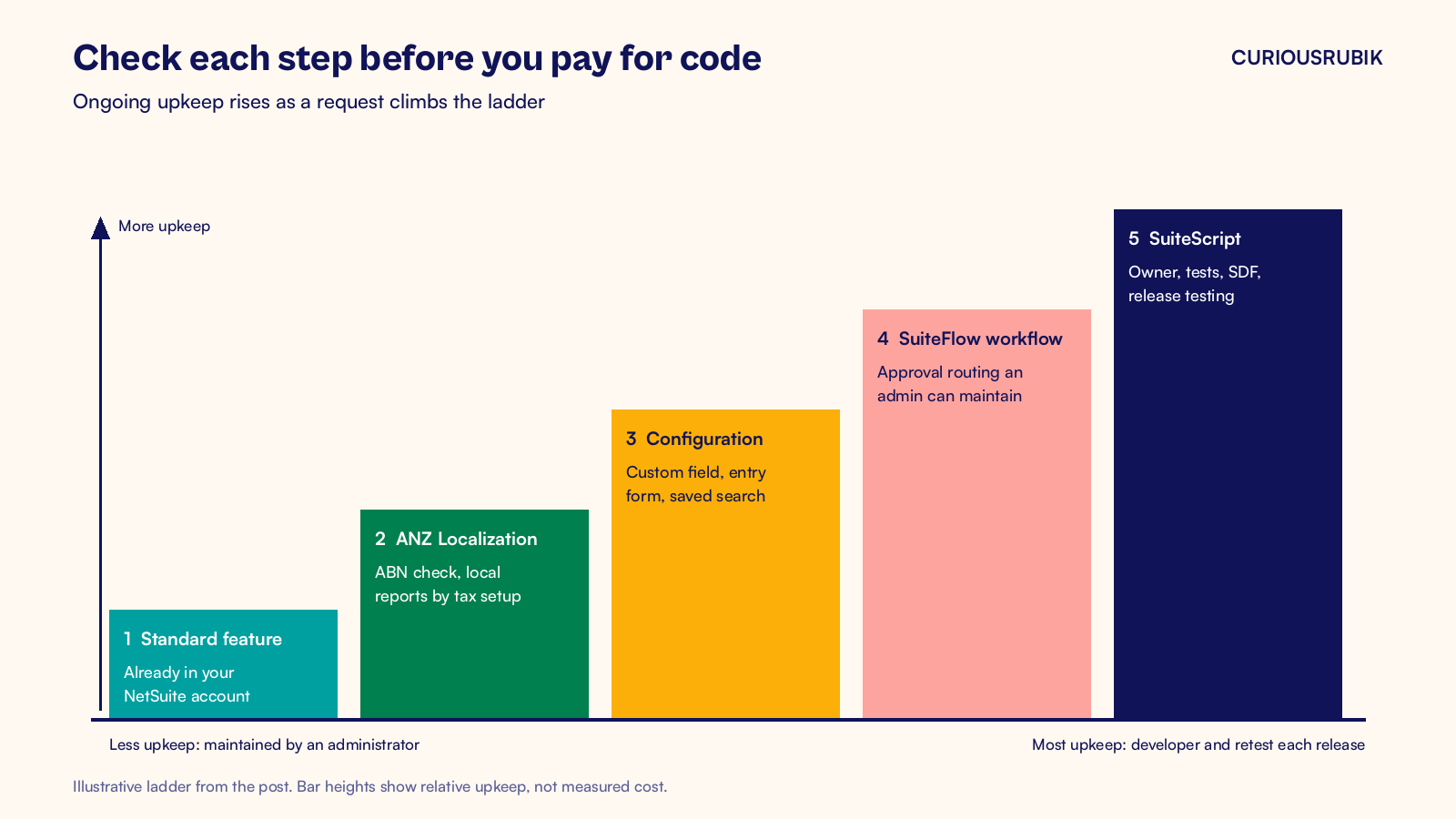
The line matters because each side carries a different cost over time. Configuration is maintained by an administrator. A script is maintained by a developer, and it must be tested every release.
| Need | Start with | Move to code when |
|---|---|---|
| Capture extra data | Custom field on the record | The value must be calculated from several records |
| Make a field mandatory | Custom entry form | The rule depends on other values in a way a form cannot express |
| Route an approval | SuiteFlow workflow | Routing needs lookups or loops a workflow cannot do cleanly |
| Report on data | Saved search or SuiteAnalytics workbook | The output is a file in a format NetSuite does not offer |
| Change a document layout | Advanced PDF/HTML template | The document combines data from many unrelated records |
| Talk to another system | A SuiteApp or connector | Standard APIs cannot meet the requirement, so a custom interface is justified |
Australian businesses usually need code for a few things. Pricing rules that read many lines are one. Others are bulk jobs over thousands of records, links to a local system with no connector, and screens built for one team's task. Everything else deserves a hard look at the standard tools first.
Our post on the NetSuite configuration or customization decision covers that choice in more depth.
Which Australian features should you check before you pay for code?
Many requests we see in Australian accounts ask for something NetSuite already does through the ANZ Localization SuiteApp. Check this list against the request before you scope any work.
- ABN checks: ANZ Localization can warn or block users who enter an invalid ABN on a customer or vendor record. Check how your forms capture missing numbers and handle valid exceptions. Form requirements alone do not control every import or integration.
- Taxable Payments Annual Report (TPAR): confirm support for your tax setup first. Vendors are flagged with the TPAR Eligible box on the AUS Reporting subtab, and bill payments carry an Include in TPAR box. Our NetSuite TPAR reporting guide walks through the setup.
- Business Activity Statement (BAS): with SuiteTax, ANZ Localization supports the BAS report based on your tax setup. Fix the tax code mapping before you consider a custom BAS report.
- Supplier ABN List and Payment Times Report: both are supported reports in the SuiteApp. Check the required features and reporting setup in your account.
- Tax invoices and statements: Advanced PDF/HTML templates can show your ABN and goods and services tax (GST) details. Confirm required invoice content with your tax adviser.
- Bank files: the Electronic Bank Payments SuiteApp produces payment files for Australian banks, so check the supported format for your bank before requesting code.
Report support depends on whether your account uses SuiteTax. Confirm which reports your setup offers before anyone promises a BAS or TPAR output.
A hypothetical example shows why this step comes first. A Melbourne wholesaler asks for a script that rejects invalid ABNs when users save vendor records. The administrator selects Warn and Block in the ABN Verification Warnings preference. Testing confirms that invalid numbers stop the save.
This closes that specific request without code. Missing ABNs need a separate review because withholding rules and exceptions may apply.
A second request from the same wholesaler does need code. Sales wants a quarterly rebate worked out from every invoice line for 40 customers. The team tests standard searches and workflows against the calculation, then scopes a map/reduce script if those tools fall short. The sales director becomes the owner, and four acceptance tests are written before the build starts.
A request checklist for NetSuite customization in Australia
Run every request through these twelve items in order. If an item fails, stop and fix it before you move on. A request that clears all twelve is ready to build.
Before anyone writes code
- Write the problem in one sentence. Name the record, the user and what goes wrong today. "AP clerks key one freight charge on 200 bills a month" is a problem. "Automate AP" is not.
- Name a business owner. This is the person who signs off the result and decides future changes. Without one, nobody can say whether the script still does the right thing in two years.
- Record the standard fit test. List which fields, forms, workflows, saved searches and SuiteApps were tried and why each fell short. This note protects you later when someone asks why code exists.
- Check your customization inventory. Search for an existing script or workflow on the same record. Two scripts firing on one save is a common cause of slow forms. Our post on building a NetSuite customization inventory shows how to keep that list current.
- Agree the acceptance tests. Write three to five tests in plain words, including at least one that should fail. For a pricing script, test a normal order, a credit note and an order in a second currency.
While it is built
- Pick the script type to match the job. A check when a user saves a record is a user event script. A field that reacts while the user types is a client script. A nightly job over many records is a map/reduce script.
- Respect governance limits. NetSuite meters each script in usage units. User event and client scripts get 1,000 units per run, scheduled scripts 10,000 and RESTlets 5,000. Map/reduce jobs can yield automatically between function calls. Each invocation still has hard limits, so divide bulk work into small tasks.
- Build in a sandbox and use the SuiteCloud Development Framework. SDF represents scripts and supported custom objects as files you can keep in source control. A developer can validate a project against an account and then deploy it to sandbox and production with a deployment log.
- Set the deployment carefully. For user event and client scripts, Testing status limits execution to the owner. Use Released with a restricted audience for testing by several users. Scheduled scripts use different deployment statuses. Set production logging to the level support needs.
After it goes live
- Add it to release testing. Each new script joins the list of things you retest in the Release Preview account before every upgrade.
- Write a one page support note. Cover what the script does, which records it touches, the business owner and how to switch it off safely.
- Review it once a year. Ask whether a newer NetSuite feature now does the same job. If one does, plan to retire the script and move to the standard feature.
How do you keep custom scripts working through NetSuite releases?
Oracle ships two major NetSuite releases each year. Before each upgrade, your administrator can request a Release Preview account at Setup > Company > Release Preview. It runs the new version against a copy of your account, so you can test your scripts before the upgrade reaches production.
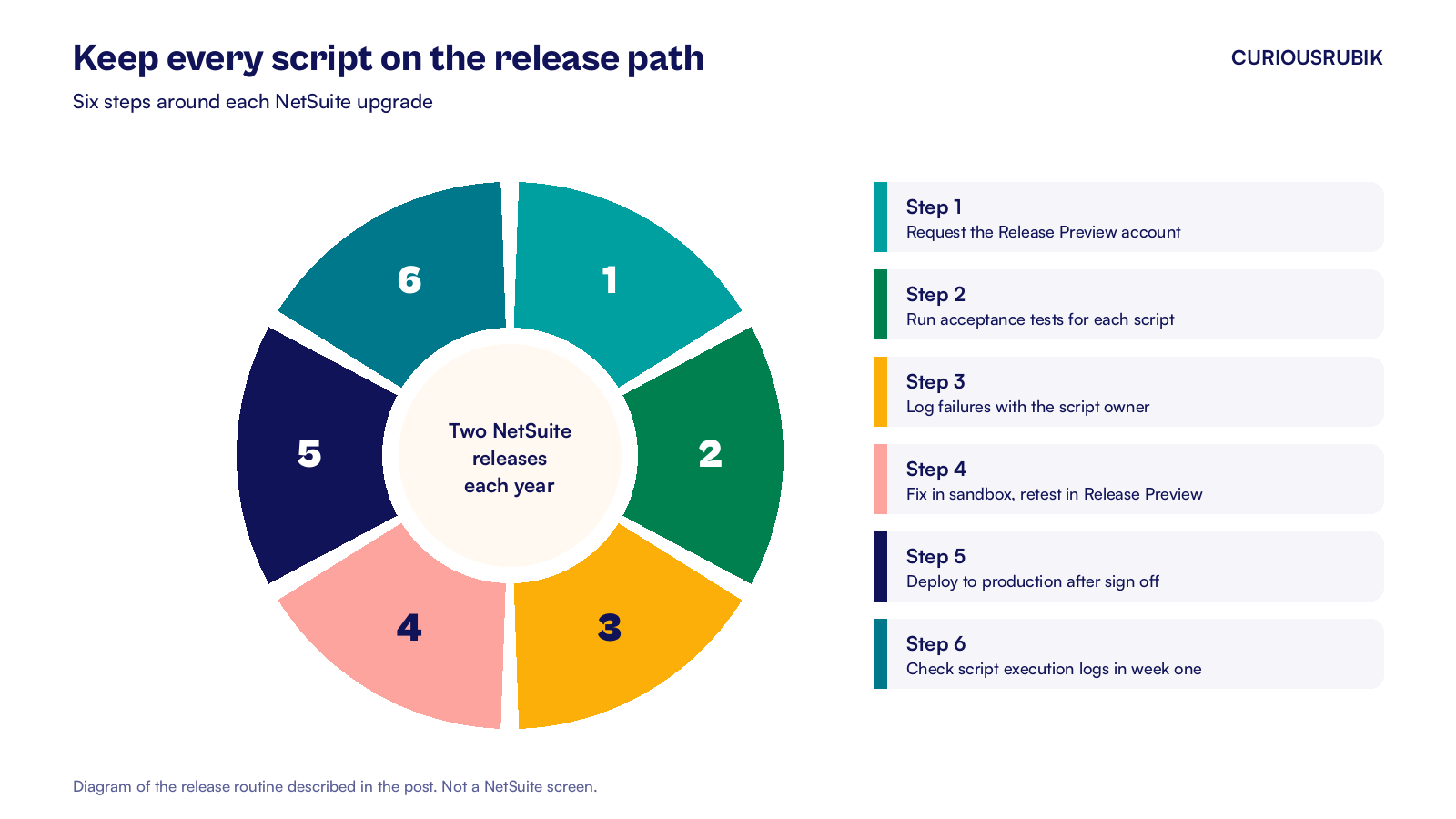
A simple routine keeps release weeks calm for an Australian team.
- Request the Release Preview account as soon as it is offered.
- Run the acceptance tests for every script on your release list.
- Log any failure with the script owner and agree a fix date before the upgrade.
- Fix in sandbox through SDF, then retest the fix in Release Preview on the new version.
- Deploy to production once the business owner signs off.
- Check the script execution logs during the first week after the upgrade.
Plan these weeks around your own calendar and time zone. A team in Perth and a team in Sydney may need different test windows. A release that lands near a BAS filing or end of financial year needs testing finished earlier, because finance will have little spare time. Our post on NetSuite optimization in Australia suggests a quarterly review rhythm that fits the same calendar.
Frequently asked questions
How much does NetSuite customization cost in Australia?
Cost depends on the script type, the records it touches and the testing it needs. A fair quote comes after the standard fit test, not before. Ask for each request to be priced on its own with its acceptance tests attached. Then you can weigh code against a workflow or a process change.
Do we need a NetSuite developer on staff?
You do not always need a developer on staff. They need an administrator who owns configuration and a partner who builds and supports scripts on request. What you do need in house is a business owner for each script and a current inventory. That way the knowledge stays with you if a person or a partner changes.
Is a SuiteFlow workflow a customization?
A workflow is configuration in the sense that an administrator can build it without code, but it still changes how records behave. Treat it like a script for ownership and release testing. Give it an owner, a one line purpose and a test, and add it to the same inventory as your scripts.
Should we customize the BAS or TPAR output?
Start with ANZ Localization, which supports BAS with SuiteTax and TPAR using vendor and payment fields. Check support for your tax setup first. When a figure looks wrong, inspect the tax codes and reporting flags before changing the output. Fix the data first and confirm the treatment with your BAS agent or tax adviser.
At CuriousRubik, we run the standard fit test with you before any code is quoted. Our NetSuite customization team builds, tests and documents scripts so they survive each release. We work with companies across Australia, from single entity wholesalers to groups running several subsidiaries.
Related reading
NetSuite Standard Configuration or Customization Decisions
How to decide whether a requirement belongs in configuration or in code.
Building a NetSuite Customization Inventory with Clear Ownership
How to list every script, workflow and custom record with an owner and a purpose.
NetSuite Optimization in Australia Should Run Every Quarter
Why a quarterly review timed to BAS and releases keeps an Australian account healthy.