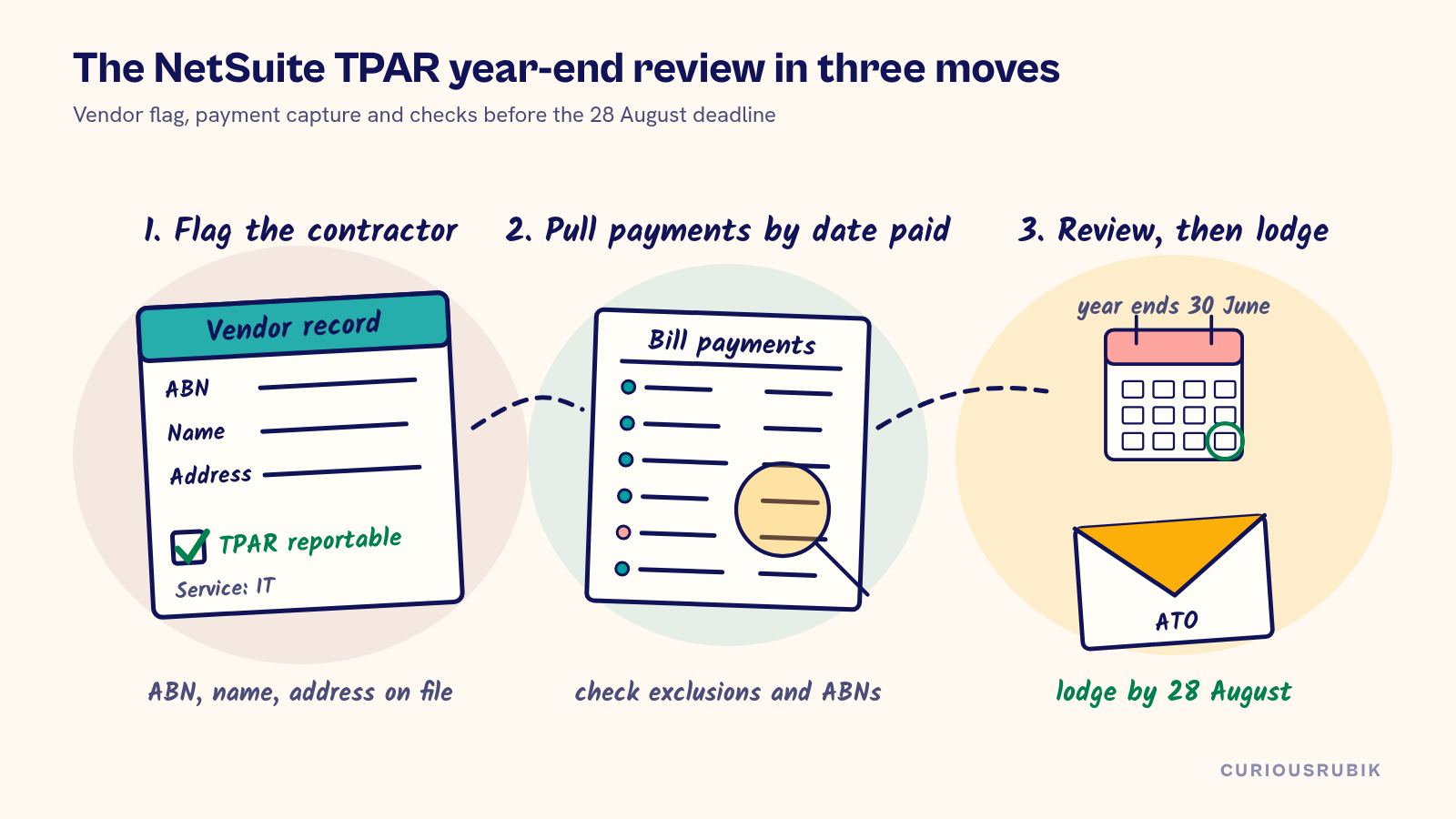
NetSuite TPAR reporting works when three things are in place before 30 June: every contractor vendor that supplies a reportable service is flagged on its vendor record, payments are captured by the date they were paid and a year-end review removes what the ATO says to leave out. With that in place, the Taxable payments annual report becomes an extract and a review, ready to lodge by 28 August.
The trap is building the report from bills. The TPAR covers payments you made during the financial year, not invoices you received. A bill dated 20 June and paid on 5 July belongs in next year's report. A flag that only exists in someone's spreadsheet goes missing the first time AP creates a new contractor in March.
Confirm your business has to lodge a TPAR
Start with the ATO test, not the vendor list. A business must lodge if it provides one of the taxable payments reporting system services and pays contractors to deliver them. Those services are building and construction, cleaning, courier and road freight, information technology and security, investigation or surveillance.
For mixed businesses the test is a percentage. If payments you receive for one of these services make up 10% or more of your business income for the year, you must lodge for that service. Courier and road freight are combined for this test. Building and construction uses a different rule: you lodge if you are primarily in that industry, meaning 50% or more of your current-year income or activity, or 50% or more of last year's income, comes from building and construction services.
Write the calculation down each year with the income figures and who approved it. If the answer is no, the ATO accepts a non-lodgment advice. Either way, the decision should not live in one person's memory.
Flag TPAR vendors on the vendor record
Put the flag where AP already works. In NetSuite that usually means a custom checkbox on the vendor record, such as "TPAR reportable", plus a custom list field for the service type so a mixed business can tell an IT contractor from a cleaning contractor. Some accounts already have Australian localization fields or a third-party bundle for this. Confirm with the account owner what is installed before you build your own fields, or you will end up with two flags that disagree.
The flag is only as good as the vendor record behind it. Check that each flagged vendor has an ABN in the field your account uses for it (often the tax registration number field), a legal or business name and a current address. Those are the details the ATO asks for on every contractor line. Check ABNs against ABN Lookup at onboarding, and again before lodgment for anyone whose details changed.
Make the flag a required decision when a vendor is created. A saved search of vendors created this month with the flag left blank is a short weekly review for the AP lead.
Capture TPAR payments by the date paid
The ATO wants payments made on or before 30 June. Unpaid invoices at year end are left out and picked up in the year you pay them. In NetSuite terms, the source transaction is the bill payment, the check written directly to a vendor or any other transaction that actually settles the contractor, dated inside 1 July to 30 June.
Watch the edge cases. A bill paid in two installments across 30 June splits across two reports. A vendor credit applied to a bill reduces what you paid. Prepayments made in June count in June even if the work happens in July. A payment reversed and reissued after year end needs a note so nobody counts it twice.
Gross means the amount paid including GST and any tax withheld. The GST figure should come from the bills each payment settled, not from a flat one-eleventh guess, because some contractors are not registered for GST. If your team derives GST from the payment amount, test the derivation on a sample of bills each year and record the result.
Build a NetSuite TPAR saved search on vendor payments
Build one saved search that returns the payment lines you will report, and keep its definition in the year-end pack. Criteria: transaction type covers the payment types your account uses to settle vendors, the vendor's TPAR flag is true, the payment date is within the financial year and voided transactions are excluded. Results: vendor, ABN, name, address, payment date, amount paid, GST from the applied bills, tax withheld and service type.
Group the results by vendor and ABN. If a contractor changed ABN during the year, for example a sole trader who incorporated, the ATO expects each ABN reported. In NetSuite that often shows up as two vendor records for the same person. Do not merge them before you lodge.
Compare the search total to the payments posted to the contractor expense accounts for flagged vendors. The two will not match exactly, but the difference should be explainable in a few lines.
A hypothetical TPAR for an IT services company
Take a hypothetical Australian software and IT services company, illustrative only, preparing its TPAR for the year ended 30 June 2026. IT services brought in AUD 2.1 million of AUD 7.5 million total business income. That is 28%, above the 10% threshold, so the company lodges for IT contractor payments.
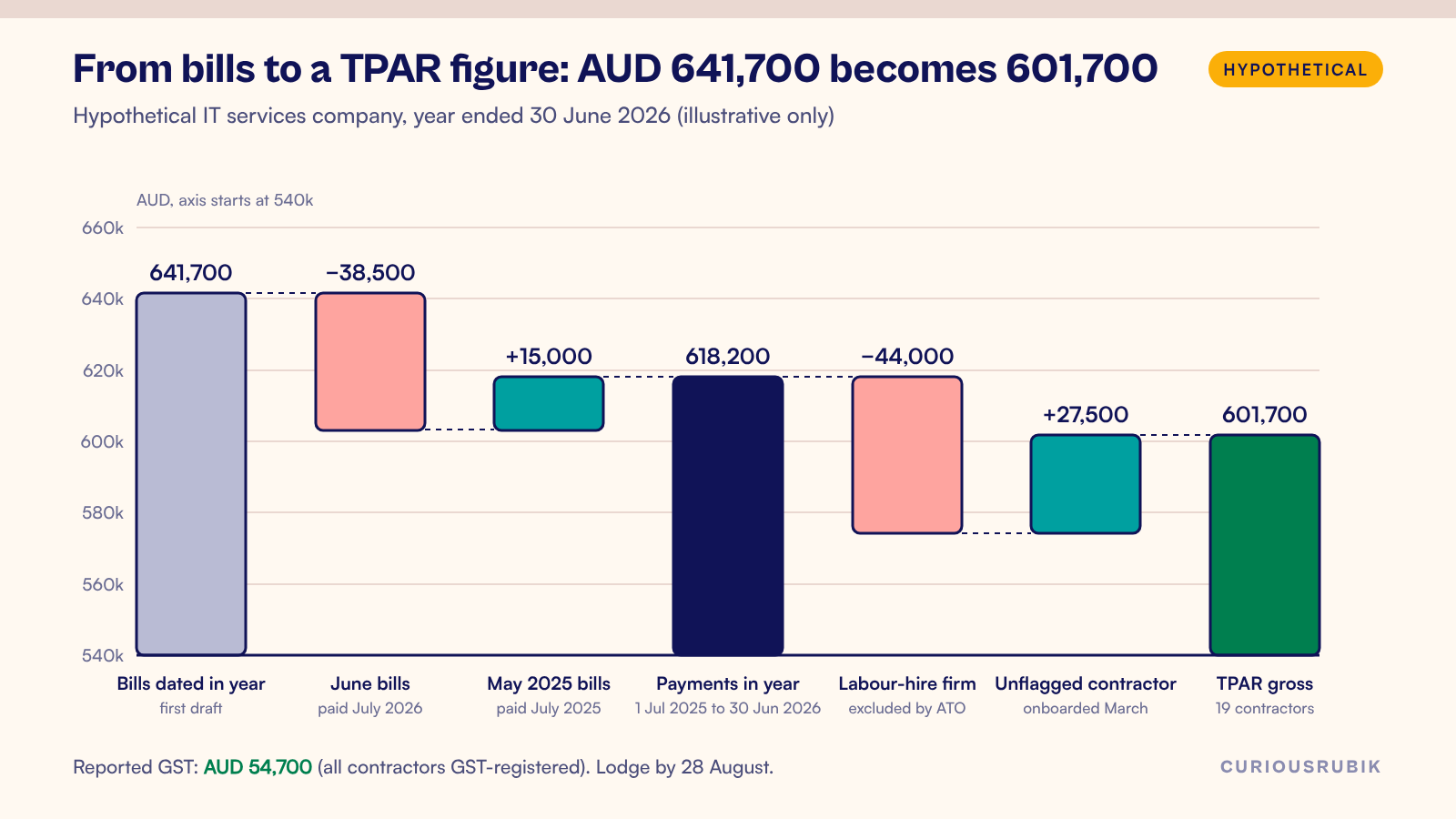
The first draft was built from bills dated in the year for flagged vendors: AUD 641,700. The reviewer rebuilt it from payments. June bills of AUD 38,500 were paid in July 2026, so they come out. May 2025 bills of AUD 15,000 were paid in July 2025, so they come in. The payment-based figure is AUD 618,200 across 19 contractors.
Two more findings. One flagged vendor is a labour-hire firm that placed workers on site, which the ATO excludes, so AUD 44,000 comes out. A contractor onboarded in March was never flagged, and its payments of AUD 27,500 go in. The lodged gross is AUD 601,700 across 19 contractors. All of them are GST-registered and every bill was standard-rated, so reported GST is AUD 54,700. No tax was withheld.
Each change has a vendor, a document number and a reviewer's initials. A report built only from bills would have overstated the gross by AUD 40,000 and left a contractor out entirely.
Exclude payments the ATO leaves out
Clear the exclusions before anyone signs. The ATO lists payments that do not belong in the TPAR. They include materials-only invoices, labour that is incidental to a supply of materials, workers engaged through labour hire or on-hire arrangements, payments to members of the same income tax consolidated group and private or domestic payments. Employee wages are reported through Single Touch Payroll, not the TPAR. Our guide to NetSuite Single Touch Payroll covers that side.
Where an invoice includes both labour and materials, report the total payment. Foreign residents and contractors who did not quote an ABN have their own rules. Amounts withheld because no ABN was quoted go on either the TPAR or the separate annual report for that withholding, not both. Confirm the treatment with your tax adviser and write the decision next to each affected vendor.
Run year-end checks before 28 August
Run the review in July while the year is fresh. Check that every flagged vendor has an ABN, name and address. Look for unflagged vendors coded to contractor expense accounts. Find bills paid after 30 June and payments reversed after year end. Then reconcile the saved search to the ledger and take sign-off from someone who did not build the search.
Lodge online. The ATO stopped accepting paper TPARs after 28 August 2025. You can lodge through software that can produce the ATO's TPAR data file, through Online services for business or through your registered tax or BAS agent. If a contractor's details turn out to be wrong after lodgment, the ATO has an amendment process. Use it rather than waiting for next year.
The TPAR fits naturally into the July part of a NetSuite EOFY checklist for Australian finance teams. Keep the saved search definition, the extract, the exclusions table and the ATO receipt together for at least five years. If your team is thin in July, CuriousRubik managed support can run the vendor flag review and TPAR extract as a recurring year-end control. Our NetSuite work in Australia covers the wider local setup.
Frequently asked questions
Does NetSuite produce the TPAR automatically?
Not automatically in every account. Some accounts have Australian localization features or a third-party bundle that adds TPAR fields or an export. Confirm with the account owner what is installed and test its output against your own saved search before relying on it.
Can we build the TPAR from vendor bills?
No. The ATO wants payments made in the financial year. Bills unpaid at 30 June belong in the year you pay them, so start from payment transactions.
Do we report GST on contractors who are not registered for GST?
No GST is reported for them because none was charged. Report the gross amount paid. This is why GST should come from the bills, not a fixed fraction of the payment.
What if a contractor changed ABN during the year?
Report each ABN with the payments made under it. Keep both vendor records until the TPAR is lodged, then clean up master data.
Is the TPAR the Australian version of Form 1099?
The idea is similar, but the rules differ. If you also run US entities, our post on NetSuite 1099 reporting covers that process. Keep the vendor flags and saved searches separate by country.