For Australian finance leads moving to NetSuite who want clean opening balances, a clean first BAS and a calm cutover.
Last reviewed: 10 November 2026. Product details reflect this review date. Availability and behavior can vary by account, role and release.
A NetSuite data migration in Australia moves your master records, open transactions and balances from your current system into NetSuite on one cutover date. Pick the first day of a BAS period. Load open invoices and bills one by one with their GST codes. Then reconcile the trial balance and your first BAS before anyone signs off.
- Cut over on the first day of a BAS period, so each activity statement comes from one system.
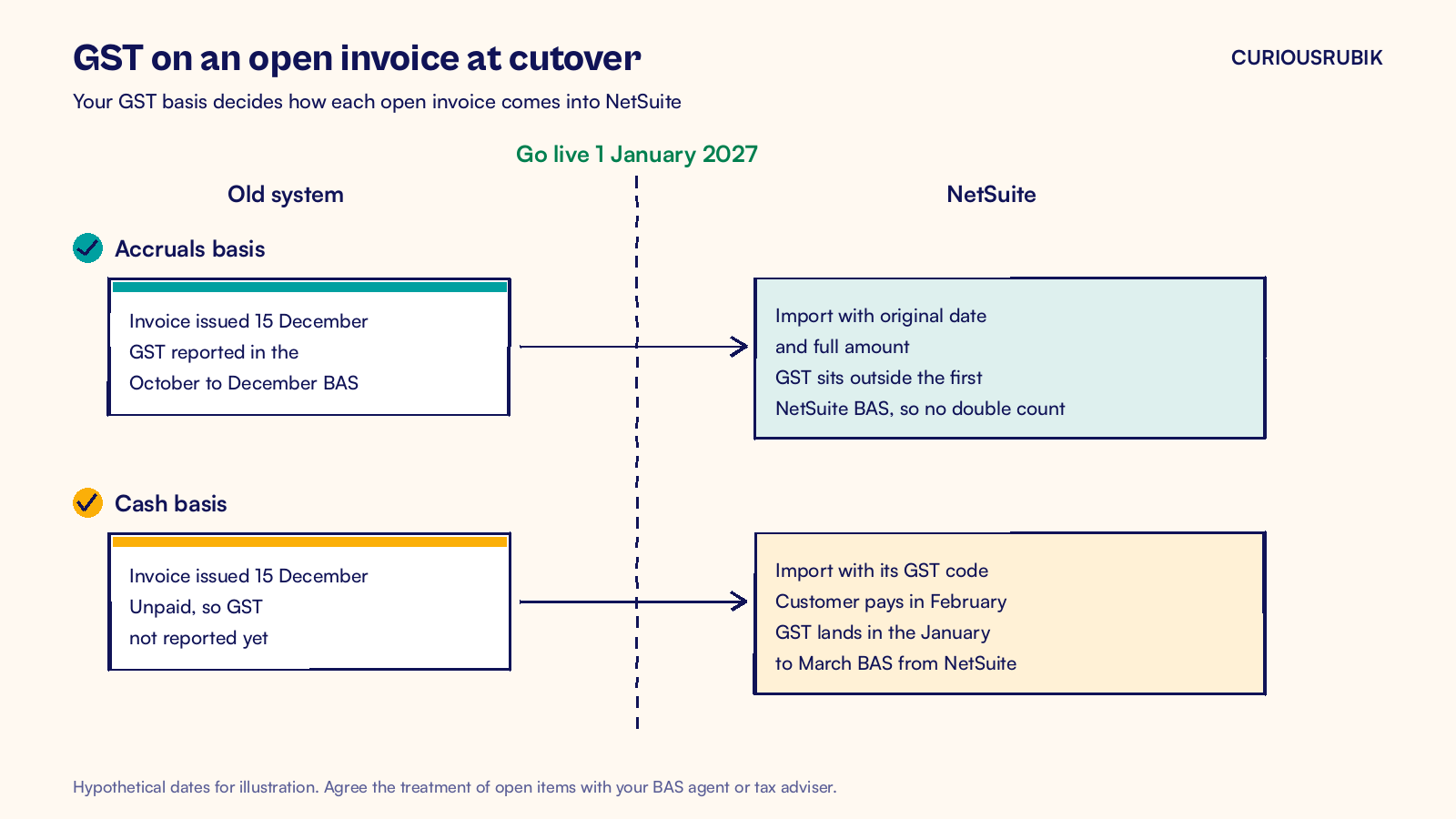
- Your GST basis, cash or accruals, decides how open invoices come across.
- Load open receivables and payables as documents, never as one lump balance.
- Treat the first BAS from NetSuite as the final acceptance test.
What is a NetSuite data migration?
A data migration is the planned move of records and balances from one system to another, checked so the totals agree on both sides. It is one stream inside your wider NetSuite implementation timeline, and it usually runs in parallel with configuration and testing.
An Australian migration usually moves four kinds of data. Each one has its own local check.
| Data | What to load | Australian check |
|---|---|---|
| Master records | Customers, vendors, items, chart of accounts | ABN on every vendor and customer that needs one, GST status on each item |
| Open transactions | Unpaid invoices, unpaid bills, open sales and purchase orders | Original dates, GST codes and part payments kept |
| Balances | Trial balance at the cutover date, stock on hand by location | Ties to the last lodged BAS and the old ledger |
| History | Monthly totals for one or two prior years | Enough for comparisons, with the old system kept for detail |
Closed transaction history is a choice, not a requirement. Monthly summary balances give you comparative reports at a fraction of the effort of loading every old invoice.
Which cutover date suits a NetSuite data migration in Australia?
Choose the first day of a BAS period. The old system then prepares every BAS up to the switch, and NetSuite prepares every BAS after it. A cutover in the middle of a quarter leaves one BAS built from two ledgers, and that is where GST goes missing or gets counted twice.
If you lodge quarterly, the natural dates are 1 July, 1 October, 1 January and 1 April. A 1 July cutover also lines up with the financial year and the payroll year. It lands in the busiest weeks for most finance teams, though, so protect their time for EOFY work if you choose it.
A 1 January or 1 April start is often calmer. You still get a clean BAS boundary, and the team is not closing the year at the same time.
How should GST on open invoices come across?
Your GST accounting basis decides this. Check it on your last BAS or with your tax adviser before you build the import files.
On the accruals basis, the GST on every open invoice was already reported in the period you issued it. Import each open invoice with its original date and its full GST inclusive amount, with no separate GST line. That GST already sits in the GST balance on your opening trial balance. The dates fall before go live, so the invoices sit outside the periods NetSuite will report on, and the GST is not reported twice.
On the cash basis, the GST on an unpaid invoice has not been reported yet. It is reported when the customer pays. Each open invoice must therefore arrive in NetSuite with its GST code, so the GST lands in the right BAS when the payment comes in after go live.
The same logic applies to unpaid bills and GST credits. Agree the treatment with your BAS agent or tax adviser, write it down and test it in the sandbox before cutover.
Run the migration in eight steps
NetSuite brings records in through the Import Assistant at Setup > Import/Export > Import CSV Records. Give every record an External ID from the old system, so you can update a record later without creating a duplicate.
- Clean the source data. Remove duplicate customers and vendors, inactivate items nobody sells and check vendor ABNs against the Australian Business Register.
- Map the chart of accounts. Match every old account to a NetSuite account and record the mapping in one shared sheet.
- Map the tax codes. Match each old GST code to the NetSuite tax code for taxable, GST free, input taxed and export supplies.
- Build the import templates. One CSV file per record type, loaded in order: accounts, then customers and vendors, then items, then open transactions.
- Run a trial load in the sandbox. Load everything as at a recent month end and note every error.
- Reconcile the trial load. Compare the trial balance, aged receivables, aged payables and stock value with the old system, line by line.
- Rehearse the cutover. Repeat the full load with a stopwatch, so you know how long the real weekend takes.
- Run the cutover. Freeze the old system, take the final extracts, load into production and reconcile again before users start work.
Plan for two trial loads at a minimum. The first one finds the mapping problems. The second one proves they are fixed and tells you the timing.
How do you avoid counting receivables twice?
The most common opening balance mistake is telling NetSuite about the same debt twice. It happens when the trial balance journal includes the receivables balance and the open invoices are imported as well.
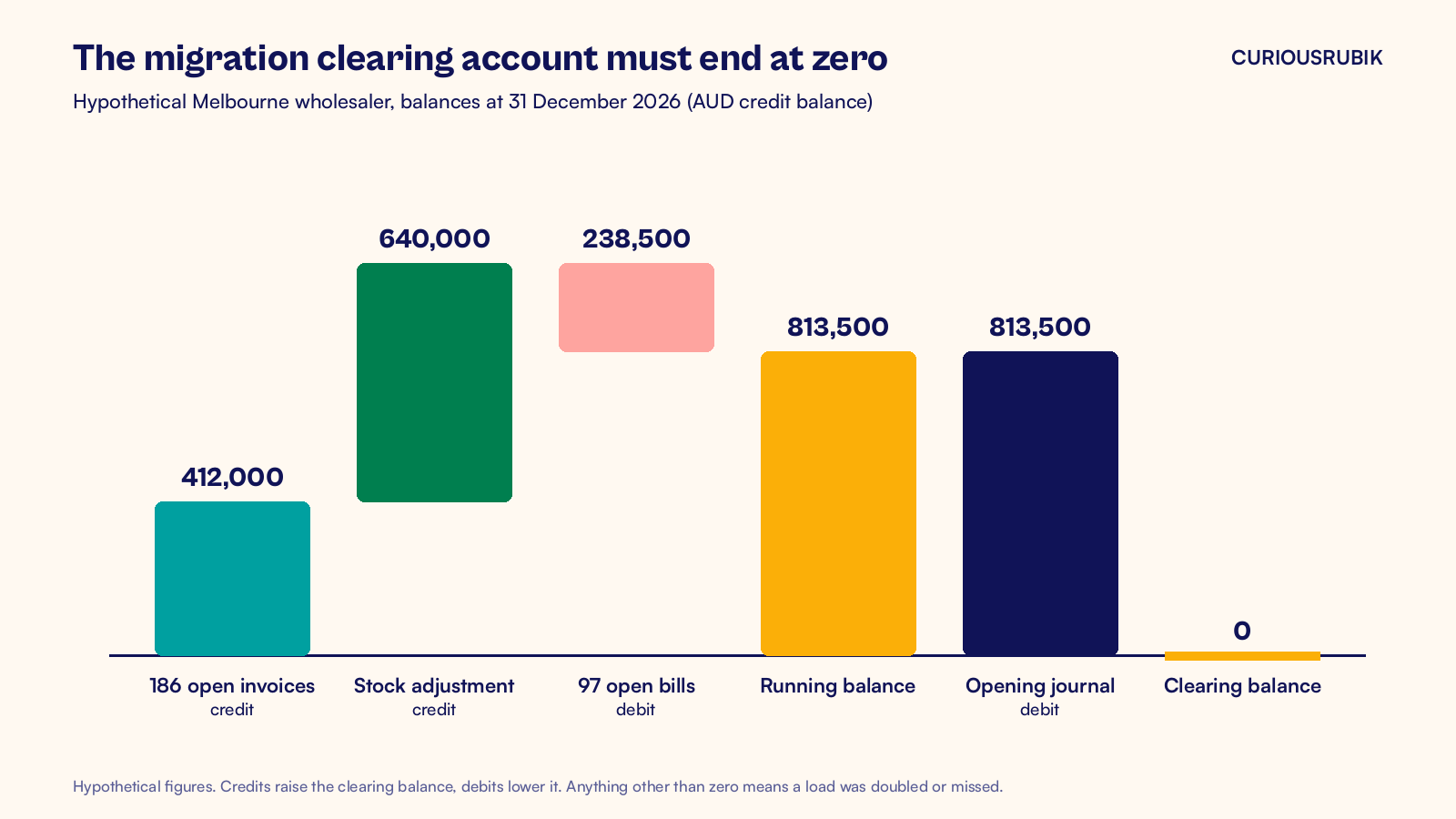
The fix is a migration clearing account. Post the open invoices, open bills and stock against it. Leave the receivables, payables and stock accounts out of the trial balance journal, then check that the clearing account returns to zero.
A hypothetical wholesaler going live on 1 January 2027
A hypothetical Melbourne wholesaler on the accruals basis moves to NetSuite on Friday 1 January 2027, the start of its January to March BAS quarter. At 31 December 2026 the old system shows:
| Balance at 31 December 2026 | Old system (AUD) | How it comes into NetSuite |
|---|---|---|
| Accounts receivable | 412,000 | 186 open invoices, original dates, against the clearing account |
| Accounts payable | 238,500 | 97 open bills, original dates, against the clearing account |
| Stock on hand | 640,000 | Inventory adjustment by item and location, against the clearing account |
| All other balance sheet accounts | As per trial balance | One opening journal, excluding the three accounts above |
The invoices credit the clearing account with AUD 412,000 and the stock adjustment credits it with AUD 640,000. The bills debit it with AUD 238,500. That leaves a credit of AUD 813,500. The opening journal then debits the clearing account with exactly AUD 813,500, so it ends at zero.
If the clearing account shows anything other than zero, something was loaded twice or not at all. Find it before go live, not at the first month end.
What happens to payroll, TPAR and old records?
Payroll usually stays in your payroll solution, and that solution keeps reporting through Single Touch Payroll. NetSuite receives the pay run journals. Check the first journal after go live against the payroll report, and set up the Payday Super tracking for each pay run from the first payday.
The taxable payments annual report (TPAR) covers the whole financial year. If you cut over mid year, the report for that year needs contractor payments from the old system as well as from NetSuite. Save a payments report from the old system at cutover. Our guide to NetSuite TPAR reporting shows how to set up the vendor side.
Keep the old system available in read only form, or keep a full export you have tested. The ATO asks most businesses to keep records for five years, and changing software does not change that.
How do you sign off the first BAS?
Treat the first BAS from NetSuite as an acceptance test. For the hypothetical wholesaler, that is the January to March 2027 quarter.
- Run the draft BAS in NetSuite and agree labels G1, 1A and 1B to the tax codes and the general ledger.
- Check that no opening balance or imported open invoice created GST in the new quarter on the accruals basis.
- Compare the quarter with the same quarter last year from the old system and explain any large swing.
- Ask the finance lead to sign off the BAS and the reconciliation together.
A big swing in GST free sales or capital purchases usually points to a tax code mapping error. Fix the mapping, then rerun. The first weeks after go live bring other firsts too, and our guide to NetSuite hypercare in Australia lists them in order.
Frequently asked questions
How much history should we migrate to NetSuite?
A common approach is to load open transactions plus monthly summary balances for one or two prior years. That gives finance comparative reports without the cost of loading every closed invoice. Keep the old system in read only form, or a tested full export, for the detail. Load more history only when a report or audit needs it.
Can we migrate in the middle of a BAS quarter?
You can, but it makes the next BAS harder, because the figures come from two ledgers. Someone has to combine them by hand and check that no GST is missing or doubled. If the project date is flexible, move the cutover to the first day of the next BAS period. That one change removes most of the risk.
Do vendor ABNs need to come across into NetSuite?
Yes. Carry the ABN on each vendor record and check it before the first load. NetSuite uses vendor details on bills and payment runs, and TPAR needs correct ABNs for reportable contractors. A vendor without an ABN may also affect withholding, so flag those records for your accounts payable and tax team before go live.
Who should sign off the migrated data?
The finance lead signs off balances and the first BAS. Each data owner signs off their own records: sales for customers, purchasing for vendors and operations for items and stock. The implementation team prepares the reconciliations, but sign off belongs to the business. A short record of who approved what helps your auditors later.
CuriousRubik's NetSuite data migration team plans the mapping, trial loads and reconciliations with your finance team, and stays through the first BAS. We work with companies across Australia on implementations of every size.
Related reading
NetSuite Implementation Timeline in Australia
How long each stage of an Australian NetSuite project takes and where the BAS calendar fits.
NetSuite Hypercare in Australia After Go Live
The first pay run, payment run, month end and BAS checks after go live.
NetSuite TPAR Reporting: Vendor Flags and Year End Checks
How to set up vendors and payments for the taxable payments annual report.