For Australian finance and project leads planning the weeks after go live, a practical hypercare plan built around local deadlines.
Last reviewed: 4 November 2026. Product details reflect this review date. Availability and behavior can vary by account, role and release.
NetSuite hypercare in Australia is the period of extra support straight after go live, when the project team stays close while your people run real transactions. Plan it around the Australian firsts: the first pay run under Payday Super, the first ABA payment file, the first month end close and the first BAS. Plan for 6 to 8 weeks.
What is NetSuite hypercare?
Hypercare is a short, planned phase after go live in which the people who built your account stay on hand to fix problems quickly. It is not the same as ongoing support. During hypercare, the project team still owns the result, and fixes go in within hours or days rather than joining a queue.
The phase exists because go live is the first time your real data, real volumes and real people meet the design together. Testing proves the design works. Hypercare proves it works on an ordinary Tuesday, with a full inbox and a supplier on the phone.
NetSuite makes this phase easier. System Notes on each record show who changed a field and when, so you can trace what happened to a transaction or a customer. Saved searches and dashboards let you watch exceptions as they appear, instead of waiting for someone to complain.
Which Australian firsts should hypercare cover?
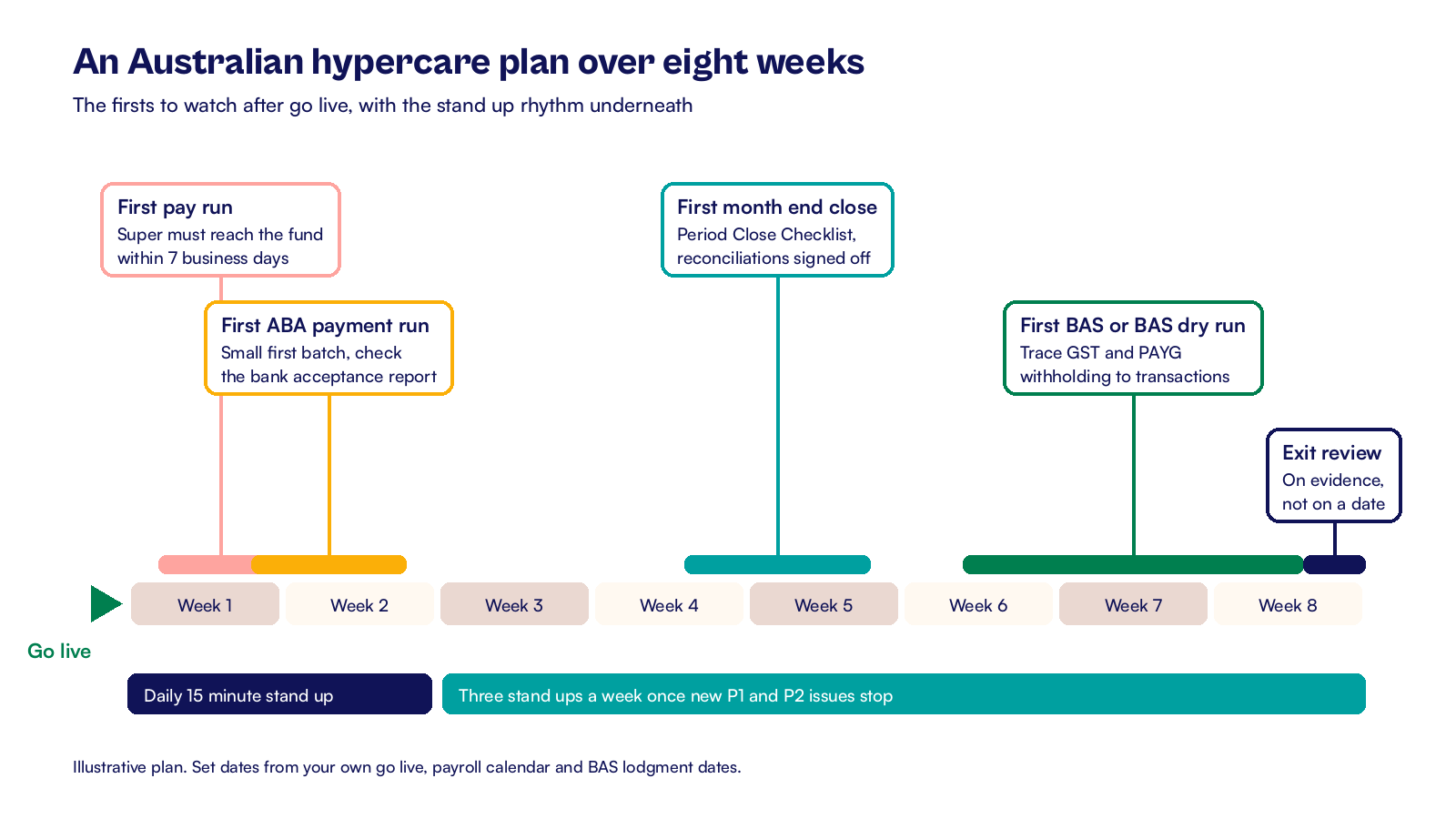
A generic hypercare plan watches the first invoice and the first purchase order. An Australian plan adds the local events that carry a deadline or a penalty. Put each one on the hypercare calendar with a date, an owner and a test.
| First event | Why it matters | Who checks it |
|---|---|---|
| First pay run and super payment | Under Payday Super, super must reach the fund within 7 business days after payday | Payroll lead |
| First ABA payment file | A rejected bank file delays supplier payments and staff reimbursements | Accounts payable lead |
| First month end close | Every posting rule, accrual and mapping runs for real for the first time | Financial controller |
| First BAS from NetSuite | GST, PAYG withholding and BAS labels must trace from transactions to the return | Tax or finance manager |
| First STP report after go live | Year to date figures must continue without gaps if payroll changed | Payroll lead |
If you went live at the start of a quarter, the first BAS may fall after hypercare has ended. In that case, keep a small slice of the project team available for the BAS week. Or run a BAS dry run from NetSuite data at the end of the first month. Our guide to the NetSuite implementation timeline in Australia explains how to pick a go live date that leaves room for these events.
How long does NetSuite hypercare in Australia last?
Hypercare should last until the first month end close is done and reconciled, and ideally until the first BAS has been prepared from NetSuite. In our experience, 6 to 8 weeks is a fair planning range, and your own calendar sets the real length. Fixing it at a tidy two weeks often means the experts leave just before the hardest test.
Size it from your calendar, not from a budget line. Count forward from go live to the first close, then to the first BAS lodgment date. Quarterly BAS is generally due on the 28th of the month after the quarter ends, and the October to December quarter is due on 28 February. Your registered agent may have different dates, so confirm them with your tax adviser.
Also look for local pressure points inside the window. A go live in late November runs straight into Christmas trading, staff leave and the January slowdown. Agree who covers those weeks before go live, on your side and the partner's.
Set up the issue log and daily rhythm
Hypercare works when every problem has one home and one owner. Set these up the week before go live:
- Create one issue log. A NetSuite case record, a custom record or a shared tracker all work, as long as everyone uses the same one.
- Agree four priority levels. For example, P1 stops a payment, a pay run or shipping. P4 is cosmetic.
- Agree a response time for each level, and write it into the hypercare plan.
- Name a NetSuite administrator on your side who triages new issues each morning.
- Hold a 15 minute stand up each business day for the first two weeks, with finance, operations, payroll and the partner.
- Move to three stand ups a week once new P1 and P2 issues stop appearing.
- Send a short written summary each Friday: issues opened, closed and still open, and any risk to the next deadline.
Ask users to report problems through the log, not by email or chat. A side message feels faster, but it hides the pattern. Three people with the same problem in one week usually point to one setup fix, not three separate errors.
What should you watch every day?
Watching every day means running a short list of saved searches each morning and acting on anything that appears. Build them before go live and add them to a hypercare dashboard for the administrator and the controller.
- Integration errors and records stuck in a pending status, such as orders from a web store or employees from the payroll provider.
- Sales orders pending fulfillment or billing beyond your normal window.
- Vendor bills pending approval for more than two days.
- Bank lines that are not matched in the bank reconciliation.
- Items with negative stock on hand at any location.
- Transactions posted to a suspense or clearing account.
- Users who have not logged in since go live, which can point to a training or access gap.
Fix access problems first. When a user cannot see a record or approve a bill, they fall back to the old system or a spreadsheet, and the workaround becomes a habit. Roles and permissions are quick to change in NetSuite, so treat them as same day fixes.
How do you get the first pay run and payment run right?
The first pay run and the first supplier payment run are the two hypercare events your staff and suppliers will notice. Give them their own checklist and rehearse them in the sandbox account before the live date.
Payroll and super
For payroll, check that the pay run journal lands in NetSuite with the right accounts, departments and liability balances. Then confirm the super payment for that payday is sent in time for the fund to receive it within 7 business days. From 1 July 2026, super is calculated on qualifying earnings and reported in STP each payday. Reconcile the super clearing account after the first two pay runs, as our guide to NetSuite Single Touch Payroll integration describes.
Supplier payments
For supplier payments, NetSuite creates ABA files for Australian banks through the Electronic Bank Payments SuiteApp. Before the first live run:
- Confirm every supplier in the run has an approved bank record with a BSB and account number.
- Run a small first batch, for example ten suppliers, rather than the full weekly run.
- Upload the file to the bank and check the bank's acceptance report the same day.
- Do not release the next batch until the bank has confirmed this one, and fix any rejected lines first.
- Match the bank debit in the reconciliation the next morning.
What does the first month end close need?
The first close is where hypercare earns its cost. Every accrual, allocation, revaluation and report runs on live data for the first time, and the opening balances meet the first month of activity.
Use the Period Close Checklist in NetSuite to work through the close in order, and add your own tasks with owners. Before you close the period, check these:
- Opening balances agree to the signed migration reconciliation, account by account.
- Accounts receivable and accounts payable aging agree to their control accounts.
- Bank accounts are reconciled to the statement for the month.
- Payroll liabilities and the super clearing account agree to the payroll reports.
- Inventory quantity and value by location agree to the stocktake or migration figures.
- GST accounts agree to the tax detail report you will use for the BAS.
- Clearing and suspense accounts are at zero or explained.
Lock accounts payable and accounts receivable first, then close the period once the controller has reviewed the reconciliations. If you find a migration error, fix it with a dated journal and a note in the issue log, so the next person can follow what changed. Our NetSuite month end close checklist lists the tasks that repeat every month after hypercare ends.
When should hypercare end?
Hypercare should end on evidence, not on a date. Agree the exit criteria before go live, then review them in the final week with the sponsor, the controller and the partner.
A sensible Australian exit list looks like this:
- The first month end has closed and reconciled.
- The first BAS has been prepared from NetSuite and traced to transactions, or a BAS dry run has passed.
- Two pay runs have reconciled, with super paid on time.
- No P1 or P2 issues are open, and every remaining issue has an owner and a date.
- Users have stopped keeping side spreadsheets for daily work.
Then hand over in writing to whoever supports the account next, whether that is your internal administrator, a managed support team or both. The handover should list open issues, recurring tasks, integration owners and the saved searches from the hypercare dashboard. Our article on NetSuite hypercare exit criteria goes deeper on the exit decision itself.
At CuriousRubik, we plan hypercare in the same workshop as cutover, so the Australian dates are on the calendar before anyone picks a go live day. If you are planning a go live in the next six months, our NetSuite implementation team can draft your hypercare calendar and dashboard with you. You can also see how we work with NetSuite customers in Australia.
A good next step is to list your first pay run, payment run, close and BAS dates on one page. Then check that each one has a named owner.
Related reading
NetSuite Hypercare Exit Criteria and Support Readiness
How to decide that hypercare is finished and support is ready to take over.
NetSuite Implementation Timeline in Australia
How EOFY, BAS and STP dates shape an Australian project plan.
NetSuite Single Touch Payroll Integration and Reconciliation
How to connect payroll to NetSuite and reconcile STP and super every pay cycle.