For Australian finance leads deciding whether Peppol eInvoicing in NetSuite can wait, the case for starting this year.
Last reviewed: 3 November 2026. Product details reflect this review date. Availability and behavior can vary by account, role and release.
NetSuite eInvoicing in Australia sends and receives invoices as structured data over the Peppol network, using your ABN and an accredited access point. Business to business eInvoicing is still voluntary. I think it is worth starting now anyway, because it cuts manual bill entry, makes payment redirection scams harder and helps if you sell to government.
What is eInvoicing in Australia?
eInvoicing is the exchange of invoice data directly between two accounting systems, with no PDF or email in the middle. In Australia it runs on Peppol, an international network with shared rules. The ATO is the Australian Peppol Authority.
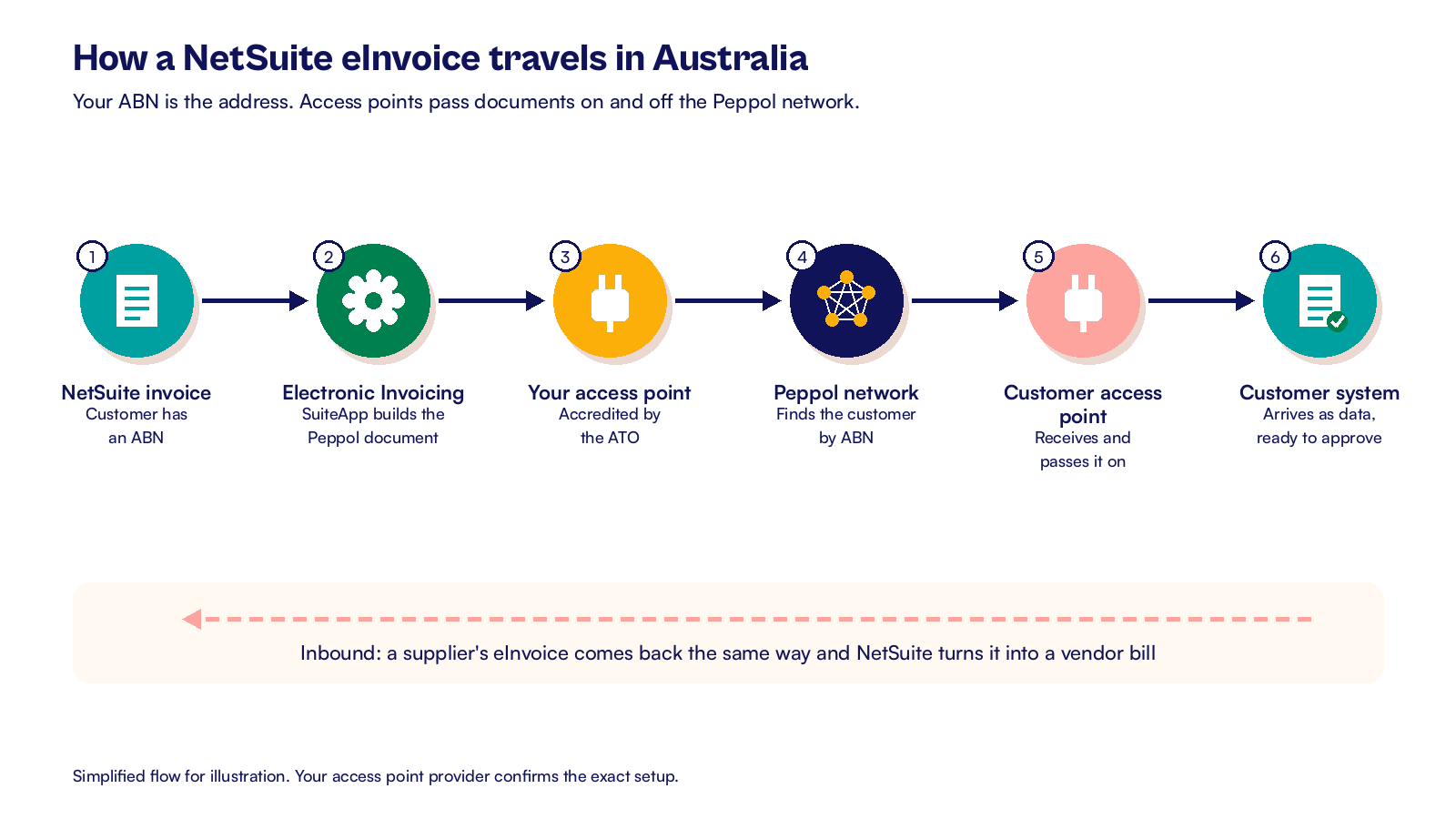
Each business connects through an accredited access point, which is a service that passes documents on and off the network. Your ABN is the address. When you send an invoice, it lands in your customer's system as data they can match and approve.
Here is where things stand in November 2026:
- Business to business eInvoicing is voluntary. No date has been set to make it compulsory.
- Non corporate Commonwealth entities have had to accept eInvoices since 1 July 2022.
- Those entities were asked to reach 30% of invoices received as eInvoices by 1 July 2026, and to automate sending and processing by December 2026.
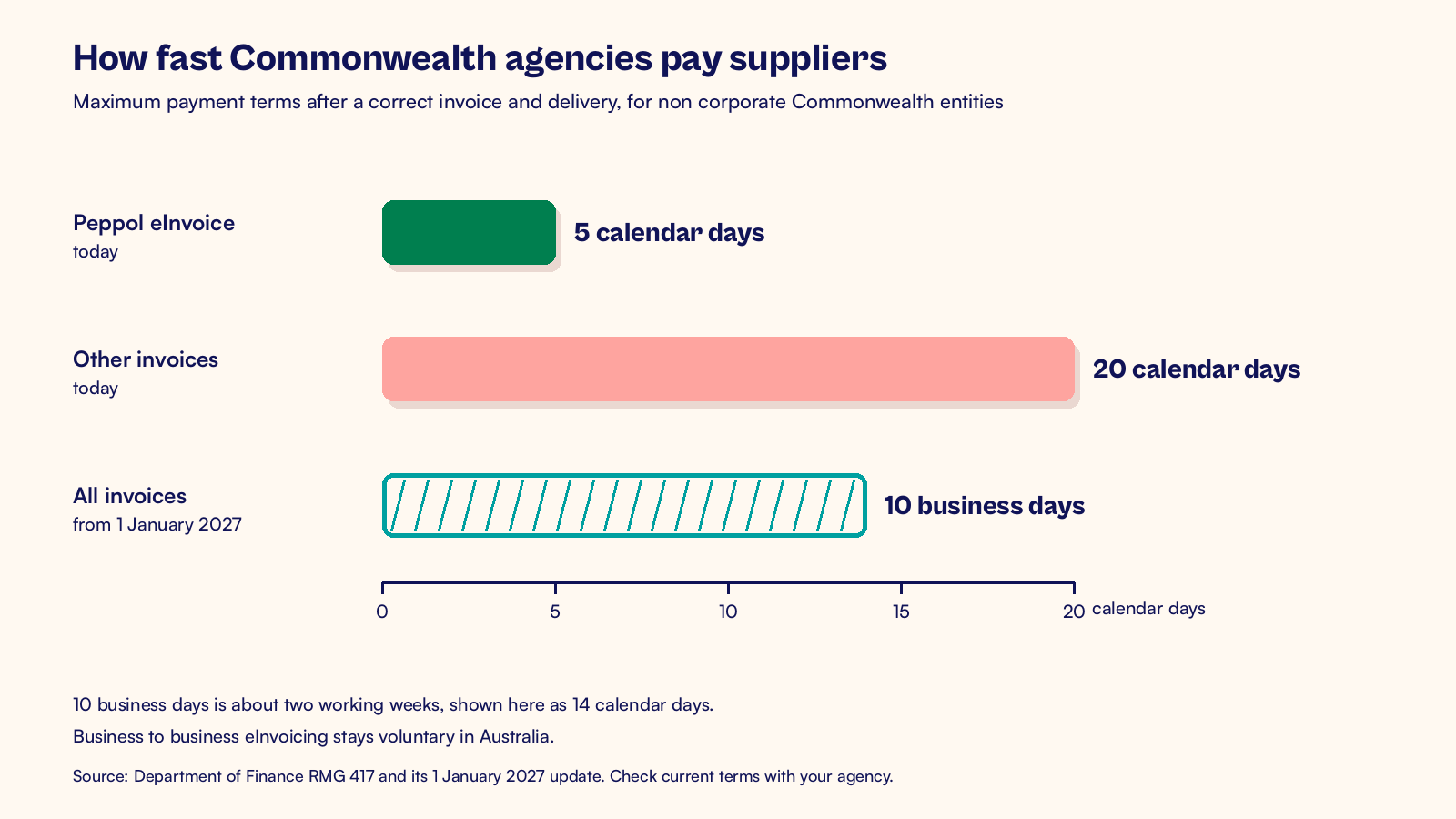
- Under the current Commonwealth payment policy, a correct eInvoice is paid within 5 calendar days where both sides use Peppol and agree to it, against 20 days for other invoices. From 1 January 2027, the policy moves to 10 business days for all invoices.
Why start before your customers ask?
The usual question I hear is "Why do this if nobody is making us?" My answer is that the payoff sits mostly on your own side of the ledger.
Start with accounts payable. An inbound eInvoice arrives as data, and NetSuite can turn it into a vendor bill. Nobody keys in the supplier, the lines or the GST. Your team spends its time on approval and matching instead.
Then think about fraud. Payment redirection scams work by sending a fake invoice or a changed bank detail by email. The ATO names disrupting these scams as one of the reasons for eInvoicing. A document that arrives from a known ABN over Peppol is much harder to fake than a PDF.
Government work is the third reason. If you supply Commonwealth agencies, they are under pressure to raise their eInvoice share and will ask suppliers to switch. Being ready makes you easier to buy from.
Finally, the setup forces good housekeeping. You need a correct ABN on every customer and supplier, clean tax codes and one owner for failed documents. Those habits help your BAS and your close even before the first eInvoice goes out.
None of this needs a big bang. You can start with inbound bills from a handful of suppliers, then add outbound invoices for the customers who ask. Each step is small, and each one removes some manual work.
How does NetSuite eInvoicing in Australia work?
NetSuite handles this through the Electronic Invoicing SuiteApp, which generates outbound documents and turns inbound ones into transactions. It includes Peppol templates built for Australia and New Zealand, covering invoices, credit memos and vendor bills. You connect it to an accredited access point, which links your account to the network.
Setting it up
The setup usually follows this order:
- Install the SuiteApps License Client, then the Electronic Invoicing SuiteApp.
- Set your free use country, or your license, at Setup > E-Documents > Electronic Invoicing Preferences.
- Create templates from the Australia and New Zealand Peppol samples, with the matching data source plug-in.
- Set up a sending method that passes documents to your access point.
- Group the templates in a package and assign it to each customer and vendor who trades this way.
- Add the right roles and permissions, then test one invoice, one credit memo and one inbound bill in your sandbox.
Testing and running it
Watch the GST details in testing. The sample templates say they do not fill every tax category field, so your team may need to add those through the template or plug-in. Check one taxable line and one GST free line before you go live.
Test the inbound side with the same care. Oracle notes that inbound conversion for the Australia and New Zealand template is not supported in SuiteTax accounts, so confirm your tax setup first.
Ask one friendly supplier to send a real eInvoice to your sandbox setup. Check that the vendor, the lines, the GST and the due date land on the bill as you expect. Then run it through your normal approval route.
Once documents flow, someone has to watch the queue each day for rejected or failed documents. That is ordinary support work, the kind we list in our guide to what a NetSuite managed services plan covers. If you also run a web store, the same owner can watch both queues, as our guide to NetSuite ecommerce integration in Australia explains.
What to check this week
You do not need a big project to begin. These checks take a few hours and tell you how ready you are:
- Run a saved search for customers and vendors with a missing or badly formatted ABN.
- List your ten biggest suppliers and look them up in the Peppol Directory to see who can already send.
- Ask your government customers whether they plan to require eInvoices at your next contract renewal.
- Find out whether the Electronic Invoicing SuiteApp is installed in your account.
- Name one person to own failed and rejected documents.
At CuriousRubik, we treat eInvoicing as an integration with clear owners and tests, not a switch you flip. Our NetSuite finance and payments integration team can set up the SuiteApp, templates and access point link for your Australian entity. Read more about our work with NetSuite customers in Australia, or start with a NetSuite health check for Australian businesses to see where your data stands. You can also add eInvoicing to a quarterly NetSuite optimization routine, one supplier group at a time.
Related reading
NetSuite Ecommerce Integration in Australia for Retailers
How Australian retailers connect a web store to NetSuite, from GST inclusive prices to payouts.
NetSuite Health Check in Australia: What It Covers
How to find the gaps in an existing NetSuite account and rank the fixes.
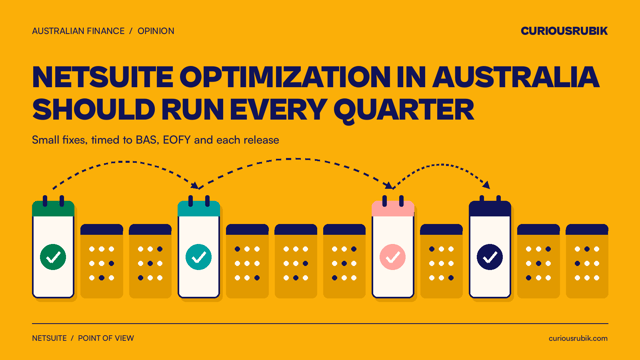
NetSuite Optimization in Australia Should Run Every Quarter
Why small, regular improvements timed to the Australian calendar beat one big fix.