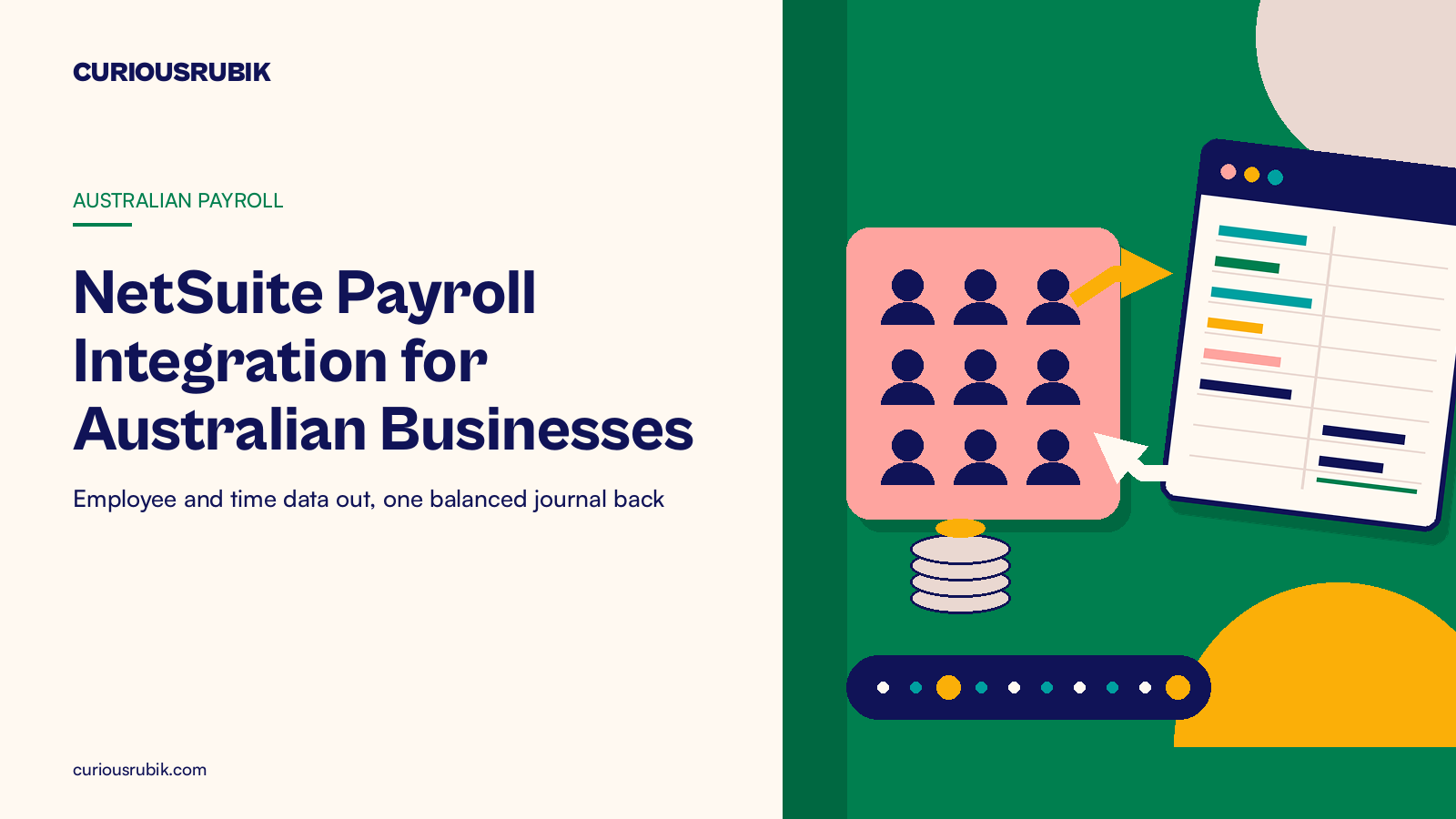
For Australian finance and payroll leads: what flows between payroll and NetSuite, plus a first integrated pay run worked in AUD.
Last reviewed: 26 October 2026. Product details reflect this review date. Availability and behavior can vary by account, role and release.
NetSuite payroll integration in Australia links your payroll system and NetSuite so each does its own job. NetSuite sends employee, cost center and approved time data. Payroll calculates pay, lodges Single Touch Payroll and returns one balanced journal per pay run, split by department and project. Super, PAYG and net pay then reconcile in NetSuite.
What is NetSuite payroll integration in Australia?
A payroll integration is the agreed set of data that moves between your payroll system and NetSuite, in which direction, and when. It decides who keeps each record and how the cost of every pay run lands in your ledger.
NetSuite's own payroll product, SuitePeople U.S. Payroll, is built for employees in the United States. Australian businesses run pay in an Australian payroll solution instead.
That can be a payroll SuiteApp that runs inside your NetSuite account or a separate payroll platform connected to it. Both are common, and in both cases NetSuite stays the home of your general ledger, projects and reporting.
The table shows the usual split. Your own may differ, but every row needs an owner and a timing.
| Data | Direction | Owner | When it moves |
|---|---|---|---|
| New starters and changes: name, department, location, start date | NetSuite to payroll | People team | When the employee record is saved |
| Tax file number, bank account, super fund choice | Stays in payroll | Payroll officer | At onboarding |
| Approved timesheet hours by project | NetSuite to payroll | Project managers approve | Before the pay run cutoff |
| Pay run journal: wages, super, PAYG, net pay | Payroll to NetSuite | Payroll officer, then accountant | When the pay run is finalized |
| Leave balances and leave provision | Payroll to NetSuite | Accountant | Monthly |
| Single Touch Payroll report | Payroll to the ATO | Payroll officer | On or before payday |
| Net pay file | Payroll to the bank | Payroll officer | Before payday |
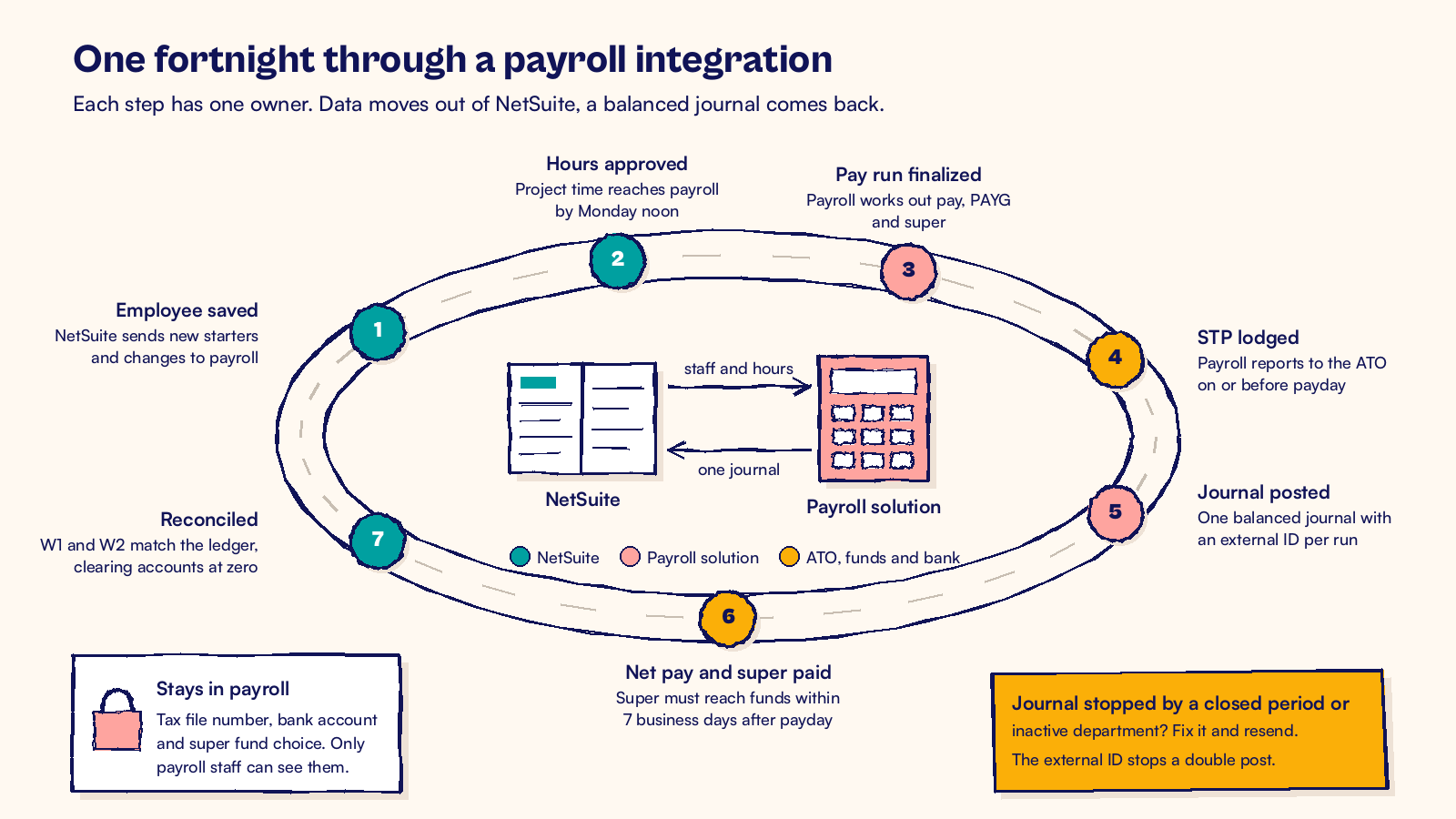
Sensitive details such as tax file numbers and bank accounts stay in payroll, where only payroll staff can see them. If you are still mapping STP Phase 2 pay categories to accounts, start with our guide to NetSuite Single Touch Payroll integration.
How should data flow between payroll and NetSuite?
Design the flow before anyone writes a line of mapping. These seven steps cover what most Australian businesses need.
- Decide which system owns each employee field. NetSuite usually owns department, location, class, supervisor and start date. Payroll owns pay rates, tax details and super.
- Map each payroll cost center to a NetSuite department, location and class. In NetSuite OneWorld, add the subsidiary too. Keep this mapping in one table that finance owns.
- Map each pay category to a general ledger account. Ordinary hours, overtime, allowances, leave taken and super each get an expense account. PAYG withholding, super, net wages and payroll tax each get a liability account.
- Post a summary journal by department, location and project, not one line per employee. Individual pay stays private in payroll, and the ledger stays readable.
- Give each journal an external ID built from the pay run number. NetSuite does not allow two journal entries with the same external ID, so the same pay run cannot post twice by mistake.
- Choose how the journal arrives. A small team can import a file at Setup > Import/Export > Import CSV Records. Pick Transactions as the import type and Journal Entry as the record type. A connected platform can post the journal through an API, using an integration role that can make journal entries and very little else.
- Agree the cutoff calendar. For example, timesheets approved by Monday noon, pay run finalized Wednesday, journal posted the same afternoon and payday on Thursday.
If you want an accountant to check each journal before it posts, turn on Require Approvals on Journal Entries in Accounting Preferences. The payroll journal then waits as Pending Approval until someone approves it.
Plan for the day a journal fails. A closed period or an inactive department will stop it. The payroll officer should get an alert, fix the cause and send the journal again. The external ID makes the resend safe.
Before the first live payday, run one parallel pay run. Post the old way and through the integration, then compare the two journals line by line. Matching totals are not enough, because two wrong lines can cancel each other out.
Leave needs its own rule. Payroll knows each person's leave balance and the value of that balance. Send NetSuite one monthly journal that moves the leave provision to the new total, split by department.
A hypothetical Brisbane firm's first integrated pay run
A hypothetical engineering services firm in Brisbane has 45 staff and pays fortnightly. It tracks project time in NetSuite and runs payroll in a separate Australian payroll platform. Its first integrated payday is Thursday 12 November 2026. To keep the numbers simple, every dollar of gross pay here counts toward super.
Before the pay run
On Monday 9 November, a new site engineer starts. The people team creates her employee record in NetSuite with the delivery department, the Brisbane location and her supervisor. The integration creates her in payroll that afternoon. The payroll officer then adds her tax file number declaration and super fund choice directly in payroll.
Leavers follow the same path in reverse. The last day of work in the Termination/Release Date field flows from NetSuite to payroll. The payroll officer then works out the final pay, including any unused leave.
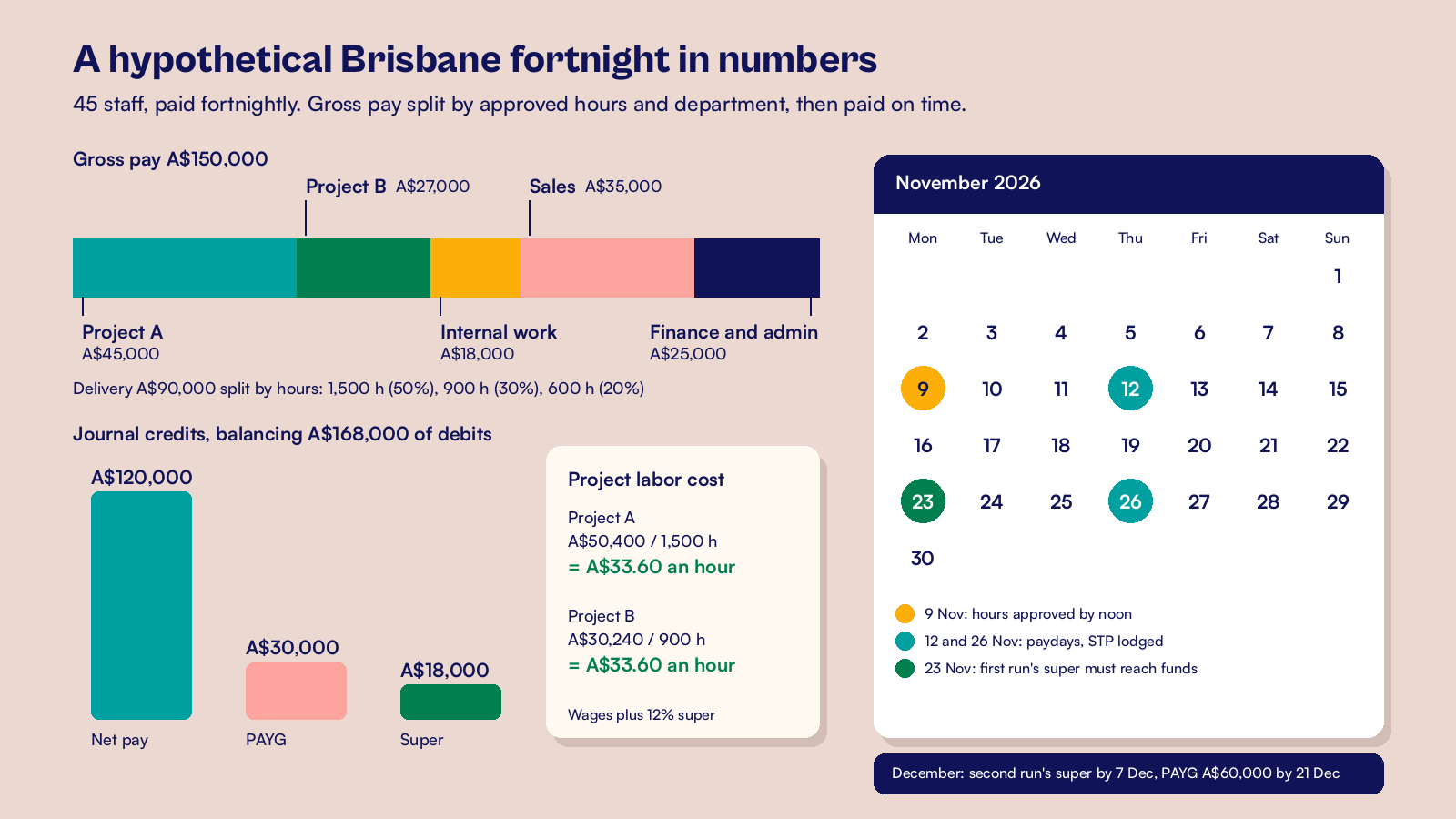
By Monday noon, project managers have approved 3,000 hours of delivery time in NetSuite. Project A has 1,500 hours, Project B has 900 hours and internal work has 600 hours. Those approved hours flow to payroll with their project codes.
The parallel run that caught a gap
Two weeks earlier, the firm ran the previous fortnight as a parallel run in its NetSuite sandbox. The integration journal was rejected. Payroll had a cost center for a new Gold Coast site office, but nobody had mapped it to a NetSuite location.
Finance added the location and the mapping row, and the payroll officer sent the journal again under the same external ID. It posted once. The fix took ten minutes in the test, rather than a late night after the first live payday.
The pay run
Payroll calculates the fortnight. Gross pay is A$150,000. PAYG withheld is A$30,000, so net pay is A$120,000. Super at 12 percent is A$18,000.
The payroll officer lodges the STP report on payday, as the rules require.
Delivery staff earned A$90,000 of the gross pay. The firm splits it by approved hours, so Project A gets 50 percent, Project B gets 30 percent and internal work gets 20 percent. Sales staff earned A$35,000 and finance and admin staff earned A$25,000.
The journal NetSuite receives
The journal arrives with external ID PR20261112 and balances at A$168,000 on each side.
| Line | Department or project | Debit | Credit |
|---|---|---|---|
| Wages | Project A | A$45,000 | |
| Wages | Project B | A$27,000 | |
| Wages | Delivery, internal work | A$18,000 | |
| Wages | Sales | A$35,000 | |
| Wages | Finance and admin | A$25,000 | |
| Super expense | Split the same way as wages | A$18,000 | |
| Net wages clearing | A$120,000 | ||
| PAYG withholding payable | A$30,000 | ||
| Super payable | A$18,000 |
Super follows the wages, so Project A carries A$5,400 of super and Project B carries A$3,240. Project A's labor cost is A$50,400 for 1,500 hours, or A$33.60 an hour. Project B's is A$30,240 for 900 hours, the same A$33.60 an hour. The project manager sees real labor cost in NetSuite the day after payday, not at month end.
Paying and clearing the liabilities
Net pay of A$120,000 leaves the bank on payday, and the bank line clears the net wages clearing account.
Super of A$18,000 goes to the clearing house on payday too. It must reach the funds within 7 business days, which is Monday 23 November. The new site engineer's first contribution has up to 20 business days, but the firm pays everyone together on payday. When it is paid, super payable falls back to zero.
The firm is a medium withholder, so it pays PAYG monthly. The second November pay run on 26 November is the same size. November's A$60,000 of PAYG is due with the activity statement on Monday 21 December.
Checking the result
At month end, the accountant compares the STP figures with the ledger. The ATO describes STP gross wages (BAS label W1) and PAYG withheld (label W2) as amounts that generally match what you posted for the pay run.
Here W1 is A$150,000 and W2 is A$30,000 for the first run, matching the journal. Both clearing accounts show zero. A saved search of journals whose external ID starts with PR confirms that each November pay run posted exactly once.
Which payroll deadlines set the integration calendar?
Three deadlines now set the rhythm of an Australian payroll integration, and your cutoff calendar has to fit inside them.
- STP is due on or before each payday. Your payroll solution lodges it, and you finalize the year's STP data by 14 July.
- Since 1 July 2026, super guarantee must reach each fund within 7 business days after payday. The rate is still 12 percent, now worked out on qualifying earnings. The first contribution for a new employee, or to a new fund, has up to 20 business days.
- PAYG withholding is paid quarterly, monthly or within days of payday, depending on how much you withhold each year.
The ATO's Small Business Superannuation Clearing House closed on 1 July 2026. Employers now pay through another channel, often a commercial clearing house built into their payroll solution. Allow enough time for it to process, which is why the ATO suggests paying super on payday.
Payday Super changes what you watch in NetSuite. Super payable used to build up for a quarter. Now it should clear every pay cycle.
A saved search of super payable balances older than seven business days shows a late payment before it becomes a charge. Our guide to reconciling Australian payroll with NetSuite shows how to tie each payment back to the pay run, the ledger and the bank.
PAYG works the same way on a slower cycle. Our guide to NetSuite PAYG withholding covers matching withheld amounts to the activity statement. Payroll tax is set by each state, with its own rates and thresholds. Post it as a monthly journal and confirm the figures with your adviser.
Cash timing tightens too, because super now leaves with every payday. Faster customer payments help, and the habits in our NetSuite DSO best practices checklist work in any market.
At CuriousRubik, we design the mapping table, the cutoff calendar and the error alerts before the first live pay run. Our finance and payments integration team can connect your payroll solution to NetSuite and test it with a parallel pay run. The NetSuite Australia page explains how we support Australian finance teams.
Frequently asked questions
Can NetSuite run Australian payroll on its own?
NetSuite's built in payroll, SuitePeople U.S. Payroll, covers employees in the United States. Australian businesses run payroll in an Australian payroll solution, either a SuiteApp that works inside NetSuite or a separate platform. Both connect to NetSuite, which stays the ledger for wages, super and PAYG, and the place you report labor cost.
How does payroll integration work with more than one Australian entity?
In NetSuite OneWorld, each employing entity is usually its own subsidiary. A regular NetSuite journal posts to one subsidiary only, so payroll sends a separate journal for each entity. Each entity also reports STP under its own ABN. Keep one mapping table with a subsidiary column, so adding an entity means adding rows, not rebuilding the integration.
Who should own the payroll integration after go live?
Split the work by job: the payroll officer owns each pay run and acts on failed journal alerts. Finance owns the mapping table and adds rows when a new department, location or project appears. Your NetSuite administrator owns the integration role and its access. Review the mapping each quarter and before any restructure.
How often should payroll post to NetSuite?
Post a journal for every pay run, on the day it is finalized. Post leave provisions and payroll tax monthly. At month end, accrue wages earned but not yet paid, and set the journal's Reversal Date to the first day of the next month. NetSuite reverses it on that date, so the next pay run is not counted twice.
Related reading
Connecting NetSuite to a Payroll Provider
Journal controls and correction handling for any payroll provider.
Preparing the First Payroll and Payment Run After NetSuite Go Live
What to check before your first live pay run and supplier payment run.
Resolve Late Timesheets Before Payroll Closes
How to handle late or disputed hours before the payroll cutoff, with an owner for each decision.