For Singapore finance teams selling or scrapping equipment who want the ledger, the depreciation and the GST to agree.
Last reviewed: 22 November 2026. Product details reflect this review date. Availability and behavior can vary by account, role and release.
NetSuite fixed asset disposal in Singapore starts on the Asset Disposal page in Fixed Assets Management. Choose Sale or Write off and enter the posting date. For a sale, review the invoice NetSuite creates, check the goods and services tax (GST) and reconcile the amounts to your GST F5 return.
How does NetSuite fixed asset disposal in Singapore work?
A fixed asset disposal is the entry that takes an asset off your books when you sell it, scrap it or give it away. Net book value is the amount left after depreciation in these examples. In NetSuite, the Fixed Assets Management SuiteApp handles it at Fixed Assets > Transactions > Asset Disposal.
There are two disposal types. A sale lets you enter the proceeds. NetSuite posts the difference between net book value and proceeds, creates a sales invoice using the disposal item and sets the asset status to Disposed. A write off posts the net book value and the cumulative depreciation, then sets both to zero.
Disposal is applied to the accounting method and to any tax methods linked to the asset. The sale amount is worked out separately for each method, based on the current cost for that method.
You can dispose of a simple asset, a compound asset or a single component. If you pick a compound asset, NetSuite adds all of its components to the page. For a part sale, such as 2 of 5 identical racks, enter the quantity to dispose. NetSuite reduces the remaining value and keeps the asset's current status.
If the asset stays in use and changes location or subsidiary, review the transfer workflow. Our guide to asset disposal and transfer controls covers that difference.
What do you set up before the first disposal?
Three settings do most of the work, and all three live on the asset type:
- Disposal Item. A non inventory item for sale. It appears on the invoice when an asset is sold.
- Disposal Cost Account. The account for asset sale expenses. Review it alongside the account on the sale item so you can trace both sides of the sale in a test posting.
- Depreciation Rules. The choice that decides how the final month is depreciated. Review the rule on the asset before you estimate the sale result.
If your asset register is new, our fixed assets implementation readiness guide explains how to build the opening register first. If you run NetSuite OneWorld, the customer, asset, sale item and any manually selected Sales Tax Code must match the same subsidiary.
Which depreciation rule decides the final month?
The Depreciation Rules field on the asset type has these options:
| Rule | When depreciation starts or ends |
|---|---|
| Acquisition | Depreciation is recognized in the period the asset is first made active |
| Disposal | Depreciation is recognized in the asset's final period |
| Pro rata | The asset depreciates for a partial month in both the first and final periods, using a 30 day month |
| Mid month | Depreciation starts in the month of purchase if the start date is in the first half of the month, otherwise in the next month |
Oracle's example has depreciation starting on June 18 and ending on September 17. That gives 13 days of depreciation in the first period and 17 days in the last one, always out of 30. Oracle also gives special cases for depreciation that starts on the last day of a month.
Check the Depreciation Start Date as well as the Disposal Date when estimating the final charge. The example below assumes a full first month and 12 days in the last month.
A hypothetical sale of a cold room unit
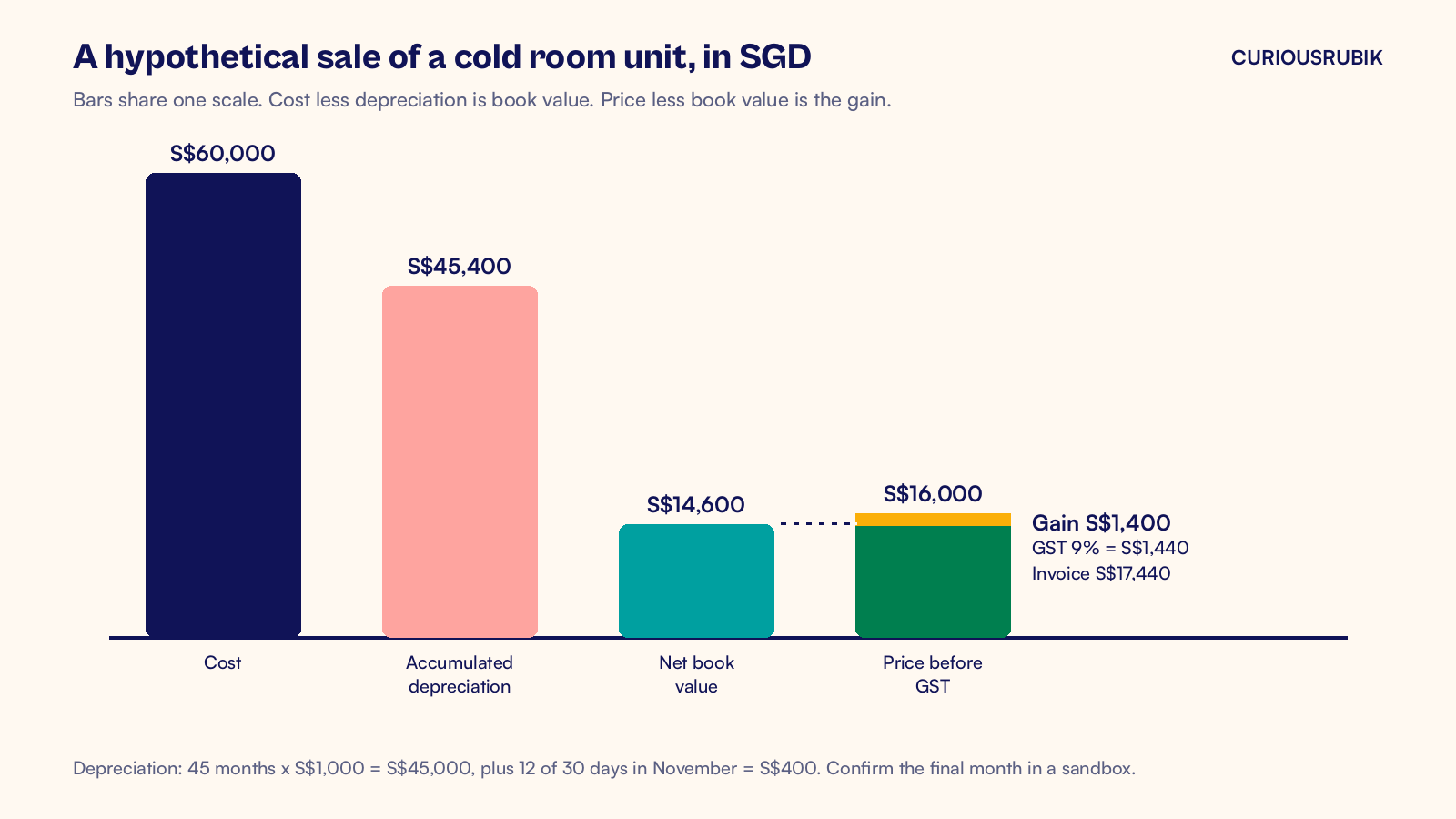
A hypothetical GST registered Singapore distributor sells an old cold room unit to a local buyer. Assume the unit has no residual value and uses monthly depreciation under the Pro rata rule.
- Cost: S$60,000.00, depreciated straight line over 60 months at S$1,000.00 a month.
- Depreciation started February 1, 2023 and is posted through October 31, 2026, which is 45 months.
- Disposal date: November 12, 2026.
- Agreed price: S$16,000.00 plus 9 percent GST.
The numbers work out like this:
| Line | Calculation | Amount |
|---|---|---|
| Depreciation to October 31 | 45 x S$1,000.00 | S$45,000.00 |
| Final month, 12 of 30 days | S$1,000.00 x 12 / 30 | S$400.00 |
| Accumulated depreciation at disposal | S$45,000.00 + S$400.00 | S$45,400.00 |
| Net book value | S$60,000.00 less S$45,400.00 | S$14,600.00 |
| Sale price before GST | Agreed | S$16,000.00 |
| Gain on disposal | S$16,000.00 less S$14,600.00 | S$1,400.00 |
| GST at 9 percent | S$16,000.00 x 9% | S$1,440.00 |
| Invoice total | S$16,000.00 + S$1,440.00 | S$17,440.00 |
The exact number of days charged in the final month depends on your rule and disposal date. Run the disposal in a sandbox and read the disposal depreciation history before you rely on the S$400.00 figure.
How do you record the sale in NetSuite?
Follow these steps:
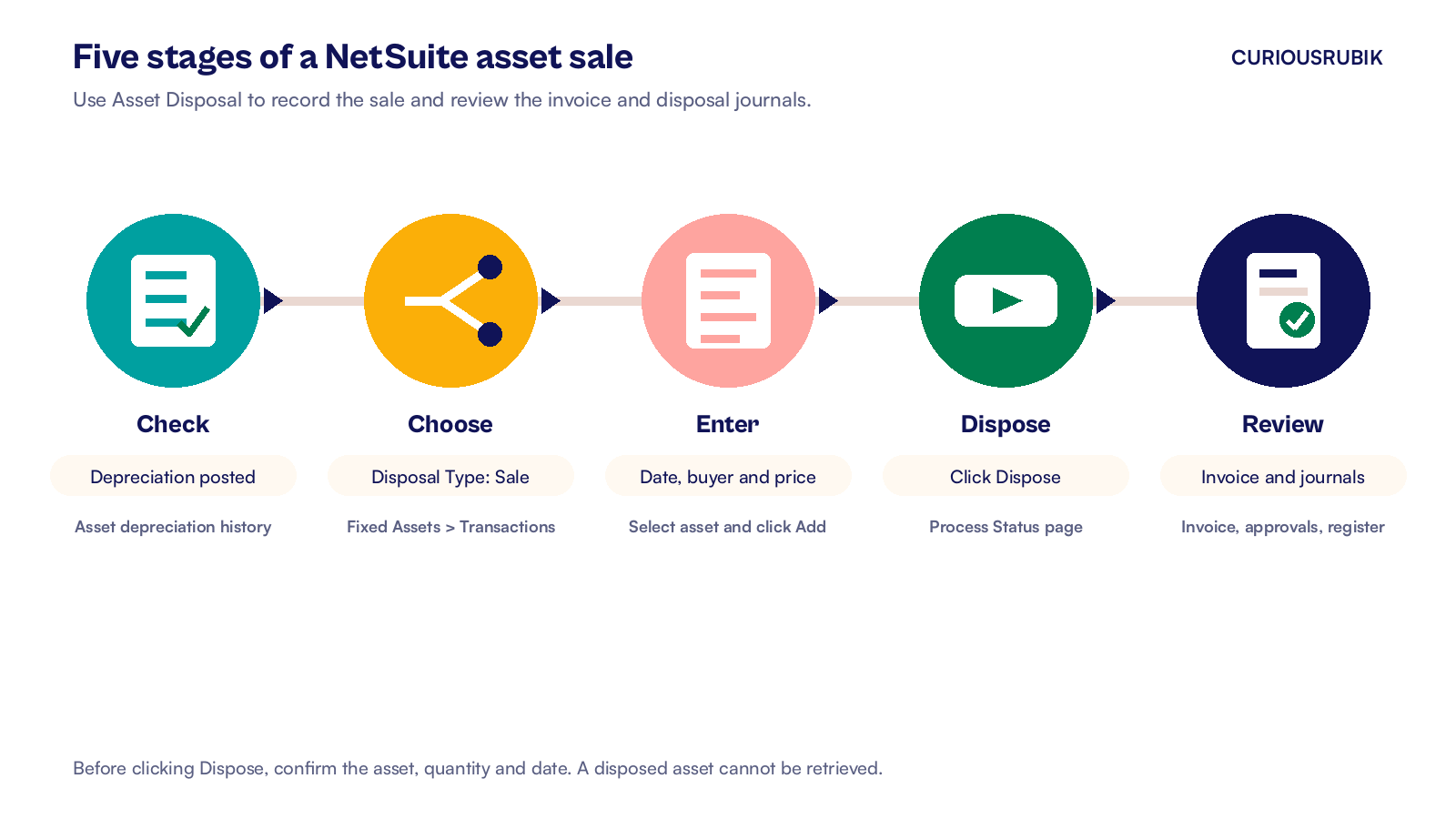
- Check the asset's depreciation history. For this example, confirm the posted balance through October 31 before estimating the November charge.
- Go to Fixed Assets > Transactions > Asset Disposal.
- Set Disposal Type to Sale and enter the Disposal Date. In the example it is November 12, 2026.
- Choose the Customer and a valid Sale Item for the invoice. Select the Sales Tax Code if the field appears. If SuiteTax is on, the tax engine sets the tax code on the invoice and the field is hidden.
- Under Disposal Details, select the asset in Asset ID/Name. Enter 1 in Quantity To Dispose and S$16,000.00 in Sales Amount. If Multi-Location Inventory is enabled, confirm the Location or select it if the asset record has none.
- Click Add. Repeat for any other assets in the deal. Check Consolidate Line Items on Invoice if the buyer should see one line for the combined amount.
- Click Dispose. NetSuite shows the Process Status page while it works.
- Open the invoice and confirm the price, the GST and the customer.
Four checks before clicking Dispose
- Check that the posting period is open and available for the disposal journals.
- Confirm Disposal Type is Sale so NetSuite creates the invoice.
- If the agreed price includes GST, work out the price before GST for Sales Amount.
- Select only the component sold if the other parts of a compound asset are still in use.
Fix these before step 7. Oracle warns that you can no longer retrieve a disposed asset, so check the asset name and quantity first.
If Require Approvals on Journal Entries is on, an administrator must approve the journals before posting if you lack approval permission. With Custom Transactions and Use Custom Journals enabled, set the entry to Approved at Fixed Assets > Transactions > Journal Types.
What if the asset is scrapped instead of sold?
For a damaged or obsolete asset with no buyer, choose Write off. The disposal posts the net book value and cumulative depreciation, then sets both to zero. For the write off expense, check the Write Off Account on the asset record. No sales invoice is created.
A hypothetical damaged forklift has a cost of S$30,000.00 and accumulated depreciation of S$26,500.00. Its net book value is S$3,500.00. A write off posts that S$3,500.00 as a loss, takes S$30,000.00 off cost and removes S$26,500.00 from accumulated depreciation. The forklift's book value and cumulative depreciation then show zero.
For a free disposal, IRAS generally bases GST on what an unrelated buyer would pay before GST. To treat the asset as having no market value, show that your business used it, wrote it off and disposed of it without passing it on for further use. Keep evidence, such as a certificate of destruction. Other exceptions apply if the asset cost S$200 or less before GST or you claimed no input tax when you bought or imported it.
If GST is due on a free disposal, account for it on the disposal date. Read the IRAS guidance on the sale and disposal of business assets, and confirm your case with your tax adviser.
How does the sale reach the GST F5 return?
A local sale of used business equipment by a GST registered company generally attracts GST at 9 percent. IRAS says to account for the output tax on the earliest of the invoice date, the payment date or, for non residential property, the handover.
Assuming no earlier payment, the November 12 invoice puts S$16,000.00 in Box 1, the value of standard rated supplies. The S$1,440.00 of GST goes in Box 6, output tax due.
If you receive part payment before you invoice, check the GST timing for that amount and tell the person who posts customer deposits. Match the invoice's output tax code and sale value to the detailed F5 report for the right period. If you want a refresher on how those boxes fill, read our guide to the GST F5 return in NetSuite.
Who checks the result, and what do they look at?
A disposal moves real money on the balance sheet, so give it a preparer and a different approver. The preparer collects the sale agreement, the buyer's details and any payment evidence already available, then enters the disposal. The approver checks the disposal date, the price and the tax code against those papers before the journals post. For a write off, the papers are the sign off from an authorized person and any certificate of destruction.
Ask the buyer for the payment date so the finance team can check which GST period applies. Keep the evidence with the transaction, using an attachment or a note on the invoice. That gives the reviewer a record of the sale terms and GST timing.
Before you close the month, check these five things:
- The asset status is Disposed. Confirm the cost and accumulated depreciation were cleared from the ledger and the disposed asset is out of active balances.
- The disposal depreciation history record shows the final month you expected.
- The sale and disposal postings produce a net gain of S$1,400.00. Trace the proceeds on the invoice and the disposal cost in the journal.
- The invoice total of S$17,440.00 is in accounts receivable, and the GST ties to your tax report.
- The fixed asset register agrees with the general ledger asset and depreciation accounts.
Capital allowances and balancing adjustments for tax are worked out in your tax computation. The disposal entry gives your tax adviser the accurate dates, cost and proceeds to work from.
Your next step
Pick one asset you expect to retire in the next quarter. Write down its cost, depreciation to date, depreciation rule and likely buyer. Then run a practice disposal in a sandbox and compare the final month with your own calculation. If the asset has a replacement on order, use the matching steps in our supplier statement reconciliation guide to check the replacement bill.
CuriousRubik's NetSuite reporting team can set up the asset types, accounts and registers so disposals post cleanly. See how we support NetSuite customers in Singapore.
Related reading
NetSuite GST F5 Return: Where Each Box Comes From
How the F5 boxes fill from NetSuite tax codes and what to check before you file.
NetSuite Supplier Statement Reconciliation for Australia
How to match a supplier statement to A/P Aging Detail and explain every difference.
NetSuite GST Reverse Charge in Singapore Explained
How one overseas bill creates output and input tax in a single entry.