An explainer for Singapore finance teams that buy services from overseas and need NetSuite to record GST correctly.
Last reviewed: 17 November 2026. Product details reflect this review date. Availability and behavior can vary by account, role and release.
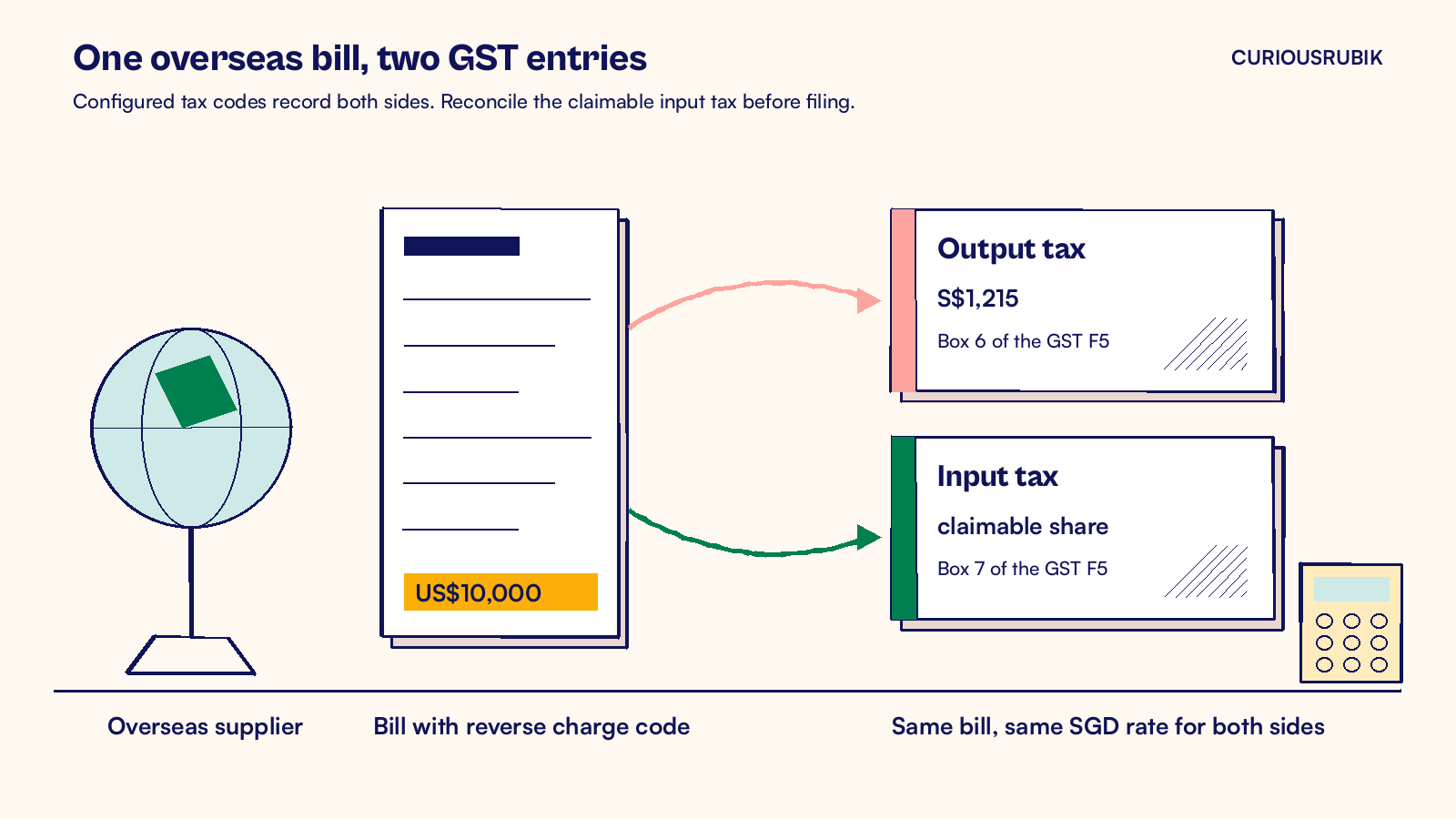
NetSuite GST reverse charge in Singapore is handled with a configured reverse charge tax code on the overseas supplier's bill. The code records GST as if you were the supplier and, where the normal rules allow, the matching input tax claim. Reconcile the purchase and tax to Boxes 1, 5, 6, 7 and 14 of your GST F5 return.
What is GST reverse charge in Singapore?
Reverse charge is a rule where the Singapore buyer, not the overseas seller, accounts for GST on a purchase. It covers services bought from suppliers outside Singapore since 1 January 2020. Since 1 January 2023 it also covers low value goods. These are goods with a sales value of S$400 or less, imported by air or post, excluding dutiable and exempt goods.
The buyer charges itself GST at 9% on the value of the purchase. It reports output tax. In the same return, it claims the GST back as input tax, subject to the normal input tax rules.
Full input tax recovery would cancel the output tax. The rule targets businesses without full recovery.
Give an overseas supplier your GST registration number for covered business purchases. A supplier under Overseas Vendor Registration should then omit Singapore GST. Seek refunds of GST charged incorrectly and apply reverse charge where required. Your own sales still need a proper tax invoice, as our guide to the NetSuite tax invoice template for Singapore explains.
Who has to apply reverse charge?
Under IRAS rules, you are a reverse charge business if you are GST registered and not entitled to full input tax credit. A GST registered member of a group without full credit also qualifies. IRAS gives these examples:
- Partially exempt businesses, such as banks, other financial institutions and developers of mixed use property
- Taxable businesses with substantial exempt supplies, such as interest on loans to related companies
- Investment holding companies that earn dividend income
- Charities that receive grants or donations and provide free or subsidized services
- Fully taxable companies that sit in a GST group with a partially exempt member
A company that is not GST registered can still be pulled in. If it would not get full credit and its imported services and low value goods exceed S$1 million over 12 months, it may have to register. Ask your adviser to check past purchases and expected imports.
Some services fall outside the rule. Services that would be exempt or zero rated locally are excluded. Imports directly attributable to taxable supplies are generally excluded too, unless you elect to tax all covered imports. IRAS lists the rest in its reverse charge e-Tax Guide, and your tax adviser should confirm how it applies to your business.
How does NetSuite GST reverse charge in Singapore work on a bill?
NetSuite supports reverse charge through bill tax codes and configured posting accounts. Confirm your tax engine, SuiteApps and reporting setup before relying on automatic entries.
The code depends on your tax setup. Accounts using SuiteTax with the Singapore Localization SuiteApp carry SG_SRRC plus SG_TXRC codes. SG_TXRC-TS covers taxable supplies only under the election. SG_TXRC-ESS covers Regulation 33 exempt supplies, while SG_TXRC-N33 covers other exempt supplies.
Accounts without SuiteTax use SRRC9-SG, a purchase code with the Reverse Charge property at 9%.
A typical flow looks like this:
- Mark the overseas supplier's vendor record with its country and currency, and agree a default reverse charge code with your tax adviser.
- Identify the earlier of invoice issuance and payment. That is normally the IRAS time of supply. Record the purchase in that GST period, including any payment before invoicing.
- Pick the reverse charge code on each service line, based on whether the service supports taxable or exempt supplies.
- Save the bill. With configured tax accounts, NetSuite records notional output and input tax from the bill. Check the SGD conversion and any nonrecoverable tax treatment.
- Run the GST F5 return. Reconcile the reporting mappings and any required adjustments, particularly Boxes 5 and 7.
Use one exchange rate for both sides. IRAS expects the input tax to use the same rate as the output tax, which NetSuite does when both come from the same bill.
A hypothetical overseas software bill
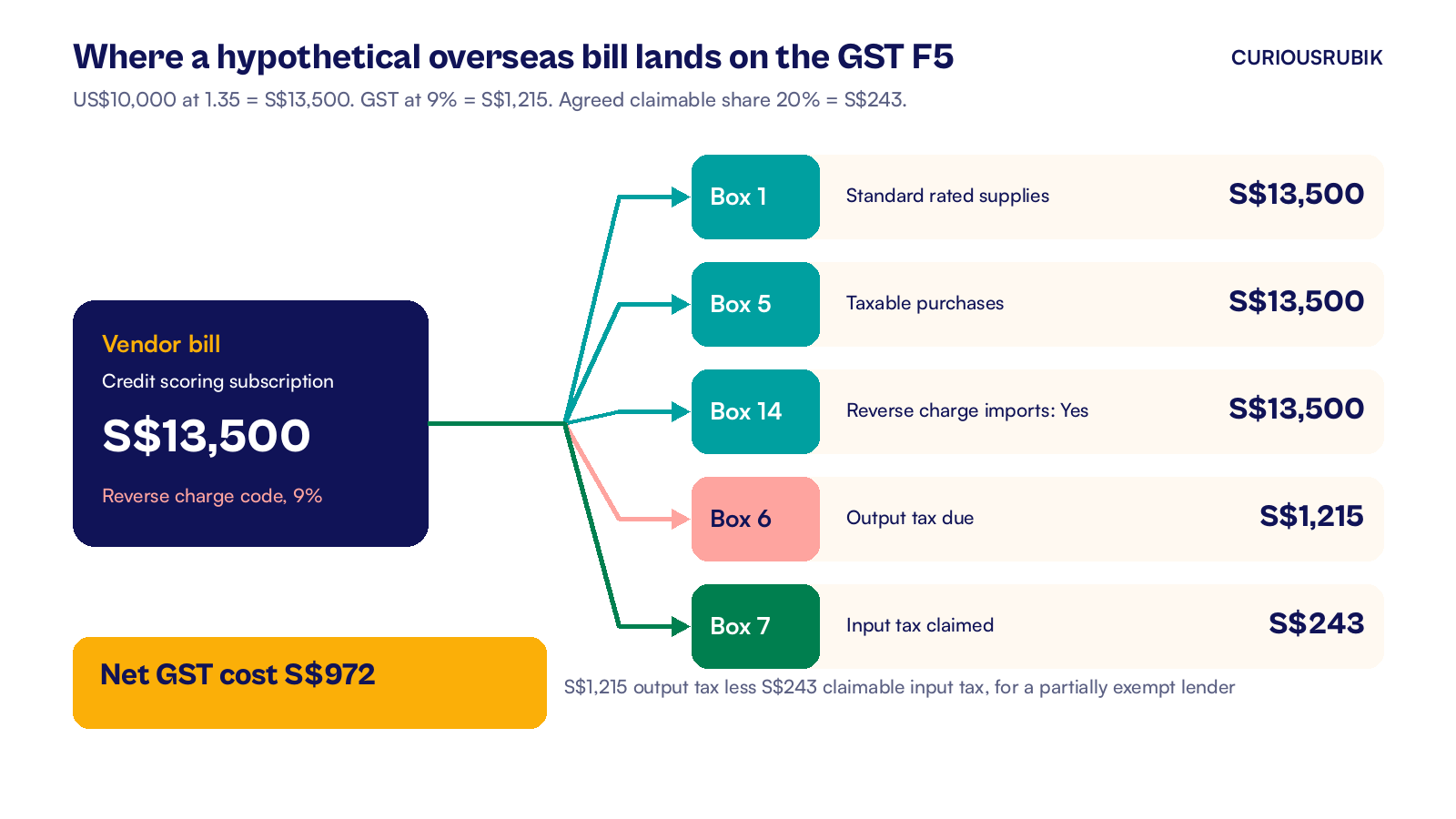
A hypothetical Singapore lender is partially exempt. In January 2027 it receives a US$10,000 bill from a US supplier for a credit scoring subscription. The bill exchange rate is 1.35, so the value is S$13,500.
GST at 9% is S$1,215. The lender accounts for that as output tax. The subscription mostly supports its exempt lending, so its adviser agrees that only part of the input tax is claimable under its apportionment method. Say the agreed claim is 20%, which is S$243.
| GST F5 box | What goes in | Amount |
|---|---|---|
| Box 1, standard rated supplies | Value of the imported service | S$13,500 |
| Box 5, taxable purchases | Value of the imported service | S$13,500 |
| Box 6, output tax due | Reverse charge GST | S$1,215 |
| Box 7, input tax claimed | Claimable share only | S$243 |
| Box 14, reverse charge question | Answer Yes, value of imports | S$13,500 |
The net cost is S$972, which is S$1,215 less S$243. That is the GST a Singapore supplier would have charged and the lender could not fully recover.
Agree the recovery method with your adviser and test its accounting and report mappings. A tax code alone does not establish a 20% claim. Reconcile any approved adjustment to Box 7 before filing.
What to check this week
Start with these five checks.
- Confirm your status. Ask your tax adviser whether you are a reverse charge business, and write the answer and date in your tax file.
- List overseas service suppliers. Run a saved search of vendors outside Singapore with bills in the last four quarters. Include cost recharges from overseas group companies.
- Check the codes. Open your tax code list and confirm the reverse charge codes exist for Singapore, at 9%, with the right accounts.
- Test one bill in your sandbox. Enter a foreign currency bill with the reverse charge code and check the GL impact shows both the output and input tax.
- Preview the F5. Run the GST F5 for the test bill's period. Reconcile Boxes 1, 5, 6, 7 and 14, including any input tax adjustment.
A useful review starts with overseas bills carrying an out of scope code. CuriousRubik’s NetSuite administration team can set up the codes, update vendor defaults and test the return with you.
For the wider return, read our guide to the NetSuite GST F5 return. For a different mechanism that also moves GST to the buyer, see NetSuite customer accounting for Singapore GST. Teams in banking and finance can see our work with financial services companies, and our NetSuite Singapore page covers local setup more broadly.
Related reading
NetSuite GST F5 Return: Preparation and Review
How to prepare and review the quarterly GST F5 return in NetSuite.
NetSuite Customer Accounting for Singapore GST Explained
How NetSuite handles customer accounting for prescribed goods on both sides of the sale.
NetSuite Tax Invoice Template for Singapore GST
Which NetSuite fields print each item IRAS requires on a tax invoice.