For Singapore finance teams who sell or buy phones, memory cards or boxed software and need NetSuite to get the GST right.
Last reviewed: 2 November 2026. Product details reflect this review date. Availability and behavior can vary by account, role and release.
NetSuite customer accounting in Singapore handles an IRAS rule for prescribed goods. These are mobile phones, memory cards and off the shelf software sold to a GST registered business for more than S$10,000 on one invoice. The supplier uses a customer accounting tax code and charges no GST. The customer accounts for that GST in its own return.
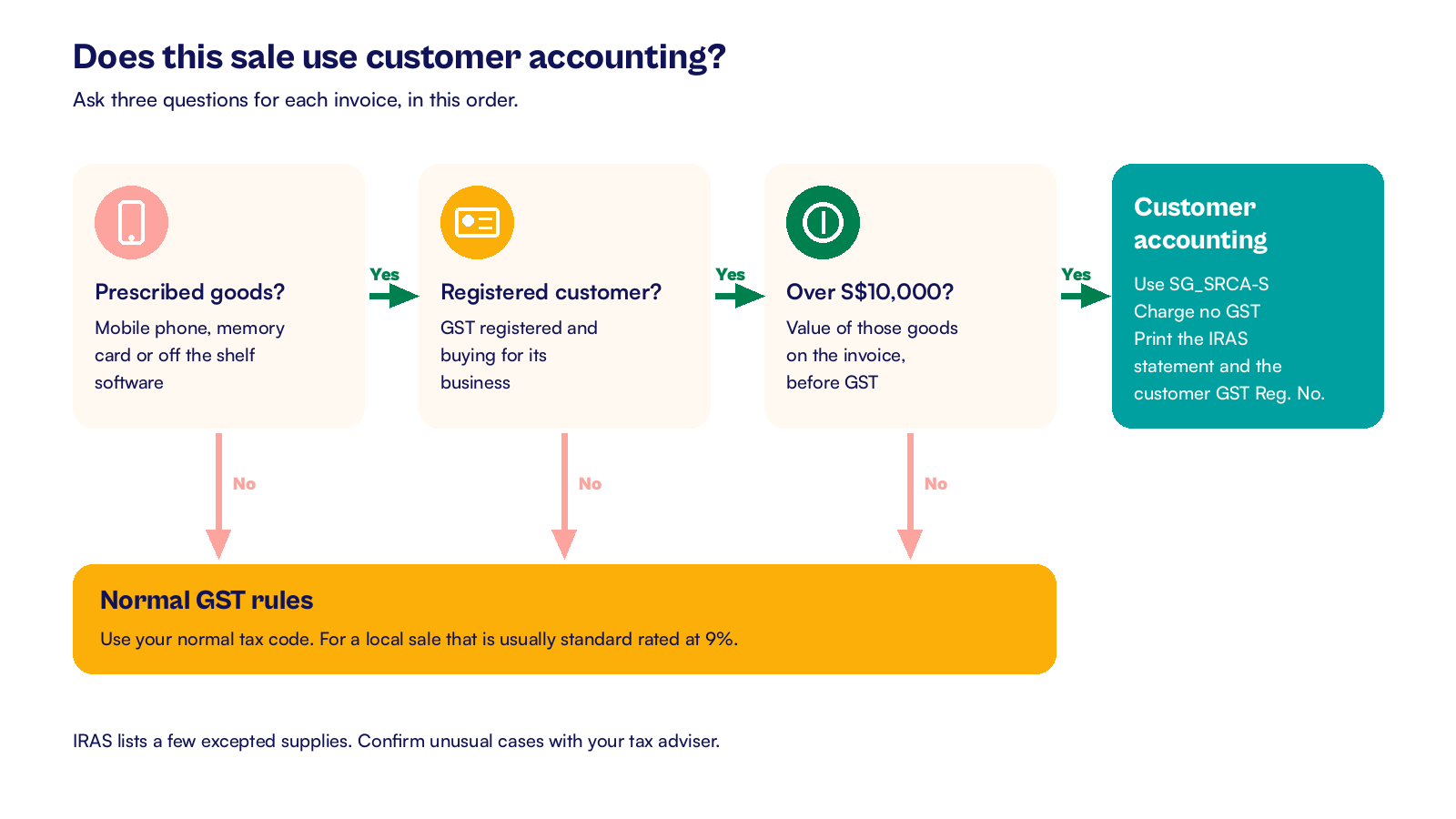
- The rule applies only when all three conditions are met: prescribed goods, a GST registered business customer and more than S$10,000 of those goods on the invoice.
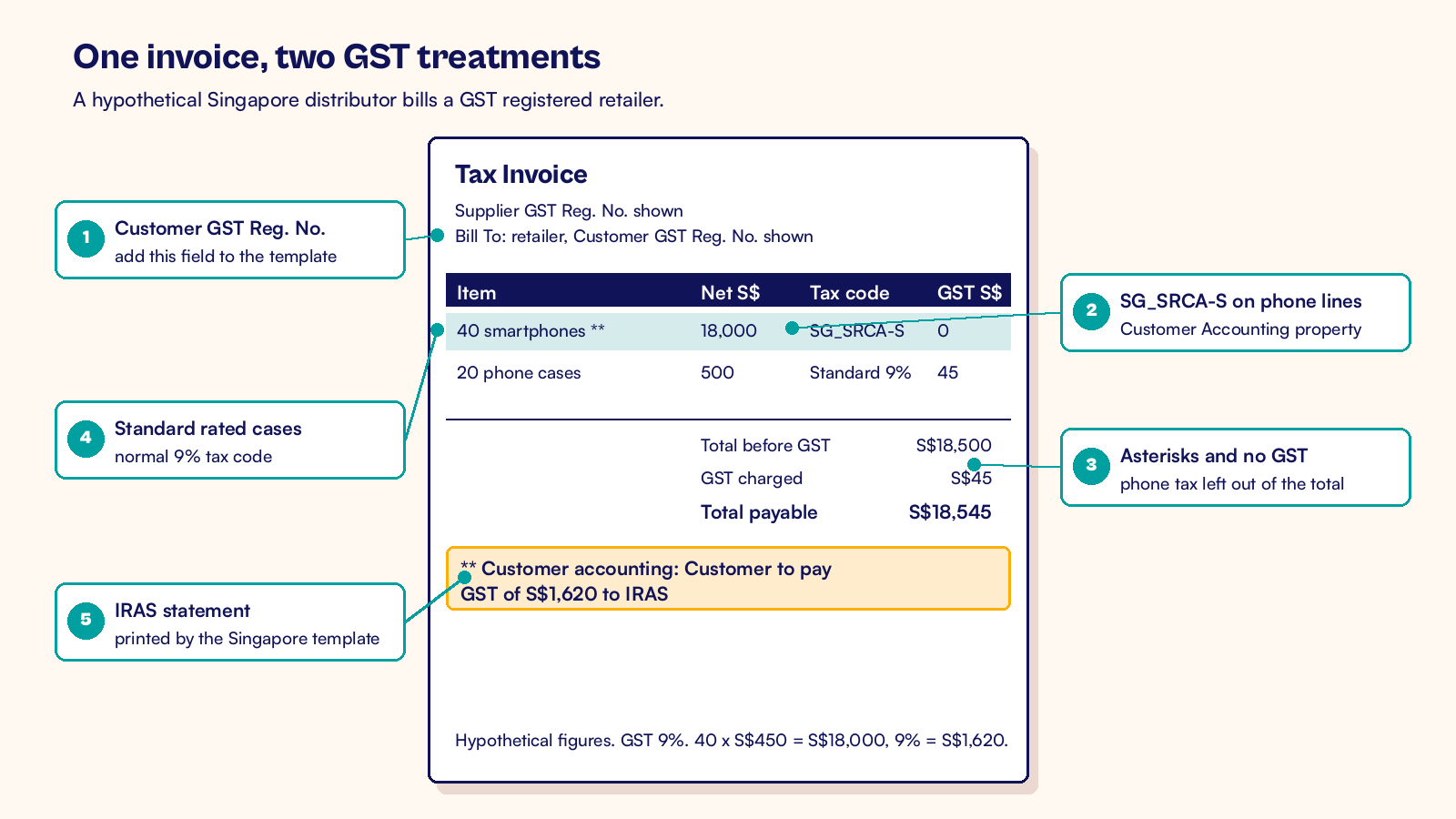
- On sales, NetSuite uses the SG_SRCA-S tax code, marks the lines with asterisks and prints the statement IRAS asks for.
- Add the customer's GST registration number to your invoice template, because the default Singapore template does not print it.
- On purchases, NetSuite records the GST you account for and the GST you claim, so both land in the right F5 boxes.
What is customer accounting for GST in Singapore?
Customer accounting is an IRAS rule that moves the duty to account for GST from the supplier to the customer. It has applied since 1 January 2019 to local sales of three kinds of goods, called prescribed goods:
- Mobile phones that make calls over a cellular network and have a screen of 17.5 cm or less. Phones sold with a subscription plan are left out.
- Memory cards, such as SD and CompactFlash cards. USB flash drives, solid state drives and RAM do not count.
- Off the shelf software on a disc, or with a license key in or on the physical box. Keys sent by email do not count.
The rule applies when three conditions are all true:
- You sell prescribed goods in Singapore.
- Your customer is GST registered and buys the goods for its business.
- The value of the prescribed goods on the invoice, before GST, is more than S$10,000.
IRAS tests the value at the time of supply, which is generally the earlier of the invoice date and the payment date. Read the value from the invoice, not the sales order, because an order can change before it is billed.
When all three are met, the rule covers the full value, including the first S$10,000. You must not charge GST on those lines, but you still report the sale in your GST return. Sales to consumers and to businesses that are not GST registered stay standard rated.
That makes the customer's GST status part of every quote. Check it with the GST registered business search on the IRAS website before you invoice. IRAS also lists a few excepted supplies in its e-Tax guide on customer accounting, so confirm any unusual case with your tax adviser.
How does NetSuite customer accounting in Singapore work?
NetSuite handles customer accounting through tax codes in the Singapore Localization SuiteApp. Each code below has the Customer Accounting property switched on. That property also turns on Post as Sales in IAF, so the lines appear correctly in the IRAS Audit File.
| Tax code | Used on | What it records |
|---|---|---|
| SG_SRCA-S | Sales invoices and credit memos | A customer accounting sale. No GST is charged, and the net value goes to Box 1 |
| SG_TXCA | Vendor bills | A standard rated purchase of prescribed goods, so you can claim the GST |
| SG_SRCA-C | Vendor bills | The GST you account for on your supplier's behalf, as output tax |
Accounts set up before the SuiteApp may use older names, such as SRCA-S-SG, for the same codes. You can see your list at Setup > Accounting > Tax Codes.
On your sales invoices
- Flag prescribed goods on the item record, for example with a custom checkbox, so staff can spot them.
- When an invoice holds more than S$10,000 of those items for a GST registered customer, set SG_SRCA-S on those lines.
- Leave other lines, such as cases or delivery, on their normal tax code.
- Print the invoice with the Singapore tax invoice template.
The template marks customer accounting lines with two asterisks and leaves their tax out of the GST total. It then adds the line "Customer accounting: Customer to pay GST of $(amount) to IRAS", with the amount filled in.
IRAS also wants the customer's GST registration number on a customer accounting invoice. The default Singapore templates do not print it, so add the field to your template. Our guide to the NetSuite tax invoice template for Singapore GST shows where each template field comes from.
Choosing the code by hand is easy to forget on a busy day. A saved search of open invoices with more than S$10,000 of prescribed goods on a standard rated code catches misses before the invoice goes out. If your volumes are high, a small workflow can set the code for you.
On supplier bills
When you buy prescribed goods under customer accounting, your supplier's invoice shows no GST. Enter the bill with the customer accounting codes your account uses for purchases. NetSuite then records two notional amounts.
One is the GST you account for as output tax. The other is the GST you claim as input tax, if you are entitled to claim it. Nothing extra is paid to the supplier.
Ask each supplier for a customer accounting tax invoice that shows your GST registration number. IRAS expects you to hold a valid one before you claim the input tax. File it with the bill in NetSuite, so the evidence sits next to the entry.
On credit notes
For a credit memo against a customer accounting invoice, the Singapore credit note template prints "Customer accounting: Customer to account for output tax adjustment of -$(amount)". The right treatment depends on whether the revised value still exceeds S$10,000. Agree it with your tax adviser before you issue the note.
A hypothetical Singapore phone distributor's invoice
A hypothetical Singapore distributor sells to a GST registered retailer. One invoice has two lines:
- 40 smartphones at S$450 each, which is S$18,000 before GST.
- 20 phone cases at S$25 each, which is S$500 before GST.
The phones are prescribed goods worth more than S$10,000, so they take SG_SRCA-S. The cases are not prescribed goods, so they stay standard rated at 9 percent.
| Line | Net (S$) | Tax code | GST charged (S$) | GST the customer accounts for (S$) |
|---|---|---|---|---|
| 40 smartphones | 18,000 | SG_SRCA-S | 0 | 1,620 |
| 20 phone cases | 500 | Standard rated | 45 | 0 |
| Total | 18,500 | 45 | 1,620 |
The retailer pays S$18,545. The invoice states that the customer must pay GST of S$1,620 to IRAS.
Each business then reports this invoice in its GST F5 return:
| F5 box | Distributor (supplier), S$ | Retailer (customer), S$ |
|---|---|---|
| Box 1, standard rated supplies | 18,500 | 18,000 |
| Box 5, taxable purchases | 0 | 18,500 |
| Box 6, output tax due | 45 | 1,620 |
| Box 7, input tax claimed | 0 | 1,665 |
For the retailer, the S$1,620 in Box 6 and Box 7 cancels out if it meets the input tax conditions. The other S$45 in Box 7 is the normal claim for the GST it paid on the cases.
Now change one number. If the retailer had ordered 20 phones, worth S$9,000, the phones would stay standard rated. The distributor would charge S$810 of GST on them and report it in its own Box 6.
Before you file, run the GST F5 preview in NetSuite and check where each customer accounting line lands. Our NetSuite GST F5 return guide walks through the review box by box. To trace a box back to its transactions, use our guide to reconciling Singapore GST reporting in NetSuite. At month end, the tax accounts then follow the same checks as any other balance in our NetSuite record to report process.
My view is that customer accounting should be an item and customer rule in NetSuite, not a memory test for the billing team. Flag the prescribed items, keep each customer's GST status current and let a saved search check every large invoice before it prints. Then test one invoice, one credit note and one supplier bill in your sandbox, and read the F5 preview for each. The slip to watch for is a correct code used for a customer whose GST registration has ended.
At CuriousRubik, we set up GST rules like this with a test for each one before go live. Our NetSuite administration team can configure the tax codes, the template field and the checks for your Singapore entity. You can also read how we support NetSuite customers in Singapore.
Related reading
NetSuite Tax Invoice Template for Singapore GST
How each IRAS tax invoice detail maps to a NetSuite field, with five test prints.
NetSuite GST F5 Return: Preparation and Review
How to prepare and review the GST F5 return box by box, with evidence and a named sign off.
Reconcile Singapore GST Reporting in NetSuite
How to trace each GST return box back to the transactions behind it.