For Singapore finance and operations leads who want one purchasing flow in NetSuite that also keeps GST claims clean.
Last reviewed: 11 November 2026. Product details reflect this review date. Availability and behavior can vary by account, role and release.
NetSuite procure to pay in Singapore runs from purchase requisition to purchase order, item receipt, vendor bill, payment file and bank match, all on one record chain. GST input tax is claimed from the vendor bill, InvoiceNow bills arrive as vendor bills, and payments go out as GIRO or FAST files. Each step has one owner and one check.
- Every bill traces back to an approved purchase order and a receipt, so input tax claims rest on evidence.
- Under the invoice date method, the tax invoice date sets the GST claim period.
- InvoiceNow changes how bills arrive and are reported, not how you approve them.
- Payment files and bank matching close the loop, so you know the supplier was actually paid.
What is procure to pay in NetSuite?
Procure to pay is the end to end flow from the moment someone asks to buy something to the moment the supplier's payment clears your bank. In NetSuite, each step is a linked record, so you can open any bill and see the order, the receipt and the payment behind it.
| Step | NetSuite record | Usual owner in a Singapore team |
|---|---|---|
| Ask to buy | Purchase requisition | Requester and department head |
| Commit to buy | Purchase order | Purchasing |
| Goods or service arrives | Item receipt | Warehouse or the requester |
| Supplier asks for payment | Vendor bill | Accounts payable |
| Pay the supplier | Bill payment, sent as a bank file | Finance manager |
| Confirm the money left | Bank match and reconciliation | Accountant |
This guide follows a hypothetical Singapore distributor through each step. The figures are illustrative, and the GST points should be confirmed with your tax adviser for your own facts.
How does NetSuite procure to pay in Singapore work, step by step?
The distributor buys 500 units of a stock item at S$40 each. Here is the flow, with the date each record is created.
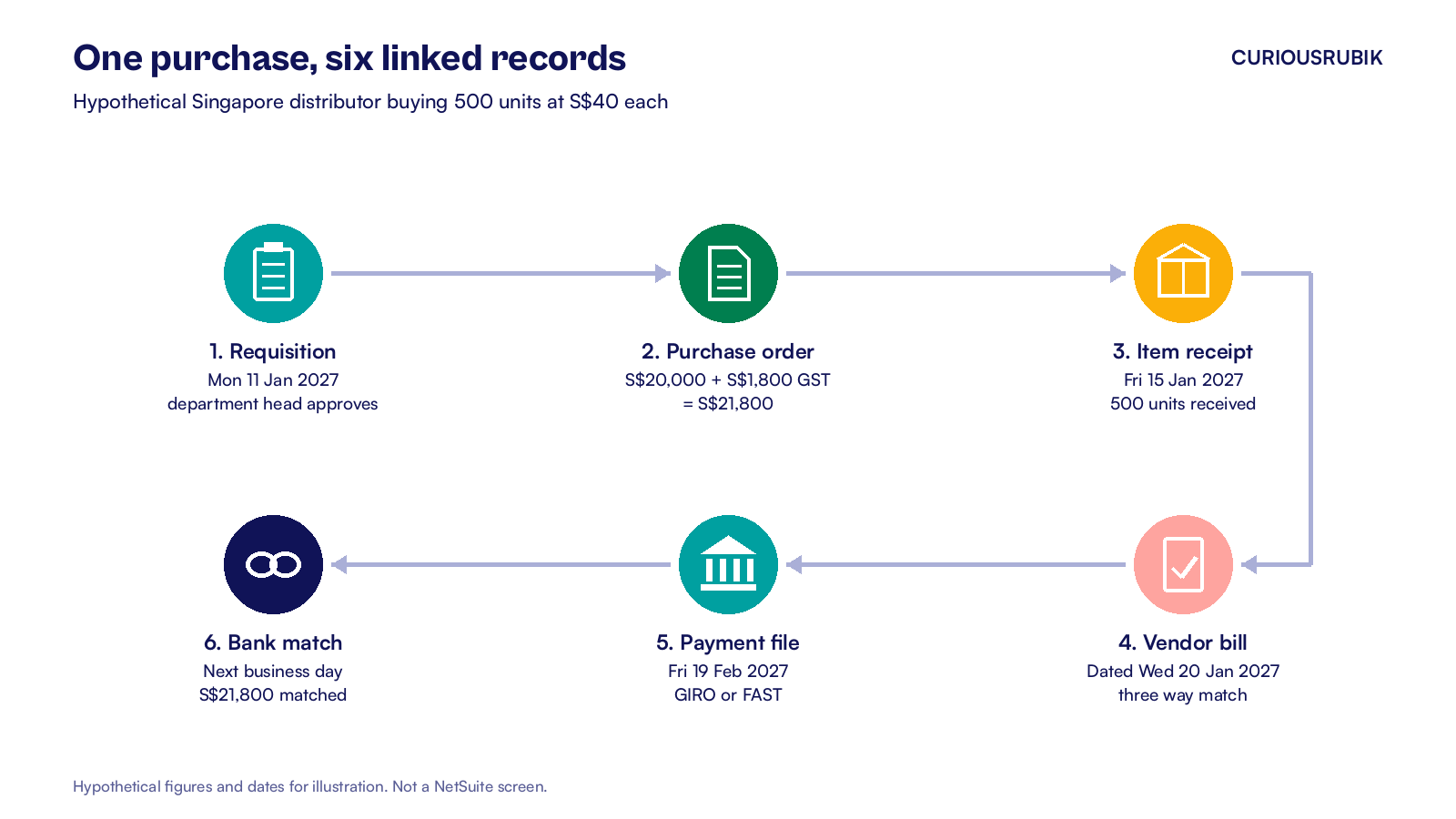
1. Requisition on Monday 11 January 2027
The sales team raises a purchase requisition for 500 units. The department head approves it. Approval routing, limits and delegates work the same way as in our guide to NetSuite purchase requisition approval.
2. Purchase order the same day
Purchasing turns the requisition into a purchase order for S$20,000 plus 9 percent GST of S$1,800, a total of S$21,800. The vendor record holds the supplier's UEN, GST registration number, payment terms and bank details. Purchasing emails the order from NetSuite, so the sent copy stays on the record.
3. Item receipt on Friday 15 January 2027
The warehouse receives all 500 units against the order. NetSuite updates stock and credits the Inventory Received Not Billed account until the bill arrives.
Services work a little differently. A consulting retainer or a software subscription has nothing to receive in the warehouse, so the requester confirms delivery instead. For those lines, bill the purchase order directly and add a short approval from the requester on the vendor bill.
4. Vendor bill dated Wednesday 20 January 2027
The supplier's tax invoice arrives for S$20,000 plus S$1,800 GST. Accounts payable bills the purchase order, and NetSuite compares the bill with the order and the receipt. This is the three way match.
If the price or quantity differs beyond your tolerance, the bill waits for approval. Our article on three way match exceptions covers how to release those bills with evidence.
5. Payment on Friday 19 February 2027
The bill is on 30 day terms, so it falls due on 19 February. The finance manager approves a payment batch, and NetSuite builds a GIRO or FAST file for the company's bank. Electronic Bank Payments, with Southeast Asia Localization, provides Singapore templates for DBS, OCBC and UOB.
6. Bank match the next business day
The bank line for S$21,800 is imported and matched to the bill payment. Our guide to NetSuite Intelligent Transaction Matching explains how that match happens automatically when the payment reference agrees.
How does GST input tax fit into the flow?
Input tax is the GST you pay on business purchases, which a GST registered business can claim back in its GST return. IRAS sets the conditions. You need a valid tax invoice addressed to you, and the purchase must be for your business.
In NetSuite, the claim comes from the tax code on the vendor bill line. A standard rated local purchase uses a 9 percent purchase tax code. Imports, exempt purchases and purchases from suppliers who are not GST registered each need their own code, so the GST F5 boxes fill correctly.
Three IRAS rules shape how you run the flow:
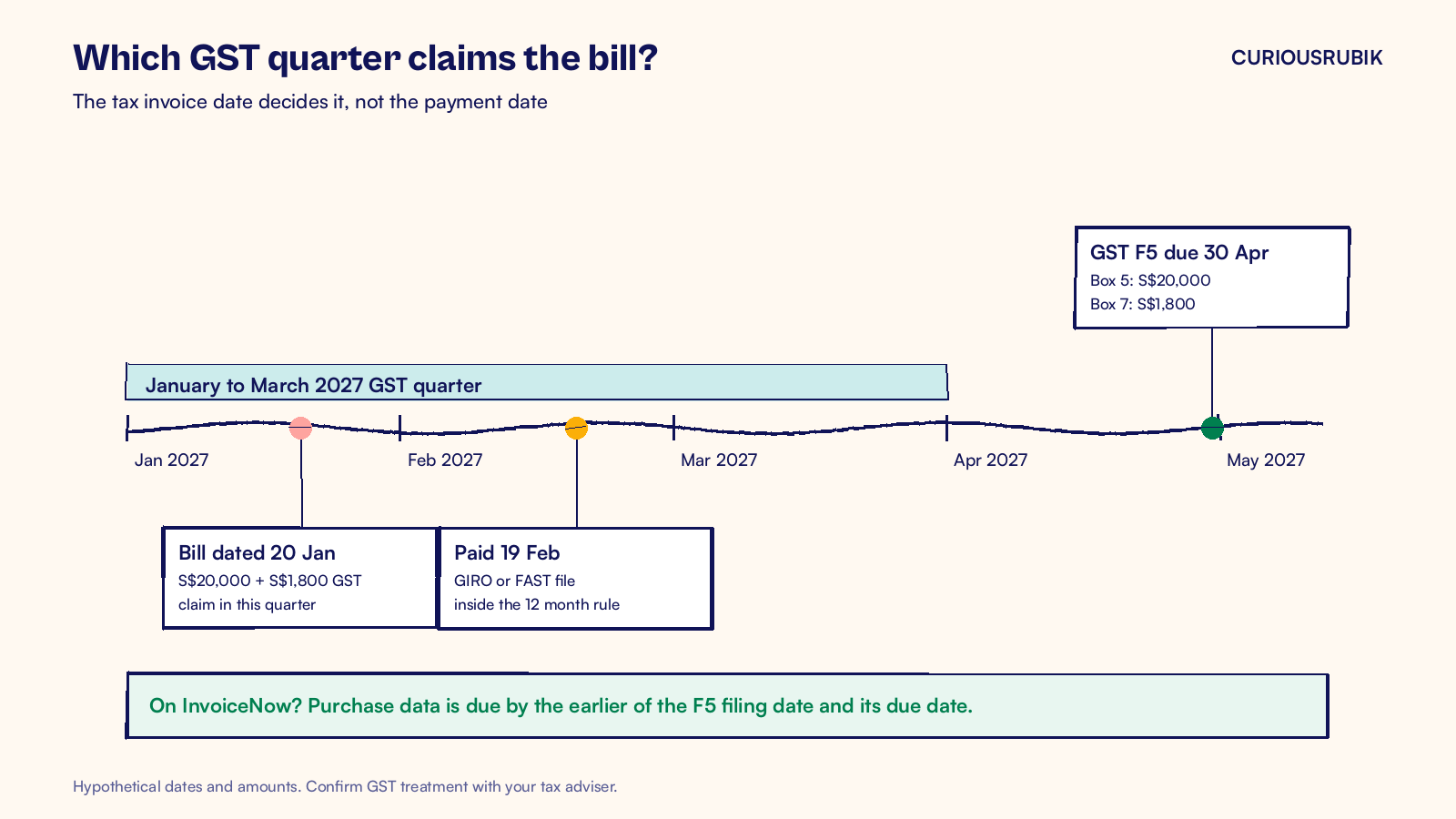
- Claim by invoice date. The default method uses the period matching the tax invoice date. IRAS also permits the posting or processing date if you apply it consistently, hold the original documents and prevent duplicate claims. Take a company filing quarterly on a January to March cycle. Our bill dated 20 January 2027 falls in that quarter, and its GST F5 is due on 30 April 2027. Its S$20,000 goes to Box 5 and its S$1,800 to Box 7.
- Claim before you pay. You can claim before you pay the supplier. If you have not paid within 12 months of the due date, you must repay the input tax to IRAS.
- Keep the original. The tax invoice must be on file when you claim. Attach it to the vendor bill in NetSuite so the evidence and the claim sit together.
An open bills search filtered to bills more than 11 months past due gives you an early warning on the 12 month rule. Our guide to the NetSuite tax invoice template for Singapore covers what a valid tax invoice shows.
Where does InvoiceNow change the flow?
InvoiceNow is Singapore's network for sending invoices as structured data between businesses, with IRAS receiving GST invoice data. The GST InvoiceNow Requirement is being phased in:
| From | Who must comply |
|---|---|
| 1 November 2025 | Companies that register for GST voluntarily within 6 months of incorporation |
| 1 April 2026 | All new voluntary GST registrants |
| 1 April 2028 | New compulsory registrants and existing registrants with annual supplies up to S$200,000 |
| 1 April 2029 | Existing registrants with annual supplies up to S$1 million |
| 1 April 2030 | Existing registrants with annual supplies up to S$4 million |
| 1 April 2031 | All other existing GST registered businesses |
NetSuite handles this through the Singapore PEPPOL Ready e-Invoicing SuiteApp. It receives InvoiceNow documents and turns them into vendor bills. Your team still approves those bills the same way, with the same match and the same approvers. The only difference is that nobody keys the invoice in by hand.
Each vendor record gets a data flow type: 1B for bills received through InvoiceNow, 3A for paper or PDF bills you record yourself.
Purchase data must reach IRAS by the earlier of the date you file the GST return and its due date. Once you turn on Enable GST InvoiceNow under Setup > Singapore Localization > SG PEPPOL E-Invoicing Preferences, you can't turn it off, so test it in a sandbox first.
Which controls keep the flow clean?
A short list of controls covers most of the risk in a Singapore purchasing flow.
- Vendor master: only one role can create vendors or change bank details, and every change is checked against the supplier's written confirmation.
- Segregation of duties: the person who approves a purchase order does not approve the payment batch.
- Match tolerance: set a price and quantity tolerance on bills, and route anything outside it to purchasing.
- Tax code review: each month, a saved search lists bills with a zero rated or no GST code from GST registered suppliers.
- Unbilled receipts: at month end, review receipts with no bill so the accrual is right and the claim is not missed.
- Duplicate bills: set Duplicate Number Warnings in Accounting Preferences to warn or block, so a repeated supplier invoice reference is caught before the bill saves.
Where to start
Pick last month's ten largest supplier bills and trace each one back through the chain in NetSuite: receipt, order, requisition and approval. Then trace it forward to the bank match. Note every bill where a link is missing or the tax code looks wrong. That list is your process gap list, and it usually points to two or three settings to change.
At CuriousRubik, we map purchasing flows step by step with the people who run them. Our NetSuite business consulting team can review your procure to pay flow, GST codes and InvoiceNow readiness. We support companies across Singapore on NetSuite.
Related reading
NetSuite Tax Invoice Template for Singapore GST
What a valid Singapore tax invoice must show and how to set up the template in NetSuite.
NetSuite Three Way Match Exceptions and Release Evidence
How to handle bills that fail the match and release them with the right evidence.
NetSuite Bank Reconciliation in Singapore, Step by Step
How to match SGD and USD bank activity, including supplier payments, each month.