NetSuite Planning and Budgeting pays off when your reforecast takes longer to rebuild than it does to discuss. If finance spends the week after close exporting actuals, chasing department workbooks and repairing links before anyone looks at the numbers, a planning application tied to the general ledger usually earns its cost. If one analyst refreshes a tidy model in a morning, it usually does not.
The trap is buying a planning tool to fix a planning process nobody has written down. NetSuite Planning and Budgeting (NSPB) runs on Oracle EPM Cloud alongside your NetSuite account, so it inherits whatever you feed it: a messy chart of accounts, departments that changed mid-year and drivers that live in one person's head. Settle those first and the software decision becomes a straightforward cost comparison.
Decide whether NetSuite Planning and Budgeting fits your planning cycle
Start with the cycle, not the features. Write down how often you plan (annual budget, quarterly reforecast, monthly rolling forecast), who submits numbers, who approves them and how many versions the board sees. Then mark where the work happens today: NetSuite, Excel, email or a shared drive.
Native NetSuite budgets are enough for many US companies. You can load a budget by account, subsidiary, department and class, then report budget versus actual inside NetSuite. If that covers the board's questions, read our guide to NetSuite budget versus actual reporting and stop there. NSPB becomes worth evaluating when you need driver-based models, workforce plans by position, several live scenarios or a rolling forecast that rolls forward each month without someone rebuilding the file.
Measure what the spreadsheet process costs each month
Ask each person who touches the forecast to log their hours for one full cycle. Split the log into four buckets: getting actuals out of NetSuite and mapping them, collecting and checking department inputs, consolidating and fixing the model, and building the board pack. Most teams are surprised by the second and third buckets.
Add two costs the log will not show. The first is delay: how many business days after close the updated forecast reaches leadership. The second is key-person risk, which is the number of people who can safely change the master workbook. If the answer to the second is one, that is a control finding as much as an efficiency problem.
Design the data model before anyone builds a form
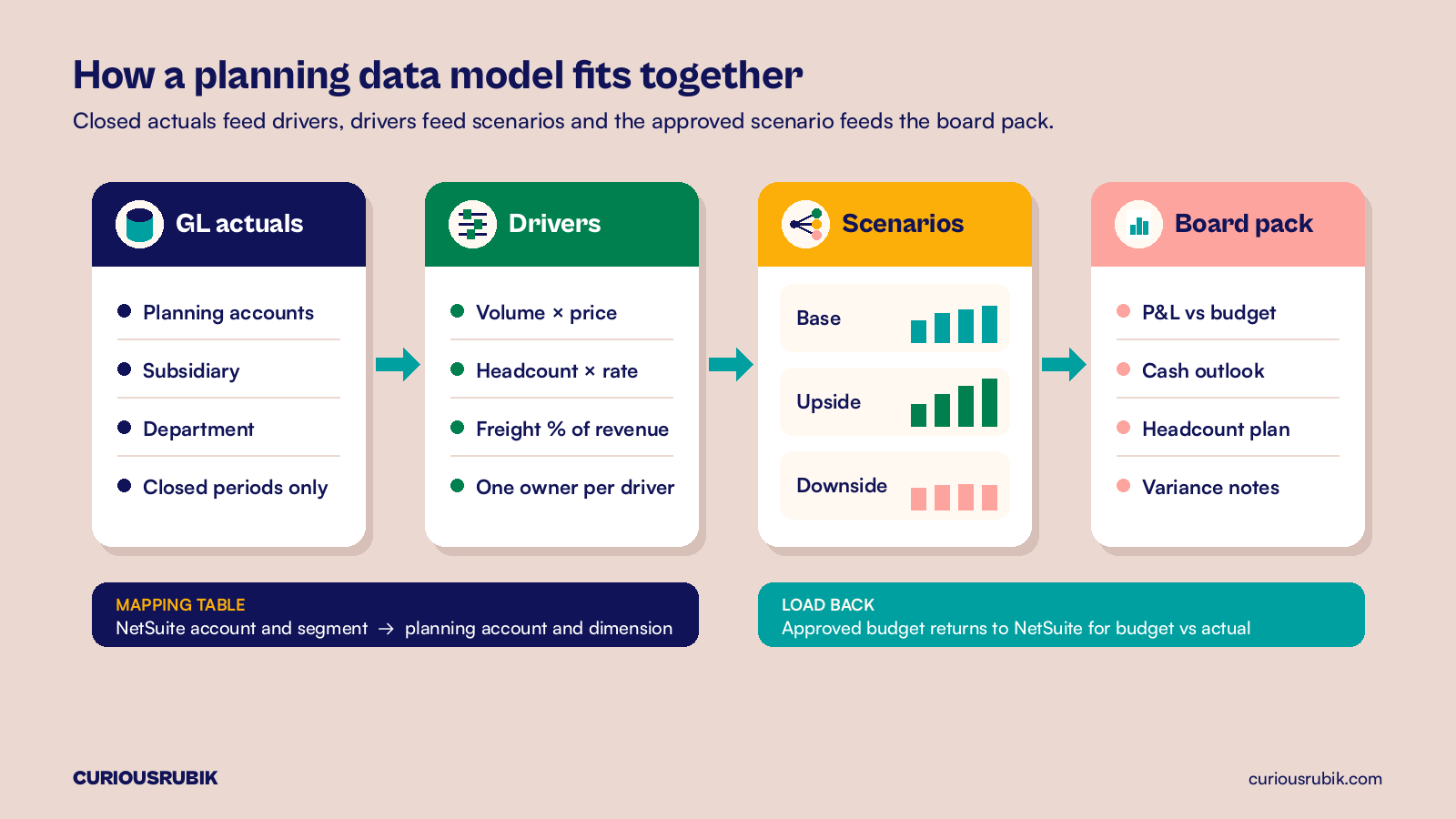
The data model decides whether NSPB stays in step with the ledger. Agree which NetSuite accounts roll up to which planning accounts, and which segments you plan by. Subsidiary and department are common; class and location only earn a place if managers actually plan at that level. Every extra dimension multiplies the number of cells someone has to fill or explain.
Write the mapping as a table with an owner and test it against one closed month. Total revenue, gross margin and operating expense in NSPB should agree to the NetSuite income statement for the same period and subsidiary. When it does not, the cause is usually a new account or department that was never mapped. Our walkthrough on how to check actuals loaded into NetSuite EPM covers that reconciliation step by step, so it is not repeated here.
Choose drivers that managers can actually own
A driver is only useful if a named manager can defend it in a review. Revenue might be volume times price by product line. Payroll might be headcount by position times salary, benefits and payroll tax rates. Freight might be a percentage of shipped revenue. Keep the list short enough that each line has one owner who updates it every cycle.
Resist the urge to rebuild every formula from the old workbook. Many spreadsheet models carry dozens of plugs and one-off adjustments from past years. Pick the eight to twelve drivers that explain most of the movement in the P&L, model those properly and let smaller lines trend from actuals. You can add detail once the first two cycles run cleanly.
Run the close-to-forecast loop on a fixed calendar
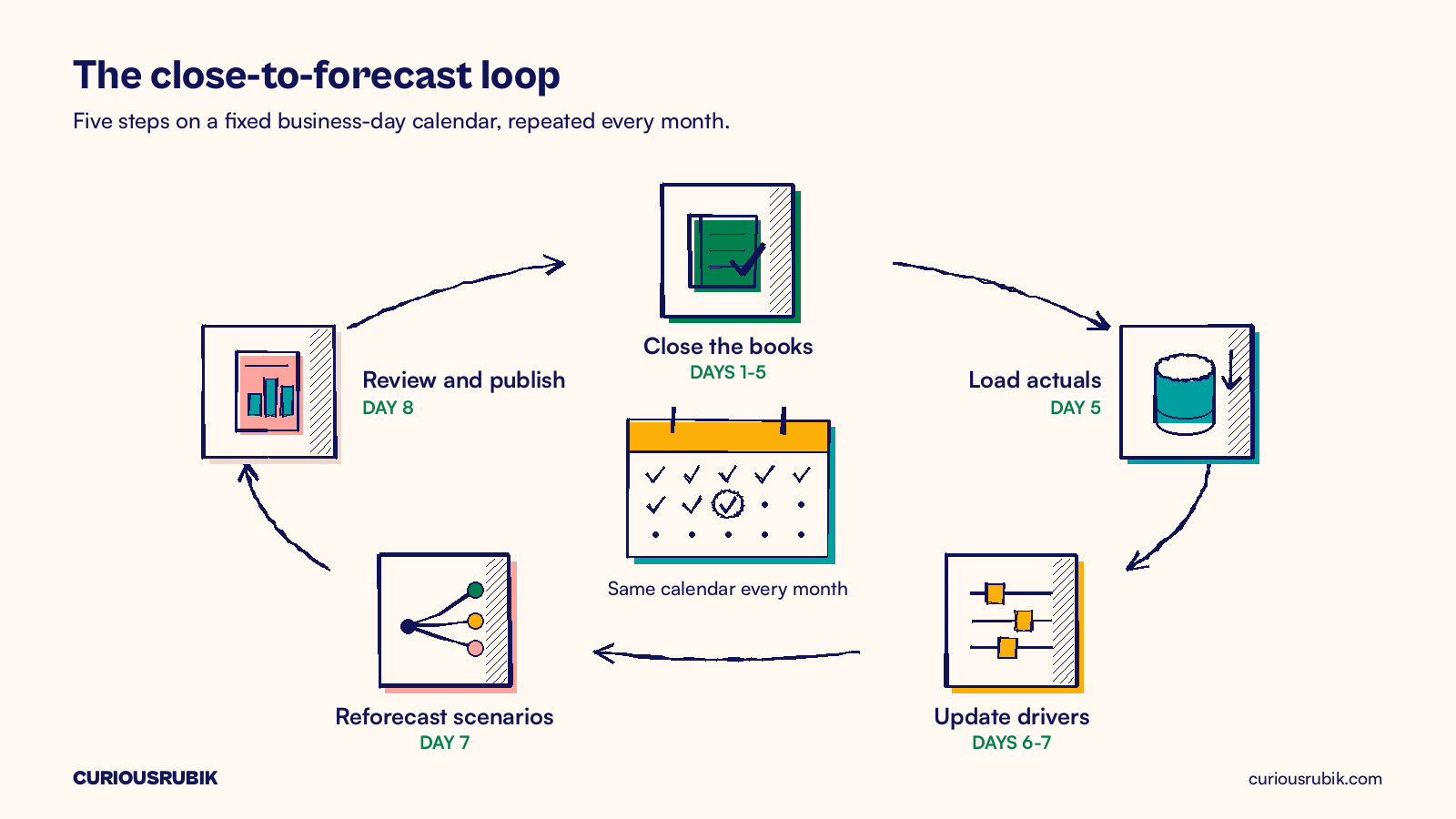
The real payoff is a loop that runs the same way every month: close the books, load actuals, update drivers, reforecast the scenarios, review and publish. Put a business day against each step. A workable target is close by day 5, actuals loaded the same afternoon, driver updates by day 7 and the reforecast reviewed by day 8.
The loop breaks at the handoffs. If close slips, the load runs on unfinished numbers. If a department misses its driver deadline, finance either waits or guesses. Tie the planning calendar to your month-end close checklist with reconciliation evidence, so the load only starts once the close owner signs off. The same discipline supports a reconciled short-term cash forecast if treasury needs one.
A hypothetical Dallas services group pricing its reforecast cycle
This example is hypothetical and simplified. A Dallas-based field services group has $85 million in revenue, four US subsidiaries, 22 departments and 640 employees. It closes in NetSuite and plans in 38 linked Excel workbooks, one per department plus a consolidation file. A three-person FP&A team runs a monthly reforecast and an annual budget.
The team logged one full cycle. The monthly reforecast took 120 hours: 30 on exporting and mapping actuals, 40 on chasing and checking department inputs, 30 on consolidation and broken links and 20 on the board pack. At a loaded cost of $95 an hour, that is $11,400 a month, or $136,800 a year. The annual budget added 400 hours, or $38,000. The total came to $174,800 a year, and the forecast reached leadership on business day 12.
Suppose a scoped NSPB design could cut the monthly cycle to 50 hours and the annual budget to 220 hours. The saving is 70 hours a month ($79,800 a year) plus 180 budget hours ($17,100), or $96,900 a year. Now assume an illustrative quote of $55,000 a year in subscription plus $90,000 one-time to implement. These are placeholder figures for the exercise, not list pricing. Over three years the cost is $255,000 and the saving is $290,700, a modest gain of $35,700, with the forecast arriving on day 8 instead of day 12 and no single owner of the master file.
Change the facts and the answer changes. At $75,000 a year, the three-year cost rises to $315,000 and the hours alone no longer cover it. With one subsidiary and six departments, the log would likely show under 40 hours a month, and a cleaner workbook beats a new application.
Keep Excel where it still earns its place
Moving to NSPB does not mean banning spreadsheets. Oracle Smart View lets planners work in Excel against the planning application, so a sales leader can still update a grid in a familiar layout while the numbers land in one controlled model. The difference is that the formulas and versions sit in the application, not in a file someone emails.
Keep a list of what stays offline: one-off acquisition models, deal pricing and early scenarios nobody has approved yet. When an offline model becomes part of the monthly cycle, move it in. If your reporting question is closer to analysis than planning, compare a NetSuite saved search or SuiteAnalytics workbook before you add a planning license.
Set acceptance tests before you sign the order form
Write the tests the implementation must pass. Actuals for a closed month agree to the NetSuite income statement by subsidiary. A department manager can update drivers and submit without help from finance. A new department added in NetSuite appears in planning within one load, or fails loudly. The board pack refreshes from the approved scenario without manual pasting.
Ask the partner to run those tests on your data in a demonstration, not on a sample company. CuriousRubik's NetSuite reporting and analytics services can help US finance teams price the current cycle, design the data model and prove the close-to-forecast loop before anyone commits to a subscription. See our NetSuite work in the United States for more.
Frequently asked questions
Is NetSuite Planning and Budgeting part of the standard NetSuite license?
No. NSPB is licensed separately and runs as its own Oracle EPM Cloud application connected to your NetSuite account. Confirm the modules, user counts and renewal terms with your account owner before you build a business case.
Can we keep using native NetSuite budgets alongside NSPB?
Yes, many teams do. A common pattern is to plan in NSPB and load the approved budget back into NetSuite so budget versus actual reports and approval rules keep working. Decide which system holds the official budget and write it down.
How long does an NSPB implementation take?
It depends on scope. A financial planning model for a few subsidiaries is far smaller than one that adds workforce, capital and project planning. Ask for a timeline built from your data model and drivers rather than a standard package.
Does NSPB fix a slow month-end close?
Not automatically. It can only load actuals once the books are closed. If close takes twelve days, fix the close first, or the forecast simply inherits the delay.
Is a planning tool worth it before an IPO or a funding round?
Often, because investors and auditors ask how forecasts are built and who approved them. Version history and controlled access help answer that. Our guide to SOX controls in NetSuite for pre-IPO companies covers the wider control set.
Related reading
How to Check Actuals Loaded into NetSuite EPM
A step-by-step reconciliation of actuals from NetSuite into planning: load routes, dimension mapping, timing and how to investigate a mismatch.