A view for Australian consultancy and agency leaders connecting approved time, project billing and financial reporting.
Last reviewed: 15 November 2026. Product details reflect this review date. Availability and behavior can vary by account, role and release.
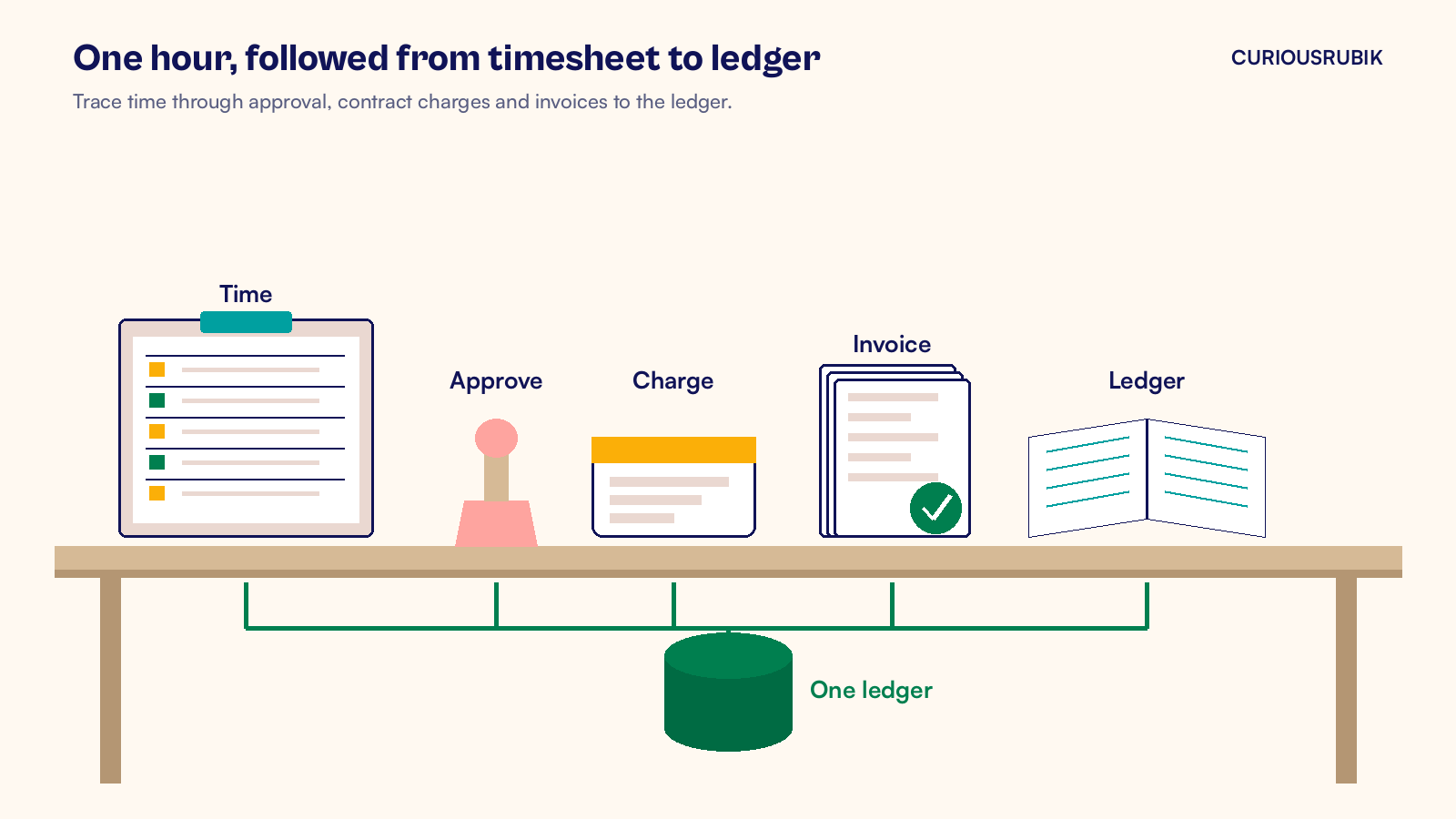
NetSuite professional services in Australia works best when approved time supports billing and revenue decisions. Run projects, timesheets, billing and the ledger in one NetSuite account. Match charges to contract rules and check GST before invoicing. Finance can then trace billed hours to time records, while recognizing revenue under the applicable accounting policy.
What should NetSuite professional services in Australia cover?
A professional services firm sells time and expertise, so its system has to follow an hour from the timesheet to the bank. Professional services automation is the set of tools that plans projects, assigns people, captures time and bills clients. In NetSuite, those tools sit in the same account as your general ledger, receivables and reporting.
For an Australian firm, I would expect the setup to cover five jobs.
- Projects and tasks. Each engagement is a project record with tasks, a budget, a project manager and the people assigned to it.
- Time and approval. Consultants enter time against project tasks, from the office or a phone, and an approver signs it off each week.
- Billing rules. Each project bills the way the contract says, whether by the hour, by milestone or as a monthly fixed fee.
- GST on every invoice. Taxable Australian services carry GST at 10 percent when the firm is registered or required to register. Some services for overseas clients can be GST free.
- Margin and billable hours. Leaders see hours, revenue and cost by project, client and consultant without a separate spreadsheet.
NetSuite can cover these jobs with the relevant project features enabled. For firms that need deeper resource planning across large teams, SuiteProjects Pro, the NetSuite professional services application formerly called OpenAir, adds richer scheduling and connects back to the same financials. I would first test whether the native project tools meet your contracts before adding another application.
The point is not the feature list. The point is that one record set means one version of the truth. When the project manager, the billing clerk and the CFO look at a project, they see the same hours and the same dollars.
Why does time entry decide your margin?
On an hourly contract, an eligible hour that is worked but never billed can mean lost fees. It rarely disappears in one dramatic event. It leaks through late timesheets, unapproved entries and rates that never made it into the billing system.
NetSuite closes those gaps with a few settings that I think every Australian firm should switch on early.
Approval that matches your delivery model
Billable project time must be approved before NetSuite will bill it. You decide who approves.
On each project record, the Preferences tab has a Time Approval field. It offers automatic approval, Default Time Approver, Project Time Approver or Project Time Approver or Default Time Approver. The default approver is the employee's supervisor or assigned time approver.
Project time approval permission sits on the project resource role, at Setup > Accounting > Setup Tasks > Project Resource Roles. Check Project Time Approver for the roles that should sign off time. Assign that role to the approver on each relevant project.
Review Own Time Approval too, because it can approve that resource's time automatically. Approvers then work from Transactions > Employees > Approve Time.
My advice is to make the project manager the approver for client work. They know whether the hours were real and whether the client will accept them. A supervisor in another team usually does not.
Billing rules that read the contract
Charge Based Billing turns approved time into charges using rules you set on each project. A time based rule can price hours from a billing rate card. Project Management and Advanced Billing must be enabled to use Charge Based Billing.
Fixed fee rules include Fixed Date and Milestone types, for scheduled fees or completed milestones. A charge reaches the invoice only once it is in the Ready stage, so use Hold first when finance needs a review before billing.
Billing rate cards carry effective dates. That means a rate rise from 1 July can be entered once and picked up by every project on that card, instead of being chased across spreadsheets.
GST that follows the client
For a firm registered or required to register for GST, taxable Australian services attract GST at 10 percent. Services supplied to a non resident who is not in Australia when you supply them can be GST free under ATO rules, with exceptions.
Work physically performed on Australian goods or directly connected with Australian real property can affect eligibility. Services provided to another entity here can also affect it, subject to further conditions.
Ask your tax adviser to confirm the supply treatment, then test invoice tax codes in your account. A customer address alone does not decide GST.
Margin you can see by project
Margin needs cost as well as revenue. The Labor Cost field on an employee record supplies an hourly overhead rate for project cost and profitability calculations. Task rates can override it.
Approval alone does not post labor cost to the ledger or create a billing charge. With Job Costing configured, approved time becomes available for the separate Post Time process. Confirm that posting step with finance. Expense reports and vendor bills for subcontractors can be tagged to the project too.
That gives a project manager a live view of budget, actual hours, billed revenue and cost on one record. A fixed fee job that is running over shows up while there is still time to talk to the client, not after the final invoice.
It also helps the firm price the next job. Past projects show how many hours each kind of engagement really took, by role, so the next proposal starts from evidence instead of memory.
Revenue timing matters too. Where AASB 15 applies, recognize revenue as contract performance obligations are satisfied. A fixed fee alone does not establish recognition over time. Agree the method with your auditor before you configure it, so billing and revenue rules tell the same story.
A hypothetical month in a Melbourne consultancy
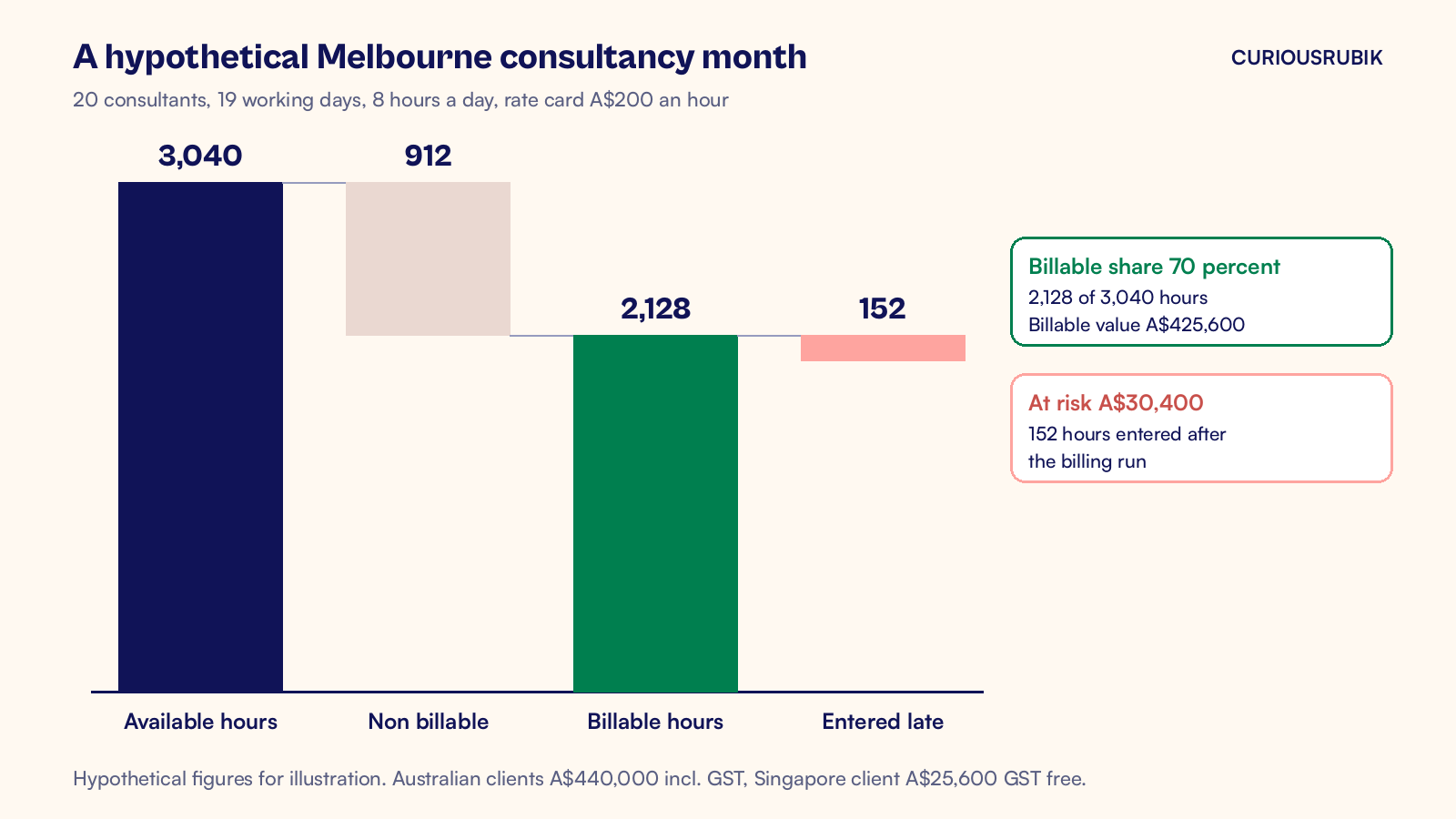
Take a hypothetical Melbourne consultancy with 20 consultants. There are 19 working days in the month at 8 hours a day, so each consultant has 152 available hours. Across the team, that is 3,040 available hours.
The team logs 2,128 billable hours, so 70 percent of available time is billable. At a rate card price of A$200 an hour, those hours are worth A$425,600.
Of those hours, 2,000 are for Australian clients and 128 are for a client in Singapore with no presence in Australia. The Australian work invoices at A$400,000 plus A$40,000 GST, so A$440,000. The Singapore work is A$25,600 and is treated as GST free after the adviser confirms the export conditions and exceptions. Total invoiced is A$465,600.
The firm runs billing on the first business day of the next month, after a Friday cutoff for approvals. Project managers approve time each week, so most hours are already approved when billing starts.
Now suppose 152 of the billable hours were entered after the billing run. At A$200 an hour, that is A$30,400 of work that slips to next month, or gets written off if nobody notices. One consultant's full month of hours, sitting outside the invoice, is exactly the leak that approved time in NetSuite is built to stop.
Hours, charges and invoices can be traced in one account, but billed fees and recognized revenue can differ. Reconcile them under your contract and accounting policy. Our guide to measuring billable hours against available hours explains why the available hours number needs care. For the controls on charge based revenue, see our piece on NetSuite charge based project revenue recognition.
Where I would start, and why
My view is simple. In a services firm, the timesheet is the most important document you produce, because every other number depends on it. If time sits in one tool, billing in another and the ledger in a third, you spend month end reconciling instead of managing.
So I would start with time, not with dashboards. Get every consultant entering time against project tasks in NetSuite, set the project manager as approver and agree a weekly cutoff. Then move rates onto billing rate cards and switch billing to charge rules. Dashboards come last, and by then they show numbers that people already trust, like those in our article on NetSuite project profitability reporting.
I would also plan support from day one. A services firm changes rate cards, roles and project templates often. Someone needs to own those changes after go live. Our coverage checklist for NetSuite support for US companies shows how to split that work, and the same split works well for Australian firms.
Australian firms are well placed for this. NetSuite already handles GST, AUD reporting and OneWorld subsidiaries for firms that expand into New Zealand or Asia. What turns that into profit is the habit of approved time, entered on time.
At CuriousRubik, we help professional services firms across Australia set up projects, time approval and charge rules in NetSuite. Our NetSuite implementation team can start with one practice area and prove the billing flow before the rest of the firm moves across.
Related reading
NetSuite Charge Based Project Revenue Recognition Controls
The controls that keep charge based project revenue accurate from charge to ledger.
NetSuite Project Profitability Reporting Explained
How to build project margin reports that explain where the margin went.
NetSuite Implementation Requirements for Professional Services
The requirements a services firm should settle before a NetSuite project starts.