For Australian owners and sales leaders deciding where the customer record should live as the business grows.
Last reviewed: 21 November 2026. Product details reflect this review date. Availability and behavior can vary by account, role and release.
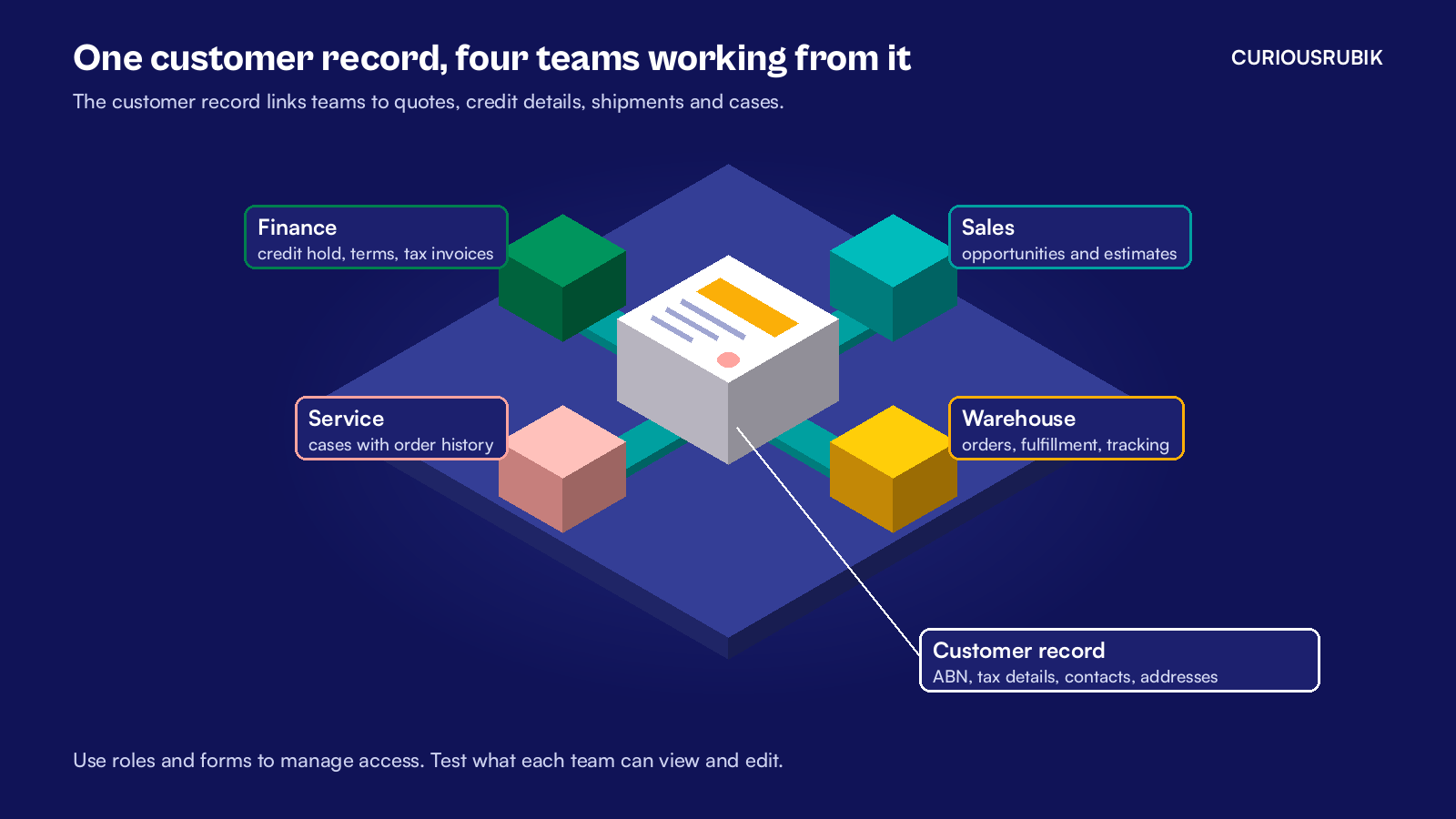
NetSuite CRM in Australia should own the customer record when sales, finance and service need the same information. Keep the Australian business number (ABN), tax details and credit terms together. Sales can create an order from an accepted quote, and service can use the same customer record to find related cases.
Why should an Australian business run CRM inside NetSuite?
NetSuite CRM is the customer relationship part of NetSuite. It covers leads, opportunities, quotes, sales orders, support cases and campaigns, with links to the sales transactions finance works from.
In a sales and finance meeting, each team may bring an accurate report and still disagree. A deal can be won before the order is shipped or the invoice is raised. A shared record gives both teams somewhere to trace the difference.
Tracing that difference across two systems is the real cost of a separate CRM, and it grows with every new rep, state and product line. A team spread across Brisbane, Sydney and Melbourne cannot lean over a desk to check a customer's status. The record has to answer the question on its own.
An Australian tax invoice must identify the seller and show the seller's ABN. For sales of A$1,000 or more, it must also show the buyer's identity or ABN. Check that the quote and invoice use the intended goods and services tax (GST) treatment. The standard rate is 10 percent for taxable sales.
Credit terms and credit holds belong to finance, but the rep needs to see them before promising stock. And when the customer calls with a problem, service needs to find the order and see what shipped.
I would give sales a customer form with the relevant credit details visible and restrict edits to finance through role permissions and form settings. Test the sales role in a sandbox to verify which fields reps can see and update.
Finance can own terms and holds while sales owns contacts and opportunities. The record is shared, and the responsibilities stay clear.
What goes wrong when the customer lives in two systems?
A hypothetical Brisbane wholesaler has eight reps across Queensland, New South Wales and Victoria. Sales runs in a standalone CRM. Finance runs in NetSuite. A nightly sync copies new customers and won deals across.
Here is a normal week for that business.
- Monday. A rep in Sydney quotes A$10,000 plus A$1,000 GST to a customer who went on credit hold on Friday. The hold is in NetSuite. The rep cannot see it.
- Tuesday. The customer accepts. The sync creates a duplicate customer because the CRM spells the trading name differently from the legal name in NetSuite.
- Wednesday. Finance raises the tax invoice against the duplicate. The invoice shows a trading name from an old order, and the customer's accounts team asks for a correction.
- Thursday. The customer rings about a late delivery. Service checks the CRM, which shows the deal as won and nothing more. They call the warehouse to find out what shipped.
- Friday. The sales leader reports A$420,000 of won deals for the month. Finance reports A$385,000 invoiced. Most of the gap is orders not yet shipped, but it takes a meeting and two exports to prove it.
The duplicate makes it harder to check the credit hold, confirm the invoice details and trace the shipment. The two reports also measure different stages of the sale.
Now run the same week in NetSuite. The rep opens the customer record and checks the Hold field on the Financial subtab before quoting. The rep creates the estimate against the existing customer.
Finance can check the buyer details on the invoice against the existing customer record. With the right permissions, service can open the sales order and follow it to the item fulfillment to check what shipped.
The sales leader can review open quotes by rep while finance checks overdue balances on the relevant customers. For a reconciliation, start with the won deals and trace which orders are still open, which have shipped and which have been invoiced.
How does a lead become a tax invoice in NetSuite CRM in Australia?
The customer record changes stage as a deal progresses. Open the linked sales transactions to follow the deal from estimate to order and invoice.
- Capture the lead. A web form, a trade show list or a rep's entry creates a lead record with the company name, contact and source.
- Qualify it as a prospect. When the rep creates an opportunity or an estimate, NetSuite moves the record to the prospect stage. The opportunity holds the expected close date and probability for the forecast.
- Check the ABN. With the ANZ Localization SuiteApp, an administrator can set ABN Verification Warnings under Setup > ANZ Localization > General Preferences. The preference applies to customer and vendor records. No Warnings lets the record save without an alert. Warn alerts the user and allows saving. Warn and Block stops the save until the number is valid.
- Send the quote. The estimate shows A$10,000 plus A$1,000 GST, a total of A$11,000, for a fully taxable sale.
- Convert to a sales order. When the customer accepts, open the estimate and select Sales Order. A sales transaction moves a lead or prospect to the customer stage. A closed opportunity can also move a prospect to customer.
- Ship and invoice. The warehouse fulfills the order and finance bills it. Set up the ANZ Tax Invoice template from the ANZ Localization SuiteApp. Check the printed seller ABN, buyer details and GST before sending the invoice.
- Support the customer. After the sale, log the issue as a case linked to the customer. Service can use that link to find the related customer and check order history.
Eligible opportunities and estimates feed the forecast according to your forecasting settings. A qualifying estimate can take the place of its opportunity in the forecast. Review those settings with finance so both teams know what the totals include.
Our post on NetSuite CRM for US companies explains how the forecast is built.
If you sell online as well, the web store should feed the same customer record. Our guide to NetSuite ecommerce integration in Australia covers how orders, customers and payments land in NetSuite. And if your larger customers want invoices through the Peppol network, our post on NetSuite eInvoicing in Australia explains how those invoices leave the same record.
How should you move your CRM into NetSuite?
Start by agreeing which customer record to keep and which details to carry over. Have sales and finance check a sample together before committing to the full import.
Our NetSuite data migration checklist for US companies was written for another market, but its clean up steps still apply to a customer list in any market. Keep one record per customer, a legacy ID on every row and merge duplicates in the file first.
A marketing platform can keep running campaigns and send qualified leads into NetSuite. Agree on a matching key and who resolves duplicates. Keep NetSuite as the system of record for the customer, quotes and orders.
I suggest three stages for the move.
Customers and contacts first
Clean the list, agree one owner for each field and make NetSuite the only place a new customer is created.
Ask finance to confirm the legal name, ABN and billing details. Ask sales to confirm the people who place orders and where goods are delivered. For customers with several branches, check whether they buy as one legal entity or through separate entities before merging records.
Then opportunities and quotes
Move open deals and start quoting from estimates, so the forecast and the credit check use the same record.
Use one open deal to test the handoff. Compare the source quote with the NetSuite estimate, including quantities, prices and tax. Then check that the sales role can see the credit information finance wants the rep to use.
Cases and campaigns last
Bring service cases across and connect any marketing tool, once reps trust the customer data. Give an owner the list of leads that fail to match an existing customer. Have that person resolve a few real examples before you let the integration create records.
Before switching the whole team, ask a rep to quote a customer on hold and ask finance to check the resulting order and invoice for a customer cleared to buy.
Is it time to move your CRM into NetSuite?
Here is how I would decide where to start.
| If this is true for you | My suggestion |
|---|---|
| Reps quote customers who are on credit hold, or cannot see overdue balances | Move quoting and the customer record into NetSuite first |
| Tax invoices come back because the ABN or legal name is wrong | Turn on ABN Verification Warnings and make NetSuite the only place customers are created |
| Service staff ring the warehouse to find out what shipped | Log cases in NetSuite so order and fulfillment history sit beside them |
| Marketing runs campaigns in a separate platform and is happy with it | Keep it, and sync qualified leads into NetSuite as the system of record |
| One small team can check customer changes together | A separate CRM can work while ownership stays clear. Revisit the decision when another team needs the same record |
CuriousRubik's NetSuite CRM integration team can map your sales process, clean the customer list and set up NetSuite CRM for your reps, finance and service staff. See how we support NetSuite customers in Australia.
Related reading
NetSuite CRM for US Companies: Pipeline and Forecast
Why one database for pipeline, quotes and orders makes the forecast easier to trust.
NetSuite Ecommerce Integration in Australia
How web orders, customers and payments flow into NetSuite for Australian sellers.
NetSuite eInvoicing in Australia
How Peppol invoices are sent and received from NetSuite.