A worked example for Australian finance and operations leads deciding how much NetSuite admin help they really need.
Last reviewed: 18 November 2026. Product details reflect this review date. Availability and behavior can vary by account, role and release.
A NetSuite administrator in Australia keeps the account working day to day: users and roles, saved searches, forms, imports and the BAS and EOFY peaks. Log three months of actual requests and add work that falls outside your sample. Use the annual total to decide which tasks your staff can cover and how much partner time to budget.
- Log every admin request for three months, with the hours it took and who asked.
- Add the yearly peaks: quarterly BAS, EOFY, STP finalization and the two NetSuite releases.
- Compare the yearly total with a full time role before you hire.
- Keep approvals and simple requests in house. Send setup changes, scripts and release testing to a partner block.
What does a NetSuite administrator do in an Australian business?
A NetSuite administrator is the person who owns the account's setup after go live. They grant access, build and fix saved searches, adjust forms and workflows, run imports and test each new release. They also keep a record of what changed and why.
In Australia the role picks up some local work. Finance may ask the administrator to check Australian business numbers on supplier records or test the format of a bank payment file. Where payroll feeds NetSuite through an integration, the administrator can check that payroll totals reach the right accounts. Finance owns the underlying controls and signs off on changes.
An administrator can handle routine changes with standard tools and the right permissions. A developer can take requests that need SuiteScript or changes to an integration. Record which skills each request needs so you can price those hours separately.
How much work does a NetSuite administrator in Australia actually do?
User count gives you context. The request log shows how much work actually lands with your team. Include requests from email, chat and hallway conversations so the finance manager can count work that never makes it into a ticket.
Start a simple request log. A shared list with five columns is enough:
- Date and the person who asked.
- What they needed, in one line.
- The type of request, from a short fixed list.
- The hours it took, rounded to the nearest half hour.
- Who did it, and whether it needed admin or developer skills.
Use the same request types every time, or the totals will not add up. These seven types cover most accounts:
- Access and roles: new starters, leavers, role changes and password resets.
- Saved searches and reports: new searches, edits and scheduled emails.
- Forms, fields and workflows: layout changes, new fields and approval steps.
- CSV imports and data fixes: price lists, item updates and bulk corrections.
- Integration checks: failed records from payroll, bank, store or 3PL connections.
- Release testing: preview account checks before each NetSuite upgrade.
- Calendar work: business activity statements, financial year end, payroll finalization and audit requests.
Three months gives you a fair picture. One month can be skewed by a single project. Twelve months is too long to wait before you decide.
What the log usually shows
The first surprise is how many requests repeat. The same person asks for the same report tweak every month, or the same import fails for the same reason. Check whether one change to the search or import would prevent the next request.
The second surprise is how much admin sits with one person. When the log shows that nearly every request went to the finance manager, you have found a risk as well as a workload. If she is on leave during BAS, the work simply waits.
The third is which requests need a developer. Tag those separately so the annual total shows how much time you need for routine admin and how much you need for code or integration changes.
A hypothetical Melbourne wholesaler sizes its NetSuite admin
A hypothetical Melbourne wholesaler runs NetSuite for 45 users in one Australian entity. It went live last year. The finance manager has been doing admin on the side, and the backlog is growing. She logs every request from August to October.
Her three month log averages out like this:
| Request type | Hours per month |
|---|---|
| Access and roles | 6 |
| Saved searches and reports | 8 |
| Forms, fields and workflows | 5 |
| CSV imports and data fixes | 4 |
| Integration checks | 3 |
| Routine release checks | 2 |
| Routine calendar work | 2 |
| Total | 30 |
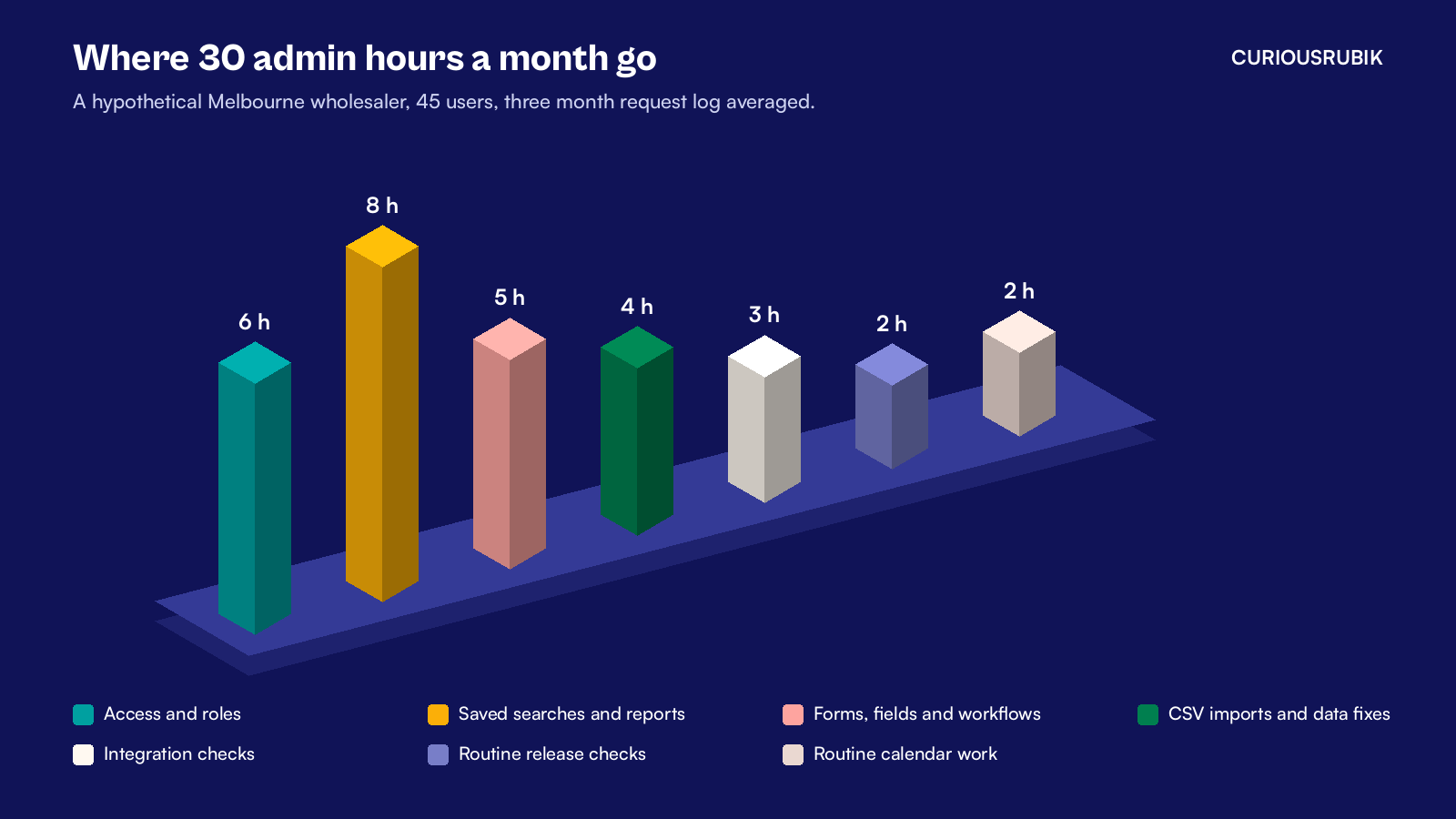
Thirty hours a month is 360 hours a year. The log includes routine release and calendar work.
She adds only the extra time for peak tasks outside the sample. End of financial year (EOFY) and Single Touch Payroll (STP) finalization add 12 extra hours in June and July. Each of the two NetSuite releases adds 8 extra hours of testing in its month. That brings the year to 388 hours.
For this comparison she budgets about 1,600 available working hours for a full time role after leave and public holidays. The wholesaler needs about a quarter of those hours. A hire could still make sense if there were enough other finance systems work to fill the role.
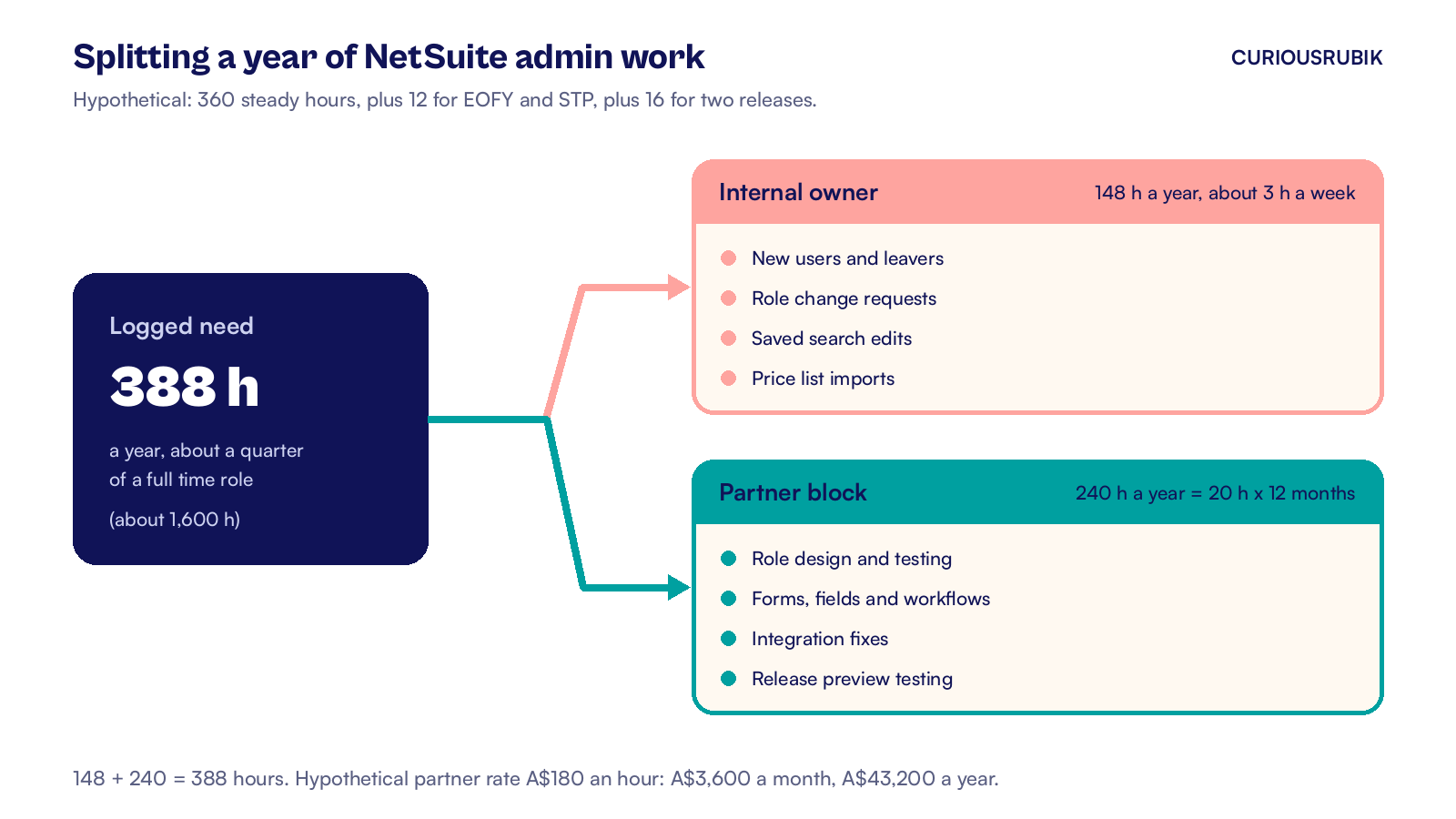
So she splits the work. The finance systems officer, who already knows the business, takes the simple requests: new users, role changes, saved search edits and price list imports. That comes to about 148 hours a year, or around three hours a week.
A partner takes the rest under a block of 20 hours a month, which is 240 hours a year. The two parts add up to the full 388 hours.
Three of the eight report hours each month were the same aging report, rebuilt by hand for the credit team. She sets up a saved search for the open receivables and schedules the results to go to the credit team each Monday. She checks the totals against the aging report before switching over. She leaves the 388 hour total as it is for now and treats the saving as a buffer.
At a hypothetical partner rate of A$180 an hour, the block costs A$3,600 a month, or A$43,200 a year. The wholesaler can now compare that figure with the full cost of a hire in Melbourne. That includes salary, super, recruitment and the risk of one person holding all the knowledge.
Which Australian calendar dates add NetSuite admin work?
The local calendar adds predictable peaks. Plan for them in the request log, or they will crowd out everything else.
- Quarterly BAS. If you lodge a quarterly business activity statement, ask finance which tax codes and transactions it needs to check before lodging. Keep those checks in the request log.
- Payday Super. From 1 July 2026, employers must pay super for each payday. Where payroll is integrated, check the mappings and alerts for rejected payments. Our post on NetSuite Payday Super covers the setup.
- End of financial year and Single Touch Payroll. For a June year end, plan for period locks, payroll checks and auditor access. Allow time for Single Touch Payroll finalization in July. The NetSuite EOFY checklist for Australia lists the tasks.
- NetSuite releases. Oracle upgrades NetSuite twice a year. Request a Release Preview account if needed. Use it to test your saved searches, forms, scripts and integrations before production upgrades. Our release preview testing checklist shows what to test first.
- New financial year setup. If your financial year starts in July, check ahead of time that the new accounting periods exist. Confirm the budget is ready for the new year and review any changes to approval limits.
Check whether your partner agreement lets you shift hours into the busiest months. If the monthly cap is fixed, book the extra work before June or the release window.
Should you hire a full time NetSuite administrator?
Sometimes, yes. A full time administrator makes sense when the logged need is consistently above about half a role, which is around 800 hours a year. That is our view. Check the skills, backup coverage and costs before you commit to a hire.
You will usually reach that point when one or more of these is true:
- You run several subsidiaries on NetSuite OneWorld, with intercompany work each month.
- You have many integrations, each with its own failed records to clear.
- You add new processes every quarter, such as a new warehouse or a new revenue stream.
- Your users number in the hundreds, with frequent starters and leavers.
Below that level, check whether an existing finance systems owner can cover the routine work. Budget partner time for changes that need testing and agree who covers urgent requests while the owner is away.
Before you post a job ad, check whether the workload is real or self inflicted. An account full of unused workflows and duplicate searches creates admin work of its own. A short NetSuite health check often removes a slice of the backlog before anyone is hired.
Even with a full time hire, keep a partner relationship for scripts, integrations and release testing. One person cannot cover every skill, every leave period and every upgrade.
How do you split NetSuite admin work between your team and a partner?
Use risk and skill to decide who owns each request. Simple, repeatable requests stay with your internal owner. Changes that touch setup, scripts or several departments go to the partner.
| Work | Internal owner | Partner block |
|---|---|---|
| New users, leavers and password resets | Yes | Backup only |
| Role design and permission changes | Approves | Builds and tests |
| Saved search edits | Yes | Complex searches |
| New forms, fields and workflows | Requests and approves | Builds in sandbox first |
| CSV imports | Routine price and item updates | Large or one off loads |
| Integration errors | Reports and checks totals | Fixes mapping and logic |
| Release preview testing | Tests key reports | Tests scripts and integrations |
Three habits make the split work:
- One front door. Every request goes into the log, even the small ones. That keeps the hour count honest.
- Monthly review. Spend 30 minutes each month on the log with your partner. Look at what repeated and what can be fixed for good.
- A change record. Note every setup change, who approved it and when. For supported records, System Notes show field changes and their old and new values. Use the change record to explain why each change was approved.
For broader coverage that includes support cases and optimization, see our post on NetSuite managed services in Australia. Businesses new to the platform can also read our NetSuite overview for Australia.
Krishna's view on sizing the role
I start with the work the finance team already does. If an access change or a report fix takes ten minutes, it can feel too small to log. Those small jobs still take time and someone needs to cover them during leave.
Three months of logging changes the conversation. You can compare hours and skills against the time your team can spare, then cost the gaps.
For a business with one entity, I would first see whether someone in finance can own the routine work. Give that person time to review the log and test key reports. Reserve partner hours for changes that need extra skills or a separate test account.
If you only do one thing this month, start the log.
CuriousRubik's NetSuite administration team can review your first three months of requests and size a support block that fits your calendar. Talk to our team.