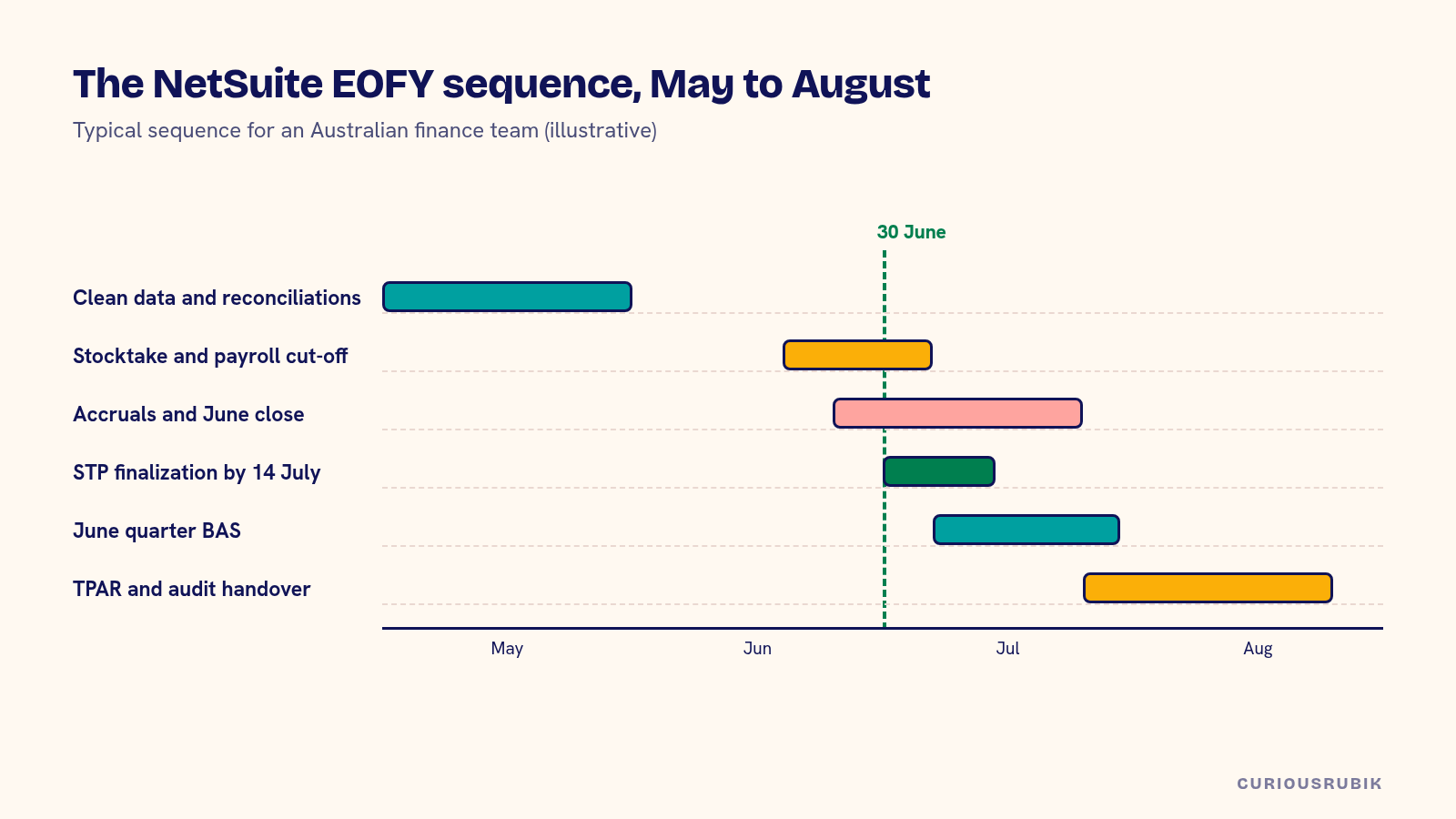
A good NetSuite EOFY checklist for an Australian finance team runs in three stages. In May, clean up master data, open transactions and reconciliations so June starts clean. Around 30 June, run the stocktake, payroll cut-off, accruals and the June close. In July and August, finalize STP by 14 July, lodge the June quarter BAS, prepare any taxable payments annual report and hand the auditors a reconciled trial balance. Each stage has owners and evidence.
The 30 June close is the busiest few weeks of the Australian finance year. It is also the close where shortcuts taken in the other eleven months come due. Starting in May turns a scramble into a checklist.
Start in May with clean data
Use May to fix what will slow June down. Review open purchase orders and close those that won't be received. Review unapplied customer payments and credits. Chase unapproved vendor bills and expense reports. Check that every bank and credit card account is reconciled to 31 May.
Look at master data too. Inactive customers and vendors with open balances, items with no cost, and employees without the right department or location all create noise in June reports. Fix them now, while there is time.
Plan the stocktake and inventory cut-off
If you hold stock, schedule the stocktake as close to 30 June as you can, and agree cut-off rules with the warehouse and any 3PL. Receipts and dispatches on 30 June need to fall on the right side of the line, and goods in transit need a clear treatment.
Post stocktake adjustments in NetSuite with a reference to the count sheets. Review large variances before posting, and check inventory valuation against the general ledger after. Keep the count records with the year-end file.
Close payroll and finalize STP
Payroll needs its own track. Make sure all pay runs for the year are posted to NetSuite, the payroll liability accounts reconcile and super contributions for the last paydays of June are paid within the Payday Super window. Then reconcile year-to-date STP totals by category to the wage accounts in the ledger.
STP finalization is generally due by 14 July for most employees. Make the finalization declaration only after the totals reconcile. Our guides to NetSuite superannuation and payroll liability reconciliation and NetSuite Single Touch Payroll cover the checks.
Post accruals and the June adjustments
List the year-end adjustments before June ends: accrued expenses, accrued revenue, prepayments, leave provisions, bonus accruals, depreciation and any impairment. Agree with your accountant or auditor which are needed and how they are calculated.
Post each with a supporting schedule attached or referenced. Use reversing journals where an accrual should reverse in July, and check that the reversal posts in the right period. Our post on NetSuite reversing journals and accrual rollforwards explains the review.
Fixed assets deserve their own pass. Check that June depreciation has run, that assets bought during the year were capitalized and not expensed, and that disposals were recorded with the gain or loss. Reconcile the fixed asset register to the balance sheet accounts. If your accountant applies different tax depreciation, give them the register in a format they can use, with acquisition dates and costs.
Reconcile GST and lodge the June BAS
Reconcile GST for the June quarter, or June month if you lodge monthly, from transactions to the return. Look for transactions dated in June but entered in July, imports with deferred GST and adjustments from earlier periods.
The June quarter BAS is generally due on 28 July for quarterly lodgers, though lodgment through a tax agent may allow later dates. Our guide to tracing Australian GST from NetSuite transactions to the BAS covers the reconciliation.
Prepare TPAR and other annual reports
If your business is in an industry that must lodge a taxable payments annual report, such as building and construction, cleaning or courier services, you need payments to contractors for the year, with their ABNs. It is generally due by 28 August. Set up a saved search in NetSuite that lists contractor payments by vendor, with ABN, gross amount and GST, and check it against the vendor records.
FBT runs on a different year ending 31 March, so it should already be done. Check that any FBT accrual is correct in the June accounts.
Close the period and check retained earnings
Once adjustments are posted, close June and the financial year in NetSuite following your close checklist. NetSuite calculates retained earnings from prior-year profit and loss, so there is no manual closing entry. Check that the opening retained earnings for the new year match the prior-year closing position plus the year's result.
Lock the periods. If an audit adjustment comes later, reopen with approval, post it and close again with a clear record. Our guide to reconciling NetSuite retained earnings after year end explains the checks.
A hypothetical EOFY calendar
A hypothetical Adelaide manufacturer with one entity, 90 staff and stock in one warehouse plans its EOFY. All dates are illustrative.
| Date | Task | Owner | Evidence |
|---|---|---|---|
| 12 May | Clean open POs, unapplied cash and bank reconciliations | AP and AR leads | Saved searches cleared |
| 30 June | Stocktake and cut-off | Warehouse lead | Count sheets and cut-off log |
| 3 July | Final June pay run posted; super paid | Payroll officer | Fund receipt report |
| 7 July | Accruals and adjustments posted | Financial controller | Schedules attached |
| 10 July | STP reconciled and finalized | Payroll officer | STP to ledger reconciliation |
| 21 July | June quarter BAS reconciled and lodged | Financial controller | BAS reconciliation pack |
| 4 August | Period closed; trial balance to auditor | Financial controller | Signed trial balance |
The manufacturer finds an A$14,000 difference between STP gross wages and the ledger on 8 July. It traces the gap to a termination payment coded to the wrong account, fixes it and finalizes on time. Your calendar will differ. The sequence is common to most companies.
Use the NetSuite EOFY checklist
Before you sign off the year, check each of these:
- Were open transactions, master data and bank accounts cleaned up in May?
- Is the stocktake complete, with cut-off evidence and adjustments posted?
- Do payroll liabilities reconcile, and are June super contributions paid on time?
- Does year-to-date STP agree with the ledger before finalization?
- Are accruals and adjustments posted with schedules and correct reversals?
- Is the June BAS reconciled and lodged by its due date?
- Is TPAR data ready, if your industry needs it?
- Are periods closed and retained earnings checked against the prior year?
Our NetSuite managed support team helps Australian finance teams through EOFY, and our page for Australian NetSuite projects describes the wider work. If you are planning a new implementation, our guide to the NetSuite implementation timeline in Australia shows how to avoid an EOFY clash.
Related reading: Reconcile Australian Payroll with NetSuite Finance and Cash
Frequently asked questions
When should we start EOFY work in NetSuite?
In May. Clean data and reconciliations before June make the close much faster.
When is STP finalization due?
Generally by 14 July for most employees. Reconcile year-to-date totals to the ledger first.
Does NetSuite need a year-end closing journal?
No. NetSuite calculates retained earnings automatically. Check the opening balance for the new year.
When is the June quarter BAS due?
Generally 28 July for quarterly lodgers, with later dates possible through a tax agent.
Who needs to lodge a TPAR?
Businesses in certain industries that pay contractors, such as building and construction, cleaning and courier services. Check ATO guidance.