Last reviewed: 10 October 2026. Product details reflect this review date. Availability and behavior can vary by account, role and release.
Editorial ink illustration: A colleague carries a folder and a box of records out of a temporary testing room.
Before changing a NetSuite record, answer one question: what should happen to the real business when you finish? If a customer balance should change, you are planning live work. If a learner should understand how a credit memo behaves, you are planning an exercise. Those tasks need different environments and different controls.
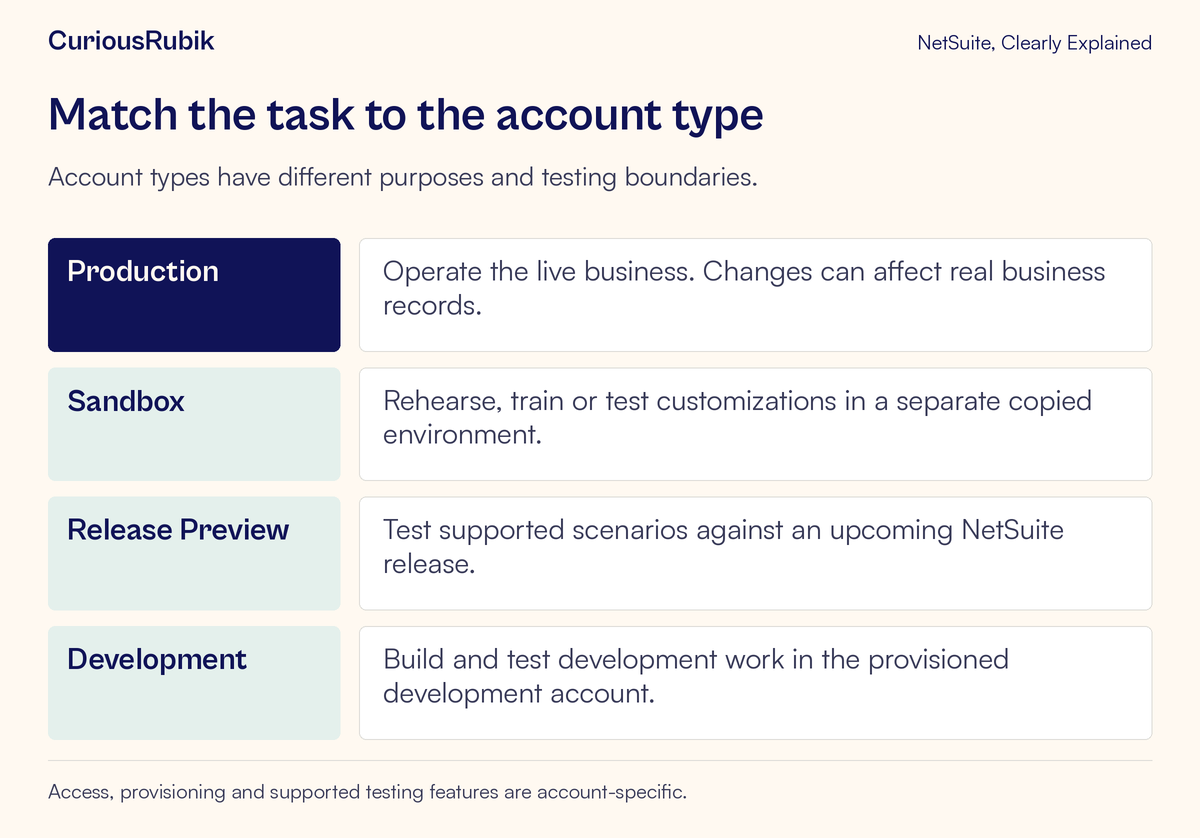
NetSuite distinguishes production, sandbox, Release Preview, and development accounts. Each has a purpose, and each has boundaries. Knowing those boundaries helps you choose where to work, explain why copied data looks different, and avoid treating a successful rehearsal as a completed production change.
This lesson is for business users, administrators, and testers. It explains the choice without assuming that every organization has every account type. Provisioning, access, subscriptions, and supported testing must be confirmed for your own account.
Name the work before choosing the account
Start with a sentence that describes the intended outcome. “Post an approved customer credit” is different from “practice entering a customer credit.” “Check our current approval customization” is different from “check that approval still works in the upcoming release.”
A useful environment request includes the task, the records needed, who will perform it, and any external systems involved. The administrator can then decide whether an available environment supports that exercise.
Avoid choosing an account simply because it is the one you can already access. Access tells you that you are permitted to enter; it does not establish that the environment is appropriate for the work. If the right account has not been provisioned or your role lacks access, resolve that dependency before starting.
The result you need also determines what evidence to keep. A training exercise needs proof that the learner can complete the agreed steps. A customization test needs evidence of the intended behavior. An upgrade check needs evidence about that behavior in the target release.
Production holds the live operation
Production is where authorized day-to-day business work happens. Records and transactions there can affect the company's operational and financial information. An invented transaction saved during a lesson can therefore create real cleanup work, even if the person intended it as practice.
Use production for approved live tasks with the appropriate role and business controls. Do not assume that a record is harmless because you expect to delete or reverse it later. It may trigger a workflow, appear in a report, or be used by another process before cleanup occurs.
Reading a production record for a permitted investigation can be appropriate. Editing it to see what happens is a different decision. Make that boundary explicit when an investigation moves from observation to a proposed change.
A sandbox provides a separate rehearsal space
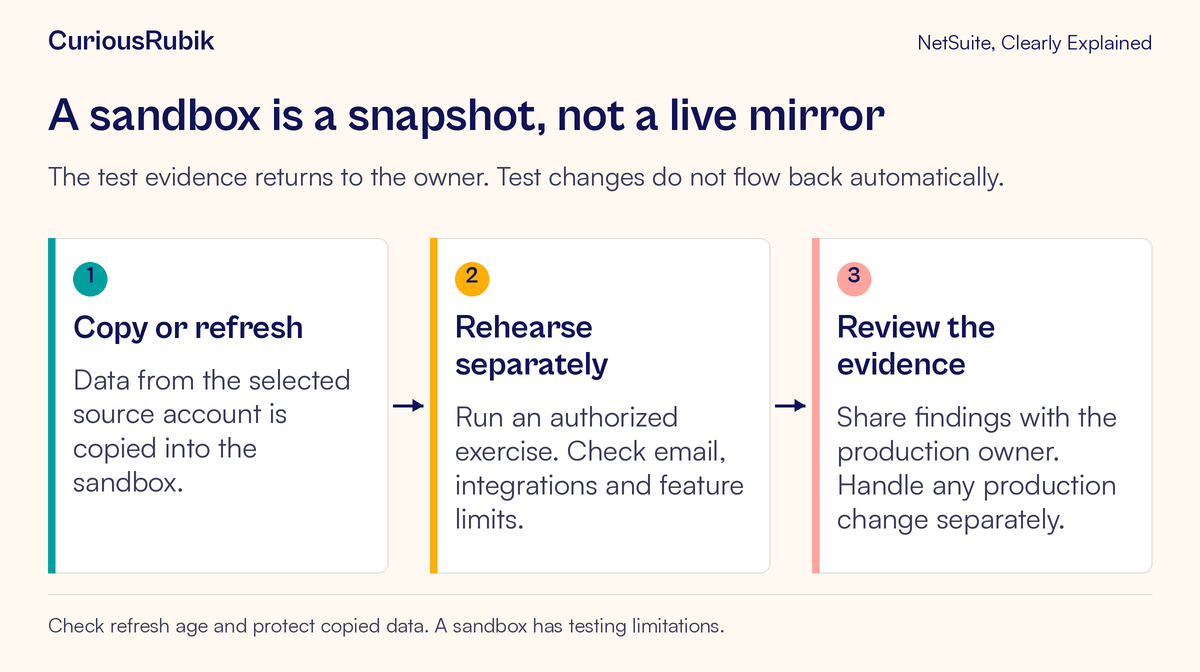
A sandbox is a separate account that can be populated from a source account. It is commonly used for training, testing customizations, and investigating changes before they reach production. Ordinary record changes made in the sandbox do not change production records.
The copied information represents a point in time. If a customer was created in production after the copy, the sandbox may not contain that customer. A balance may differ because later production transactions are absent. This is expected snapshot behavior, rather than evidence of failed synchronization.
A sandbox also has feature-specific testing limits. Do not assume that every background task or external service behaves exactly as it does in production. The administrator should confirm support for the part of the process the exercise intends to demonstrate.
For planning the operational details of a new copy, use CuriousRubik's guide to a sandbox refresh without losing work. The key concept here is that a refresh changes the test starting point.
Release Preview answers an upgrade question
Release Preview is intended for checking business processes against an upcoming release. The question is whether the existing work still behaves as expected in that release, including the relevant customizations and handoffs.
It has its own availability window and testing limitations. Confirm the release, access, copied data, and supported features before planning the exercise. A Release Preview environment should not be treated as a permanently available training account.
A sandbox and Release Preview can both support tests, but the reason for the test matters. If the issue is an upcoming release, use the environment intended to expose that release's behavior. If the issue is routine practice or a configuration change, a suitable sandbox may be the appropriate choice.
CuriousRubik's Release Preview testing checklist covers the broader upgrade preparation. Our focused lesson on turning one release note into a business scenario shows how to define the actual test.
Development has another set of boundaries
Development accounts support building solutions in a separate environment. They are designed to use test data rather than production data. Do not treat them as interchangeable with copied sandboxes.
The separation also does not mean all outside effects are automatically suppressed. Development-account activity can send email and create transactions within that environment. Use fictional contact details and approved test destinations, and have the developer confirm how the relevant functionality behaves.
A developer may need a different environment from the business user who performs acceptance testing. Agree how the solution and test evidence will move between stages. Do not assume that the place where a customization was first built is automatically the right place to rehearse a complete business process.
Understand what a refresh replaces
A sandbox refresh copies information from its selected source into the target sandbox. When the refreshed copy is activated, work in the previous sandbox version is replaced. This makes refresh planning important even when nobody is changing production.
Imagine a tester has created ten carefully prepared exception cases while a developer has changed a custom form. A refresh can remove that setup unless the team has preserved what it needs through an appropriate process. The newest data is not automatically the most useful test starting point.
Before a refresh, identify active exercises, unfinished development, required test evidence, and the people using the environment. Agree what must be saved outside the account and what will need to be recreated. An export of results can preserve evidence; it does not necessarily preserve a complete, restorable customization.
After activation, reconfirm the environment's access, configuration, integrations, and test records. Previous readiness checks applied to the earlier copy. The changed starting point can affect which conclusions remain valid.
Follow a fictional credit-memo lesson
Consider an invented company, Northbridge Parts. A new clerk, Ellis, needs to learn how an approved customer credit is entered. The training owner wants Ellis to practice without changing a real customer's production balance.
The administrator identifies a permitted sandbox and confirms its snapshot date. The trainer selects an approved fictional training customer and the records required for the exercise. They also agree what success means: the clerk completes the configured steps and can explain the resulting credit and its relationship to the customer account.
Before starting, Ellis records the account identity and selected role. The trainer checks that the exercise will not send a message to a real customer or invoke an unintended external service. The exercise uses the organization's configured credit process rather than a universal menu path from a generic tutorial.
After the practice entry, the trainer checks the saved sandbox record and the relevant sandbox balance or report. They compare the result with the expected teaching outcome. The production customer balance does not change merely because a sandbox credit was entered.
That separation has a second consequence: the practice entry has not completed a real credit request. If a customer actually needs a credit, an authorized person must perform the approved production process separately. The sandbox result provides learning evidence, not a live transaction.
At the same company, a different administrator wants to know whether that credit process remains usable after an upcoming release. This is a separate exercise in Release Preview, with its own test setup and expected results. Reusing the business scenario can be helpful, but the account, release, and evidence must identify which question was tested.
All names and activities in this example are hypothetical. It demonstrates environment choice, not a claim that every credit-memo configuration behaves identically.
Protect the data and the outside world
Copied business data remains business data. A test environment can contain personal details, pricing, financial information, or other restricted material. Limit access to the people who need it and use sanitized or fictional information when the exercise permits.
Separately inspect external effects. Email recipients, integration endpoints, scheduled processes, and connected test services deserve explicit review. “Separate account” describes the account boundary; it does not establish that every configured connection is suitable for a training exercise.
Have the responsible owner confirm each relevant connection. A finance trainer may understand the transaction but not the integration that exports it. Both perspectives are needed before a test that crosses that boundary.
Investigate differences in the right order
If data looks old, check the snapshot and refresh history before reporting a missing-record defect. Then confirm whether the specific data was included in the copy. Some objects or configurations have copy limitations.
If a person can enter production but not the sandbox, have the administrator check access to the selected environment. Do not share another person's credentials or assume that production access proves access everywhere.
If a process will not run, check the environment's supported testing scope and the process's prerequisites. A restricted background function may require a different test design. Record what could and could not be established.
If a rehearsal worked but production behaves differently, compare roles, configuration, data, release, and external dependencies. The environments may have diverged since the copy. The difference is a starting point for investigation rather than proof that the test was worthless or production is defective.
Check the environment before the next exercise
- State the business or learning outcome
- Confirm the account identity and type
- Verify provisioning, authorized access, and the intended role
- Record the snapshot date where a copy is involved
- Check feature support and missing setup
- Protect copied data and use approved test records
- Review email, integrations, and other external effects
- Coordinate refreshes with everyone using the environment
- Keep the evidence and state what it demonstrates
- Handle any production action through its own approved process
The safest choice begins with a clear purpose. Once the account matches the task, the team can concentrate on learning or testing while understanding exactly what the result changes.
If account and role selection are still unfamiliar, read why NetSuite menus look different. For help preparing controlled exercises around daily work, explore CuriousRubik's NetSuite training services.