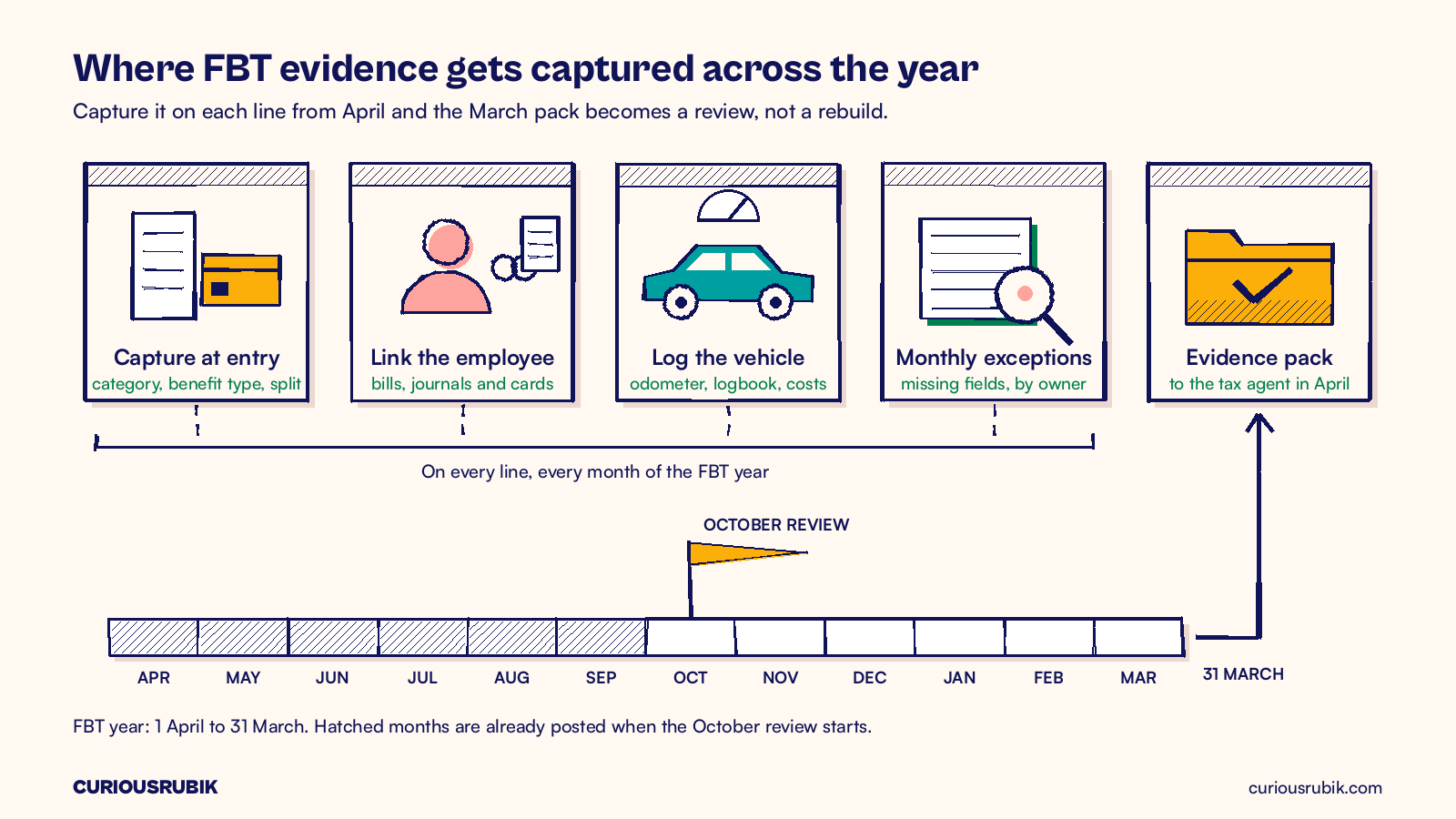
NetSuite fringe benefits tax work goes smoothly in March only if the data was captured correctly from April. October is the right time to check. The FBT year runs from 1 April to 31 March, so you still have half a year to map expense categories to benefit types, link each benefit to an employee, fix car records and split entertainment while the people who incurred the costs can still remember them.
The trap is treating FBT as a return you prepare once a year. By March, the evidence is spread across expense reports, card feeds, vendor bills and someone's fleet spreadsheet, and rebuilding attendee lists from six-month-old receipts is slow and incomplete. Fix the capture now and March becomes a review rather than an investigation.
Start the NetSuite fringe benefits tax review in October
Pull every transaction posted since 1 April to accounts that can carry a fringe benefit: entertainment, staff amenities, gifts, travel, vehicle running costs, parking, phones and reimbursed personal costs. Include expense reports, vendor bills, card transactions and journals.
Sort the population into three groups: lines coded to a benefit type with an employee attached, lines that need a decision and lines with no FBT relevance. Record the count and value of each. That baseline shows where capture is breaking down.
Keep the tax position separate from the data work. Which benefits are taxable, exempt or reportable is for your tax adviser to decide. Your job in NetSuite is to give each line enough detail that the adviser can answer without opening a receipt.
Map expense categories and items to FBT benefit types
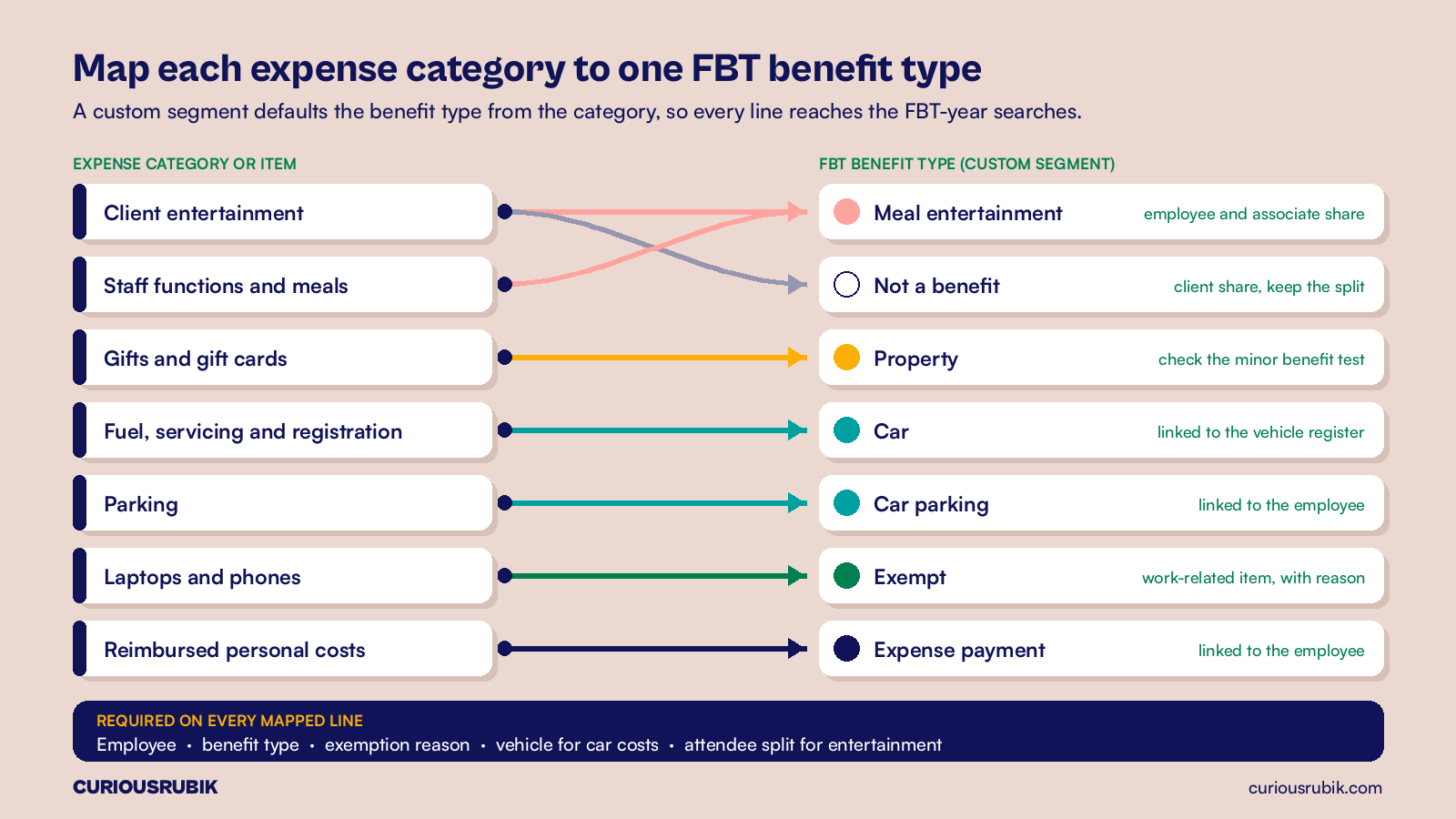
Most FBT data problems start with expense categories that describe the cost but not the benefit. "Meals" could be a client dinner, a staff function or overtime meals. Split those categories until each points to a single FBT treatment, or add a field that forces the choice.
A practical pattern is a custom segment called FBT benefit type, with values such as car, car parking, meal entertainment, expense payment, property, residual, exempt and not a benefit. Default it from the expense category or item and allow overrides only with a reason. Because a custom segment can post to GL lines, the value follows the transaction into searches and reports.
If staff claim through a separate expense tool, map the same values there. Our guide to NetSuite expense management integration controls covers the field mapping and checks that stop values getting lost on the way in.
Link every benefit to an employee
The employer pays FBT on the total, but benefits are valued and some are reported per employee. When one employee's taxable value for certain benefits exceeds $2,000 in an FBT year, the grossed-up amount generally has to be reported for that employee, and for most employers it flows through Single Touch Payroll at finalisation. You cannot do that if the gift card, the parking bay or the taxi fare is not linked to a person.
Expense reports already carry the employee. Vendor bills and journals do not, so add an employee column field to vendor bill expense lines and journal lines for benefit-type accounts, and make it mandatory when the benefit type is anything other than "not a benefit". For card spend, link the card to its holder and require an attendee or recipient when the holder buys for someone else. The approach in reconciling NetSuite corporate card transactions and expenses gives you the card-to-holder map to start from.
Then check the employee list behind your FBT reports against the payroll provider's list, including people who left during the year. Our post on NetSuite Single Touch Payroll integration and reconciliation explains how payroll data lands in NetSuite.
Keep car fleet records that support your valuation method
Cars are often the largest FBT item and the hardest to rebuild later. Each car fringe benefit is valued using either the statutory formula method or the operating cost method, and each needs different records. Both need odometer readings at the start and end of the FBT year. The operating cost method also needs a valid logbook and every running cost tied to the vehicle.
Build a vehicle register in NetSuite, as a custom record or on the fixed asset record if you use Fixed Assets Management. Store the registration, assigned employee, dates available for private use, cost base and start-of-year odometer reading. Then add a vehicle field to fuel, servicing, registration, insurance and lease lines so costs total per car.
Electric cars need their own check. Eligible zero or low emissions cars may be exempt, but their value can still count toward reportable fringe benefits, and eligibility has changed for some plug-in hybrids. Confirm each vehicle with your adviser and record the decision.
Split entertainment at the point of entry
Whether a dinner creates a benefit depends on who attended, what was provided and where. The share for employees and their associates may create FBT. The client share generally does not, although it may still be non-deductible for income tax.
Ask for the split when the claim is entered: number of employees, number of clients or others and venue type. Make these required fields on entertainment categories. Then agree with your adviser which method you will use for meal entertainment, such as the actual, 50/50 split or 12-week register method. Each needs different data, so decide now.
Flag exempt and minor benefits with a reason
Exempt benefits stay out of the taxable total, but your tax agent still needs to see why. The minor benefit exemption generally applies to benefits under $300 including GST that are infrequent and irregular. Work-related items such as a laptop or phone used mainly for work may also be exempt. The amount alone does not prove either test.
Add an exemption reason field alongside the benefit type and limit it to a short list: minor benefit, work-related item, on-premises food and drink, otherwise deductible and other (with a note). A minor benefit flag on a monthly team lunch should prompt a question, because regular benefits may fail the infrequent and irregular test.
A hypothetical mid-year FBT data review
This example is hypothetical and simplified. A Melbourne professional services firm with 180 staff and 12 company cars reviews its NetSuite data in October for 1 April to 30 September 2026. The population is 2,380 lines worth A$214,600 across benefit-type accounts.
- 1,020 lines (A$91,800) already carry a benefit type and an employee. Clean.
- 640 entertainment lines (A$62,400) have no attendee split.
- 410 card lines (A$27,300) for gifts, taxis and parking have no employee linked.
- 310 fuel and servicing lines (A$33,100) are not tied to a vehicle.
That leaves 1,360 lines worth A$122,800 needing work. Over three weeks, finance rebuilds the split on 590 entertainment lines from receipts and calendar invites, links 380 card lines using the card-to-holder map and matches all 310 car lines to the 12 vehicles through fuel card numbers. Eighty lines remain for the controller to decide, down from 1,360.
The new required fields go live on 1 November. Last March, three people spent about 180 hours rebuilding FBT data. At an illustrative blended cost of A$100 an hour, that was A$18,000. The firm's target for March 2027 is under 40 hours, or about A$4,000.
Build FBT-year saved searches and reports
Build saved searches on the FBT year, not the financial year. One lists every line from 1 April to 31 March by benefit type, employee and exemption reason. A second totals per employee, so you can see who is near the $2,000 reportable threshold. A third totals car costs per vehicle. Add exception searches for missing employee, missing benefit type, unsplit entertainment and car costs without a vehicle, and email them to their owners monthly.
Keep GST visible too. The gross-up rate depends on whether you could claim GST credits for a benefit, so show the tax code on each line. If GST coding is inconsistent, start with our guide to tracing Australian GST from NetSuite transactions to the BAS.
Hand your tax agent an evidence pack
By early April, your tax agent should receive a pack rather than an export: the benefit-type summary, per-employee totals, the vehicle register with odometer readings and logbook status, the entertainment workings, the exemption list with reasons, employee contributions, declarations and any exceptions still open.
The return is generally due on 21 May, with a later date if a registered tax agent lodges electronically for you. Confirm your date with your agent. The FBT rate has been 47% for recent FBT years, but confirm the rate and gross-up factors for the year with your adviser rather than hard-coding them. Records should generally be kept for five years. The FBT year ends three months before the financial year, so add the pack to your NetSuite EOFY checklist for Australian finance teams.
CuriousRubik's NetSuite support services can help Australian finance teams add benefit-type fields, required employee and vehicle links and FBT-year saved searches before the March close. See our NetSuite work in Australia for more.
Frequently asked questions
Does NetSuite calculate fringe benefits tax?
No. NetSuite holds the transactions, employees and vehicles behind the return, and saved searches can total them by benefit type. Your tax agent applies the valuation rules and prepares the return.
Is it too late to fix FBT data in October?
No. Half the FBT year is still ahead, and the first six months can usually be repaired from receipts, card statements and calendars while they are recent. Waiting until March makes the same work slower and less complete.
Should we use a custom segment or a custom field for the FBT benefit type?
A custom segment usually works better because it can post to GL lines and appears in financial reports. A custom field can work for a small business with few benefit accounts. Pick one and apply it to every transaction type.
Do client entertainment costs create fringe benefits?
Not usually, for the client's share. The employee and associate share of the same event may, which is why the split needs recording.
How do reportable fringe benefits reach Single Touch Payroll?
Through your payroll provider. Your adviser confirms the grossed-up amounts from NetSuite's per-employee totals, and payroll reports them at finalisation.
Related reading
Make expense claims easier without losing the evidence
How to simplify claim entry for staff while keeping the receipts, approvals and coding that finance and auditors need.